

WooCommerce PluginDownload free version
Abandoned Cart Recovery for WooCommerce
No reviews yet
from$69.00/yr
Send WordPress email through your own SMTP server and log every message
Get a Mailkeel Pro key by email and use every Pro feature for 7 days on one site. No card needed, nothing renews automatically — when the trial ends, Pro switches off unless you choose a plan. One trial per email.
Choose monthly, 1 year or lifetime — your key and download link are emailed instantly.
Upload the zip in wp-admin. The free core works right away.
Paste it in the plugin's License tab to activate.
Pro features, updates and priority support switch on.
Connect WordPress to your SMTP server, send a test email, read the email log, then resend failed emails, fail over to a backup server and route invoices in Pro.
Download the PDF user guideThe free core is a real, working plugin — not a trial that expires. Pro unlocks the advanced modules with a licence key, and nothing you build on free is lost when you upgrade.
Everything most sites need. No account, no email required — download and install.
.zip · v1.0.0 · 1 downloads
Same plugin, every module unlocked by your licence key — plus updates and priority support.
Already bought it? Enter your key:
Or sign in — every licence you own shows up there.
| Feature | Free | Pro |
|---|---|---|
| Send wp_mail() email through your SMTP server | Included | Included |
| Presets: Gmail, Outlook, Microsoft 365, Zoho, Yahoo, SMTP relays | Included | Included |
| Encryption: TLS, SSL or none | Included | Included |
| Encrypted password, never shown again; wp-config.php constants | Included | Included |
| From email, From name and return path | Included | Included |
| Test email with the SMTP conversation (login hidden) | Included | Included |
| Email log: status, error, sending plugin, server | Included | Included |
| Safe viewer for logged email content | Included | Included |
| Search, filters, bulk delete and retention cleanup | Included | Included |
| Resend failed emails, one or in bulk | Not included | Included |
| Backup SMTP server failover | Not included | Included |
| Failure alert emails | Not included | Included |
| Routing by plugin, subject or recipient | Not included | Included |
| Weekly delivery summary and optional open tracking | Not included | Included |
| Updates and email support | Community | Included |
Upgrading is just entering a key — same plugin, same settings, nothing to reinstall or migrate.
When a customer says they never got their order email or password reset, you usually have no way to check. Mailkeel sends your site's email through a real SMTP login instead of the server's PHP mail() function, and writes every message to an email log: who it went to, the subject, which plugin sent it, which server delivered it and — when it fails — the exact error your mail server returned. It works with anything that uses wp_mail(), so WordPress core, WooCommerce, Contact Form 7, membership and form plugins are all covered without extra setup.
Choose "My SMTP server" and pick your provider. Presets fill in the host, port and encryption for Gmail and Google Workspace, Outlook.com, Microsoft 365, Zoho, Yahoo, and the SMTP relays of SendGrid, Mailgun, Brevo, Amazon SES and Postmark, with a hint for each (for example that Gmail needs an app password). Any other server works with "Other SMTP server". Choose TLS for port 587, SSL for port 465 or no encryption, with an option to switch to TLS when the server offers it. Set the From email and name, decide whether they replace the From address other plugins set or only WordPress's wordpress@ default, and send bounces to the From address with the return path option.
The password field is always empty after you save; the screen only confirms that a password is stored. Leave it empty to keep it, or tick Remove the saved password. Before saving, Mailkeel encrypts the password with libsodium using a key derived from the security keys and salts in wp-config.php, so a leaked database or backup does not reveal it. This does not protect against someone who can read your server's files, because the key lives there too — and if wp-config.php has no unique security keys, Mailkeel warns you. To keep the password out of the database completely, define SSSM_SMTP_PASS (and the host, port, encryption and user) in wp-config.php; those fields then become read-only. Passwords are never written to the email log, error messages or debug.log, and the SMTP conversation on the test screen replaces the login lines with "[credentials hidden]".
Mailkeel → Send a test sends an HTML or plain-text test email to any address. If it fails you see the server's error with plain advice: a refused login usually means an app password is needed, a connection error means the host or port is wrong or blocked by your web host, and a rejected sender means the From address is not allowed for your account. Tick the troubleshooting box to see the full conversation with the SMTP server.
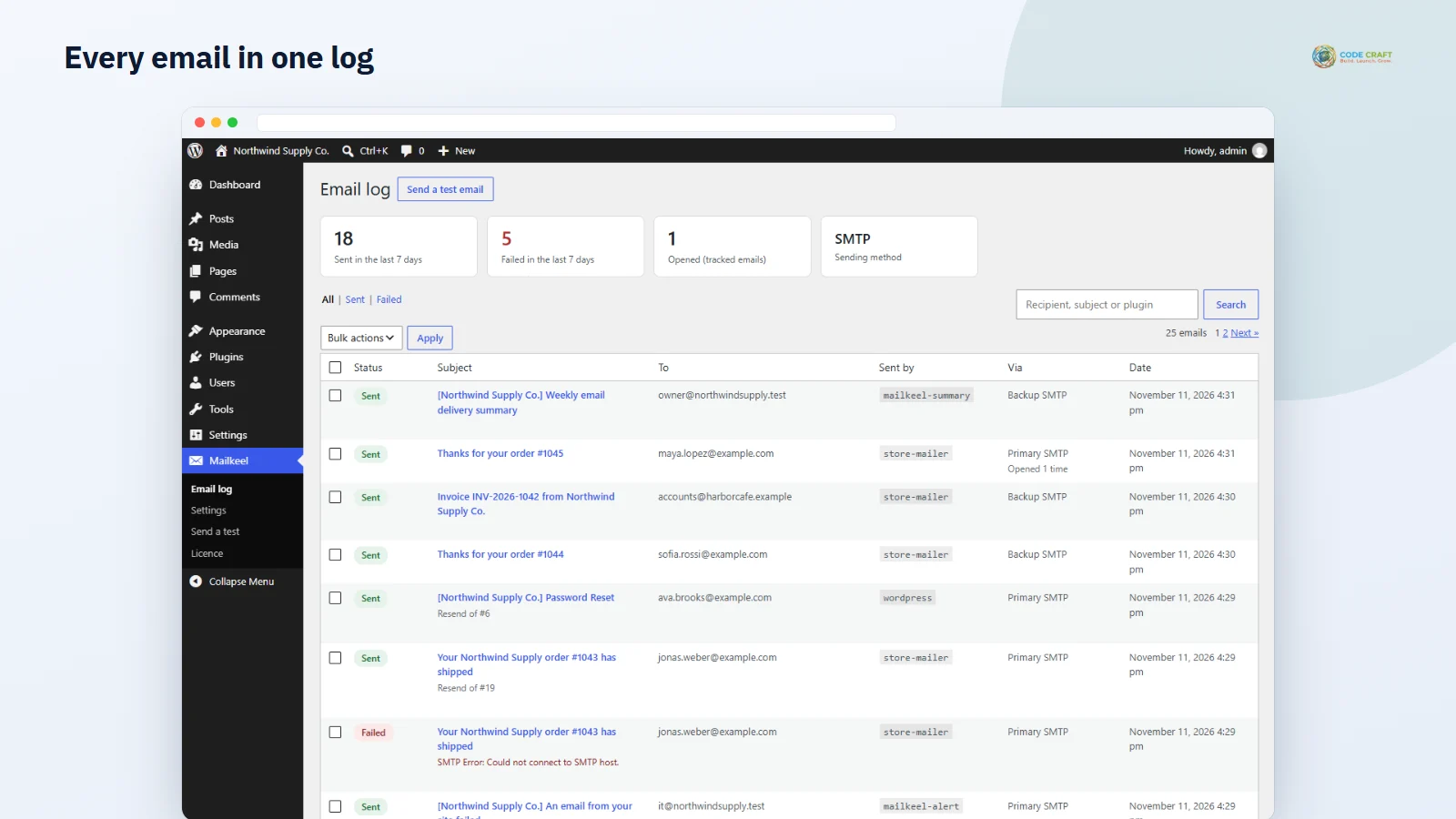
Mailkeel → Email log lists every email with a status pill, subject, recipient, the plugin that sent it (woocommerce, contact-form-7, wordpress for core emails and so on), the server used and the date, with cards for emails sent and failed in the last 7 days. Filter by sent or failed, search by recipient, subject or plugin, delete selected entries or the whole log. Opening an entry shows the details, the error, headers, attachment names and the content. HTML content is shown in a sandboxed preview that blocks scripts, forms and remote images, next to the escaped source, so a malicious email can never run code in your admin. Entries older than the retention period (30 days by default) are deleted daily, and you can log only the metadata if you prefer not to store email content.
Mailkeel Pro turns the log into a recovery tool. Resend any logged email from its row or detail page, or select several failed emails and resend them together; each resend gets its own log entry linked to the original. Add a backup SMTP server and Mailkeel sends a message through it straight away when the main server refuses it or cannot be reached — the original wp_mail() call still succeeds and the log notes why the backup was used. Failure alerts email you when a message fails, at most once every 30 minutes with a count of the failures in between, sent through the backup server when there is one. Routing rules send emails from a chosen plugin, or with a given subject or recipient, through the backup server or from a different From address — for example invoices from billing@. A weekly summary lists sent and failed emails and the most common errors, and optional open tracking (off by default) counts opens of HTML emails.
Mailkeel is for any WordPress site whose email matters: online stores that need order and password emails to arrive, membership and course sites, agencies that look after many client sites and need to answer "did the email go out?", and anyone whose contact form messages have gone missing. Free covers the SMTP connection, test email and the full log; Pro adds what you need when email is business-critical.
Mailkeel needs WordPress 6.4 or newer and PHP 7.4 or newer and works with any theme and any plugin that uses wp_mail(). It was tested on WordPress 7.1 with PHP 8.3: the whole SMTP path — login with AUTH LOGIN, sending, recipient rejection, connection failure, failover, routing and resend — was run against local test SMTP servers. The free plugin connects only to the SMTP server you configure; Pro also contacts coodecraft.com for the licence.
Most stores running Mailkeel pair it with these. Every plugin below shares the same licence system, coding standards and support team.
Also popular with our customers: ConsentCove, LockLayer, MailMeadow, Mailvetter. Browse every wordpress plugins or see our best-selling plugins. Need this built into a custom project? Our WordPress development team can help.


