

WooCommerce PluginDownload free version
Abandoned Cart Recovery for WooCommerce
No reviews yet
from$69.00/yr
WordPress email verification: new accounts confirm with a one-time link before they can log in
Get a Mailvetter Pro key by email and use every Pro feature for 7 days on one site. No card needed, nothing renews automatically — when the trial ends, Pro switches off unless you choose a plan. One trial per email.
Choose monthly, 1 year or lifetime — your key and download link are emailed instantly.
Upload the zip in wp-admin. The free core works right away.
Paste it in the plugin's License tab to activate.
Pro features, updates and priority support switch on.
Turn on email verification, edit the confirmation email, sign up on WordPress and WooCommerce and see login wait for the link, confirm with one click, manage waiting accounts on the Users screen, then the Pro checks: disposable domains, typo suggestions, comments and forms, the checkout, Cash on Delivery orders that wait for an email click, the existing-users check and the log.
Download the PDF user guideThe free core is a real, working plugin — not a trial that expires. Pro unlocks the advanced modules with a licence key, and nothing you build on free is lost when you upgrade.
Everything most sites need. No account, no email required — download and install.
.zip · v1.0.0 · 2 downloads
Same plugin, every module unlocked by your licence key — plus updates and priority support.
Already bought it? Enter your key:
Or sign in — every licence you own shows up there.
| Feature | Free | Pro |
|---|---|---|
| Confirmation link on WordPress registration (wp-login.php) | Included | Included |
| WooCommerce My Account registration: no auto-login until confirmed | Included | Included |
| Optional for accounts created at checkout and by other plugins | Included | Included |
| Login refused until confirmed, with a "send me a new link" form | Included | Included |
| Link expiry, rate-limited resend, same answer for unknown addresses | Included | Included |
| Users screen column, waiting filter, row and bulk actions | Included | Included |
| Email template with placeholders, preview and test email | Included | Included |
| Disposable-domain blocking (222 bundled + import + your list) | Not included | Included |
| Typo suggestions (gmial.com → gmail.com) and mail-server (MX) check | Not included | Included |
| Checks on checkout, comments, profile changes, Contact Form 7, WPForms | Not included | Included |
| Allow and block lists, optional role-address blocking | Not included | Included |
| Guest Cash on Delivery orders held until the email is confirmed | Not included | Included |
| Existing-user check in batches, stale-account clean-up, refused-address log | Not included | Included |
Upgrading is just entering a key — same plugin, same settings, nothing to reinstall or migrate.
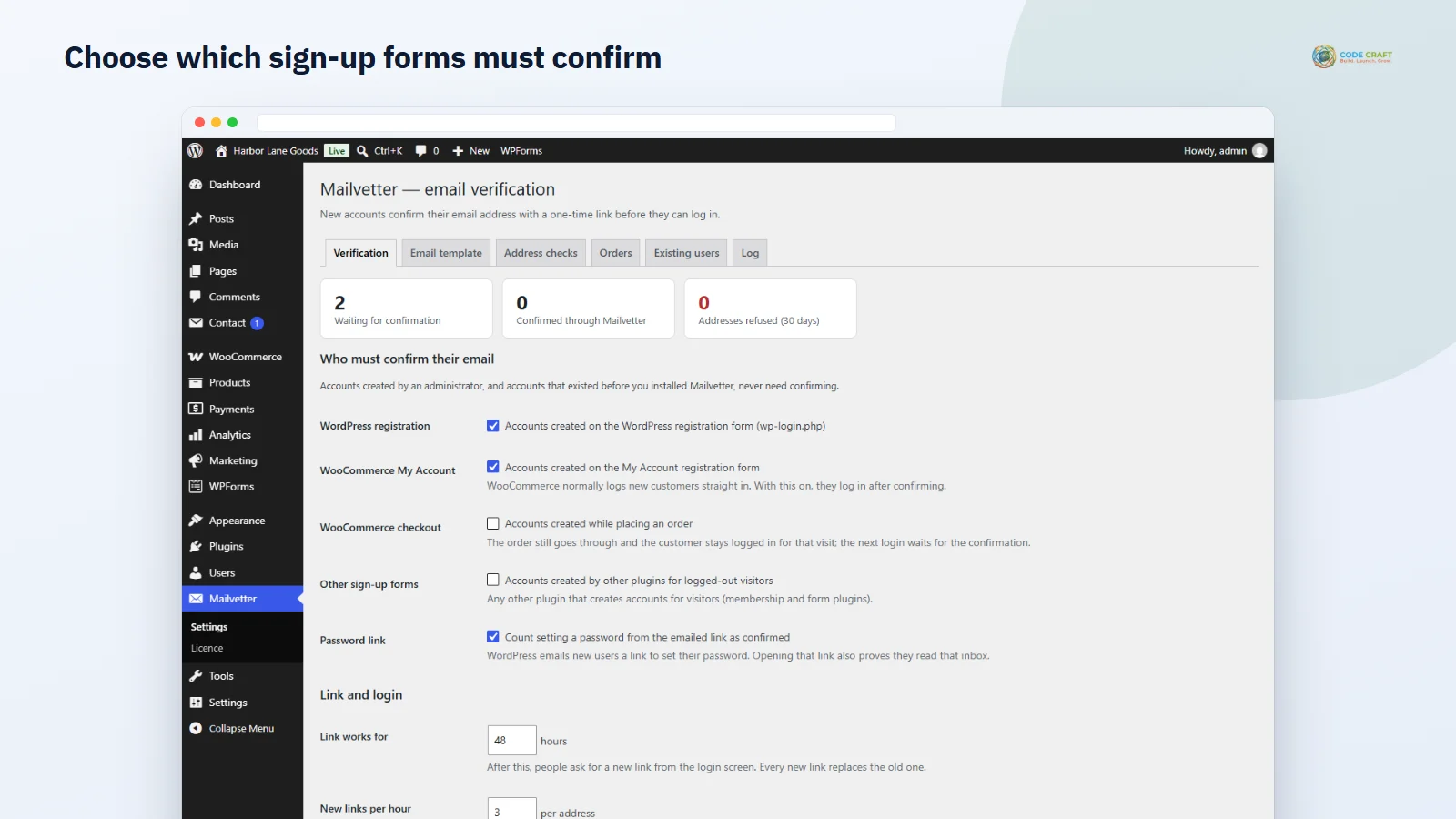
A registration form accepts any address that looks like one. Some are typos — rahul@gmial.com — and that customer never gets a password reset or an order email. Others are made up or throwaway, used by bots and by people who want a coupon twice. Mailvetter adds WordPress email verification to the place where accounts are made: as soon as an account is created on a form you switched on, an email with a one-time link goes to the address that was typed, and the account cannot log in until the link is clicked. Only someone who reads that inbox can finish signing up. Accounts created by an administrator and accounts that existed before you installed the plugin are never affected, and an administrator can never be asked to confirm again, so nobody locks themselves out.
After signing up on the WordPress form, the screen adds that a confirmation link was sent. Trying to log in before clicking it shows "Please confirm your email address first: open the link we sent to j********@example.com" with a "Send me a new link" button; the address is masked so a stranger typing a username learns nothing. On WooCommerce My Account the new customer is not logged in and sees "Almost done: we sent a confirmation link to …"; the login form refuses them with the same message until they confirm. The link works for 48 hours by default (1 to 720). An expired link, or an older link after a new one was sent, explains what happened and shows the form for a new link. One click confirms the address and lands the person on the login screen, on My Account with a notice, on your home page or on a page you choose. In our end-to-end test a WordPress sign-up, a WooCommerce sign-up, an expired link, a replaced link and a tampered key all behaved this way, and both new accounts could log in only after confirming.
Each link carries a 32-character random token. Only an HMAC-SHA256 of it, keyed with your site's secret salt, is stored, and it is compared in constant time; the token is deleted once the address is confirmed. The "send a new link" form always gives the same answer, whether or not an account exists, so it cannot be used to find out who is registered. It is limited to 3 links per address per hour (you can change it) and 10 requests per network address per hour, counted with a single INSERT … ON DUPLICATE KEY UPDATE so parallel requests cannot slip past the limit — in testing, the fourth request for one address and the eleventh request from one network were refused. Every admin action checks a nonce and the user's permissions; in testing the confirm action without its nonce was refused with HTTP 403.
The Users list gets an Email confirmed column: Confirmed (with the date and whether it was the link, the password link or an administrator), Waiting (with when the link was sent and whether it expired) or Not required. A "Waiting for email confirmation" view lists only the accounts still waiting. Each row has Confirm email, Send new link or Ask to confirm email, and the same three are in the Bulk actions menu, so you can confirm a customer who phoned you, re-send links to everyone who is waiting, or make an account confirm a changed address. The settings screen shows how many accounts are waiting and how many confirmed.
Write the subject, heading, message and button text, and pick the button colour. Placeholders fill in the site name, the person's name, username and email, the button, the plain link and the hours the link works. The settings screen shows a preview of the saved email and can send it to you as a test. The email is a simple layout with inline styles that mail clients display reliably, and it is sent through wp_mail(), so it uses whatever your site already sends with — your host's mail or an SMTP plugin.
Pro checks an address before an account, order, comment or form message is accepted. Disposable domains are refused using a list of 222 bundled domains (sub-domains included), a larger list you can import as a text file, and your own additions. Likely typos of big mail providers are refused with the fix in the message — "Did you mean nadia.ali@gmail.com?" — so the visitor corrects it in a second. A DNS lookup refuses domains that publish no mail server (MX records, or an address record that takes mail, as the mail standard allows); answers are cached for a day and the address is accepted if DNS cannot be reached, so a DNS hiccup never blocks a sign-up. Role addresses such as admin@ or noreply@ can be refused too, your block list refuses whole domains or single addresses, and your allow list wins over every other check. The checks run on WordPress and My Account registration, the classic and block checkout, comments from logged-out visitors, users changing their own email, and email fields in Contact Form 7 and WPForms. In our offline test the typo rule suggested the right provider for 31 of 31 common typos and made no suggestion for any of 50 real domains, the disposable rule caught 20 of 20 disposable domains and none of 12 regular ones, and real DNS lookups gave the expected answer for all 7 test domains.
Fake Cash on Delivery orders cost a shipment each. With this on, a guest's COD order is placed On hold and the customer gets "Please confirm your order" with a button; the thank-you page says the link was sent. One click moves the order to Processing and adds an order note, and the link works once. The usual WooCommerce "order on hold" email is not sent for these orders, so the customer gets one clear message. Orders that are not confirmed can be cancelled automatically after the hours you choose, checked hourly through WP-Cron, and WooCommerce returns the stock. Logged-in customers and other payment methods are not affected. In testing a guest COD order from the block checkout went on hold, moved to Processing after the click, refused a wrong key and a second use of the link, and a second unconfirmed order was cancelled after 48 hours.
The Existing users tab checks the addresses of the accounts you already have with the same rules, in batches of 25 — faster while the screen is open, otherwise through WP-Cron. Nothing is changed: flagged accounts are listed with the problem and the suggested fix, and Ask to confirm sends that account a link. In our test store it checked all 20 accounts and flagged exactly the 4 seeded problem addresses — a disposable domain, two provider typos and a domain with no mail server. The clean-up deletes accounts still waiting after the days you set, once a day, but only subscriber and customer accounts with no orders and no posts, at most 100 a day. The log shows totals for the last 30 days by reason and by form and the latest 100 refused addresses, and it is included in WordPress's personal-data export and erase tools.
Mailvetter needs WordPress 6.4 or newer and PHP 7.4 or newer; WooCommerce features need WooCommerce 8.0 or newer; they were tested with the block and the classic checkout on the classic (posts) order storage, use only WooCommerce's order API and declare HPOS compatibility, but have not yet been run on an HPOS store. Your site must be able to send email. Mailvetter checks the domain and confirms the mailbox with the link; it does not probe mail servers with SMTP commands, and it uses no outside verification service. The mail-server check needs PHP's DNS functions; where DNS cannot be reached it accepts the address. The WordPress multisite sign-up form (wp-signup.php) is not covered. When the plugin is deleted with "Delete all plugin data" ticked, its settings, tables, user statuses, scan results and the imported list are removed; users are never deleted by uninstalling.
Most stores running Mailvetter pair it with these. Every plugin below shares the same licence system, coding standards and support team.


