

WooCommerce PluginDownload free version
Abandoned Cart Recovery for WooCommerce
No reviews yet
from$69.00/yr
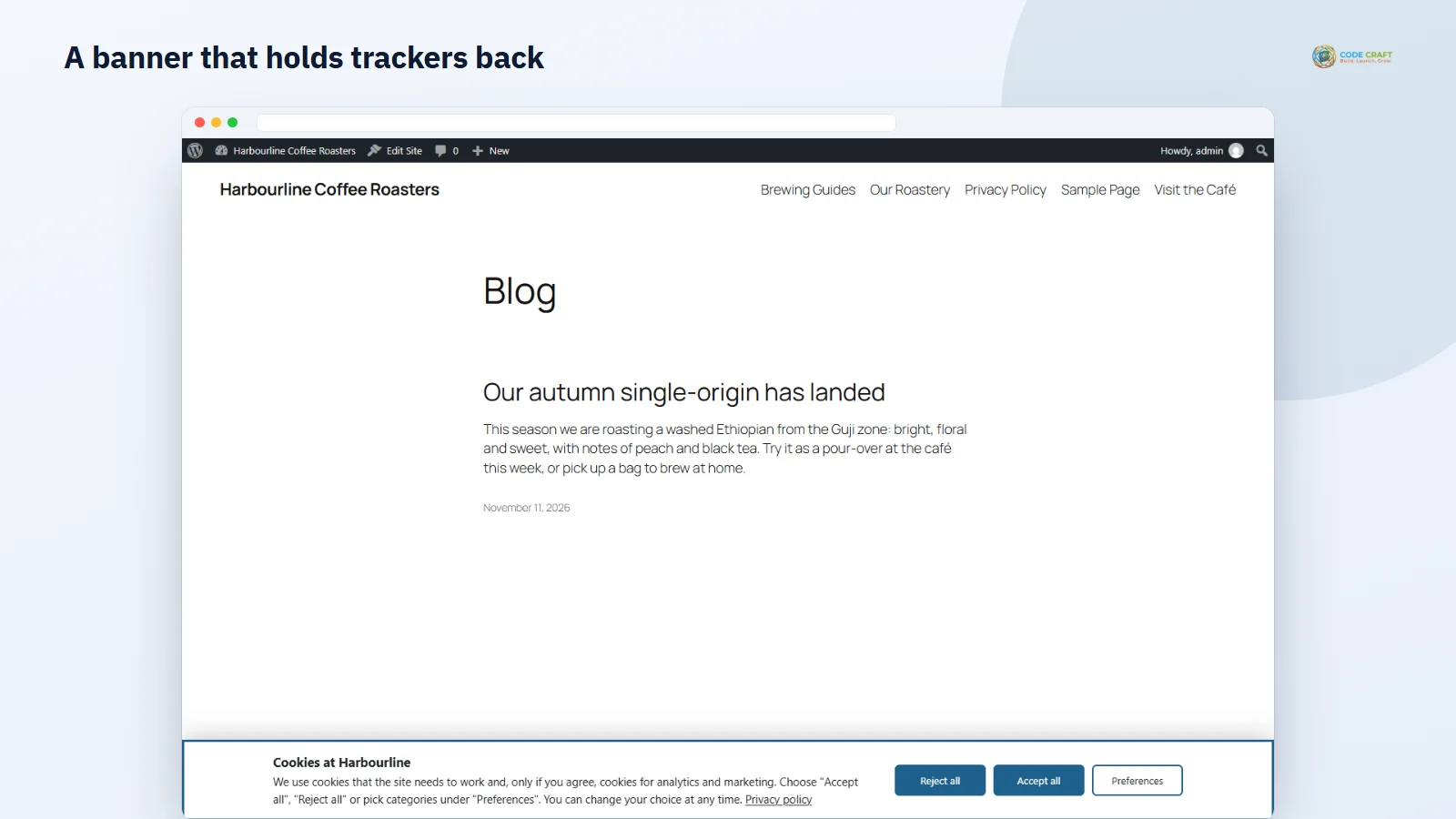
A WordPress cookie consent banner that holds back tracking scripts until visitors opt in
Get a ConsentCove Pro key by email and use every Pro feature for 7 days on one site. No card needed, nothing renews automatically — when the trial ends, Pro switches off unless you choose a plan. One trial per email.
Choose monthly, 1 year or lifetime — your key and download link are emailed instantly.
Upload the zip in wp-admin. The free core works right away.
Paste it in the plugin's License tab to activate.
Pro features, updates and priority support switch on.
Set up the banner, see trackers held back until a visitor agrees, choose per category, read the consent log, then scan for trackers, build a cookie policy and set region rules in Pro.
Download the PDF user guideThe free core is a real, working plugin — not a trial that expires. Pro unlocks the advanced modules with a licence key, and nothing you build on free is lost when you upgrade.
Everything most sites need. No account, no email required — download and install.
.zip · v1.0.0 · 3 downloads
Same plugin, every module unlocked by your licence key — plus updates and priority support.
Already bought it? Enter your key:
Or sign in — every licence you own shows up there.
| Feature | Free | Pro |
|---|---|---|
| Banner: bar or box, your colours and wording | Included | Included |
| Equal Accept all / Reject all buttons, Preferences window | Included | Included |
| Holds back 13 common trackers before consent | Included | Included |
| Your own blocking rules and pasted tracking code | Included | Included |
| Consent log with consent ID, choices, version, anonymised IP | Included | Included |
| Google Consent Mode v2 (basic and advanced) | Included | Included |
| Re-open button, shortcode and #cccc-preferences links | Included | Included |
| Ask every visitor again (banner version) | Included | Included |
| Works with page caching | Included | Included |
| Cookie scanner with one-click blocking rules | Not included | Included |
| Region rules: EU/UK, US, India, everywhere else | Not included | Included |
| Custom consent purposes | Not included | Included |
| Banner texts per language | Not included | Included |
| Consent records export (CSV) | Not included | Included |
| Cookie policy generator | Not included | Included |
| Updates and email support | Community | Included |
Upgrading is just entering a key — same plugin, same settings, nothing to reinstall or migrate.
Many cookie banners only show a message while Google Analytics and advertising pixels load anyway. ConsentCove reads the page before it is sent to the browser and changes every matching script tag to type="text/plain" with its category, so the browser does not run it. When the visitor allows a category, the held-back scripts of that category are turned back into real scripts in the order they appear on the page — an external file finishes loading before the inline code after it runs, so snippets that depend on each other keep working. It does not matter whether the script came from your theme, another plugin or a header-and-footer plugin. This was tested with a seeded inline script and an external file in each category: before consent none ran, after allowing Analytics only the analytics scripts ran, and after Reject all none ran.
The banner offers "Reject all", "Accept all" and "Preferences". Reject and Accept always have the same size, colour and weight — there is no setting to hide or shrink the reject button. The Preferences window lists Strictly necessary (always on), Preferences, Analytics and Marketing with a description each, and no switch is pre-ticked. Once a visitor has chosen, a small Cookie settings button (or the [cccc_preferences_link] shortcode, or any link to #cccc-preferences) opens the window again. When someone switches off a category whose scripts already ran, ConsentCove removes that category's known cookies, such as _ga, and reloads the page so those scripts stop. The banner is keyboard-accessible: it takes focus when it appears, buttons show a visible focus ring, the Preferences window keeps focus inside, closes with Esc and returns focus to the button that opened it.
Every choice is stored with a random consent ID that also lives in the visitor's own cookie, the time in UTC, the choice (accept all, reject all or custom), each category allowed or not, the banner version, the page and an IP address anonymised the WordPress way. No name or email is stored. Visitors can read their consent ID in the Preferences window, so you can find their records when they ask. The ConsentCove → Consent log screen shows the last 30 days at a glance, filters by choice and date and searches by consent ID. Records are kept for 365 days by default and old ones are removed daily. Pro adds a CSV export that respects the filters, ready for an audit.
ConsentCove prints the Consent Mode default at the very top of the page: ad_storage, ad_user_data, ad_personalization, analytics_storage, functionality_storage and personalization_storage denied, security_storage granted. When the visitor chooses, it sends a consent update — Analytics maps to analytics_storage, Marketing to the three ad signals and Preferences to functionality and personalization storage. Returning visitors get the update on the next line, before any Google tag loads. In the test, the stand-in gtag.js loaded only after both the default and the update were already in window.dataLayer. Basic mode (the default) also holds the Google tags back until consent; advanced mode lets them load in denied state. ConsentCove is not a Google-certified CMP partner.
The banner decision is made in the browser from the visitor's own cookie, never on the server, so the page HTML is the same for every visitor. In testing the same page was fetched with no cookie, with an accept-all cookie and with a different country header, and the HTML was byte-for-byte identical — so full-page caches and CDNs can keep serving it. The only per-visitor request is the small, uncached region lookup that Pro's region rules use.
The cookie scanner loads your home page and up to nine recently updated pages in your own browser as a logged-out visitor and lists the known services it finds with their category and usual cookies, plus any other outside script hosts; one click switches on blocking for them and adds rules for the hosts you tick. Region rules set opt-in, opt-out or no banner separately for the EU, EEA, UK and Switzerland, the United States, India and everywhere else, using the country header from Cloudflare, CloudFront or your host, or a filter — ConsentCove ships no IP database and makes no outside lookups. Custom purposes add extra switches such as Embedded videos. Banner texts can be saved per WordPress locale. The cookie policy generator prints a policy section with your categories, the scanned services and their cookies, and a Change my cookie choices button.
ConsentCove is for WordPress sites with visitors from the EU, UK, US or India that use analytics, advertising pixels or third-party widgets and want them to wait for consent: shops, blogs, agencies and local businesses. It needs WordPress 6.4 or newer and PHP 7.4 or newer, and was tested on WordPress 7.1 with PHP 8.3 on a block theme and a classic theme. It helps you collect and record consent; it does not make a site legally compliant on its own, and nothing on this page is legal advice.
Most stores running ConsentCove pair it with these. Every plugin below shares the same licence system, coding standards and support team.
Also popular with our customers: Paceloom. Browse every wordpress plugins or see our best-selling plugins. Need this built into a custom project? Our WordPress development team can help.


