

WooCommerce PluginDownload free version
Abandoned Cart Recovery for WooCommerce
No reviews yet
from$69.00/yr
A WordPress bulk email plugin for newsletters to people who opted in, with double opt-in and one-click unsubscribe
Get a MailMeadow Pro key by email and use every Pro feature for 7 days on one site. No card needed, nothing renews automatically — when the trial ends, Pro switches off unless you choose a plan. One trial per email.
Choose monthly, 1 year or lifetime — your key and download link are emailed instantly.
Upload the zip in wp-admin. The free core works right away.
Paste it in the plugin's License tab to activate.
Pro features, updates and priority support switch on.
Add your postal address, collect subscribers with double opt-in, write a campaign from a template, send it in batches, then use segments, tracking, sending services, bounces and CSV import in Pro.
Download the PDF user guideThe free core is a real, working plugin — not a trial that expires. Pro unlocks the advanced modules with a licence key, and nothing you build on free is lost when you upgrade.
Everything most sites need. No account, no email required — download and install.
.zip · v1.0.0 · 4 downloads
Same plugin, every module unlocked by your licence key — plus updates and priority support.
Already bought it? Enter your key:
Or sign in — every licence you own shows up there.
| Feature | Free | Pro |
|---|---|---|
| Lists with double opt-in (unconfirmed people never mailed) | Included | Included |
| Signup block and shortcode; honeypot, signed list ID, rate limit | Included | Included |
| Email editor: 3 templates, colour, merge tags, live preview, test email | Included | Included |
| Throttled batches through WP-Cron, never twice to one person | Included | Included |
| Sends through wp_mail (works with your SMTP plugin) | Included | Included |
| One-click unsubscribe link + List-Unsubscribe-Post (RFC 8058) | Included | Included |
| Consent log with time, source and anonymised IP | Included | Included |
| Postal address footer required before sending | Included | Included |
| Amazon SES, SendGrid, Brevo and Mailgun APIs (your own account) | Not included | Included |
| WooCommerce segments: bought, spent over, inactive | Not included | Included |
| Open and click tracking (redirect only to campaign links) | Not included | Included |
| Scheduled campaigns and a welcome series | Not included | Included |
| CSV import that keeps consent status | Not included | Included |
| Bounce and complaint webhooks with signature checks | Not included | Included |
| Updates and email support | Community | Included |
Upgrading is just entering a key — same plugin, same settings, nothing to reinstall or migrate.
MailMeadow lets a blog, shop or small business email its own audience from WordPress without a monthly per-contact bill. Everything starts with consent: people join through a form, tick a consent box, and confirm from their inbox before they count as subscribers. Campaigns go only to confirmed subscribers of the lists you pick; people who have not confirmed, unsubscribed or bounced are left out every time, also when they were already queued. Every email carries your postal address and a working unsubscribe link, and a consent log keeps the record of who joined, confirmed or left, when, and through which form.
Add the Newsletter signup (MailMeadow) block to any page and pick the list in the block settings, or paste [mmbe_form list="2"] into the classic editor, a widget or a page builder. The form asks for an email address, optionally a first name, and a consent tick box with your wording, and inherits your theme's fonts and colours. It was tested on a block theme (Twenty Twenty-Five) and a classic theme (Twenty Twenty-One). Bots are kept out by a hidden trap field, a signed list ID that cannot be swapped in the page source, and a limit of five sign-ups per connection every ten minutes. There is no per-visitor token, so the form keeps working on cached pages, and it always answers "check your inbox" so it cannot be used to find out who is subscribed.
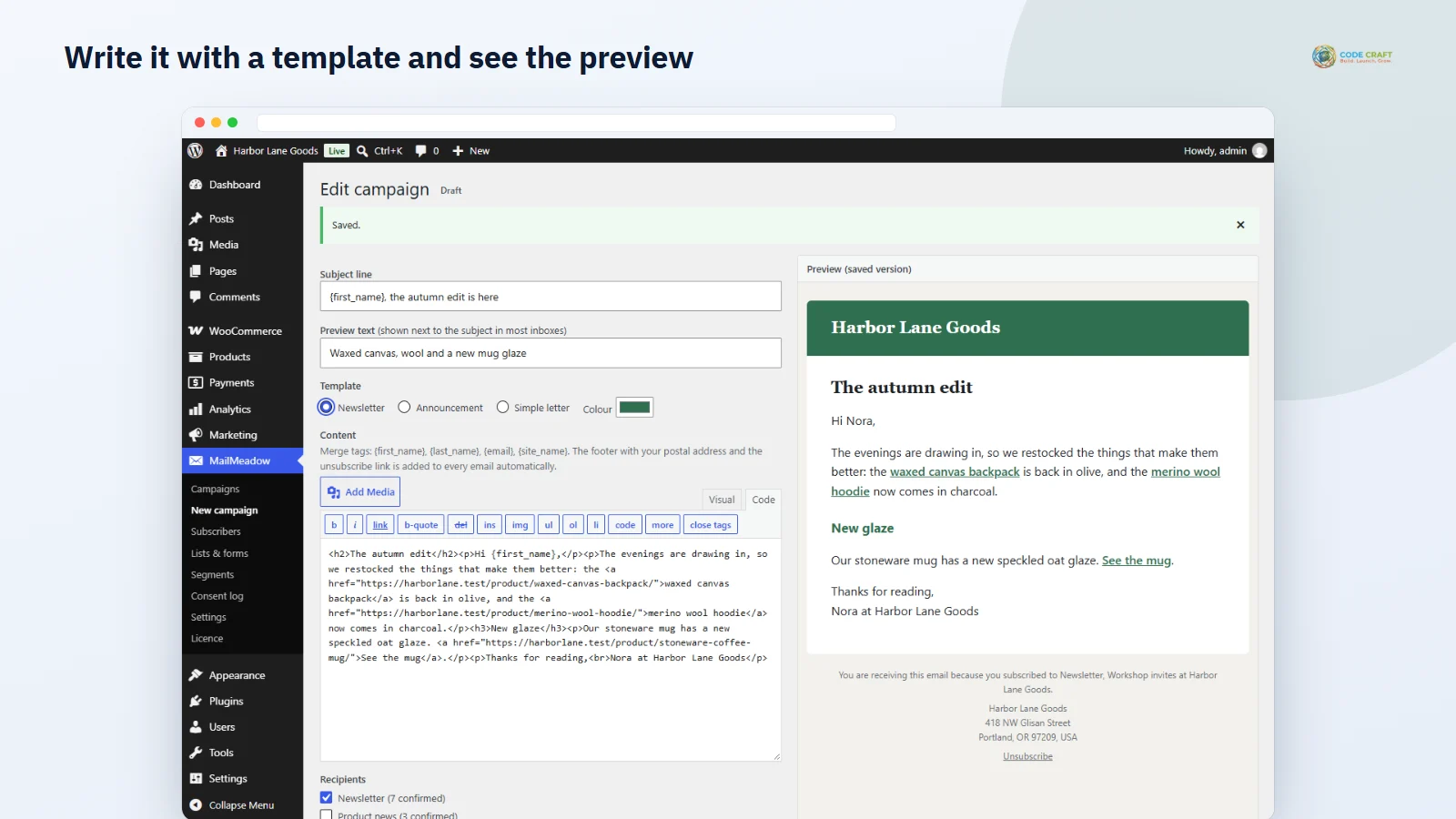
Start a campaign from one of three templates — Newsletter with a coloured header, Announcement for one big piece of news, or a Simple letter that looks personal — and each comes with example text to replace. Write in the familiar WordPress editor, add your accent colour, a subject line and the preview text shown in inboxes, and use merge tags such as {first_name}. The preview next to the editor shows the email exactly as it will be sent, switches template as you click, and a test email shows it in your own inbox first. Emails are table-based HTML with inline styles and a plain-text part.
Most hosts and email services limit how much you may send per hour, so MailMeadow sends in batches: you choose how many emails per batch and how many minutes between batches. WP-Cron runs the batches in the background; you can close the page and come back to a progress bar. Each recipient gets one row in the queue and can never be queued twice for the same campaign, a batch that runs again sends nothing new, and an email that was being sent when the server crashed is skipped rather than sent a second time. Pause and resume are one click. WP-Cron only runs when your site gets visits, so for steady sending set up a real cron job.
The footer of every email has an Unsubscribe link that works with a single click and shows a short confirmation page. Every email also carries the List-Unsubscribe and List-Unsubscribe-Post: List-Unsubscribe=One-Click headers from RFC 8058, so Gmail, Yahoo and Apple Mail can show their own Unsubscribe button, which large mailbox providers expect from bulk senders. Unsubscribing takes effect immediately, also for emails already waiting in the queue. The consent log records each sign-up, confirmation, unsubscribe, import, bounce and spam complaint with the time, the source (for example the block on a given page, the confirmation link or the one-click header) and the IP address with its last part removed.
MailMeadow Pro sends through the APIs of Amazon SES (API v2 with AWS Signature Version 4), SendGrid (v3 Mail Send), Brevo (v3 transactional email) or Mailgun (US or EU), using your own account and keys; keys are stored with autoload off and never shown again. WooCommerce segments narrow a campaign to confirmed subscribers who bought a chosen product, spent more than an amount across their paid orders, or have not ordered for a number of days — customers who never subscribed are never emailed. Open and click tracking shows how many people opened and clicked each campaign; the click redirect only goes to links that are in that campaign and are signed per email, so it cannot be abused as an open redirect.
A welcome series sends one or more emails automatically after someone confirms — right away, a day later, a week later — each once per person. Campaigns can be scheduled for a date and time. CSV import brings an existing list across with each person's consent status: people marked subscribed stay subscribed only when you confirm they agreed, everyone else comes in unconfirmed and is never emailed, opt-outs are kept, and nobody already on file is upgraded. Bounce and complaint webhooks from SendGrid (signed Event Webhook), Mailgun (HMAC signature), Brevo (secret address) and Amazon SES through SNS (message signature checked against the AWS certificate) mark dead addresses as bounced and complainers as unsubscribed, so they get nothing more.
MailMeadow is for bloggers, shops and small businesses that want to email their own subscribers from WordPress. It needs WordPress 6.4 or newer and PHP 7.4 or newer; segments need WooCommerce. It was tested on WordPress 7.1 with PHP 8.3 and WooCommerce. Deliverability depends on your sending service and your domain's SPF, DKIM and DMARC records — no plugin can promise the inbox.
Most stores running MailMeadow pair it with these. Every plugin below shares the same licence system, coding standards and support team.


