WooCommerce PluginDownload free version
Abandoned Cart Recovery for WooCommerce
No reviews yet
from$69.00/yr
WooCommerce GST invoice PDFs with CGST/SGST/IGST, HSN codes and packing slips
Get a BahiBill Pro key by email and use every Pro feature for 7 days on one site. No card needed, nothing renews automatically — when the trial ends, Pro switches off unless you choose a plan. One trial per email.
Choose monthly, 1 year or lifetime — your key and download link are emailed instantly.
Upload the zip in wp-admin. The free core works right away.
Paste it in the plugin's License tab to activate.
Pro features, updates and priority support switch on.
Set the store GSTIN and numbering, add HSN codes, take a B2B order with a GSTIN at checkout, then download the IGST invoice, a CGST/SGST invoice, a credit note and the exports.
Download the PDF user guideThe free core is a real, working plugin — not a trial that expires. Pro unlocks the advanced modules with a licence key, and nothing you build on free is lost when you upgrade.
Everything most sites need. No account, no email required — download and install.
.zip · v1.0.0 · 0 downloads
Same plugin, every module unlocked by your licence key — plus updates and priority support.
Already bought it? Enter your key:
Or sign in — every licence you own shows up there.
| Feature | Free | Pro |
|---|---|---|
| GST tax invoice PDF (GSTIN, HSN/SAC, place of supply) | Included | Included |
| CGST + SGST / UTGST or IGST worked out automatically | Included | Included |
| Packing slip PDF and bulk print | Included | Included |
| Sequential numbering with financial-year reset | Included | Included |
| Attach to order emails and download from My Account | Included | Included |
| VAT / sales-tax format for stores outside India | Included | Included |
| Template designer (logo, colour, fields, bank details) | Not included | Included |
| Credit notes for refunds | Not included | Included |
| Buyer GSTIN at checkout with validation | Not included | Included |
| Proforma invoices | Not included | Included |
| Bulk ZIP export of PDFs by date range | Not included | Included |
| Monthly GSTR-1-style CSV export | Not included | Included |
| Updates and email support | Community | Included |
Upgrading is just entering a key — same plugin, same settings, nothing to reinstall or migrate.
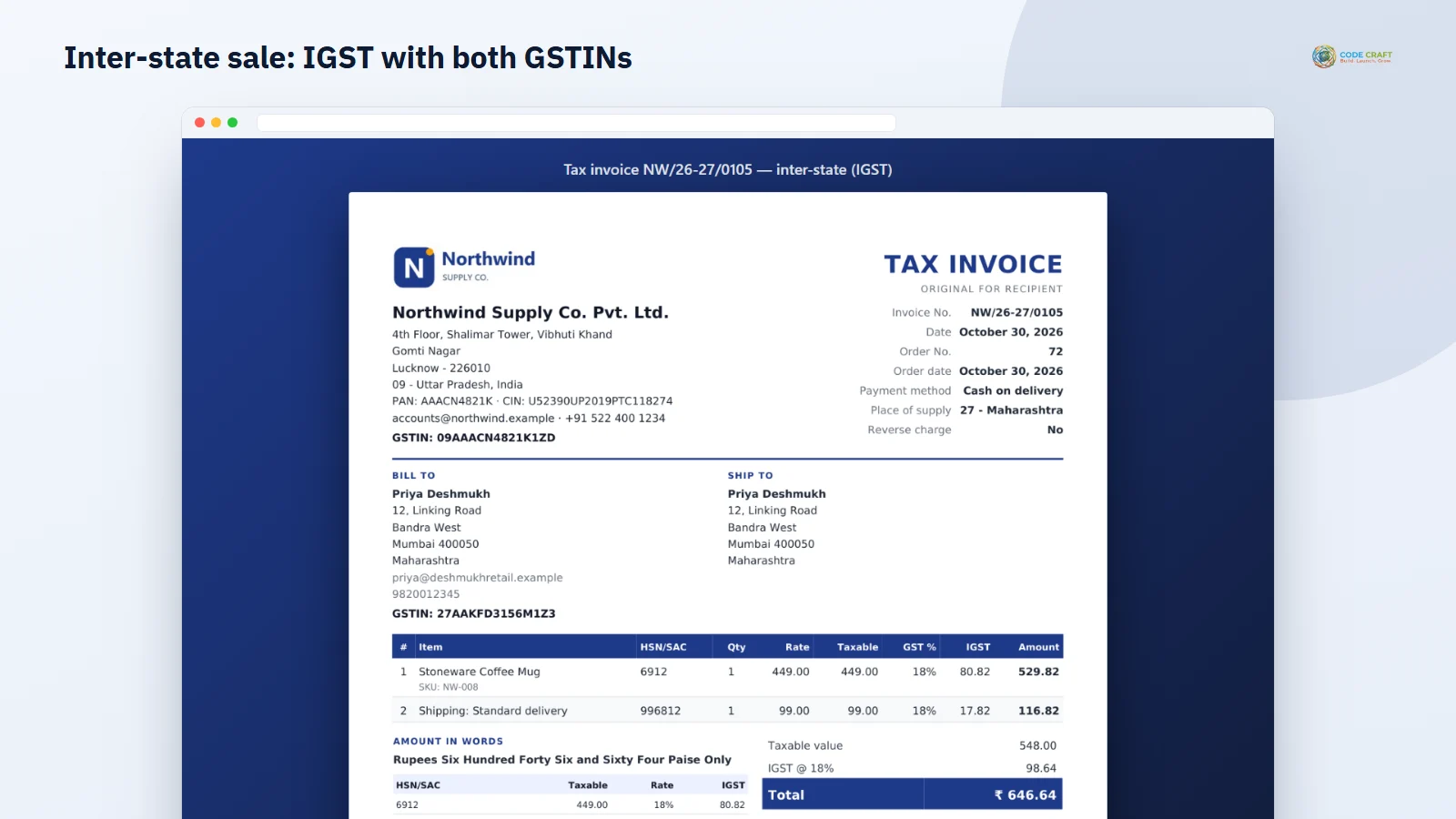
Indian buyers — especially businesses claiming input tax credit — expect a proper tax invoice, not an order email. BahiBill creates a WooCommerce GST invoice PDF as soon as an order is processing: your GSTIN and the buyer's, HSN or SAC code on every line, place of supply with its state code, reverse-charge flag and the total in words, in rupees and paise.
When the place of supply is in your own state, tax is shown as CGST + SGST (UTGST in union territories); otherwise it is IGST. Tax amounts come from the order's own tax lines, calculated in paise, so taxable value plus tax always equals the order total. An HSN-wise tax summary can be printed under the items.
The template designer adds your logo, accent colour, bank and UPI details, terms, signatory label and footer, and lets you choose which fields appear — SKU, phone, shipping address, payment method, customer note. Preview the design with your latest order before saving.
Business buyers can enter their GSTIN at checkout — on the block or classic checkout — and an invalid number is rejected before the order is placed. Refunds get numbered credit notes that reference the original invoice with the correct tax split, and on-hold orders can be sent a proforma invoice.
Download a ZIP of invoice, credit-note or packing-slip PDFs for any date range, and a monthly GSTR-1-style CSV pack (B2B, B2CL, B2CS, credit notes, HSN summary and a sales register) built from issued invoices. Review the figures with your accountant before filing.
All settings live under WooCommerce → PDF Invoices, and each tab has its own Save button. Store & GST holds your legal name, GSTIN (checked for format, state code and check digit), the invoice format — India GST, International or Automatic from your store country — the default HSN or SAC code, the SAC code for shipping lines, the paper size (A4 or US Letter) and the delete-data switch. Numbering & emails sets the prefix and suffix with placeholders such as {fy}, {fy_short}, {year}, {yy} and {month}, padding, the start number for stores moving from another system, the reset rule (never, every calendar year or every financial year from 1 April), the order statuses that create an invoice automatically and which emails get a PDF attached. HSN and SAC codes are entered on each product and variation under Product data.
When an order reaches a status you chose (processing and completed by default), BahiBill reserves the next invoice number and the PDF goes out with the order email. Logged-in customers see an Invoice button on My Account → Orders and on the order page; guests receive their invoice by email. Your team gets an Invoice & documents box on every order with buttons for the invoice, packing slip and, in Pro, proforma and credit notes, an Invoice column on the orders list, and a bulk action that prints many invoices or packing slips into one PDF for the day’s dispatch. Download links only work for a logged-in shop manager or the logged-in customer who owns the order; a guessed or edited link returns an error.
BahiBill is written first for Indian WooCommerce stores: D2C brands shipping across states, wholesalers whose business buyers need a GSTIN on the invoice to claim input tax credit, and shops that hand monthly figures to an accountant. The automatic international format means a store outside India can use the same plugin for VAT or sales-tax invoices and packing slips, although that format was built but not covered by the automated tests.
BahiBill needs WordPress 6.4 or higher, WooCommerce 8.0 or higher (tested up to 11.2) and PHP 7.4 or higher (tested on 8.3). It declares compatibility with high-performance order storage and the cart and checkout blocks; the Pro GSTIN field uses WooCommerce’s Additional Checkout Fields API on the block checkout and a normal billing field on the classic checkout. PDFs are drawn by a bundled copy of the open-source dompdf engine with the DejaVu Sans font, so the rupee sign prints correctly; remote fetching and scripts inside the PDF engine are switched off. The ZIP exports need PHP’s zip extension. Multisite was not tested.
BahiBill does not create e-invoice IRP JSON — we could not verify it against the official schema, so it is not offered. The checkout does not check that a GSTIN’s state code matches the billing state, only its format, state code and check digit. GSTR-1-style CSVs are not certified against the GST portal; review them before filing. PDFs are generated when opened, so seller details and design follow your current settings, while numbers, dates, amounts and HSN codes stay as issued. Bulk printing is capped at 200 orders and a ZIP at 300 documents. Refunds entered as an amount only print one refund line without a tax split, because WooCommerce records no tax for them.
Most stores running BahiBill pair it with these. Every plugin below shares the same licence system, coding standards and support team.
Also popular with our customers: Mailwright. Browse every woocommerce plugins or see our best-selling plugins. Need this built into a custom project? Our WordPress development team can help.