WooCommerce PluginDownload free version
Abandoned Cart Recovery for WooCommerce
No reviews yet
from$69.00/yr
WordPress media library folders with drag and drop, in the library and the editor
Get a Foldwise Pro key by email and use every Pro feature for 7 days on one site. No card needed, nothing renews automatically — when the trial ends, Pro switches off unless you choose a plan. One trial per email.
Choose monthly, 1 year or lifetime — your key and download link are emailed instantly.
Upload the zip in wp-admin. The free core works right away.
Paste it in the plugin's License tab to activate.
Pro features, updates and priority support switch on.
Create folders, drag files into them, browse folders in the editor's media pop-up, sort files, show a folder as a gallery and import from FileBird.
Download the PDF user guideThe free core is a real, working plugin — not a trial that expires. Pro unlocks the advanced modules with a licence key, and nothing you build on free is lost when you upgrade.
Everything most sites need. No account, no email required — download and install.
.zip · v1.0.0 · 0 downloads
Same plugin, every module unlocked by your licence key — plus updates and priority support.
Already bought it? Enter your key:
Or sign in — every licence you own shows up there.
| Feature | Free | Pro |
|---|---|---|
| Unlimited folders and subfolders | Included | Included |
| Drag and drop in grid view, list view and the pop-up | Included | Included |
| Move to folder: button, bulk action and file field | Included | Included |
| Folder tree in the block and classic editor | Included | Included |
| Uploads go into the open folder | Included | Included |
| Keyboard-accessible folder tree | Included | Included |
| Sort files by name, date, size or type | Not included | Included |
| Folder colours and favourites | Not included | Included |
| Download a folder as a ZIP | Not included | Included |
| Per-user folders and role permissions | Not included | Included |
| Import from FileBird, Real Media Library, Enhanced Media Library | Not included | Included |
| Folder Gallery block | Not included | Included |
| Updates and email support | Community | Included |
Upgrading is just entering a key — same plugin, same settings, nothing to reinstall or migrate.
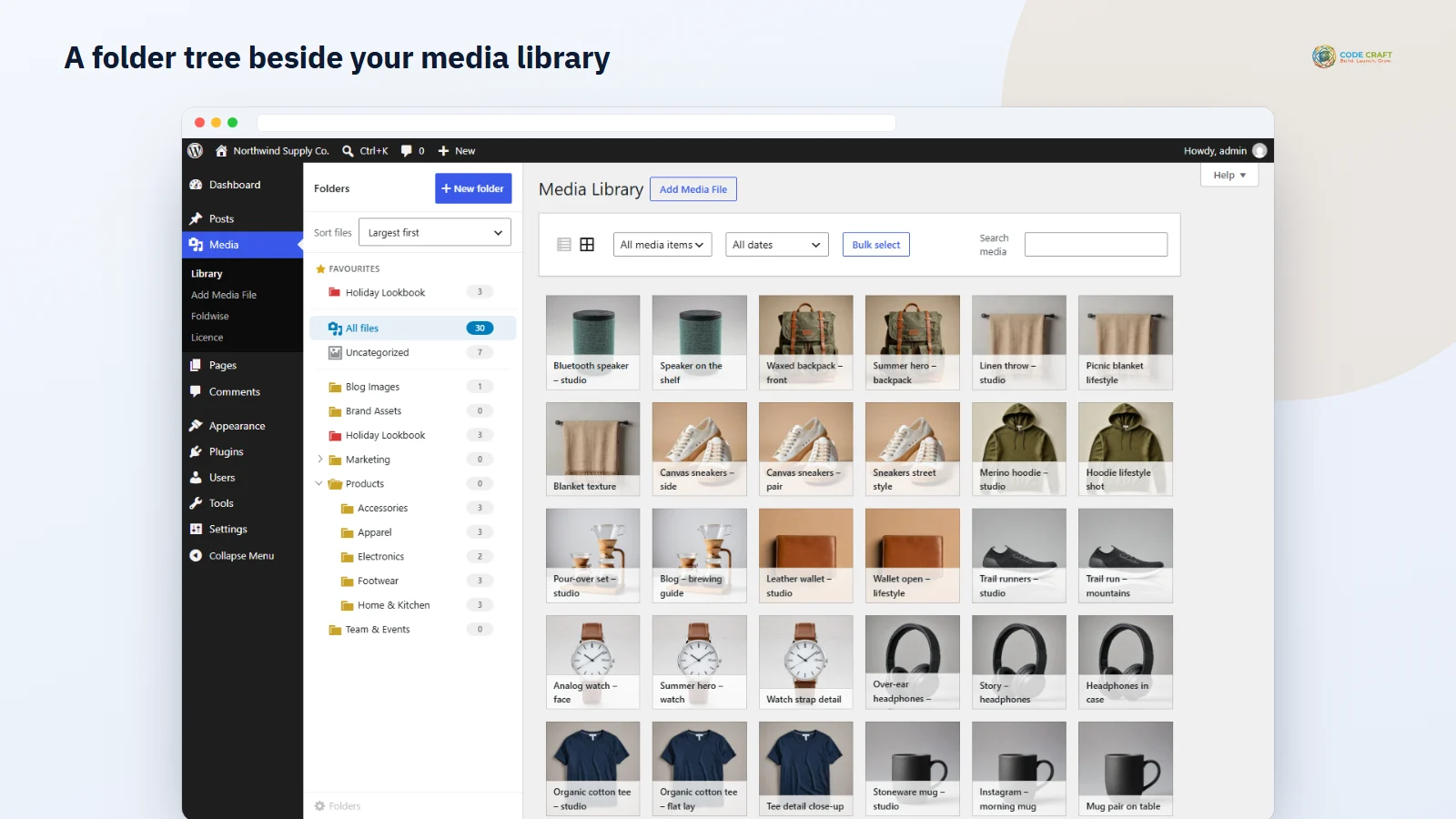
After a few years a media library holds thousands of files in one long list. Foldwise adds WordPress media library folders: a folder tree beside the library in grid and list view, with live counts for All files and Uncategorized. Create folders and subfolders, drag files onto them, and click a folder to see only what is inside.
The same folder tree appears in the WordPress media pop-up — opened by the Image, Gallery, Cover and Media & Text blocks, the featured image panel, the classic editor's Add Media button and page builders that use the WordPress media window — so you can pick an image from the right folder instead of scrolling. You can also drag files onto folders and create folders there. New uploads go straight into the folder you have open.
Folders are stored as a private WordPress taxonomy on attachments. Files are never moved on the server and their URLs never change, so images in posts keep working — and if you remove the plugin, your media library is exactly as it was.
Pro sorts files by name, date, size or type, adds folder colours and pinned favourites, and downloads any folder with its subfolders as a ZIP. Teams get per-user folder trees and role permissions. Switching from FileBird, Real Media Library or Enhanced Media Library? Pro copies their folders without changing their data, and the Folder Gallery block shows a whole folder on a page.
Click New folder, type a name and choose where it goes, or right-click a folder (or use its ⋯ button) for New subfolder, Rename, Move folder to… and Delete. Drag a folder onto another to move it, or onto the area that appears under the tree to put it at the top level. Folders are listed alphabetically, a small arrow marks folders with subfolders, and Foldwise remembers which ones you left open. In grid view the library filters in place; in list view the page reloads with the folder in the address, so you can bookmark it, and a Folder column shows where each file lives. Drop files on Uncategorized to take them out of their folder.
The settings screen starts with totals: how many folders you have, how many files are in the library, in folders and uncategorized. Three switches, all on by default, control the folder tree in the media pop-up, uploading into the open folder and the Folder column in list view. Recalculate folder counts is there for the rare case when another tool changed files directly in the database. In Pro you also set the default file order for new users, choose Shared or Per user folder mode, and tick which roles may create, rename, move and delete folders — administrators always can, and if no role is ticked every role with upload access may.
Sort files offers newest or oldest first, name A–Z or Z–A, largest or smallest first and file type; each user's choice is remembered and applies to the grid, list view and pop-up, and sizes for files uploaded before Pro are filled in by WP-Cron, 200 files per run. Folder colours come from a nine-colour palette shared by everyone, while pinned favourites are personal. Download as ZIP packs a folder and its subfolders using the original uploads, only for users who can upload and see that folder, and deletes the temporary file straight after; folders over 2 GB are refused. In per-user mode each user sees only the folders they created, though All files and Uncategorized still show the whole library. Imports read FileBird, Real Media Library or Enhanced Media Library data even if that plugin is inactive, never change it, skip files already in a Foldwise folder, never duplicate folders when run again and work in batches of 500. The Folder Gallery block shows a folder's images in 1 to 8 columns with options for maximum images, image size, order, link target, subfolders, square crop and captions, and updates itself as the folder changes.
Foldwise helps online stores with large product photo libraries, blogs and magazines with years of images, agencies that hand sites to clients who need to find their own files, and teams sharing one library who want their own folders or limits on who reorganises them. Sites moving away from FileBird, Real Media Library or Enhanced Media Library can bring their folder structure with them in Pro.
Foldwise needs WordPress 6.4 or newer and PHP 7.4 or newer, and works with any theme because it only changes the admin. It was tested on WordPress 7.1 with PHP 8.3, with the pop-up tested from an Image block in the block editor. The Pro ZIP download needs PHP's ZipArchive extension, which almost every host has. Folders are a private taxonomy on attachments with no custom tables. The free plugin makes no outside calls; Pro contacts coodecraft.com only for the licence.
Most stores running Foldwise pair it with these. Every plugin below shares the same licence system, coding standards and support team.
Also popular with our customers: SmartRank SEO. Browse every wordpress plugins or see our best-selling plugins. Need this built into a custom project? Our WordPress development team can help.