WooCommerce PluginDownload free version
Abandoned Cart Recovery for WooCommerce
No reviews yet
from$69.00/yr
AJAX WooCommerce product filter by category, colour, price, rating and stock
Get a FilterNest Pro key by email and use every Pro feature for 7 days on one site. No card needed, nothing renews automatically — when the trial ends, Pro switches off unless you choose a plan. One trial per email.
Choose monthly, 1 year or lifetime — your key and download link are emailed instantly.
Upload the zip in wp-admin. The free core works right away.
Paste it in the plugin's License tab to activate.
Pro features, updates and priority support switch on.
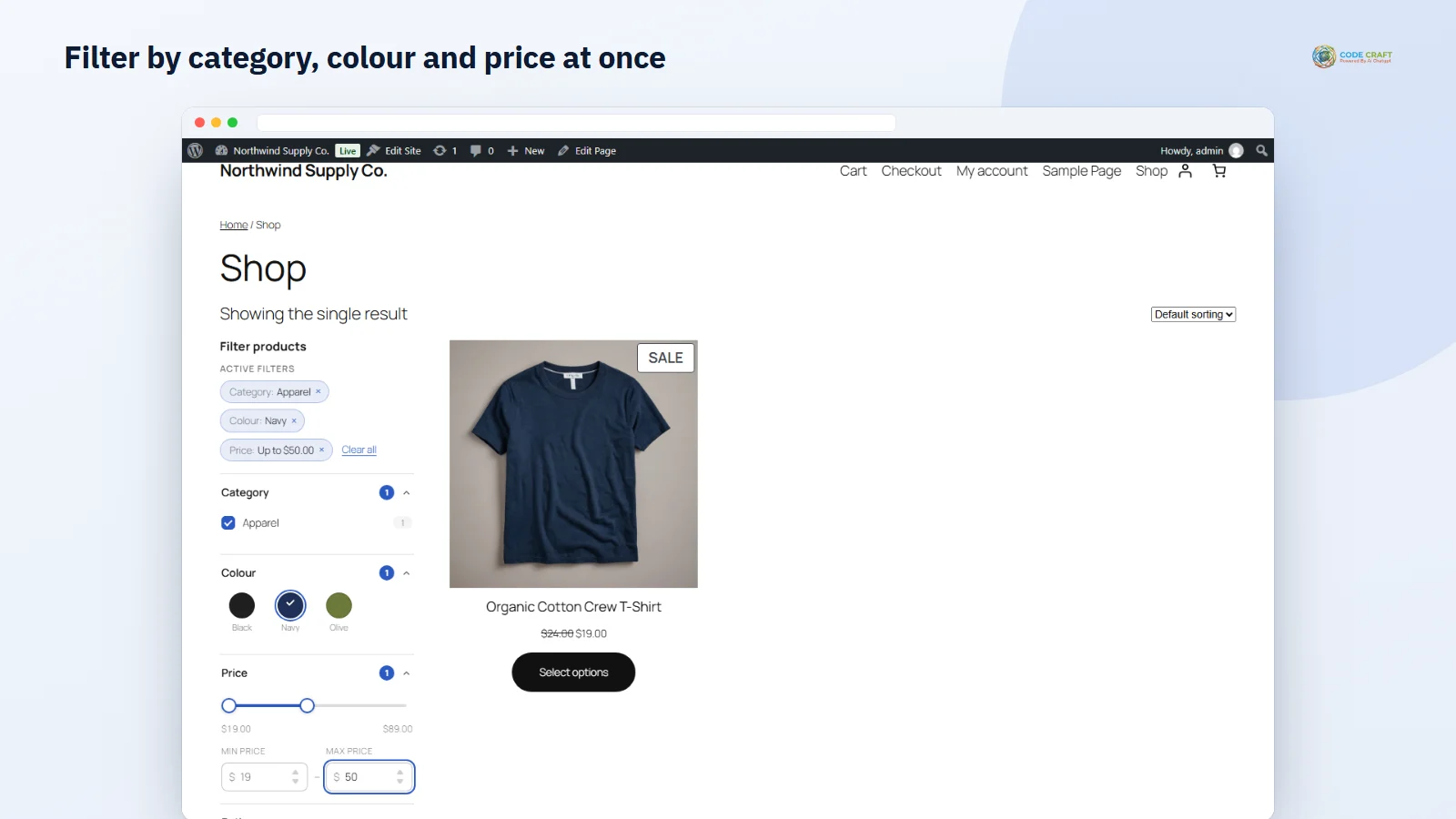
Build a filter set with colour swatches, rating and stock filters, then filter the shop by category, colour and price, use chips, Load more and the mobile panel.
Download the PDF user guideThe free core is a real, working plugin — not a trial that expires. Pro unlocks the advanced modules with a licence key, and nothing you build on free is lost when you upgrade.
Everything most sites need. No account, no email required — download and install.
.zip · v1.0.0 · 0 downloads
Same plugin, every module unlocked by your licence key — plus updates and priority support.
Already bought it? Enter your key:
Or sign in — every licence you own shows up there.
| Feature | Free | Pro |
|---|---|---|
| Category, tag and attribute filters | Included | Included |
| Price (min/max) and rating filters | Included | Included |
| AJAX results, URL updates and Back button | Included | Included |
| Active-filter chips and Clear all | Included | Included |
| Mobile slide-in filter panel | Included | Included |
| Block, widget, shortcode and auto placement | Included | Included |
| Colour and image swatches | Not included | Included |
| Dual-handle price slider | Not included | Included |
| Live counts and hiding empty options | Not included | Included |
| Stock status, brand/taxonomy and custom-field filters | Not included | Included |
| Load more and infinite scroll | Not included | Included |
| Readable filter URLs and noindex for deep combinations | Not included | Included |
| Filter analytics | Not included | Included |
| Updates and email support | Community | Included |
Upgrading is just entering a key — same plugin, same settings, nothing to reinstall or migrate.
Once a store has more than a page of products, shoppers stop scrolling and start leaving. FilterNest adds a WooCommerce product filter beside your products: tick a category, pick a colour, drag the price and the results update in place. The address bar updates too, so a filtered page can be shared, bookmarked and reopened, and the Back button returns to the previous selection.
On activation FilterNest builds a default filter set from your own store data — category, colour and the next attribute, price and rating — and adds it to the shop and product archives. On block themes it appears as a sidebar; on classic themes as a horizontal bar. You can switch layouts, use Apply-button mode instead of instant updates, or place a set anywhere with the FilterNest block, a widget or a shortcode.
Pro turns colour and pattern attributes into swatches, with a colour or image per term set on the WooCommerce attribute screen — common colour names are filled in automatically. Each option shows how many products match, and options with no matching products can be hidden so shoppers never hit an empty page. A dual-handle price slider stays in sync with the min and max boxes.
Add stock status, brands or any custom taxonomy, and product custom-field filters, and show a filter only after another is chosen. Replace page numbers with a Load more button or infinite scroll. Readable filter URLs, the selected options in the page title and noindex for combinations of two or more options keep search engines focused on pages worth ranking.
Filter analytics in Pro records anonymous daily totals of which options shoppers pick — no personal data — so you can see which colours, sizes and categories are in demand and stock accordingly.
The filter panel is a real GET form, so the state of every filter lives in the page address, for example /shop/?fn_category=apparel&fn_colour=navy&fn_price_max=50. When JavaScript is on, a change builds that address, pushes it into the browser history and fetches the page in the background, then swaps in the products, the result count, the sorting box, the archive title, the pagination and the filter panel itself. If anything goes wrong during that fetch, the browser simply loads the page normally, so a conflict with another plugin never leaves shoppers stuck. The filtering is applied to WooCommerce’s own main product query, and prices come from WooCommerce’s product lookup table rather than slow meta queries. Price ranges, matching product lists and option counts are cached and the cache is refreshed automatically when a product, variation, stock status, term or review count changes.
FilterNest → Filter sets is where you build sets: add a filter, pick its source (category, tag, attribute, price, rating, or in Pro stock status, a custom taxonomy or a product meta field), choose checkbox, radio or dropdown display, Match any or Match all, and drag filters into order. Each set has a shortcode to copy. FilterNest → Settings controls placement and behaviour: show filters automatically, which set is the default, the layout (automatic, sidebar or horizontal bar), whether filters apply instantly or after an Apply button, and the accent colour used for ticks, chips and the slider.
It is built for stores whose catalogue has outgrown a single page: clothing shops with sizes and colours, electronics stores with brands and specifications, furniture and home stores with materials and finishes, and any shop where the same question — “do you have this in black, under fifty?” — comes up again and again. Store owners who care about accessibility get native, labelled controls rather than custom widgets, and owners who care about search get clean filter links they can choose to keep out of the index.
FilterNest needs WordPress 6.4 or higher, WooCommerce 8.0 or higher (tested up to 11.2) and PHP 7.4 or higher (tested on 8.3). The Pro edition passed its end-to-end tests on both the Twenty Twenty-Five block theme, where it wraps the shop’s Product Collection block, and the Storefront classic theme, where it uses the standard shop-loop hooks; the free edition passed its own run as well. It declares compatibility with high-performance order storage and the cart and checkout blocks. Multisite networks were not part of the tests.
Readable filter URLs in Pro are clean query strings such as /shop/?colour=black, not path segments like /shop/colour/black/. Filters work on the shop, product category, tag and attribute archives and product search; a panel placed on another page sends shoppers to the shop, and a Product Collection block on a custom page that does not inherit the main query is not filtered. The price filter uses stored prices, like WooCommerce’s own price filter, not tax-adjusted display prices. Analytics does not count shoppers without JavaScript or search-engine crawlers. Custom taxonomy, meta-field and dependent filters, and infinite scroll, are built but were not covered by the automated tests, so check them on a staging copy first.
Most stores running FilterNest pair it with these. Every plugin below shares the same licence system, coding standards and support team.
Also popular with our customers: MenuForge. Browse every woocommerce plugins or see our best-selling plugins. Need this built into a custom project? Our WordPress development team can help.