

WooCommerce PluginDownload free version
Abandoned Cart Recovery for WooCommerce
No reviews yet
from$69.00/yr
A WordPress security plugin that hardens the login page without a cloud service
Get a LockLayer Pro key by email and use every Pro feature for 7 days on one site. No card needed, nothing renews automatically — when the trial ends, Pro switches off unless you choose a plan. One trial per email.
Choose monthly, 1 year or lifetime — your key and download link are emailed instantly.
Upload the zip in wp-admin. The free core works right away.
Paste it in the plugin's License tab to activate.
Pro features, updates and priority support switch on.
Move the login page, watch wp-login.php answer 404, lock out an IP after three wrong passwords, turn on two-factor login, require it for editors, then block IPs and countries, read the activity log, catch changed files and fix items on the hardening score.
Download the PDF user guideThe free core is a real, working plugin — not a trial that expires. Pro unlocks the advanced modules with a licence key, and nothing you build on free is lost when you upgrade.
Everything most sites need. No account, no email required — download and install.
.zip · v1.0.0 · 3 downloads
Same plugin, every module unlocked by your licence key — plus updates and priority support.
Already bought it? Enter your key:
Or sign in — every licence you own shows up there.
| Feature | Free | Pro |
|---|---|---|
| Custom login URL (wp-login.php and /wp-admin/ show 404) | Included | Included |
| Logout, lost-password and reset-email links follow the new address | Included | Included |
| Limit login attempts per IP (form, XML-RPC, REST application passwords) | Included | Included |
| Lockout list with Unlock, never-lock IPs, proxy IP setting | Included | Included |
| Same error for wrong user name and wrong password | Included | Included |
| Turn off XML-RPC (403) and the theme/plugin file editors | Included | Included |
| Security headers (nosniff, frames, referrer, permissions, HSTS) | Included | Included |
| Recovery line for wp-config.php | Included | Included |
| Two-factor login (authenticator app + 10 backup codes) | Not included | Included |
| Require two-factor per role | Not included | Included |
| IP allow/block lists and country rules | Not included | Included |
| Hide the WordPress version and user names | Not included | Included |
| Login activity log with CSV export | Not included | Included |
| File-change detection with daily email | Not included | Included |
| Hardening score with one-click fixes and undo | Not included | Included |
| Updates and email support | Community | Included |
Upgrading is just entering a key — same plugin, same settings, nothing to reinstall or migrate.
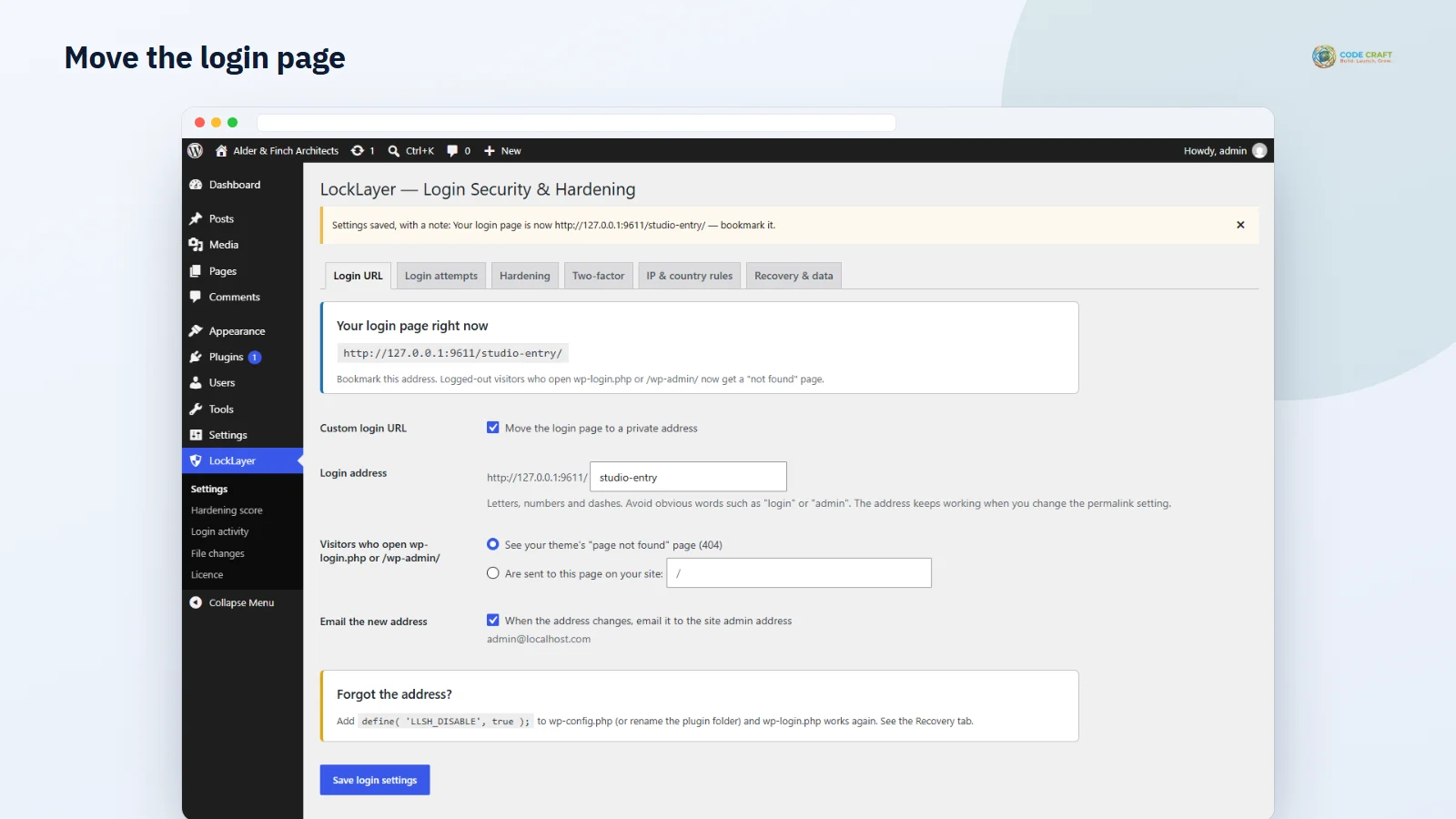
Bots try wp-login.php and xmlrpc.php on every WordPress site, all day. LockLayer makes those doors harder to find and much slower to guess. Turn on the custom login URL, type an address such as studio-entry, and the login form moves there. A logged-out visitor who opens wp-login.php gets your theme's own "page not found" page with a real 404 status; /wp-admin/ and any page inside it end on the same 404 instead of pointing to the login page; and /login, /admin and /dashboard no longer redirect there either. Logged-in users reach wp-admin as usual. The new address does not depend on rewrite rules, so it keeps working when you change the permalink setting — in testing it worked with Plain permalinks (as /?studio-entry), with Post name and with a date-based structure.
After a number of wrong passwords from one IP address within a time window (5 in 15 minutes by default), that IP is locked out for a while (20 minutes by default). While it is locked, even the right password is refused, so a lucky guess does not help. LockLayer counts failures on the login form, on xmlrpc.php when XML-RPC is on — including many guesses packed into one request — and on application passwords sent to the REST API. Other IP addresses are not affected. The Login attempts screen lists the IPs locked right now with an Unlock button, takes a list of IPs and ranges that are never locked, and lets you say where the visitor IP comes from when your site is behind Cloudflare or a proxy. In testing, three wrong passwords locked an IP on the login form, on XML-RPC and on the REST API, the right password was refused while locked and accepted again after the lockout ended.
XML-RPC is an old remote-publishing interface that many sites never use but that lets attackers try many passwords per request. With one tick LockLayer answers every request to xmlrpc.php with a 403 before any XML-RPC method runs, and removes the pingback header and RSD link that advertise it. The theme and plugin file editors in wp-admin can be switched off too, so someone who gets into an admin account can not paste code into your site from the browser; installing and updating plugins still works. Security headers — X-Content-Type-Options, X-Frame-Options: SAMEORIGIN, Referrer-Policy and Permissions-Policy, plus Strict-Transport-Security on HTTPS sites if you want it — are sent on the front end, in wp-admin and on the login page. The block editor and the Customizer were tested with the headers on and kept working.
With Pro, each user can add an authenticator app (Google Authenticator, Microsoft Authenticator, 1Password, Aegis and others) from their profile by scanning a QR code and typing one code; the QR code is drawn in the browser and the secret never leaves your site. They also get 10 backup codes, stored only as hashes, each usable once. After the password, the login page asks for the 6-digit code; no login cookie is set until the code is right, a used code can not be replayed, wrong codes count towards the IP lockout and five wrong codes end the attempt. Tick roles such as Administrator or Editor and anyone in them without an app is walked through setting one up at their next login, before they get in. Application passwords for the REST API are not asked for a code, and password logins over XML-RPC are refused for two-factor accounts.
Allow only certain IPs to log in, block IP ranges from the login page or the whole site, and block or allow countries. LockLayer never looks countries up itself: it uses the country header your CDN adds (Cloudflare or CloudFront), a web-server variable, or your own code through a filter — without one, country rules are skipped, and you should only rely on a header your CDN really sets. Rules that would block your own login are refused when you save, and logged-in administrators are never blocked from the site. Hiding the WordPress version removes the generator tag and the version from core file links; hiding user names stops ?author=1 lookups, the REST user list and the user sitemap for visitors. The login activity log records logins, failed logins, lockouts, two-factor checks, blocked visits, password resets and logouts with user, IP and time, with filters and a CSV export.
File-change detection keeps a fingerprint of every PHP, JavaScript and server-config file in WordPress core, your plugins, themes and must-use plugins, and lists files that were changed, added or removed since the snapshot, plus any PHP file in the uploads folder. It can run daily and email you. In testing it flagged a changed core file and a changed plugin file. The hardening score turns all of this into a checklist with a score out of 100. Every item LockLayer controls has a Fix it button that changes only LockLayer settings and records the old values, so each fix has an Undo button; items it can not change for you, such as a user called admin, HTTPS or the PHP version, link to where you fix them.
LockLayer is for WordPress site owners and agencies who want the login page hardened without sending traffic through a cloud service. It needs WordPress 6.4 or newer and PHP 7.4 or newer, and was tested on WordPress 7.1 with PHP 8.3 on a block theme and a classic theme. It does not make a site impossible to break into, and it is not a web application firewall or a malware scanner: keep WordPress, plugins and themes updated, use strong passwords and keep backups.
Most stores running LockLayer pair it with these. Every plugin below shares the same licence system, coding standards and support team.
Also popular with our customers: Codelatch. Browse every wordpress plugins or see our best-selling plugins. Need this built into a custom project? Our WordPress development team can help.


