

WooCommerce PluginDownload free version
Abandoned Cart Recovery for WooCommerce
No reviews yet
from$69.00/yr
A fast, accessible WooCommerce side cart that updates without page reloads
Get a CartGlide Pro key by email and use every Pro feature for 7 days on one site. No card needed, nothing renews automatically — when the trial ends, Pro switches off unless you choose a plan. One trial per email.
Choose monthly, 1 year or lifetime — your key and download link are emailed instantly.
Upload the zip in wp-admin. The free core works right away.
Paste it in the plugin's License tab to activate.
Pro features, updates and priority support switch on.
Settings with live preview, add to cart without reloads, quantity, suggested products, coupon, remove and undo, keyboard use, variation add, cart note, mobile sticky bar and the note on the order.
Download the PDF user guideThe free core is a real, working plugin — not a trial that expires. Pro unlocks the advanced modules with a licence key, and nothing you build on free is lost when you upgrade.
Everything most sites need. No account, no email required — download and install.
.zip · v1.0.0 · 2 downloads
Same plugin, every module unlocked by your licence key — plus updates and priority support.
Already bought it? Enter your key:
Or sign in — every licence you own shows up there.
| Feature | Free | Pro |
|---|---|---|
| Slide-out side cart, opens after add to cart | Included | Included |
| AJAX add to cart on product pages (incl. variations) | Included | Included |
| Change quantity, remove and undo without reloads | Included | Included |
| Floating cart icon with live count | Included | Included |
| Opens from the theme's cart icon, menu class or shortcode | Included | Included |
| Accent colour, labels, left or right side | Included | Included |
| Keyboard and screen-reader accessible dialog | Included | Included |
| Coupon field in the drawer | Not included | Included |
| Free-shipping progress bar from your shipping rule | Not included | Included |
| Suggested products (cross-sells, up-sells, related) | Not included | Included |
| Cart notes saved to the order | Not included | Included |
| Design presets and drawer width | Not included | Included |
| Sticky add-to-cart bar on mobile | Not included | Included |
| Hide on selected pages | Not included | Included |
| Updates and email support | Community | Included |
Upgrading is just entering a key — same plugin, same settings, nothing to reinstall or migrate.
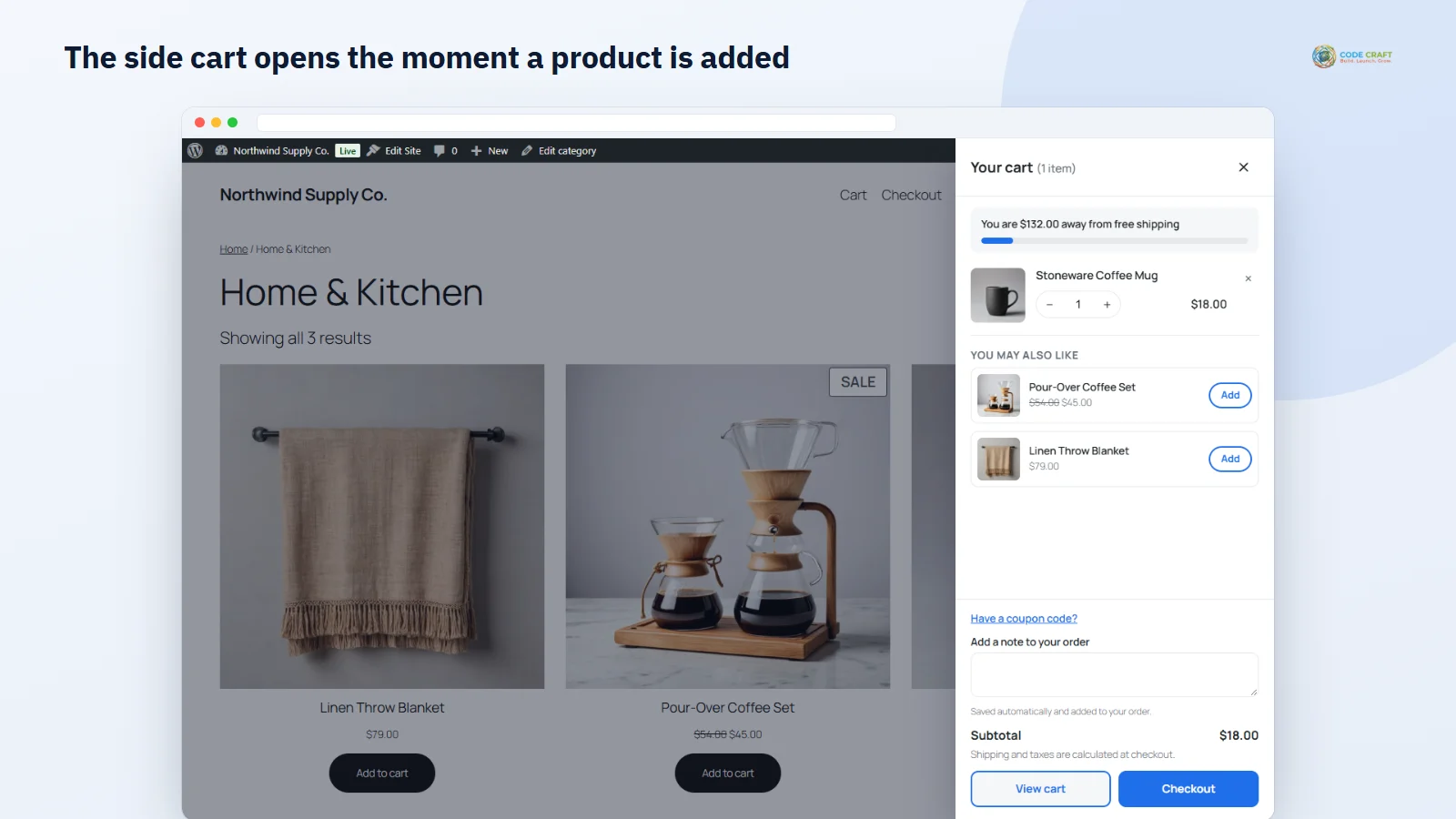
On most WooCommerce stores, adding a product either sends the shopper to the cart page or shows a small "View cart" link they easily miss. CartGlide replaces that with a WooCommerce side cart: a drawer slides in from the right (or left) with the product image, name, chosen variation, quantity controls and line price, the cart subtotal and Checkout and View cart buttons. Shoppers confirm what they added, adjust it and either go to checkout or close the drawer and carry on — the page they were on is still there. A round floating cart icon with a live item count stays in a corner of the screen, so the cart is always one tap away.
Everything inside the drawer is read and written through the WooCommerce Store API — the same API the block cart and checkout use. Changing a quantity with the − and + buttons or by typing, removing an item, undoing a removal and (in Pro) applying a coupon or adding a suggested product all happen in the background, and the drawer re-renders with the totals WooCommerce returns. Prices are never calculated in the browser, stock limits and "sold individually" products are respected, and WooCommerce's own error messages are shown in the drawer. On single product pages CartGlide sends your normal add-to-cart form in the background with every field in it, so simple, variable and grouped products and add-on plugins keep working; if the request fails, the form is submitted normally as a fallback.
CartGlide loads one stylesheet and one small script with no jQuery dependency, only on front-end pages where the drawer shows — never in wp-admin (except its own settings screen), on the cart page or on the checkout. Nothing is fetched on page load unless WooCommerce's cart cookie says the cart has items, which keeps cached pages fast and still corrects a stale count. Pro adds one more small script and stylesheet, and pages you hide the side cart on load no CartGlide files at all.
The drawer is a labelled modal dialog. When it opens, focus moves to the close button; Tab and Shift+Tab stay inside the drawer; Esc, the close button or a click on the overlay closes it, and focus returns to the button that opened it. Every icon button has a label such as "Increase quantity of Stoneware Coffee Mug", quantity changes and removals are announced to screen readers through a live region, focus is visible, and the slide animation switches off when the visitor prefers reduced motion. These behaviours are checked in our automated end-to-end test.
Everything is under WooCommerce → CartGlide. On the left: enable the side cart, open it automatically after add to cart (or bounce the icon instead), AJAX add to cart on product pages, open it from the theme's cart icon, slide in from the right or left, show the floating icon in one of four corners and optionally hide it while the cart is empty, set the heading and button labels, hide the View cart button and choose an accent colour. On the right, a live preview shows the drawer with products from your own catalogue and updates as you change the colour, side, labels and preset.
The free-shipping bar shows "You are $X away from free shipping" with a progress bar, then "You have unlocked free shipping!". It reads the minimum amount of the Free shipping method in the shipping zone that matches the shopper and uses the same subtotal WooCommerce checks, including whether coupons count — or a fixed amount you type. It is a message only and never changes your shipping prices. Suggested products appear under the cart items: the cross-sells of what is in the cart, then up-sells, then related products, skipping hidden, out-of-stock and already-added products. Simple products get a one-tap Add button; variable products link to their options.
A "Have a coupon code?" link opens a coupon field in the drawer; coupons are checked by WooCommerce, applied codes appear as chips with a remove button and the discount shows above the buttons. The optional note field saves while the shopper types and is added to the order's customer note on the classic and block checkout, and shown on the order screen as "Side cart note". Four design presets — Clean, Midnight, Soft and Bold — and a drawer width from 320 to 640 px change the look. On phones, a sticky bar with the product, price and add-to-cart button appears once the normal button scrolls away. And you can hide the side cart on product pages, on the shop and category archives, or on any pages you tick.
CartGlide suits any WooCommerce store that wants shoppers to see their cart without leaving the page: fashion and home goods shops with many small items, stores with cross-sells to promote, and mobile-heavy stores. It needs WordPress 6.4+, PHP 7.4+ and WooCommerce 8.0+, and was tested with WordPress 7.1, WooCommerce 11.2 and PHP 8.3 on the block theme Twenty Twenty-Five and the classic theme Twenty Twenty-One. It declares High-Performance Order Storage and cart/checkout block compatibility. The free plugin makes no outside connections; Pro contacts coodecraft.com only to check its licence.
Most stores running CartGlide pair it with these. Every plugin below shares the same licence system, coding standards and support team.
Also popular with our customers: RestockRing, Rowsmith, Spendrail. Browse every woocommerce plugins or see our best-selling plugins. Need this built into a custom project? Our WordPress development team can help.


