

WooCommerce PluginDownload free version
Abandoned Cart Recovery for WooCommerce
No reviews yet
from$69.00/yr
A WooCommerce free shipping bar that reads your own shipping zones and updates live
Get a Spendrail Pro key by email and use every Pro feature for 7 days on one site. No card needed, nothing renews automatically — when the trial ends, Pro switches off unless you choose a plan. One trial per email.
Choose monthly, 1 year or lifetime — your key and download link are emailed instantly.
Upload the zip in wp-admin. The free core works right away.
Paste it in the plugin's License tab to activate.
Pro features, updates and priority support switch on.
See the bar read each zone's free shipping minimum, update live as products are added on the shop and cart, count coupons like WooCommerce, follow the shopper's zone on the checkout, and add Pro goals, mini-cart, schedule and stats.
Download the PDF user guideThe free core is a real, working plugin — not a trial that expires. Pro unlocks the advanced modules with a licence key, and nothing you build on free is lost when you upgrade.
Everything most sites need. No account, no email required — download and install.
.zip · v1.0.0 · 4 downloads
Same plugin, every module unlocked by your licence key — plus updates and priority support.
Already bought it? Enter your key:
Or sign in — every licence you own shows up there.
| Feature | Free | Pro |
|---|---|---|
| Threshold read from the Free shipping method of the shopper's zone | Included | Included |
| Fixed amount instead (for other shipping plugins) | Included | Included |
| Sticky bar at the top or bottom of every page | Included | Included |
| Bar above the Cart and Checkout blocks and classic pages | Included | Included |
| [spendrail_bar] shortcode | Included | Included |
| Live updates without a page reload | Included | Included |
| Coupons, before-coupon rule and tax-inclusive prices counted like WooCommerce | Included | Included |
| Own messages and colours | Included | Included |
| Extra goals: % discount or reward message at higher amounts | Not included | Included |
| Own amount per shipping zone, or no bar in a zone | Not included | Included |
| Bar inside the Mini-Cart block and classic mini-cart | Not included | Included |
| Schedule and page targeting | Not included | Included |
| Per-currency thresholds and stats | Not included | Included |
Upgrading is just entering a key — same plugin, same settings, nothing to reinstall or migrate.
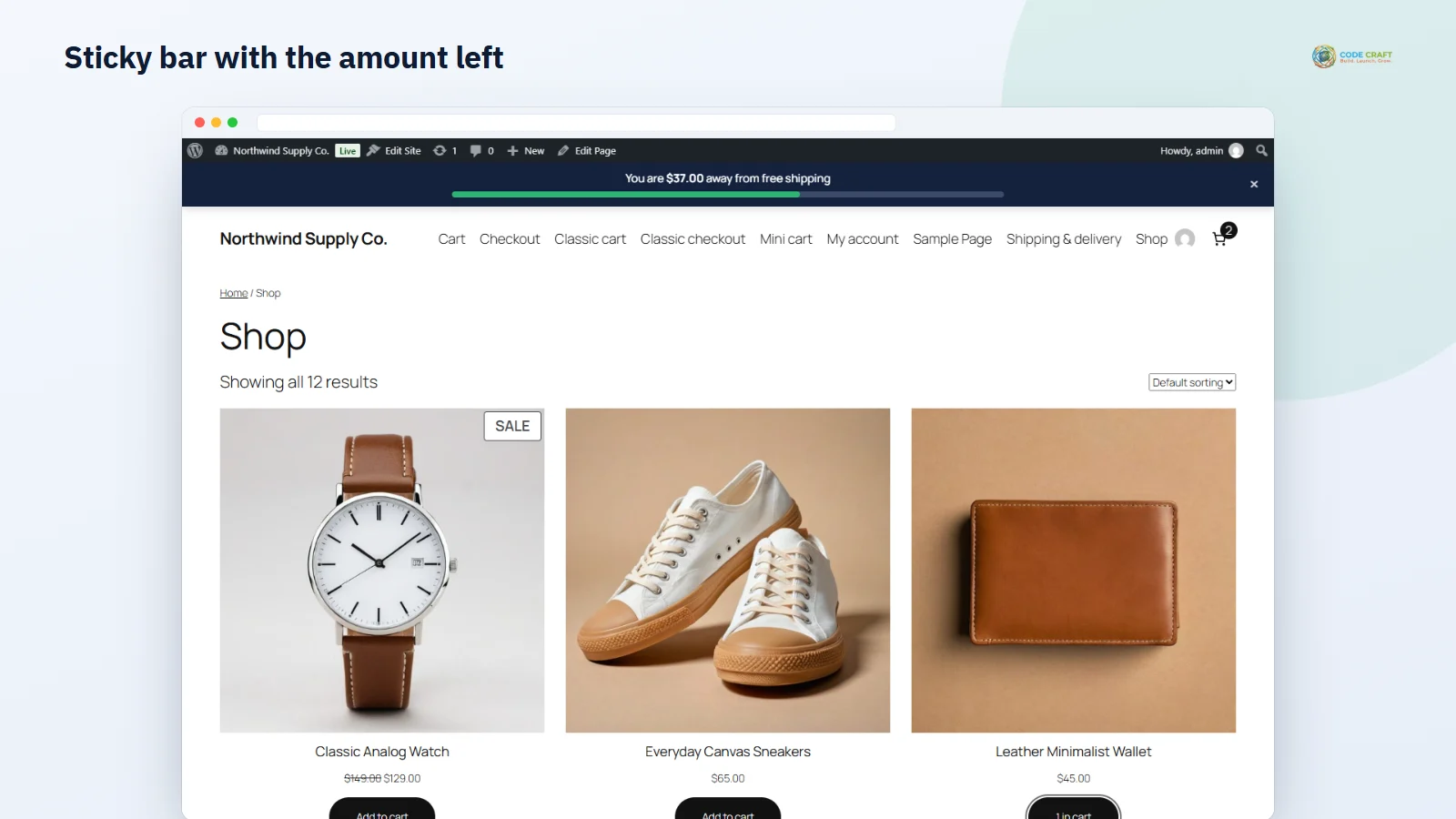
Most shoppers will add one more item to avoid paying for delivery — if they know how close they are. A free shipping bar tells them: "Free shipping on orders over $100.00" while the cart is empty, "You are $37.00 away from free shipping" once something is in it, and "Nice, your order ships free!" when the threshold is reached, with a progress bar that fills up as they shop. Spendrail is for any WooCommerce store that offers free shipping above an amount: fashion and footwear, homeware, beauty, food and drink, gifts, hobby and electronics shops. It makes no claim about what it will do to your order values; the Pro stats show you what happens in your own shop.
You do not type the amount into Spendrail. It looks up the shipping zone that matches the shopper's address — the same lookup WooCommerce does at checkout — and reads the minimum order amount of that zone's Free shipping method. If the method requires "a minimum order amount", "a minimum amount OR a coupon" or "a minimum amount AND a coupon", the bar uses its amount; if a zone has two such methods the lowest wins; a zone without free shipping gets no bar. The settings screen lists every zone with the amount the bar will use. When free shipping comes from another shipping plugin you can type a fixed amount instead. Shoppers without an address yet are matched with your store's default customer location.
WooCommerce decides free shipping on the displayed cart subtotal minus coupon discounts, unless the method's "Apply minimum order rule before coupon discount" option is ticked, and including tax when the shop shows prices including tax. Spendrail uses that same rule for the amount left. The "free shipping reached" message is not a guess: it is shown only when WooCommerce actually offers the free-shipping rate for the cart. In our tests each state of the bar was compared with the shipping rates returned by the WooCommerce Store API — after quantity changes, a $20 coupon, the before-coupon option, tax-inclusive display, a Canadian address and a free-shipping coupon — and they matched every time. If the amount is reached but WooCommerce still does not offer free shipping (for example a missing coupon), the bar hides rather than promise something the checkout will not keep.
The sticky bar sits at the top or bottom of every page, below the WordPress admin bar, and shoppers can close it for the rest of their visit. On the cart and checkout the bar appears above the Cart and Checkout blocks and above the classic [woocommerce_cart] and [woocommerce_checkout] pages; the [spendrail_bar] shortcode puts it anywhere else, such as a shipping information page. It updates without a page reload: after add-to-cart buttons on block and classic shop pages, after quantity changes and removals in the Cart block and the classic cart, after coupons, and after the shipping country changes on the Checkout block. The bar's text always comes from the server, where your message is escaped, so HTML typed into a message is shown as text and never runs. Pages served from a page cache check the cart cookie and fetch the current state when they are out of date.
Three messages cover an empty cart, a cart that is not there yet and a cart that ships free. {amount} becomes the amount still to spend and {threshold} the minimum, both formatted as prices in your shop's currency format. Background, text, progress and track colours are set with the WordPress colour picker. The empty-cart message can be switched off, and the sticky bar can be turned off entirely if you only want it on the cart and checkout.
Add up to three goals after free shipping, each with its own cart amount. A discount goal takes a percentage off the cart subtotal (after coupons, before tax) once the cart reaches the amount; it appears as its own line such as "10% off −$15.30" in the block and classic cart and checkout and is saved on the order. Only the highest reached discount applies. A reward goal only shows your message — for a gift you pack yourself, for example — and does not add anything to the cart. The bar then shows a marker per goal and a short list with ticks, and its message always points at the next goal: "Spend $47.00 more and we add a free tote bag". In our test a $153 cart got free shipping and 10% off, and the order was saved at $137.70 with the discount line and free shipping.
Zone rules let you use your own amount in a zone (for example Canada at $120 when free shipping there comes from another plugin) or hide the bar in a zone. For stores with a currency switcher, enter the free-shipping amount per currency; without one, the bar hides while a shopper browses in that currency instead of showing a wrong figure. The Mini-Cart option adds the bar inside the WooCommerce Mini-Cart block drawer and the classic mini-cart widget. A schedule shows the bar between two dates, and page targeting chooses where the sticky bar appears: home, shop, categories, products, cart, checkout and other pages. Stats count, for the last 7, 30 or 90 days, the shopping carts that saw the bar, the orders placed after seeing it, how many shipped free, how many started below the threshold and ended with free shipping, and the average order of shoppers who saw the bar and of those who did not — a pointer, not a controlled test. Everything stays in your own database.
Spendrail needs WordPress 6.4 or newer, PHP 7.4 or newer and WooCommerce 8.0 or newer. It was tested on WordPress 7.1 with the current WooCommerce on PHP 8.3 with WP_DEBUG on, on the block theme Twenty Twenty-Five and the classic theme Twenty Twenty-One, with real orders on the block checkout and on a classic shortcode checkout. It declares High-Performance Order Storage and cart/checkout block compatibility, adds one small stylesheet and script, and makes no outside requests; Pro contacts coodecraft.com only to activate and check the licence.
Most stores running Spendrail pair it with these. Every plugin below shares the same licence system, coding standards and support team.


