

WooCommerce PluginDownload free version
Abandoned Cart Recovery for WooCommerce
No reviews yet
from$69.00/yr
A WooCommerce back in stock notification form for sold-out products and variations
Get a RestockRing Pro key by email and use every Pro feature for 7 days on one site. No card needed, nothing renews automatically — when the trial ends, Pro switches off unless you choose a plan. One trial per email.
Choose monthly, 1 year or lifetime — your key and download link are emailed instantly.
Upload the zip in wp-admin. The free core works right away.
Paste it in the plugin's License tab to activate.
Pro features, updates and priority support switch on.
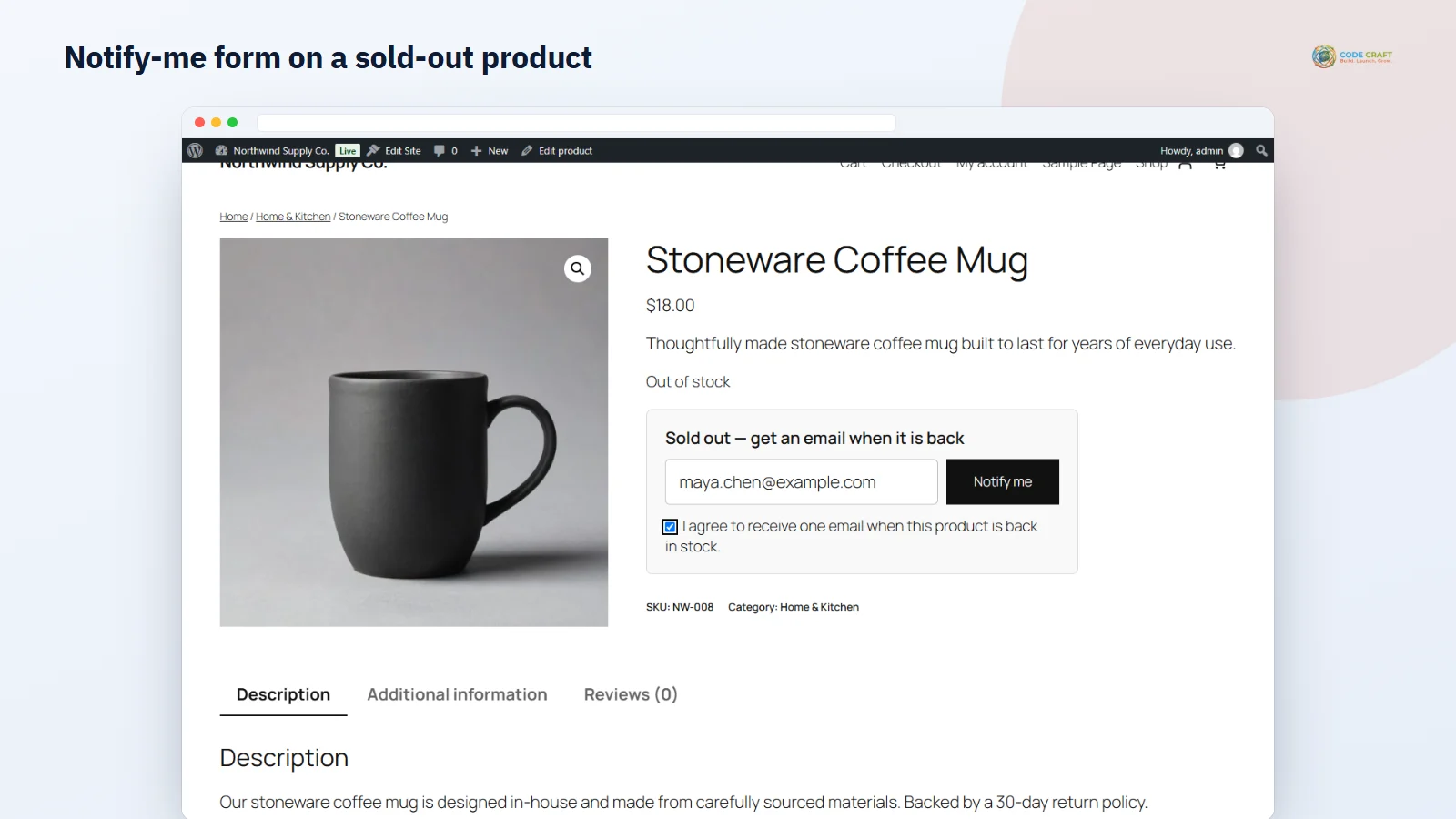
Pro settings, a shopper signing up on a sold-out mug with consent and double opt-in, the demand alert, a sold-out variation, the subscribers list and demand report, restocking in the product editor, batch sending, the restock email, a variation restock and unsubscribe.
Download the PDF user guideThe free core is a real, working plugin — not a trial that expires. Pro unlocks the advanced modules with a licence key, and nothing you build on free is lost when you upgrade.
Everything most sites need. No account, no email required — download and install.
.zip · v1.0.0 · 4 downloads
Same plugin, every module unlocked by your licence key — plus updates and priority support.
Already bought it? Enter your key:
Or sign in — every licence you own shows up there.
| Feature | Free | Pro |
|---|---|---|
| Notify-me form on sold-out simple products | Included | Included |
| Form on sold-out variations, one list per variation | Included | Included |
| Automatic restock email when stock status returns to In stock | Included | Included |
| WooCommerce email design and From address | Included | Included |
| One-click unsubscribe link in every email | Included | Included |
| Subscribers screen: filters, search, bulk delete | Included | Included |
| Waiting count in the product editor | Included | Included |
| Own form heading, button and thank-you text | Included | Included |
| Honeypot, nonce and per-visitor sign-up limit | Included | Included |
| Demand report: most-wanted sold-out items | Not included | Included |
| Double opt-in confirmation email | Not included | Included |
| Required consent (GDPR) checkbox | Not included | Included |
| Custom restock email subject, heading, text and button | Not included | Included |
| Batch sending with a stock check before each batch | Not included | Included |
| Demand alert email at a number of waiting shoppers | Not included | Included |
| Updates and email support | Community | Included |
Upgrading is just entering a key — same plugin, same settings, nothing to reinstall or migrate.
When a product sells out, WooCommerce shows "Out of stock" and the shopper has nowhere to go. RestockRing turns that dead end into a waiting list. Under the stock message it adds a short form — your heading, an email field and a "Notify me" button — and saves the shopper's address against that exact product. Logged-in customers have their email filled in, people already on the list are told so instead of being added twice, and the thank-you message is yours to write. When you restock, the people who wanted the product get an email with a link straight to it, while their interest is still fresh.
Most stock-outs on clothing and shoe stores are one size or one colour, not the whole product. On a variable product, RestockRing shows the form the moment a shopper picks a sold-out combination, such as Navy / M, and hides it again when they pick a combination that is in stock. Each variation keeps its own waiting list. When Navy / M comes back, only the people waiting for Navy / M are emailed — the list for Olive / L stays untouched until that variation is restocked. The email subject and the Subscribers screen name the variation, so everyone knows exactly which item it is about.
RestockRing listens to WooCommerce's own stock-status hooks for products and variations. Whenever WooCommerce saves an item with the status "In stock" again, RestockRing collects it, waits until WooCommerce has finished saving, and then emails everyone waiting for it. Our automated test restocks a product in the product editor and a variation through WooCommerce's stock-update function and reads the emails WordPress actually handed to its mail system. The email uses your WooCommerce email header, footer, base colour and From name and address, shows the product photo, name and price and a button to the product, and ends with a one-click "Remove me from this list" link. Each shopper gets the alert once and is then marked Notified.
Under RestockRing → Subscribers you see four totals — shoppers waiting, restock emails sent, sign-ups waiting for confirmation and sold-out items with a list — and every sign-up with its email, the product or variation (linked to the product editor), the item's stock status now, its status (Waiting, Unconfirmed, Notified or Unsubscribed), the sign-up date and the date the restock email went out. Filter by status, search by email and delete rows in bulk. In the product editor, the Inventory tab shows how many shoppers are waiting for that product, so you see the demand right where you change the stock.
The demand report ranks every sold-out product and variation by the number of shoppers waiting, with a bar for each and the unconfirmed, notified and total sign-ups and the date of the last sign-up. It answers the question every store owner with frequent stock-outs asks: what should I reorder first? The demand alert emails you — or an address you choose — when one item reaches a number of waiting shoppers you set, for example 10, so a popular item does not sit sold out unnoticed.
If 200 people are waiting and you restock 20 units, emailing everyone at once creates 180 disappointed shoppers. With batch sending you choose how many people are emailed per batch and how many minutes apart. The longest-waiting shoppers go first. Before every batch RestockRing checks that the item is still in stock; if it has sold out again, the rest of the list simply stays waiting for the next restock. Later batches run on WordPress cron, and the Subscribers screen lists items that still have emails queued, with a "Send next batch now" button.
Double opt-in sends a confirmation email first; only shoppers who click the link join the list, which keeps typos and fake addresses out and gives you a clear record of consent. The consent checkbox adds a required tick-box with your own wording (simple links such as your privacy policy are allowed), and the server refuses sign-ups without it, not just the browser. The restock email's subject, heading, message and button text can be rewritten with placeholders for the product name, price and link, the customer's name and email and your store name. Leave any field empty to keep the default wording.
RestockRing suits WooCommerce stores that sell out often: small-batch makers, fashion and footwear shops with many size and colour variations, and stores with seasonal or limited stock. It needs WordPress 6.4+, PHP 7.4+ and WooCommerce 8.0+, and was tested with WordPress 7.1, WooCommerce 11.2 and PHP 8.3 on the block theme Twenty Twenty-Five. It declares High-Performance Order Storage and cart/checkout block compatibility and does not touch the cart or checkout. Subscribers are kept in the plugin's own database table; IP addresses are not stored. The plugin makes no outside connections; Pro contacts coodecraft.com only to check its licence.
Most stores running RestockRing pair it with these. Every plugin below shares the same licence system, coding standards and support team.
Also popular with our customers: Releasewright. Browse every woocommerce plugins or see our best-selling plugins. Need this built into a custom project? Our WordPress development team can help.


