

WooCommerce PluginDownload free version
Abandoned Cart Recovery for WooCommerce
No reviews yet
from$69.00/yr
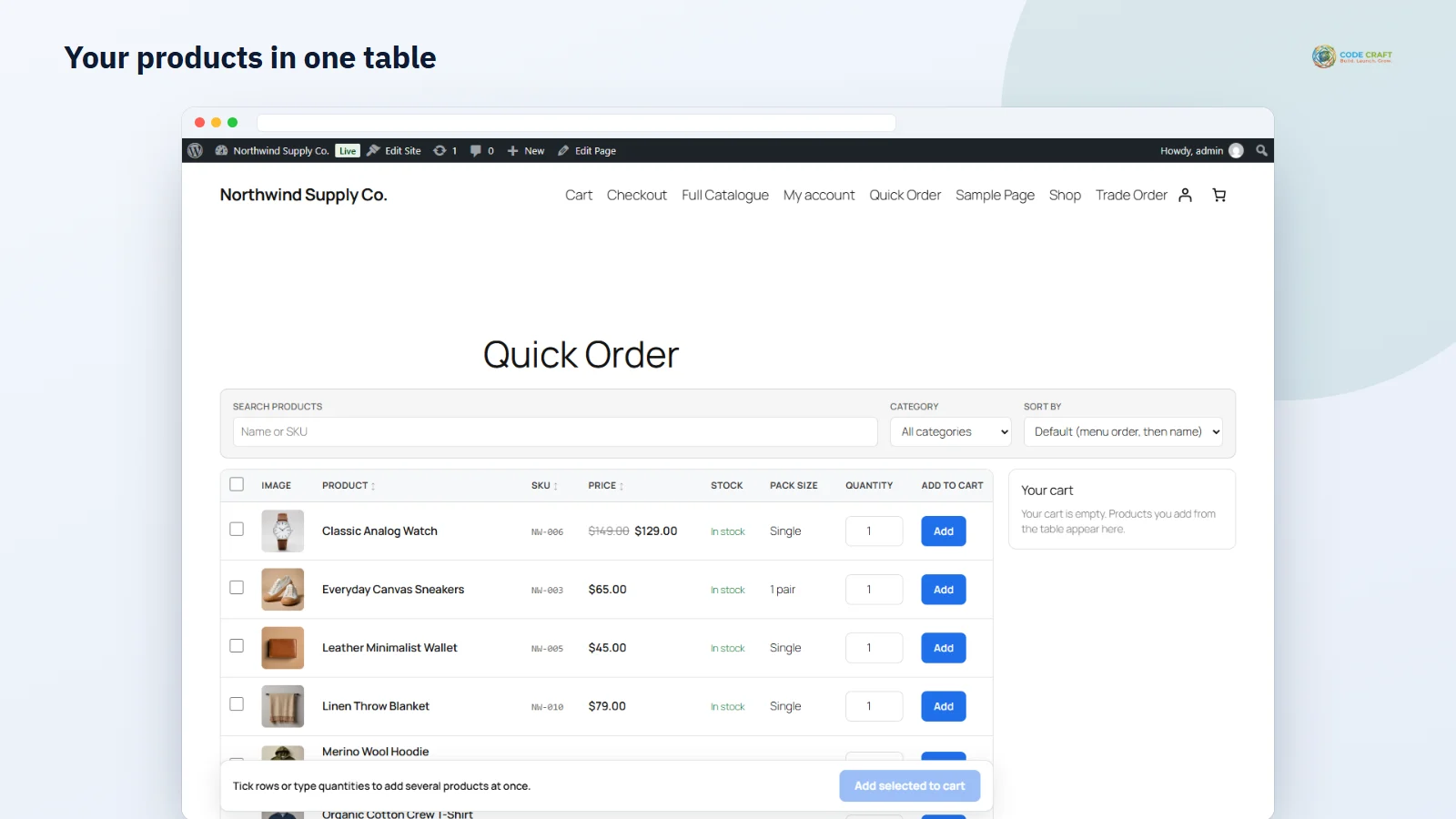
A WooCommerce product table and quick order form: search, filter, type quantities and add to cart from the row
Get a Rowsmith Pro key by email and use every Pro feature for 7 days on one site. No card needed, nothing renews automatically — when the trial ends, Pro switches off unless you choose a plan. One trial per email.
Choose monthly, 1 year or lifetime — your key and download link are emailed instantly.
Upload the zip in wp-admin. The free core works right away.
Paste it in the plugin's License tab to activate.
Pro features, updates and priority support switch on.
Set up a product table, search by name and SKU, filter by category, sort by price, add a row, pick a variation in the row, bulk-add ticked rows, load variation rows as you scroll and place the order.
Download the PDF user guideThe free core is a real, working plugin — not a trial that expires. Pro unlocks the advanced modules with a licence key, and nothing you build on free is lost when you upgrade.
Everything most sites need. No account, no email required — download and install.
.zip · v1.0.0 · 1 downloads
Same plugin, every module unlocked by your licence key — plus updates and priority support.
Already bought it? Enter your key:
Or sign in — every licence you own shows up there.
| Feature | Free | Pro |
|---|---|---|
| Unlimited product tables, shortcode and block | Included | Included |
| Columns you choose and order (image, name, SKU, category, stock, weight, price…) | Included | Included |
| Quantity box and Add button on every simple product row | Included | Included |
| Live search by name, description and SKU | Included | Included |
| Category filter and per-table categories | Included | Included |
| Sort menu and clickable Product, SKU and Price headers | Included | Included |
| Page numbers, mobile card layout, theme mini-cart updates | Included | Included |
| Multi-select bulk add to cart in one request | Not included | Included |
| Variation dropdowns in the row | Not included | Included |
| One row per variation | Not included | Included |
| Mini-cart beside the table | Not included | Included |
| Lazy loading in batches as shoppers scroll | Not included | Included |
| Attribute and custom-field columns | Not included | Included |
| Role-restricted tables (e.g. trade customers only) | Not included | Included |
Upgrading is just entering a key — same plugin, same settings, nothing to reinstall or migrate.
A shop page full of product cards is great for browsing and slow for ordering. A café re-ordering twenty supplies, a workshop buying spare parts by SKU or a trade customer topping up stock does not want to open twenty product pages. Rowsmith turns your catalogue into a quick order form: one row per product with its picture, name, SKU, stock and price, a quantity box and an Add button. Shoppers search, narrow down by category, sort by price or name, type quantities and add, and the page never reloads. It is made for wholesale and B2B stores, restaurants and food suppliers, spare-parts and hardware shops, and any store with a long catalogue that is faster to scan as a list.
Each table has its own settings, and you can have as many as you like: a full catalogue, a list per category, a trade price list. In the table editor you tick the columns you want and put them in order with the arrow buttons — image, product name, SKU, category, short description, stock, weight, price, quantity and add to cart — choose which categories to list (sub-categories included), pick the default order and how many products a page shows, and turn the search box, category filter, header sorting and out-of-stock hiding on or off. The panel beside the editor shows the shortcode, for example [ospt_table id="1"], and a Create a page with this table button. In the block editor, add the Rowsmith Product Table block and pick the table in its settings. A category="slug" option on the shortcode limits one page to some categories without making a new table.
The search box looks in product names, descriptions and SKUs, and a variation's SKU finds its product, so a buyer can type a part number. Results update as they type. The category filter only offers the categories in that table, the sort menu has name, price, SKU, newest and best selling, and the Product, SKU and Price headers sort on click (click again to reverse). Paging shows a count such as "Showing 1–20 of 134 products". The current search, category, sort and page are kept in the address bar, so a buyer can bookmark or share them, and the search, filter, sort and page links still work with JavaScript turned off.
The browser only sends product IDs, quantities and chosen options. Rowsmith checks on the server that the product is published and visible, then runs WooCommerce's own add-to-cart validation and adds the line to WooCommerce's cart — so prices, stock limits, minimum and maximum quantities, "sold individually" and other plugins' add-to-cart rules apply exactly as they do on the product page. The quantity box uses each product's own minimum, maximum and step. After each add the shopper sees what was added with a View cart link, screen readers hear it, and the theme's mini-cart updates (classic cart fragments and the Mini-Cart block). The cart and checkout are WooCommerce's own; Rowsmith does not change them.
For trade and repeat buyers, Pro adds a tick box to every row, a Select all box and an Add selected to cart bar under the table. Typing a quantity ticks the row, and every ticked row is sent to the cart in one request; the message lists what was added and any line WooCommerce refused. Variable products can be ordered from the table too, in one of two ways. Dropdowns in the row show one dropdown per option, such as Colour and Size; when every option is picked, the price and SKU switch to that variation and the row adds exactly that variation. Or one row per variation lists every size and colour as its own line with its own SKU and quantity box, which suits apparel and parts with many sizes. Options are checked on the server against the product's own variations, so a combination that does not exist cannot be added.
The mini-cart sits beside the table with the cart lines, variation details, quantities, line totals, subtotal and View cart and Checkout buttons, and updates after each add (it moves under the table on smaller screens). Lazy loading replaces page numbers with batches that load as the shopper scrolls to the end of the table or presses Load more products; each batch is one small database query, so a big catalogue is never rendered at once. Attribute columns show values such as Colour or Size (a variation row shows its own value) and custom-field columns show any product meta key, for example a pack size or a supplier code. Role-restricted tables show only to the roles you tick — or only to guests — with your own message and a Log in button for everyone else; the rows request refuses them too.
Rowsmith needs WordPress 6.4 or newer, PHP 7.4 or newer and WooCommerce 8.0 or newer, and was tested with WordPress 7.1 and WooCommerce 11.2 on PHP 8.3, on the Twenty Twenty-Five block theme and the Twenty Twenty-One classic theme, with the block cart and checkout. It declares High-Performance Order Storage and cart/checkout block compatibility; it never reads or writes orders. The free plugin makes no outside connections; Pro contacts coodecraft.com only to activate and check the licence. Our automated test sets up a table, searches, filters, sorts, adds a single row, bulk-adds ticked rows including a variation picked from dropdowns, reads the real cart back through the WooCommerce Store API, adds a variation row from a lazy-loading table and places an order on the block checkout.
Most stores running Rowsmith pair it with these. Every plugin below shares the same licence system, coding standards and support team.


