WooCommerce PluginDownload free version
Abandoned Cart Recovery for WooCommerce
No reviews yet
from$69.00/yr
WooCommerce dynamic pricing: quantity tiers, BOGO, cart discounts and fees
Get a Dealsmith Pro key by email and use every Pro feature for 7 days on one site. No card needed, nothing renews automatically — when the trial ends, Pro switches off unless you choose a plan. One trial per email.
Choose monthly, 1 year or lifetime — your key and download link are emailed instantly.
Upload the zip in wp-admin. The free core works right away.
Paste it in the plugin's License tab to activate.
Pro features, updates and priority support switch on.
Create a quantity-tier rule and a buy 2 get 1 free deal, see them in the shop and cart, add a cash-on-delivery fee and check the rule reports.
Download the PDF user guideThe free core is a real, working plugin — not a trial that expires. Pro unlocks the advanced modules with a licence key, and nothing you build on free is lost when you upgrade.
Everything most sites need. No account, no email required — download and install.
.zip · v1.0.0 · 0 downloads
Same plugin, every module unlocked by your licence key — plus updates and priority support.
Already bought it? Enter your key:
Or sign in — every licence you own shows up there.
| Feature | Free | Pro |
|---|---|---|
| Product and category discounts | Included | Included |
| Quantity tiers and product-page tier table | Included | Included |
| Cart subtotal discounts | Included | Included |
| Schedules, priorities and on/off switch | Included | Included |
| Strike-through prices in the shop | Included | Included |
| Buy X get Y (BOGO) | Not included | Included |
| Bundles and mix-and-match | Not included | Included |
| User-role and customer rules | Not included | Included |
| Payment-method fees and surcharges | Not included | Included |
| Deal badges and cart savings notices | Not included | Included |
| Rule usage reports | Not included | Included |
| Updates and email support | Community | Included |
Upgrading is just entering a key — same plugin, same settings, nothing to reinstall or migrate.
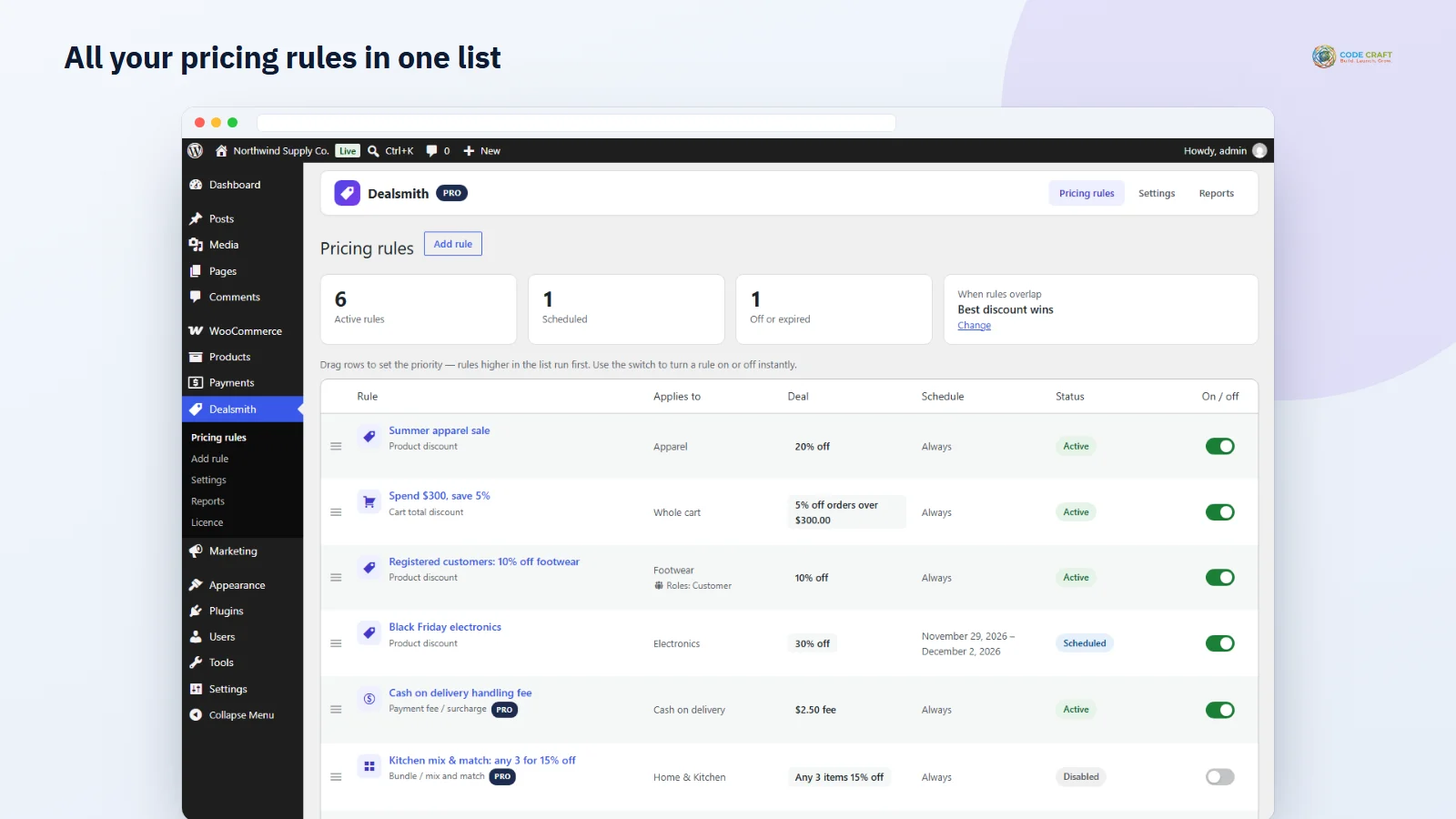
Sale prices and coupons get messy as soon as you run more than one promotion. Dealsmith keeps WooCommerce dynamic pricing in a single list of rules — a category sale, a quantity break, a spend-over discount — each with its own schedule, priority and on/off switch, so shoppers get the deal automatically and you never hand-edit prices again.
Set tiers like 10% off 2–4 items and 20% off 5 or more, per product, per variation group or per category. A tier table on the product page shows the price per item at each quantity and highlights the tier the shopper has reached, and the cart applies the same price.
Run buy 2 get 1 free, buy X get Y at a discount, fixed-price bundles and mix-and-match offers like any 3 for 15% off. Give wholesale or registered customers their own prices, and decide whether overlapping rules give the best discount, stack, or stop at the first match.
Add a fee or surcharge for a payment method — for example a cash-on-delivery handling fee — that updates live at checkout. Deal badges on shop images, a BOGO offer box on the product page and cart notices such as “You are saving $97” or “Spend $70 more to get 5% off” nudge shoppers to buy more.
Pro rule reports show, for each rule, how many orders used it, how much discount it gave, the revenue from those orders and when it was last used — so you can keep the promotions that pay and switch off the rest.
Dealsmith → Add rule starts with a choice of rule type. A product discount takes products or categories and gives a percentage off, an amount off or a fixed price per item. Quantity tiers add rows such as 2–4 items and 5 or more, each with its own discount, and you choose whether quantities count per product, per variation or across all matching items. A cart total discount sets a minimum subtotal and a percentage or fixed amount, and appears as its own line named after the rule. In Pro, buy X get Y sets how many to buy, how many are rewarded, the reward discount and whether the deal repeats; a bundle or mix-and-match rule sets the products or category, how many items make a set and a group price or percentage; a payment fee picks payment methods, a fixed amount or a percentage of items plus shipping, and whether the fee is taxable — a negative amount turns it into a payment-method discount. Every rule has an optional label for shoppers, start and end dates in the store time zone, and in Pro user-role, specific-customer and exclusive conditions plus custom badge text.
Shoppers see crossed-out prices on the shop, category and product pages, a tier table that highlights the price they have reached, and in Pro a badge on product images and an offer box for BOGO and bundle deals. In the cart, item prices drop as the rules apply, and cart discounts and fees appear as their own lines; Pro notices tell them how close the next deal is. Store owners manage everything in one list with an on/off switch, drag-and-drop priority and status pills — Active, Disabled, Scheduled, Expired or Needs Pro. Orders keep the discounted prices and the discount and fee lines, and the admin order shows how much the item discounts saved.
Dealsmith fits wholesalers and bulk sellers who want quantity breaks without a separate B2B system, stores that run weekend and festival sales and want them to start and stop on time, shops that sell sets and multipacks, and Indian or Gulf stores that charge a handling fee for cash on delivery. If you only need one coupon code a year, WooCommerce’s own coupons are enough; Dealsmith earns its place once you have several promotions running at the same time.
Dealsmith needs WordPress 6.4 or higher, WooCommerce 8.0 or higher (tested up to 11.2) and PHP 7.4 or higher (tested on 8.3). Item prices are set while WooCommerce calculates the cart, which both the block cart and checkout (Store API) and the classic shortcode pages run, and it declares compatibility with high-performance order storage. The end-to-end tests ran on the Twenty Twenty-Five block theme with the block cart and block checkout and cash on delivery; a classic-theme run could not be completed because the test harness timed out at login, so classic themes are expected to work but were not verified. Multisite was not tested.
BOGO does not add the free item to the cart for the shopper; they add it and Dealsmith discounts the cheapest qualifying items, with a Pro notice when one more is free. BOGO and bundle discounts are spread across the line, so a unit price can be fractional — line and order totals are exact, but the block cart may show a unit price a cent lower than the classic cart. Shop strike-through prices only reflect rules that apply to a single item; BOGO, bundle and cart rules are explained by the offer box and notices instead. Badges do not appear in the JavaScript-rendered “All Products” block. Some Pro features — BOGO with a different reward product, bundles, mix-and-match and the stack/first combination modes — were checked with unit tests of the pricing engine rather than in a live store, and role and customer conditions and the classic-checkout fee refresh were not tested yet.
Most stores running Dealsmith pair it with these. Every plugin below shares the same licence system, coding standards and support team.
Also popular with our customers: PriceGlobe, Gridsmith, Gatewise. Browse every woocommerce plugins or see our best-selling plugins. Need this built into a custom project? Our WordPress development team can help.