WooCommerce PluginDownload free version
Abandoned Cart Recovery for WooCommerce
No reviews yet
from$69.00/yr
WooCommerce multi currency: prices, cart and checkout in the shopper's currency
Get a PriceGlobe Pro key by email and use every Pro feature for 7 days on one site. No card needed, nothing renews automatically — when the trial ends, Pro switches off unless you choose a plan. One trial per email.
Choose monthly, 1 year or lifetime — your key and download link are emailed instantly.
Upload the zip in wp-admin. The free core works right away.
Paste it in the plugin's License tab to activate.
Pro features, updates and priority support switch on.
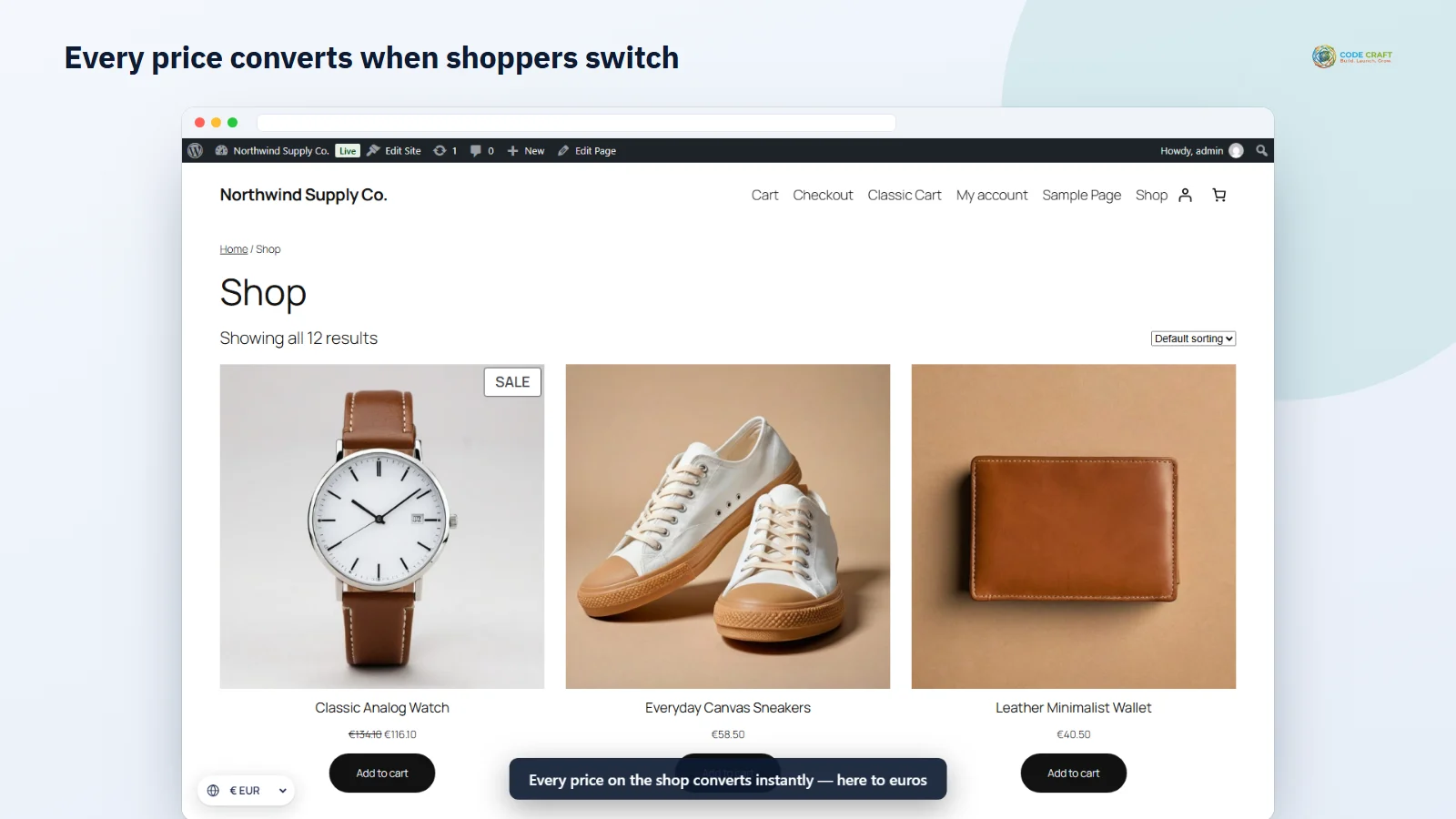
Add EUR and INR with exchange rates, switch currency on the shop, see the cart and checkout convert, and check the euro order and sales-by-currency report.
Download the PDF user guideThe free core is a real, working plugin — not a trial that expires. Pro unlocks the advanced modules with a licence key, and nothing you build on free is lost when you upgrade.
Everything most sites need. No account, no email required — download and install.
.zip · v1.0.0 · 0 downloads
Same plugin, every module unlocked by your licence key — plus updates and priority support.
Already bought it? Enter your key:
Or sign in — every licence you own shows up there.
| Feature | Free | Pro |
|---|---|---|
| Unlimited currencies with manual rates | Included | Included |
| One-click ECB exchange rates | Included | Included |
| Switcher: floating, block, widget, shortcode | Included | Included |
| Prices, cart, shipping, coupons and checkout converted | Included | Included |
| Orders stored in the shopper's currency | Included | Included |
| Currency by visitor country | Not included | Included |
| Scheduled rate updates with markup | Not included | Included |
| Fixed product prices per currency | Not included | Included |
| Payment methods per currency | Not included | Included |
| Fixed coupon and shipping amounts per currency | Not included | Included |
| Sales by currency report | Not included | Included |
| Updates and email support | Community | Included |
Upgrading is just entering a key — same plugin, same settings, nothing to reinstall or migrate.
Visitors who see prices in a foreign currency hesitate, do the maths and often leave. PriceGlobe adds WooCommerce multi currency to a single store: shoppers choose euros, pounds, dirhams or rupees and every price updates — product pages, price ranges, sale prices, mini-cart, cart and checkout — while your products stay priced once, in your store currency.
Enter each exchange rate yourself or pull the European Central Bank's latest rates with one click; Gulf currencies pegged to the dollar are derived from their official pegs. Every currency has its own symbol, position, decimals, separators and rounding — round rupees to the nearest whole number, or end euro prices in .99.
An order placed in euros is stored in euros, and the admin order screen also shows its value in your store currency at the rate used at checkout. Pro's sales-by-currency report converts every order back, so you always know what you actually earned.
Pro picks the currency from the visitor's country using Cloudflare's country header or WooCommerce's own geolocation — no calls to outside services on page load. Schedule rate updates with a markup to cover card fees, set exact prices per currency for products and variations, fix coupon and shipping amounts, and choose which payment methods appear for each currency.
PriceGlobe never rewrites your stored prices. It converts them at the moment WooCommerce reads them for a shopper — on front-end pages, in WooCommerce’s cart and checkout requests and in the Store API used by the cart and checkout blocks — and switches WooCommerce’s currency, decimals, separators and symbol position for that request. Admin screens, the WooCommerce REST API, Analytics, WP-Cron and WP-CLI always see the stored values, so nothing is converted twice and your product edit screens look exactly as before. Shipping rates are converted per currency, the free-shipping minimum and fixed coupon amounts follow, and if a cart was built in another currency it is recalculated. At checkout the exchange rate and your store currency are saved on the order. The visitor’s choice is kept in a 30-day cookie, and a link such as ?pgmc_currency=EUR switches currency and returns to the clean address.
Everything lives on PriceGlobe → Currencies. The first row is your store currency, always at rate 1. Each added currency has an exchange rate, an optional custom symbol, symbol position, decimals, rounding (none, nearest, up or down), an enabled switch and a remove box; a currency without a rate is not offered to shoppers. Opening a currency’s detail line reveals the thousand and decimal separators, the rounding step (1, 0.5, 10, 100…), an optional price ending such as .99 and a live example. Rounding and endings apply to product prices; shipping, coupons and totals are converted exactly. The switcher settings choose the floating position (bottom-left, bottom-right or off), dropdown or buttons, the label style (“€ EUR”, “EUR” or “Euro (€)”) and the currency for new visitors.
PriceGlobe is meant for one store selling to several countries: an Indian brand with buyers in the US, UK and Gulf, a European shop that also sells in pounds and dollars, or a Gulf store showing dirhams and riyals side by side. It suits owners who want one catalogue and one stock count, with the shopper’s own currency at checkout and a clear store-currency figure on every order for the books.
PriceGlobe needs WordPress 6.4 or higher, WooCommerce 8.0 or higher (tested up to 11.2) and PHP 7.4 or higher (tested on 8.3). Orders are handled through WooCommerce’s CRUD functions only, so high-performance order storage is supported; the end-to-end test placed a euro order on the block checkout with cash on delivery and checked it on an HPOS order screen. Your payment gateway must accept the currency the shopper pays in — Pro can hide gateways per currency. With page caching, set your cache to vary by or bypass the pgmc_currency cookie, or use Pro’s cache-friendly mode. Currency by country uses WooCommerce geolocation (add a free MaxMind key under WooCommerce → Settings → Integration) or Cloudflare’s header.
WooCommerce Analytics is not converted; it adds up totals across currencies, so use Pro’s sales-by-currency report for converted figures. The price filter slider and minimum/maximum price queries use store-currency amounts. Flat-rate shipping formulas using a percentage fee mix converted and stored amounts; plain numbers, [qty] and [cost] work. Items added by hand to an order in the admin use store-currency prices. The switcher shows symbols and codes, not flags. The live ECB fetch, scheduled updates, fixed product prices, coupon conversion, gateway restriction, cache mode, the block, widget and shortcode, the classic shortcode checkout and classic themes are built and code-reviewed but were not part of the automated test run.
Most stores running PriceGlobe pair it with these. Every plugin below shares the same licence system, coding standards and support team.