WooCommerce PluginDownload free version
Abandoned Cart Recovery for WooCommerce
No reviews yet
from$69.00/yr
A WooCommerce payment gateway fee or discount for each method — COD fees, prepaid discounts, correct totals
Get a Gatewise Pro key by email and use every Pro feature for 7 days on one site. No card needed, nothing renews automatically — when the trial ends, Pro switches off unless you choose a plan. One trial per email.
Choose monthly, 1 year or lifetime — your key and download link are emailed instantly.
Upload the zip in wp-admin. The free core works right away.
Paste it in the plugin's License tab to activate.
Pro features, updates and priority support switch on.
Create a cash on delivery fee and a capped prepaid discount, set COD limits and hide a payment method, then switch methods on the block and classic checkout and check the saved orders and the report.
Download the PDF user guideThe free core is a real, working plugin — not a trial that expires. Pro unlocks the advanced modules with a licence key, and nothing you build on free is lost when you upgrade.
Everything most sites need. No account, no email required — download and install.
.zip · v1.0.0 · 0 downloads
Same plugin, every module unlocked by your licence key — plus updates and priority support.
Already bought it? Enter your key:
Or sign in — every licence you own shows up there.
| Feature | Free | Pro |
|---|---|---|
| Flat or % fee per payment method | Included | Included |
| Flat or % discount per payment method | Included | Included |
| Live update on the classic and block checkout | Included | Included |
| Saved order always matches the method used (block checkout) | Included | Included |
| Own checkout label and tax class | Included | Included |
| Minimum / maximum cart total per rule | Included | Included |
| Hint under each method on the classic checkout | Included | Included |
| Conditions: country, shipping method, category, user role | Not included | Included |
| Hide or show payment methods by rules | Not included | Included |
| COD limits: order value and postcode / pincode list | Not included | Included |
| At least / at most caps and tiered amounts | Not included | Included |
| Schedule rules by date | Not included | Included |
| Report of fees collected and discounts given | Not included | Included |
Upgrading is just entering a key — same plugin, same settings, nothing to reinstall or migrate.
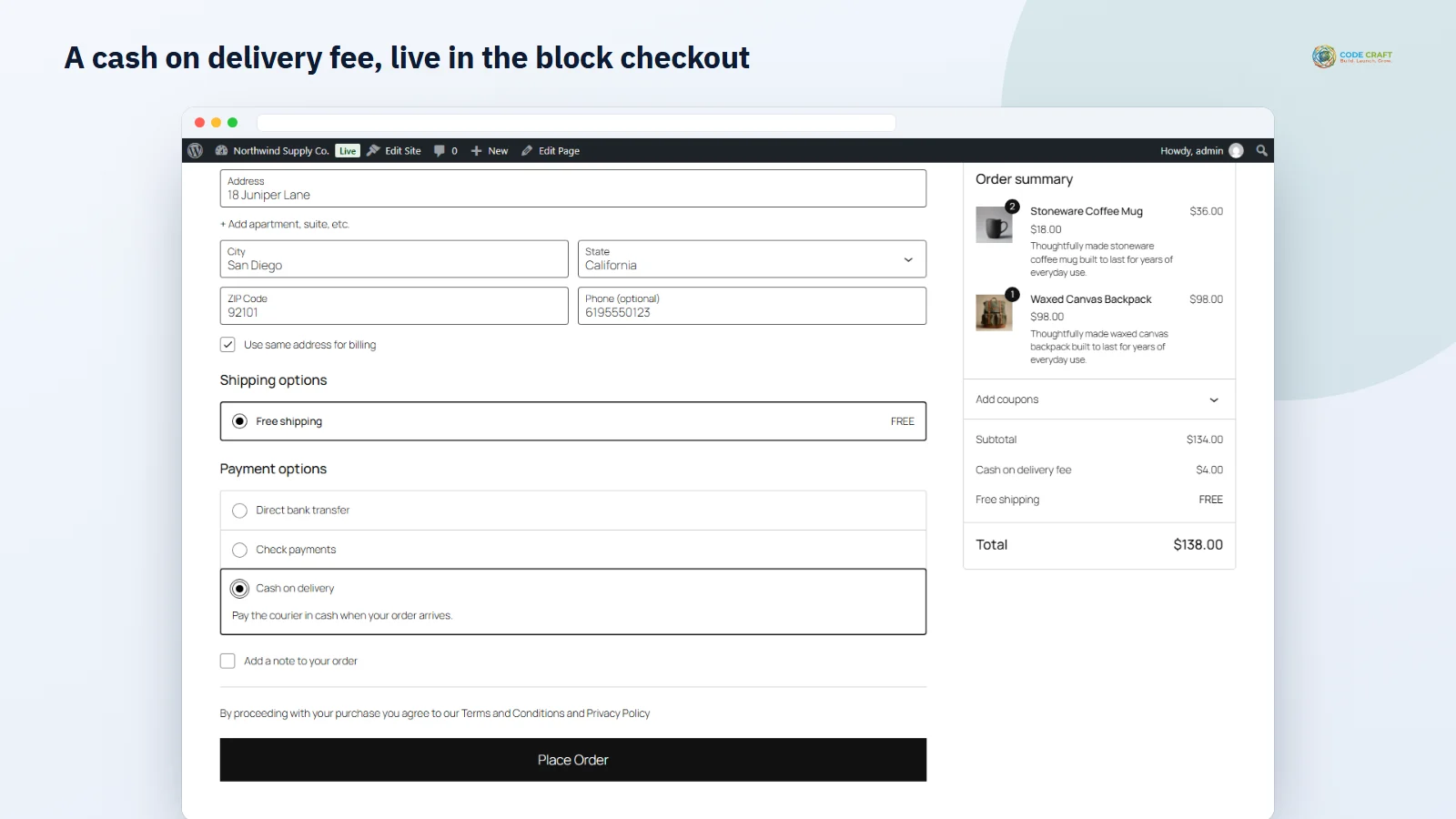
Cash on delivery costs you a courier collection charge and more returns; online payments cost a provider fee. Gatewise lets you price that in: add a WooCommerce payment gateway fee for the methods that cost you more, or a discount for the ones you prefer. The fee or discount appears as its own line in the order summary with your label, and changes the moment the shopper picks another method.
On the WooCommerce block checkout the order is placed through the Store API, where a payment-method fee can easily be missed if the summary had not refreshed yet. Gatewise reads the payment method from the checkout request itself, recalculates the cart and corrects its own fee lines on the order before it is saved, so the order total always matches the method used.
Offer cash on delivery only where it is safe: set a minimum and maximum order value and a pincode allow-list or block-list with wildcards and ranges. Hide any method — or show it only — by cart total, country, postcode, shipping method, product category or customer role, for example no cheques over $500 or bank transfer only for wholesale customers.
Keep a percentage fee between two amounts (2% COD fee, at least $3, at most $15), use a different amount per cart-total tier, run a prepaid offer between two dates, and see how much each fee earned and each discount cost per rule and per payment method.
Each rule belongs to one or more payment methods and is either a fee or a discount. A fixed amount is added or taken off as it is; a percentage is worked out on the cart subtotal after coupons, including tax, or — if you choose it under Settings — on the subtotal plus shipping, which suits fees that pass on a provider's charge on the full amount. Rules run from top to bottom, so one method can carry a fixed fee and a percentage at the same time, and a discount is never allowed to push the order below zero. The optional minimum and maximum cart total let a rule apply only to part of your orders, for example a COD fee only on orders under $1,000. Every fee or discount is added through WooCommerce's own fee API, so it is a normal fee line: it shows in the order summary, on the order received page, in the admin order and wherever WooCommerce lists fee lines, and it can be taxable with any tax class you have set up.
Gatewise is made for stores where payment methods really cost different amounts. Indian stores use it to put a small charge on cash on delivery, to reward UPI and card payments that arrive up front, and — with Pro — to switch COD off for high-value carts or pincodes with many returned parcels. Stores in other countries use it to pass on a card or wallet surcharge where that is allowed, to give a discount for bank transfer, or to keep cheque payments for small orders only. Wholesale shops can show bank transfer only to their trade customers with a role condition.
Gatewise needs WordPress 6.4 or newer, WooCommerce 8.0 or newer and PHP 7.4 or newer; it was tested on WordPress 7.1, WooCommerce 11.2 and PHP 8.3 with debugging on and no notices from the plugin. It declares support for the WooCommerce block checkout and High-Performance Order Storage and only uses WooCommerce's order API. Our end-to-end tests ran on the block checkout and the classic shortcode checkout with WooCommerce's cash on delivery, bank transfer and cheque methods, on the legacy order storage. Other gateways are listed and can carry rules, but were not tested one by one. Amounts are in the store currency only, and conditions look at the whole cart rather than at single products. When a monthly or yearly Pro licence ends, plain rules keep working, rules that use Pro options pause, hidden methods are shown again and COD limits stop until you renew — nothing is deleted.
Most stores running Gatewise pair it with these. Every plugin below shares the same licence system, coding standards and support team.