WooCommerce PluginDownload free version
Abandoned Cart Recovery for WooCommerce
No reviews yet
from$69.00/yr
WooCommerce bulk edit products in a spreadsheet grid, with undo and history
Get a Gridsmith Pro key by email and use every Pro feature for 7 days on one site. No card needed, nothing renews automatically — when the trial ends, Pro switches off unless you choose a plan. One trial per email.
Choose monthly, 1 year or lifetime — your key and download link are emailed instantly.
Upload the zip in wp-admin. The free core works right away.
Paste it in the plugin's License tab to activate.
Pro features, updates and priority support switch on.
Filter products, raise prices by 10%, edit cells with the keyboard, see validation, undo, roll back from history, and bulk edit orders and coupons.
Download the PDF user guideThe free core is a real, working plugin — not a trial that expires. Pro unlocks the advanced modules with a licence key, and nothing you build on free is lost when you upgrade.
Everything most sites need. No account, no email required — download and install.
.zip · v1.0.0 · 0 downloads
Same plugin, every module unlocked by your licence key — plus updates and priority support.
Already bought it? Enter your key:
Or sign in — every licence you own shows up there.
| Feature | Free | Pro |
|---|---|---|
| Spreadsheet grid for products | Included | Included |
| Filters: search, category, stock, type, status | Included | Included |
| Edit price, sale price, stock and status | Included | Included |
| Bulk price change by % or amount | Included | Included |
| Validation and one-click undo | Included | Included |
| Variations as editable rows | Not included | Included |
| History with roll back of any batch | Not included | Included |
| Bulk edit orders and coupons | Not included | Included |
| Find and replace | Not included | Included |
| Saved views | Not included | Included |
| Scheduled price changes | Not included | Included |
| Updates and email support | Community | Included |
Upgrading is just entering a key — same plugin, same settings, nothing to reinstall or migrate.
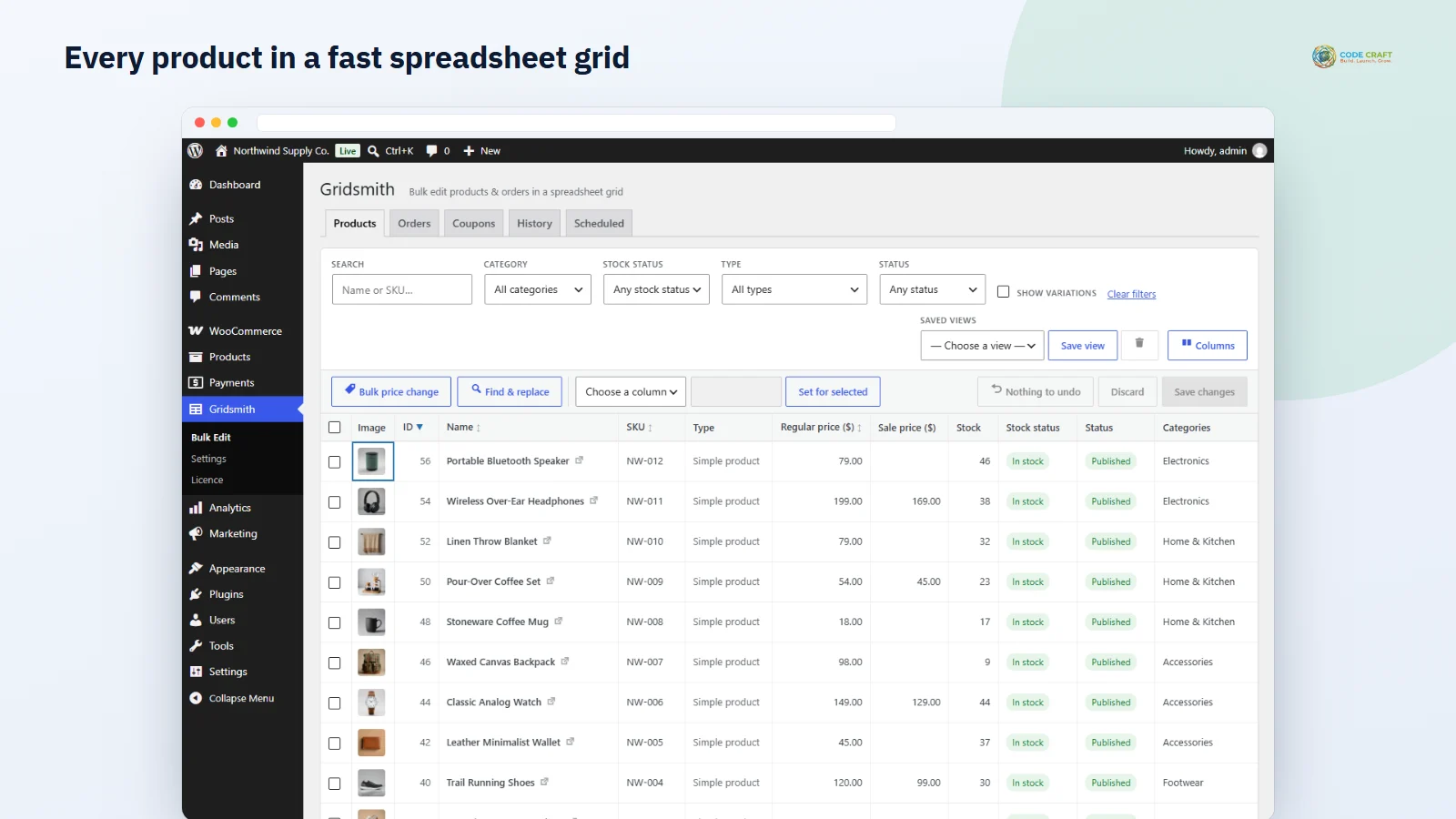
Changing prices or stock product by product takes hours and invites mistakes. Gridsmith, under Gridsmith → Bulk Edit, shows your catalogue as a spreadsheet with image, ID, name, SKU, type, regular price, sale price, stock, stock status and status. Filter to the products you need with search (name or SKU), category, stock status, type and status, sort by ID, name, SKU or price, and choose 20 to 200 rows per page. WooCommerce bulk edit products work becomes a few minutes of typing — and changed cells stay highlighted in yellow until you save, so nothing is changed by accident.
The grid behaves like a spreadsheet. Move with the arrow keys, Home, End, Page Up and Page Down; press Enter or F2, or just start typing, to edit; Enter commits and moves down, Tab moves right and Esc cancels. Delete clears a cell — an empty sale price removes the sale, an empty stock cell stops stock tracking — and Space selects the row. Ctrl+S saves the batch. To put one value into many rows, tick them, pick a column, enter the value and click Set for selected, for example to mark a whole range Out of stock or Draft. Columns can be shown or hidden, and your choice is remembered in the browser.
Bulk price change works on the selected rows or on every product matching your filter across all pages. Choose regular or sale price, then increase or decrease by a percentage, increase or decrease by a fixed amount, set a value, set the sale price to regular minus a percentage, or remove the sale. A line shows the result for a real product before you apply. The work runs in chunks of 40 products with a progress bar, so large catalogues do not time out, and results are rounded to your store's price decimals. Products that would end up with a sale price at or above the regular price are skipped and listed.
Gridsmith talks to WordPress through its own REST routes, which only users with the manage_woocommerce capability — Administrators and Shop Managers — can call, protected by a nonce. Filtering, sorting and pagination run on the server through WooCommerce's product query, so the browser never loads the whole catalogue. Every write uses the WooCommerce product, order and coupon objects, then re-syncs touched variable products, which keeps lookup tables, price caches, stock status and other plugins' hooks working as if you had edited each product by hand.
Tick Show variations and each variable product is followed by its variations, so a size or colour can have its regular price, sale price, SKU, stock and stock status edited like any other row. The Orders tab lists orders through WooCommerce's order API, which works with High-Performance Order Storage and the classic storage; filter by status or customer email, tick orders and set a new status in one save. Status changes add an order note and send the normal WooCommerce emails. The Coupons tab edits code, discount type, amount, expiry date, usage limit and free shipping, refusing duplicate codes and percentages above 100.
Pro adds a Categories column and, through Columns, tags, attributes and up to 15 custom fields you list in the settings. Categories and tags take comma-separated names that already exist, so a typo never creates a new term; attributes are shown read-only; an empty custom-field cell deletes that meta value. Find and replace changes text in titles, short descriptions or descriptions, with optional match case, for the selected rows or all matching products. Saved views store a named set of filters, sorting and columns per user and bring it back in one click.
The History tab logs every save, bulk action, undo, rollback and scheduled run with who, when, what and how many values. Show changes lists each old and new value, and Roll back restores the old values of any batch, even an older one, while keeping values that were changed again since. In the Bulk price change dialog you can choose Schedule for a date and time in your site's timezone; the job runs in the background through WooCommerce's Action Scheduler or WP-Cron and uses the filter as it is at that moment. The Scheduled tab lets you Run now or Cancel, and pending jobs are queued again if the plugin is reactivated.
Gridsmith → Settings holds the default rows per page, the custom-field columns and the number of days of history to keep (Pro, pruned daily), and a Delete all plugin data option that is off by default. Gridsmith suits store owners raising prices for a new season, warehouse staff updating stock after a delivery, marketers preparing a sale, and anyone cleaning up SKUs or statuses across a large catalogue without exporting to a spreadsheet and importing it back.
Gridsmith needs WordPress 6.4 or newer, PHP 7.4 or newer and WooCommerce 8.0 or newer, and was tested with WordPress 7.1 and WooCommerce 11.2 on PHP 8.3. It declares compatibility with High-Performance Order Storage. It only adds admin screens, so it has no effect on your theme or checkout. The free plugin makes no outside connections; Pro contacts coodecraft.com only to activate the licence and check it once a day.
Most stores running Gridsmith pair it with these. Every plugin below shares the same licence system, coding standards and support team.