WooCommerce PluginDownload free version
Abandoned Cart Recovery for WooCommerce
No reviews yet
from$69.00/yr
WooCommerce table rate shipping by weight, item count or subtotal — per zone, with handling fees, free-shipping thresholds and rules that hide methods
Get a RateGrid Pro key by email and use every Pro feature for 7 days on one site. No card needed, nothing renews automatically — when the trial ends, Pro switches off unless you choose a plan. One trial per email.
Choose monthly, 1 year or lifetime — your key and download link are emailed instantly.
Upload the zip in wp-admin. The free core works right away.
Paste it in the plugin's License tab to activate.
Pro features, updates and priority support switch on.
Create a weight-based rate table with a postcode band, handling fee, free-shipping threshold and volumetric weight, add a hiding rule, then watch the rates change on the block and classic checkout and check the saved orders.
Download the PDF user guideThe free core is a real, working plugin — not a trial that expires. Pro unlocks the advanced modules with a licence key, and nothing you build on free is lost when you upgrade.
Everything most sites need. No account, no email required — download and install.
.zip · v1.0.0 · 0 downloads
Same plugin, every module unlocked by your licence key — plus updates and priority support.
Already bought it? Enter your key:
Or sign in — every licence you own shows up there.
| Feature | Free | Pro |
|---|---|---|
| Rate tables by weight, item count or cart subtotal | Included | Included |
| Cost plus extra per unit (e.g. per kg above 5 kg) | Included | Included |
| "No shipping" bands for oversized carts | Included | Included |
| One or more tables per WooCommerce shipping zone | Included | Included |
| Handling fee: flat and/or % of subtotal | Included | Included |
| Free-shipping threshold by cart subtotal | Included | Included |
| Fallback cost or hide when no row fits | Included | Included |
| Block and classic checkout, rate saved on the order | Included | Included |
| Per shipping class and per item calculation | Not included | Included |
| Volumetric (size-based) weight | Not included | Included |
| Postcode / pincode range rows | Not included | Included |
| Hide shipping methods by rules; hide paid rates when free | Not included | Included |
| CSV import / export and delivery-time labels | Not included | Included |
Upgrading is just entering a key — same plugin, same settings, nothing to reinstall or migrate.
A single flat rate is either too high for a small parcel or too low for a heavy one. RateGrid lets you copy the shape of your courier's price list into WooCommerce table rate shipping: rows with a From and To value and a cost, checked from top to bottom, the first row that fits winning. A row can also add an extra amount for every unit above its From value, so one row can say "$10 for 5 kg, plus $1 for every kilogram more" instead of fifteen separate bands. Leave From or To blank for an open range, and tick "No shipping" on the last band to stop carts that are too heavy for parcel post.
Each table charges by one measure. Weight adds up product weight × quantity in your store's weight unit; item count adds up quantities; cart subtotal uses the subtotal after coupons and without tax by default, and a setting switches to before coupons or including tax. Tables live inside WooCommerce shipping zones, so the West Coast, Alaska and Hawaii, the rest of the country and the rest of the world can each have their own prices, and one zone can offer several tables side by side — for example Ground by weight and Freight per class — next to WooCommerce's own flat rate, free shipping and local pickup.
Add a handling fee to every rate of a table as a flat amount, a percentage of the subtotal, or both; it is part of the shipping cost, so it is taxed like the rate. Set "Free shipping from" and the table costs nothing once the subtotal reaches it — except for bands marked "No shipping", which always win. When no row fits a cart you choose what happens: the method is not offered, or a fallback cost is charged. A fallback without a cost is saved as "not offered", so a gap in your table can never turn into free delivery.
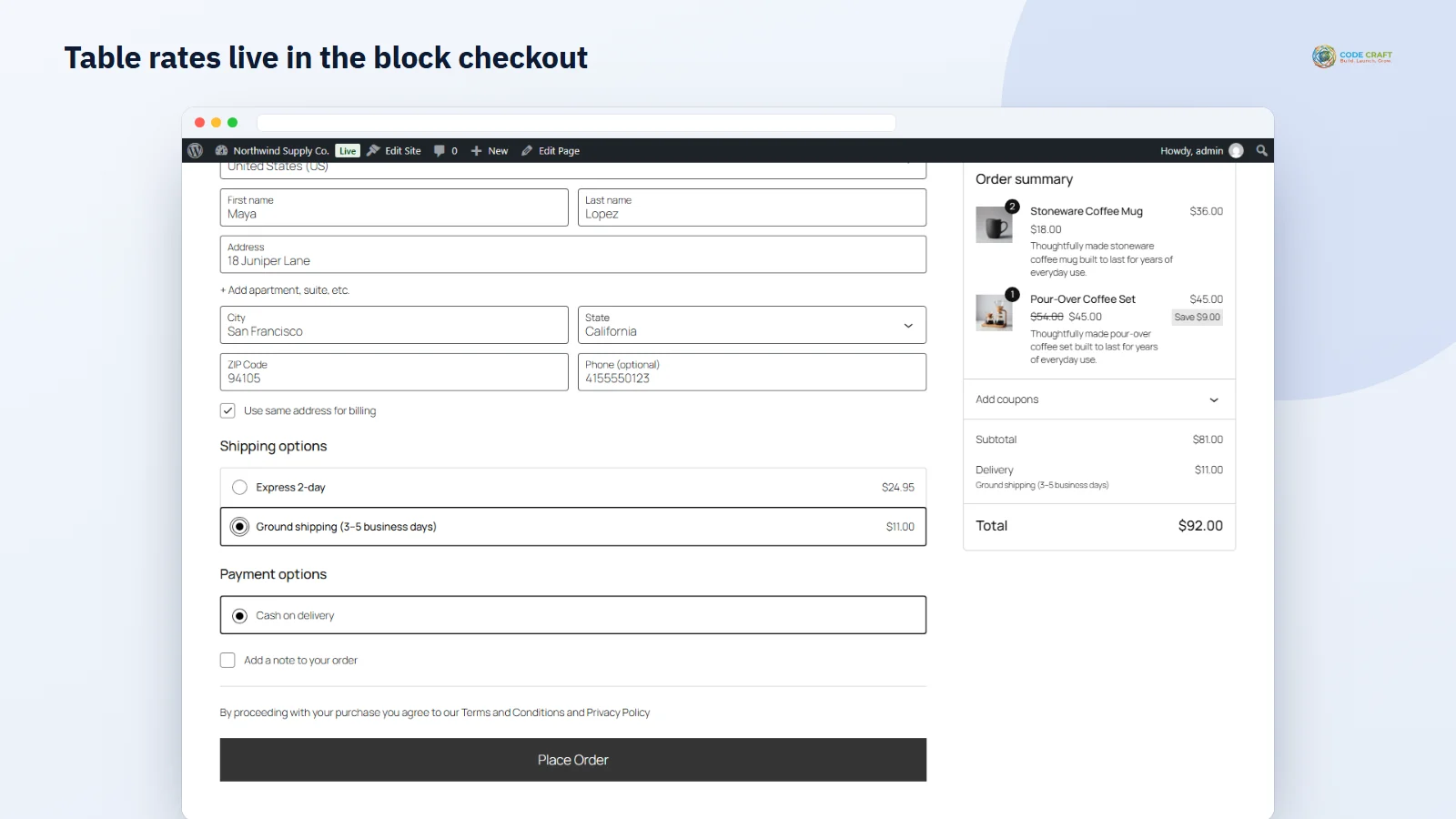
Every table is a standard WooCommerce shipping method, so the block cart and checkout and the classic shortcode checkout list it, update it when the shopper changes the address or the cart, and save the chosen rate on the order. In our end-to-end tests the rate changed live when a Los Angeles postcode was entered, the totals followed when the shopper switched between Express and Ground, an order placed straight after switching method was saved with the method really chosen, and a Seattle order with a 10% tax rate was saved with tax on both the goods and the shipping. RateGrid clears WooCommerce's cached rates whenever you save a table, a rule or a setting, so the new prices apply at once.
Mixed carts are where flat pricing breaks. In per-shipping-class mode RateGrid groups the cart by WooCommerce shipping class, finds a row for each group and adds the costs: two fragile mugs at $8, one bulky blanket at $12 and a wallet at $5 make $25. Per-item mode matches every product on the value of one unit and multiplies by the quantity. Volumetric weight charges each unit at the larger of its real weight and length × width × height ÷ divisor (5000 for centimetres and kilograms, 139 for inches and pounds), so a light but large blanket pays like the 6 kg parcel it is.
Give a row a list of postcodes or pincodes — exact codes, wildcards like 97* or ranges like 90001...90899 — and it only applies there, for a cheaper local courier band or a remote-area surcharge. Hiding rules remove any shipping method of any zone when the cart subtotal or weight is in a range, the cart contains a shipping class or the destination postcode matches; one switch hides paid rates as soon as a free one is available, keeping local pickup. Tables export to CSV and import back (replace or append), and a delivery-time label such as "3–5 business days" is shown after the method title and saved on the order's shipping line.
RateGrid is made for stores whose parcels vary a lot: furniture, homeware and garden shops with bulky items, stores that sell both tiny accessories and heavy equipment, Indian stores pricing by pincode, and shops that ship nationally and abroad with a different courier for each. It suits store owners who already know their courier's price bands and want the checkout to charge exactly that, without paying for a live-rates subscription.
RateGrid needs WordPress 6.4 or newer, WooCommerce 8.0 or newer and PHP 7.4 or newer; it was tested on WordPress 7.1 with the WooCommerce version Playground installed, PHP 8.3 and debugging on, with no notices from the plugin, on the block theme Twenty Twenty-Five and the classic theme Twenty Twenty-One. It declares support for the block checkout and High-Performance Order Storage. It does not fetch live carrier rates, does not price by driving distance, and does not split a cart into several packages itself (each package WooCommerce or another plugin creates is rated on its own). Amounts are in the store currency. When a monthly or yearly Pro licence ends, tables keep working on Free rules: per order, real weight, rows with a shipping class or postcode skipped, no hiding rules and no delivery labels; the table's fallback setting covers any cart no row fits. Nothing is deleted, and everything applies again when you renew.
Most stores running RateGrid pair it with these. Every plugin below shares the same licence system, coding standards and support team.