WooCommerce PluginDownload free version
Abandoned Cart Recovery for WooCommerce
No reviews yet
from$69.00/yr
WooCommerce pincode checker for the product page — delivery availability, a delivery date per pincode and a checkout guard
Get a PinPost Pro key by email and use every Pro feature for 7 days on one site. No card needed, nothing renews automatically — when the trial ends, Pro switches off unless you choose a plan. One trial per email.
Choose monthly, 1 year or lifetime — your key and download link are emailed instantly.
Upload the zip in wp-admin. The free core works right away.
Paste it in the plugin's License tab to activate.
Pro features, updates and priority support switch on.
Import serviceable pincodes from a CSV with wildcard and range rules, add a pincode by hand, set the dispatch cut-off and holidays, check pincodes on the product page, watch the block checkout fill in the city, add the delivery charge and stop unserviceable pincodes, check the classic checkout, see the estimate on the order and add a searched pincode from the demand report.
Download the PDF user guideThe free core is a real, working plugin — not a trial that expires. Pro unlocks the advanced modules with a licence key, and nothing you build on free is lost when you upgrade.
Everything most sites need. No account, no email required — download and install.
.zip · v1.0.0 · 2 downloads
Same plugin, every module unlocked by your licence key — plus updates and priority support.
Already bought it? Enter your key:
Or sign in — every licence you own shows up there.
| Feature | Free | Pro |
|---|---|---|
| Pincode / ZIP check box on product pages + [pinpost_checker] shortcode | Included | Included |
| Serviceable codes: add, search, delete | Included | Included |
| CSV import (file or paste) and CSV export | Included | Included |
| Delivery days and dates per pincode | Included | Included |
| Stop checkout for unserviceable codes (block + classic) | Included | Included |
| Estimate saved on the order, order-received page and e-mails | Included | Included |
| Own wording, countries checked, per-visitor rate limit | Included | Included |
| Cash on delivery on or off per pincode | Not included | Included |
| Delivery charge and minimum order per pincode | Not included | Included |
| Wildcard (1100**) and range (400001-400104) rules | Not included | Included |
| City and state auto-fill at checkout | Not included | Included |
| Dispatch cut-off time, working days and holidays | Not included | Included |
| Demand report of searched, unserved pincodes | Not included | Included |
Upgrading is just entering a key — same plugin, same settings, nothing to reinstall or migrate.
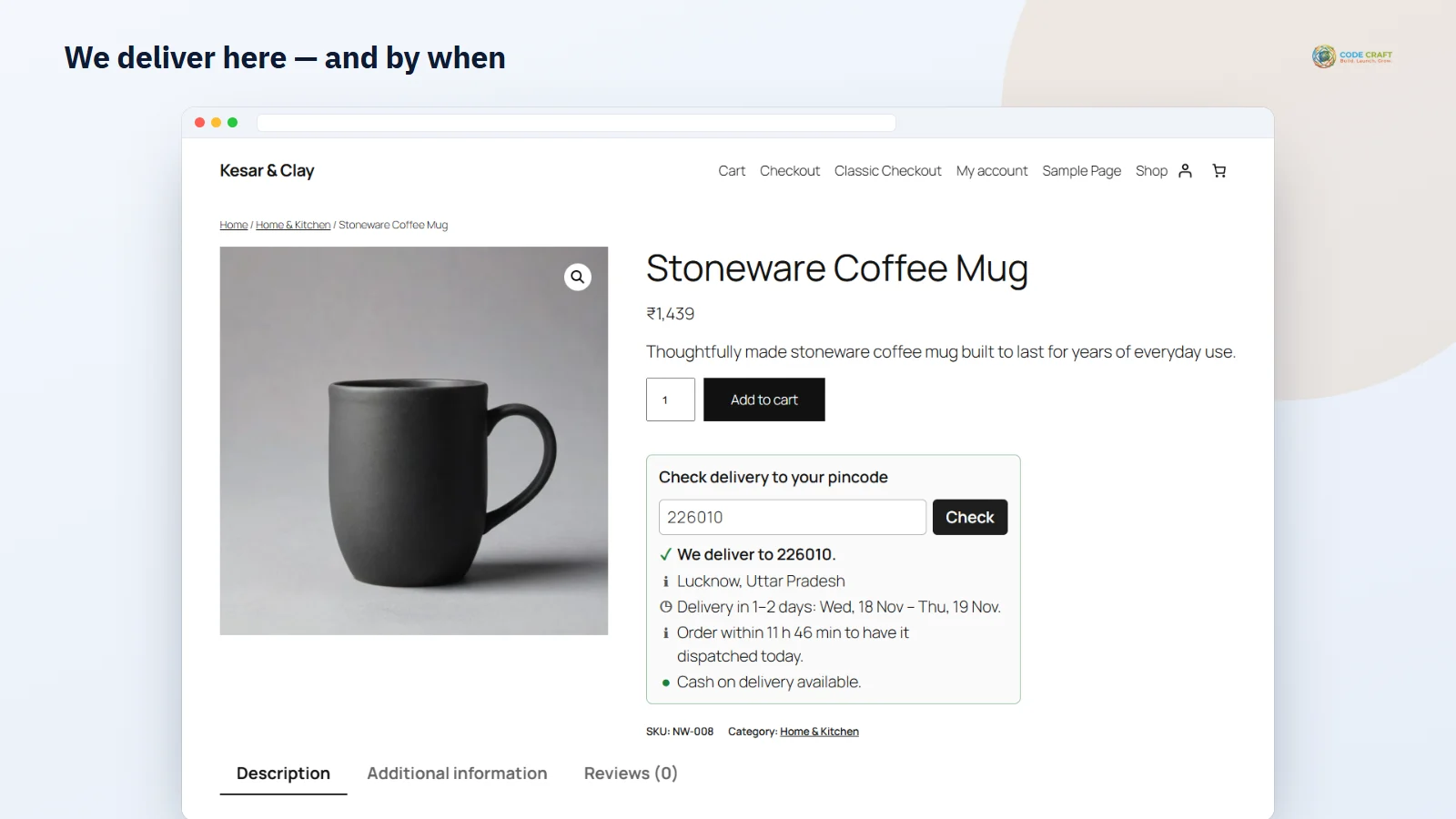
If you only deliver to some pincodes — a D2C brand in India working with one courier, a bakery with its own vans, a US or UK store with a limited delivery zone — shoppers want to know before they fall in love with a product. PinPost puts a small "Check delivery to your pincode" box under the Add to cart button of every product that needs shipping. The shopper types a pincode, ZIP or postcode and gets a plain answer in under a second: "We deliver to 226010" with the delivery days and dates, or "Sorry, we do not deliver to 999999 yet". The last code they checked is remembered in their browser, so the next product page answers on its own.
PinPost keeps serviceable codes in its own indexed table, so a lookup is one query even with tens of thousands of codes. The Import / export tab takes a CSV file of up to 5 MB and 50,000 rows, or rows pasted into a box. A header row is optional; with one, the columns can be in any order and common names such as zip, postcode or min_days are understood, and semicolon-separated files work too. Rows already on the list are updated, bad rows are skipped and the notice tells you which lines, and you can choose to replace the whole list. The Pincodes tab shows how many codes you serve, lets you add or update one code with its days, search by code and delete rows, and Export gives you the same CSV back. In Pro the same file can carry cod, charge, min_order, city and state columns, and importing a file without them never resets those values on existing rows.
Every code has its own fewest and most delivery days — 1–2 days in your own city, 3–5 for the metros, 4–7 for the rest — and codes without days use the default from the Settings tab. The shopper sees "Delivery in 3–5 days: Thu, 20 Nov – Sat, 22 Nov", worked out in your store's time zone, or only the number of days if you switch dates off. The estimate shown when the order is placed is saved on the order, so you and the customer can see it later on the order screen, the order-received page and in the WooCommerce order e-mails. Pro makes the dates smarter: a dispatch cut-off time ("Order within 3 h 30 min to have it dispatched today"), working days (Monday to Saturday by default) and a holiday list are all taken into account, and a live example on the settings screen shows what a 3–5 day pincode gets right now.
With "Stop the order when the delivery pincode is not on the list" switched on, PinPost checks the shipping address (or the billing address when no separate shipping address is used) when the order is placed. On the WooCommerce checkout block the order is refused through the Store API with your message, on the classic checkout it appears as a normal checkout error, and in both cases the shopper can simply change the address. Orders with nothing to ship are never stopped, and only addresses in the countries you choose are checked — by default just your store's own country, so international orders are not affected. Switch the rule off if you only want to inform shoppers on the product page.
Indian stores often offer cash on delivery only where the courier collects it. In Pro every pincode, wildcard or range has its own cash-on-delivery switch: the product page says "Cash on delivery available" or "not available here — please pay online", the checkout hides the Cash on delivery payment method for that address, and an order that still tries to pay by COD is refused. A delivery charge per pincode is added to the cart as a fee named "Delivery charge (400001)" on both checkouts, and a minimum order per pincode stops smaller orders with a message that says how much more is needed. All of it is checked on the server when the order is placed.
Instead of typing every code, Pro accepts wildcard rules where each * is one character (1100** covers 110000 to 110099) and numeric ranges such as 560001-560103. An exact pincode always wins, then the narrowest range, then the wildcard with the fewest stars, so you can make exceptions inside a range. When a row has a city and state, the product page shows them and the checkout fills an empty city and state field as soon as the shopper types the pincode — on the block checkout through WooCommerce's cart store and on the classic checkout through the normal fields; it never overwrites a city the shopper typed. The demand report counts every time a shopper types a pincode you do not serve into the product-page box (automatic re-checks and checkout auto-fill lookups are not counted), with the number of searches and the first and last time, so you can see where to expand next; Add to list puts a code on your list in one click and the report downloads as CSV. Only the pincode is stored, never an IP address or customer.
PinPost needs WordPress 6.4+, WooCommerce 8.0+ and PHP 7.4+. We tested it on WordPress 7.1 with WooCommerce and PHP 8.3 with debugging on, on Twenty Twenty-Five and Twenty Twenty-One, with the block checkout and the classic shortcode checkout, and it declares HPOS compatibility. Checks from one visitor are limited per hour (60 by default) with an atomic database counter, so scripts cannot read your whole list through the box. Limits today: the delivery estimate is the same for every product (there are no per-product or per-category delivery days), the charge is a cart fee rather than a shipping method, the cut-off time and holidays apply to the whole store rather than per courier, and PinPost does not look up couriers or ship to carriers' APIs. When a monthly or yearly Pro licence ends, COD rules, charges, minimum orders, wildcard and range matching, auto-fill, cut-off dates and the demand report stop until you renew; your list and every Pro value are kept and the free checker keeps working.
Most stores running PinPost pair it with these. Every plugin below shares the same licence system, coding standards and support team.