

WooCommerce PluginDownload free version
Abandoned Cart Recovery for WooCommerce
No reviews yet
from$69.00/yr
WooCommerce pre order plugin: take orders before a product is released or back in stock, with a release date, a Pre-ordered status and an email on release
Get a Releasewright Pro key by email and use every Pro feature for 7 days on one site. No card needed, nothing renews automatically — when the trial ends, Pro switches off unless you choose a plan. One trial per email.
Choose monthly, 1 year or lifetime — your key and download link are emailed instantly.
Upload the zip in wp-admin. The free core works right away.
Paste it in the plugin's License tab to activate.
Pro features, updates and priority support switch on.
Put headphones on pre-order with a release date and a 10% pre-order price, order them through the block checkout, pre-order a single T-shirt variation, take a pay-on-release order on the classic checkout, cancel pre-orders, then release by stock, by date and by hand.
Download the PDF user guideThe free core is a real, working plugin — not a trial that expires. Pro unlocks the advanced modules with a licence key, and nothing you build on free is lost when you upgrade.
Everything most sites need. No account, no email required — download and install.
.zip · v1.0.0 · 2 downloads
Same plugin, every module unlocked by your licence key — plus updates and priority support.
Already bought it? Enter your key:
Or sign in — every licence you own shows up there.
| Feature | Free | Pro |
|---|---|---|
| Pre-order now button and "available on" label (texts editable) | Included | Included |
| Release date per product, shown to shoppers | Included | Included |
| Automatic release on the date (hourly check) or Release now | Included | Included |
| Pre-ordered order status; pre-ordered units taken from stock on release | Included | Included |
| "Pre-order received" and "Pre-order released" emails | Included | Included |
| Cart rule: pre-orders on their own, or mixed with in-stock products | Included | Included |
| Pre-orders screen: waiting orders, Release now, Cancel pre-order | Included | Included |
| Block and classic checkout; HPOS compatible | Included | Included |
| Pay on release with an emailed payment link | Not included | Included |
| Customers cancel unpaid pre-orders in My Account | Not included | Included |
| Pre-order price: percentage off or fixed price | Not included | Included |
| Per-variation pre-orders with their own date | Not included | Included |
| Pre-order limit (units left, then full) | Not included | Included |
| Release automatically when stock arrives | Not included | Included |
| Pre-order report per product | Not included | Included |
Upgrading is just entering a key — same plugin, same settings, nothing to reinstall or migrate.
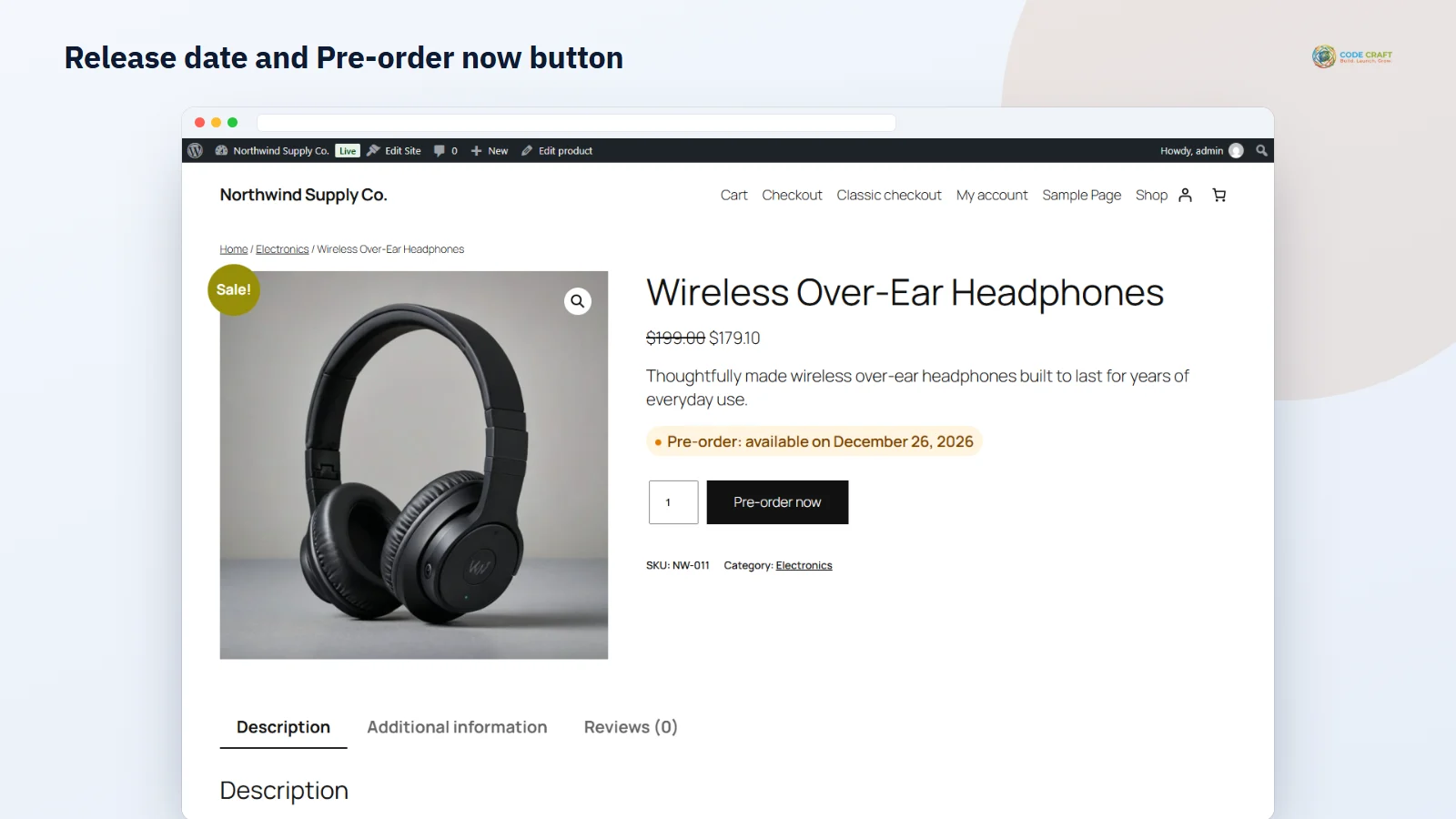
A new album, a book before its publication date, headphones that land in six weeks, a sneaker drop, a restock you already know is coming: shoppers want to secure one now, and you want the order now. WooCommerce on its own only offers backorders, which look like a normal order that is late. Releasewright turns a product into a real pre-order. Open the product, go to the new Pre-order tab, tick Pre-orders and pick a release date. From that moment the product page and the shop say Pre-order now instead of Add to cart, the stock line reads "Pre-order: available on" with the date, and the product can be ordered whatever its stock. For a variable product the setting covers every variation; with Pro a single variation can be on pre-order on its own.
A paid pre-order is saved with the order status Pre-ordered instead of Processing, so your packing team and your fulfilment plugins do not ship it early. Every pre-ordered line carries "Pre-order: Available on …" in the cart, the checkout, the order emails, My Account and the admin order screen. The customer receives a "Pre-order received" email straight away, and you receive WooCommerce's normal New order email. Both Releasewright emails are standard WooCommerce emails: edit their subject, heading and text, or turn them off, under WooCommerce → Settings → Emails.
On the release date an hourly WP-Cron check releases the product automatically, and the Pre-orders screen has a Release now button for each product and a Run the release check now button. A release turns the product back into a normal product — Add to cart, the normal stock text and the normal price — and moves every waiting order on whose pre-ordered products are all released: paid orders go to Processing and their units are taken from stock; pay-on-release orders go to Pending payment. Each customer gets the "Pre-order released" email. You can start a new pre-order on the same product later by ticking Pre-orders again.
Pre-orders in the admin menu lists every product and variation on pre-order with its release date, payment mode, price and units waiting, and every order waiting for release with the customer, the products, the total and whether it was charged. Each waiting order has a Cancel pre-order link. The Settings screen holds the button text, the label with and without a date, the automatic release switch and the cart rule. By default a pre-order is ordered on its own, so one order has one release date; you can allow pre-orders and in-stock products in one order instead, and then the whole order waits for the release while the in-stock items are taken from stock at once.
Set a product's Payment to Pay on release and the checkout offers a single method, "Pay when it is released": the order is saved as Pre-ordered and nothing is charged. When the product is released the order becomes Pending payment and the customer is emailed a "Pay for your order" link that opens WooCommerce's normal payment page with your usual payment methods. Releasewright does not store card details and never charges a card automatically; WooCommerce's rule that cancels unpaid orders after the hold-stock time is switched off for these orders. Customers with an account can cancel an unpaid pre-order themselves from My Account → Orders. Products paid on release are always ordered on their own.
Pro adds the settings stores ask for once pre-orders sell. A pre-order price can be a percentage off the regular price or a fixed price; shoppers see the regular price struck through and the normal price returns on release. Each variation can have its own pre-order with its own date, payment, price and limit, and the product page button switches to Pre-order now only when the shopper picks that variation. A pre-order limit stops taking pre-orders after a set number of units — the label adds "3 left to pre-order", then "Pre-orders are full" — and the Store API enforces the same limit. Release when stock arrives ends the pre-order as soon as the stock quantity goes above zero, for example when you receive a delivery and update the stock. The pre-order report shows, for the last 30, 90 or 365 days, the orders, units waiting, unpaid units, units released, units cancelled and the value of each product.
Product launches and limited drops, publishers and record shops taking orders before a release date, electronics and gadget stores selling the next model, fashion labels taking orders for a new collection, and any shop that knows a restock is on the way and would rather take the order than lose the customer. The free plugin covers pre-orders paid at checkout; Pro is for stores that want to take orders without payment, run launch prices, cap a limited run or pre-order single sizes and colours.
Releasewright needs WordPress 6.4 or newer, PHP 7.4 or newer and WooCommerce 8.0 or newer. It was tested with WordPress 7.1 and WooCommerce 11.2 on PHP 8.3 with High-Performance Order Storage on, on the block cart and checkout and the classic shortcode checkout, with the Twenty Twenty-Five block theme and the Twenty Twenty-One classic theme, in a US-dollar store using cash on delivery as the payment method.
Most stores running Releasewright pair it with these. Every plugin below shares the same licence system, coding standards and support team.


