
Tendora — Home Services Booking App
A home services booking app you host yourself: time slots, automatic professional assignment, start codes, a pro panel, admin, REST API and an Expo mobile app
Everything included
- Service catalogue: categories, prices and durations
- Free time slots per area, date strip and travel buffer
- Auto-assignment by skill, area, working hours and free time
- No double-booking, enforced by a database index
- 4-digit start code the professional never receives
- Extra parts the customer approves or rejects
- Professional panel: online switch, jobs, KYC, earnings
- Admin: bookings, professionals, KYC review, ledger, CSV
- Cash and UPI (link and QR) built in; no wallet
- REST API and Expo app with customer and pro modes
From order to a live website
- 1
Choose a package
Code only, We set it up, or Customised. All prices are one-time.
- 2
Pay securely
Your download link is emailed once payment is confirmed and also appears in My Account.
- 3
We contact you
For setup packages we email within one business day for your cPanel / hosting login and domain.
- 4
Live on your domain
Your booking app runs on your own Node.js hosting, with bookings in your admin panel and professionals in their own panel or app.
A booking app for a home services business
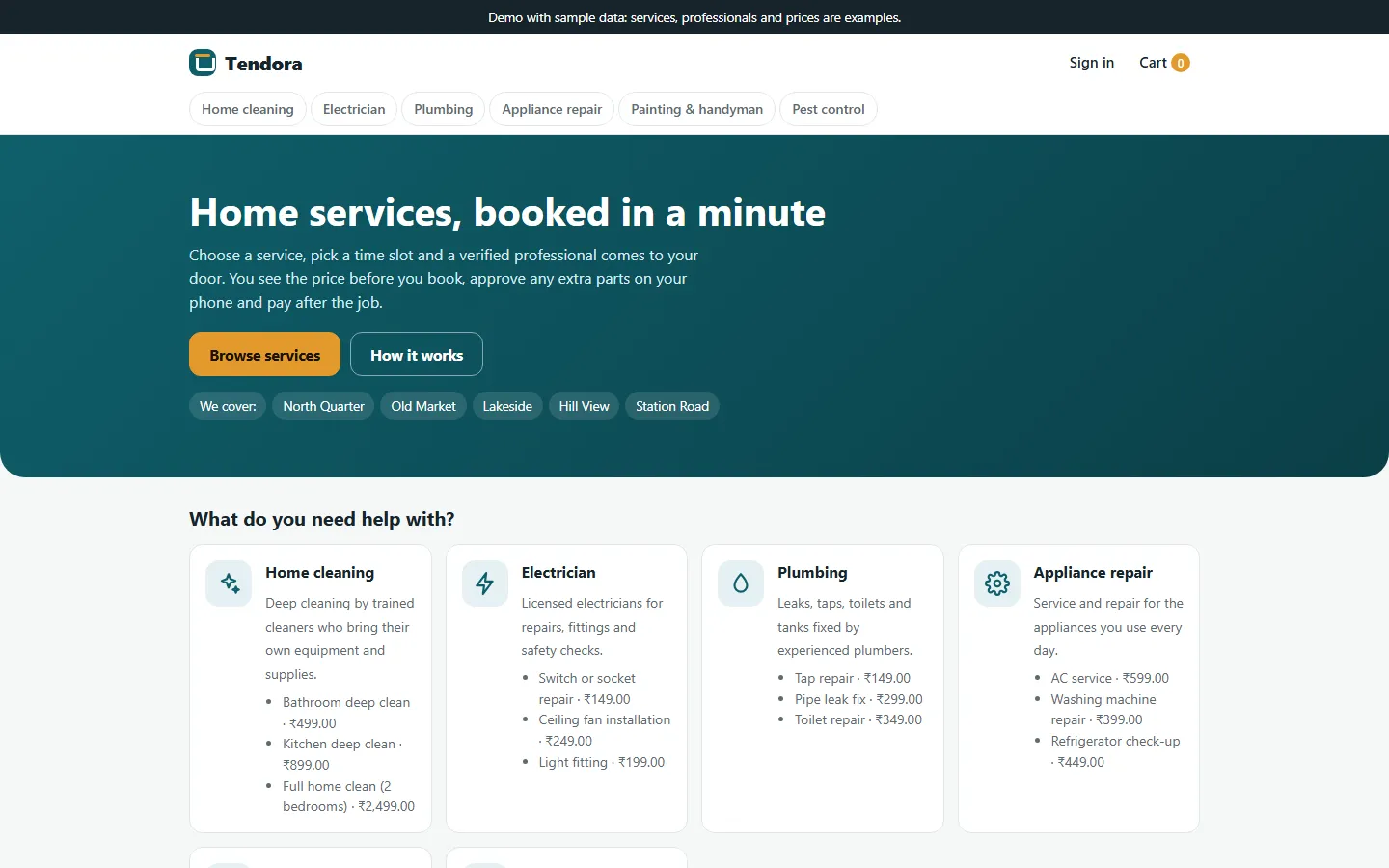
Tendora is not a brochure website with a contact form: it is the working software behind a home services business that sends its own professionals to customers' homes. Customers see real prices and real free times, book in a few steps and follow the job on a live booking page. Professionals see only the jobs assigned to them. You see every booking, every professional and what each one owes you or is owed. The demo brand, the city of Riverton, its five areas, six categories, 20 services and six professionals are sample data marked as such, ready for you to replace.
- Customer web app that works on phones
- Professional panel at /pro
- Admin panel at /admin
- REST API at /api/v1 and an Expo app
How a customer books
The customer adds services to the cart (each with its price and duration), applies a coupon if they have one and sees the full price before booking: services, a visit fee for small jobs (free above an amount you set) and tax. On the booking page they pick an area, type the address and can drop a pin on the map, then choose a date from the strip and one of the start times that are actually free. The server prices everything again, checks the slot and assigns a professional straight away. If nobody is free, the customer is asked to pick another time. Customers can save addresses, cancel up to a cut-off before the slot, and rate the job once it is completed.
- Cart, coupon and price shown before booking
- Only free start times are offered
- Live booking page that refreshes by itself
- Cancel before the cut-off, rate after the job
Assignment, start codes and extra parts
With auto-assign on (the default), the app looks for an approved, KYC-verified professional who is online, has every skill the booking needs, covers the area and has the time free inside their working hours, plus a travel buffer. It prefers the one with the fewest jobs that day, then the better average of real ratings. Every busy 30-minute block is a database row with a unique index, so the same professional can never be booked twice for the same time, even when two customers press Book at once; the tests check exactly that. At the door the professional enters the customer's 4-digit start code; after five wrong tries it locks until the admin resets it. During the job the professional can add parts with a price and quantity, and only the parts the customer approves are charged. A job cannot be completed while a part is still waiting for an answer.
- Match by skill, area, hours and free blocks
- Unique index stops double-booking
- Start code with a limit on wrong tries
- Customer approves each extra part
The professional panel
Professionals sign up on the Join page with their skills and areas, then upload an ID document (JPEG, PNG, WebP or PDF up to 5 MB) for KYC. The file is stored outside the public folder and only admins can open it. Once you approve the profile and the KYC, the professional can go online. Their panel lists open jobs and refreshes every 30 seconds; each job shows the customer's contact, address and map, the start-code form, the extra-parts form, the Complete button and the payment step (cash received, or the customer's UPI reference). History, an earnings ledger and a profile page with working hours and areas complete it.
- Join, KYC upload and approval
- Online and offline switch
- Jobs, history and earnings
- Working hours and areas on the profile
The admin panel for your operations team
The dashboard shows today's bookings, bookings waiting for a professional, jobs in progress, professionals online, jobs completed and job value for the last 30 days, the commission recorded and KYC documents to review. Bookings can be filtered and exported to CSV; on a booking you can assign or reassign it (only professionals who are qualified and free are listed), cancel it, record a cash or UPI payment and reset a locked start code. You manage categories and services, service areas with PIN codes, professionals (approve, suspend, skills, areas, hours, KYC viewer with approve or reject and a note, settlements), customers, coupons and payment methods. Settings cover your business details, logo and colours, SEO, maintenance mode, booking rules (auto-assign, commission, visit fee, tax, first and last slot, slot step, travel buffer, lead time, days ahead, cancel cut-off, start-code tries, map centre), live chat, WhatsApp button, analytics, announcement bar, cookie notice and SMTP. An email log keeps every message the app sends.
- Bookings with assign, cancel and CSV export
- Professionals, KYC review and settlements
- Services, areas, coupons and payments
- Booking rules, branding, SEO and email
Payments and the commission ledger
Customers pay per job after it is done: cash to the professional, or UPI to your business UPI ID through a payment link and a QR code for the exact total, confirmed by hand with the UTR. A card gateway can be added through the add-on system (ADDONS.md documents the payment contract), but no gateway add-on is bundled. When a job is completed the ledger records the platform commission (20% by default): on a cash job the professional owes you the commission, on a UPI or online job you owe the professional their share. You settle outside the app and record the settlement on the professional's page. The app never holds, moves or pays out money and has no wallet or stored balance, because holding customer money as a balance in India needs an RBI licence for prepaid payment instruments.
- Cash and UPI link or QR built in
- Ledger records commission, settled outside the app
- No wallet, no stored balance
- Gateway add-ons possible, none included
The mobile app
The mobile/ folder is an Expo SDK 58 app in TypeScript with Expo Router. One app has two modes chosen by the signed-in account: customers browse services, use the cart and coupon, book a free slot, follow the booking (refreshing every 8 seconds), share the start code, approve parts, open their UPI app with the exact amount, cancel and rate; professionals switch online, see jobs, start with the code, add parts, complete, record payment and see earnings. Prices, slots, branding and payment methods all come from your server, so rebranding needs no new build. Admins use the web panel; the app refuses admin sign-ins.
- Customer mode and professional mode
- Talks only to the REST API
- Name, colours and payments from the server
- EAS build profiles included
What is in the zip and how it was tested
You get the full source: server.js, the Express routes for the web app, professional panel, admin and API, the booking, slot and pricing logic, EJS templates, CSS and JavaScript, the Prisma schema and a seed script with the sample data, the mobile app source, README.md, API.md and ADDONS.md, and the illustrated installation guide. npm run setup creates the .env file with a random secret, the tables and the sample data; --no-seed gives an empty app with a setup wizard. The tests run on a fresh SQLite database: unit tests for slots, buffers, working hours, totals, coupons, commission, the UPI link and CSV escaping; an API test of the whole booking flow including the start-code lock, double-booking at the same moment, manual assignment rules, cancellation and KYC upload limits; and a web test that books through the real forms with CSRF tokens and opens every admin screen.
- Full source with README, API.md and ADDONS.md
- Sample data or an empty app in one command
- Unit, API and web-form tests included
- Illustrated installation guide (PDF)
What it does not do
Native Android and iOS builds of the mobile app have not been run by us: the app type-checks and its web export was used against the server in a browser, so build and test it on your devices before publishing to the stores. No payment gateway is included and UPI payments are confirmed by hand. The maps use Leaflet with OpenStreetMap tiles, whose public server is fine for trying the app but not for real traffic, so a live site needs your own tile provider (set MAP_TILE_URL). We tested on SQLite only; MySQL and PostgreSQL use the same Prisma schema but were not part of our test run. Email needs your own SMTP server. Slots follow the server's time zone (set TZ). There is no wallet, refund processing or automatic payout, and the sample data contains no bookings, ratings or reviews.
- Native mobile builds not run by us
- No payment gateway bundled
- Own map tile provider needed for live use
- Tested on SQLite; no wallet or payouts
More ready-made websites
Built by the same team, with the same setup service and support.
Browse every ready-made website, or compare our custom website packages if you need a site designed from scratch. Want more guests to find you on Google Maps? See our local SEO service, or talk to our web design team.



