
Ridelane — Ride Booking App
A ride booking app for a taxi, auto or bike-taxi business: rider web app, driver panel, admin, REST API and an Expo mobile app
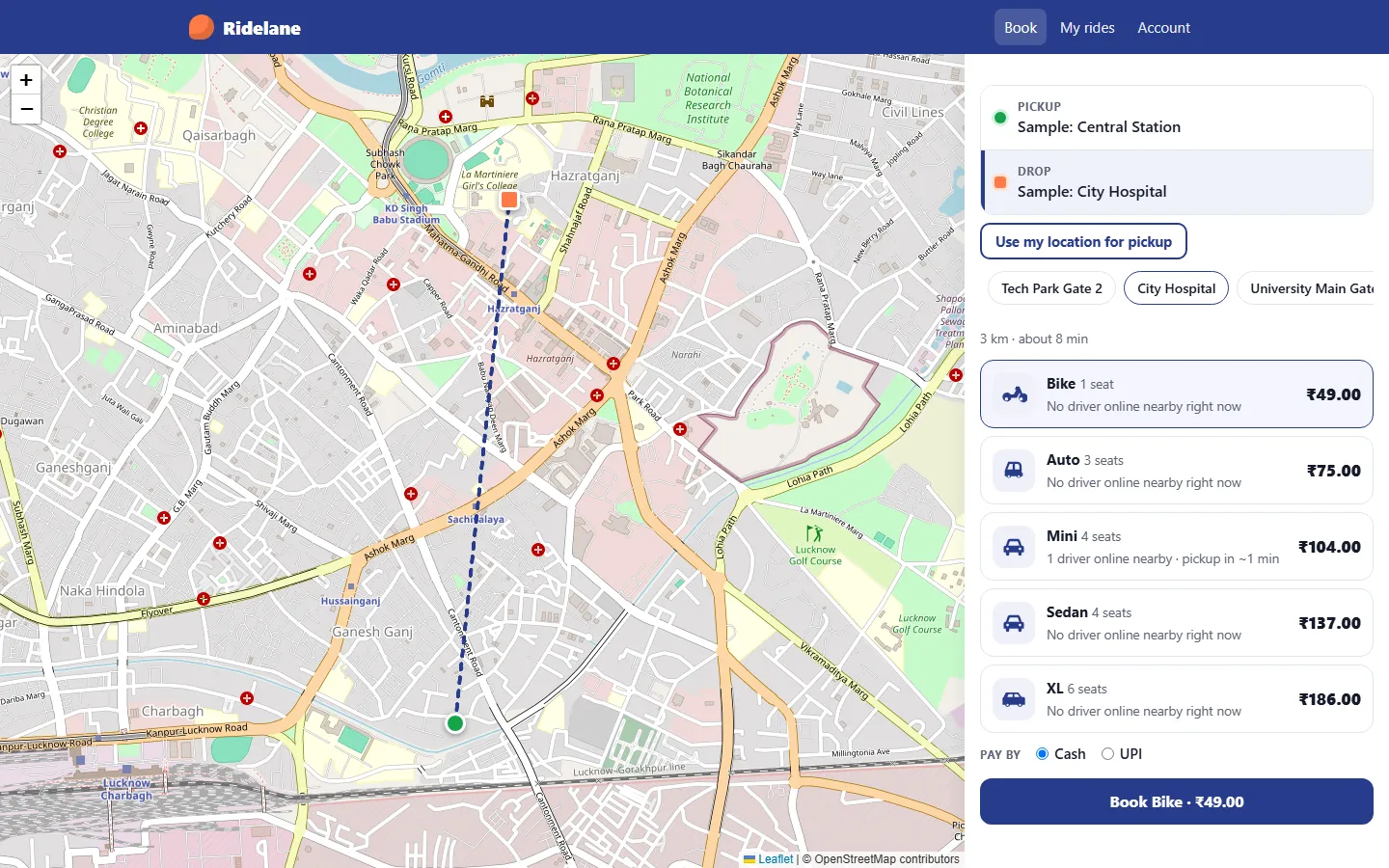
Everything included
- Rider web app: map booking, fares per vehicle type, live ride page
- 4-digit start code before every trip, locked after 5 wrong tries
- Driver panel: documents, online/offline, 30-second ride offers
- Nearest-driver matching, one driver offered at a time
- Admin: live map, trips, drivers, riders, fares, surge, ledger
- Fare = base + per km + per minute, minimum fare, times surge
- Cash or UPI to the driver, with a UPI link and QR code
- Commission ledger and settlements, no wallet
- REST API and Expo mobile app with rider and driver modes
- SQLite by default; MySQL or PostgreSQL via Prisma
From order to a live website
- 1
Choose a package
Code only, We set it up, or Customised. All prices are one-time.
- 2
Pay securely
Your download link is emailed once payment is confirmed and also appears in My Account.
- 3
We contact you
For setup packages we email within one business day for your cPanel / hosting login and domain.
- 4
Live on your domain
Your ride app runs on your own Node.js hosting, with trips, drivers and commission in your admin panel.
A ride business you host yourself
Ridelane is for a taxi, auto-rickshaw or bike-taxi operator who wants their own booking app for one city instead of renting a platform. You get the source code, install it on your own hosting and keep your riders, drivers and trip data. The sample brand, colours and logo are placeholders: change them in Admin → Settings. The sample city uses neutral place names such as "Sample: Central Station" placed on a real map, so you can see how booking works before you add your own popular places.
- One app for riders, drivers and the admin
- Five sample vehicle types: Bike, Auto, Mini, Sedan and XL
- Your own popular pickup places
- No monthly platform fee
What the rider does
A rider taps the map, uses their location or picks a popular place to set pickup and drop. The app shows the estimated distance and time and the fare for every active vehicle type, with how many drivers are online nearby. After booking, the ride page updates every four seconds: finding a driver, driver on the way, arrived, trip started, completed. It shows the driver's name, vehicle, plate, rating and last position on the map, and a 4-digit start code the rider tells the driver on pickup. The rider can cancel before the trip starts. At the end there is a receipt with base fare, distance, time and rounding, a UPI link and QR code if they chose UPI, and a form to rate the driver. Trip history is under My rides.
- Map booking with OpenStreetMap and Leaflet
- Fare shown and locked before booking
- Live ride page with start code
- Receipt, UPI link and QR, driver rating
What the driver does
Drivers sign up, choose their vehicle type, enter make, model, colour, plate and licence number, and upload their driving licence, registration and photo (JPEG, PNG, WebP or PDF up to 5 MB, stored privately outside the public folder). Once you approve them they can go online. While the driver panel is open it sends their location every ten seconds. The nearest request is offered to one driver at a time with a 30-second countdown. The driver accepts or declines, marks arrival, types the rider's start code to begin, completes the trip, confirms the cash or UPI payment and rates the rider. The earnings page shows today and all time, the commission owed and the ledger.
- Document upload and approval status
- Online/offline with location every 10 seconds
- Accept, arrive, start with code, complete
- Earnings and commission ledger
The admin panel for your dispatch desk
The dashboard shows drivers online now, rides in progress, trips completed today, commission recorded today, a live map of online drivers and pickups, and the drivers waiting for document approval. Every trip has a detail screen with the route on the map, the fare breakdown, commission, the rider and driver, and a timeline from requested to completed; an admin can cancel a ride. On a driver's screen you see the uploaded documents, approve them or ask for changes with a note (the driver gets an email), switch the account off, and record settlements. Vehicle types & fares holds each type's base fare, per-km, per-minute and minimum fare, plus the surge multiplier from 1 to 5, the commission percentage, upfront or metered fare mode, rounding, road factor, average speed, pickup radius and the offer and search timeouts. Settings cover business details, logo and colours, map tiles, payment methods and UPI ID, SEO, maintenance mode, live chat, analytics, cookie notice and SMTP, with admin users, an email log, add-ons and the licence screen.
- Live map, trips and trip timeline
- Driver document review and approval
- Vehicle types, rates, surge and commission
- Commission ledger and settlements
Money: how riders pay and how you earn
Riders pay the driver directly in cash or by UPI. The UPI option opens the rider's UPI app with a upi://pay link and a QR code for the driver's UPI ID, or yours if the driver has not set one; the app does not see or verify the transfer, so the driver confirms that the payment arrived. Your commission (15% by default) is written to the driver's ledger when a trip is completed. It is a record only: you collect it from drivers outside the app and record each settlement in the admin. There is no wallet or stored balance, because a wallet that holds customer money in India needs an RBI prepaid payment instrument licence.
- Cash or UPI, confirmed by the driver
- Commission recorded per completed trip
- Settlements recorded by the admin
- No wallet, no money held by the app
Mobile app and REST API
The mobile/ folder holds an Expo (React Native, TypeScript, Expo Router) app. A rider account opens rider mode: where to, fares, booking, the live ride with start code, receipt, UPI pay link and rating. A driver account opens driver mode: online/offline, ride offers with a countdown, the trip steps, earnings and vehicle details. The app shows positions by opening OpenStreetMap; the full Leaflet map is in the web app. Both talk to the versioned REST API at /api/v1 with bearer tokens, documented endpoint by endpoint in API.md.
- Rider and driver modes in one app
- Bearer-token sign-in, rate-limited
- Every endpoint documented in API.md
- The app never calculates a price
What is in the zip and how it was tested
You get the full source: server.js, the Express routes for the rider web app, driver panel, admin and API, the fare, matching and ride logic, EJS templates, CSS and page scripts, the Prisma schema and a seed script with sample data, the Expo app, README.md, API.md and the installation guide. npm run setup creates the .env file, the tables and the sample data; --no-seed gives empty tables and a setup wizard, --reseed reloads the samples. npm test runs 23 tests on SQLite: the fare formula, commission split and GPS filtering, and an API run of a full trip including decline and re-offer, wrong start code, metered mode, timeouts, document approval and CSRF.
- Backend, web app, admin and mobile app source
- One setup command with sample data
- Unit and API tests on SQLite
- README, API.md and PDF guide
What it does not do
Native Android and iOS builds of the mobile app have not been run; only its TypeScript check and web export were. No payment gateway is included and none has been tested with this app, and there is no automatic UPI verification. There are no push notifications or SMS: screens update by polling while they are open, and driver location is sent only while the panel or app is on screen. Distances and times are straight-line estimates times a road factor, not road routing or traffic. Scheduled rides, shared rides, promo codes and cancellation fees are not included, and document checks are done by your staff. The public OpenStreetMap tile servers are for light use only, so set your own tile provider in Admin → Settings → Map before going live. Running a ride service may also need local permits and insurance.
- Mobile app not built for stores yet
- No gateway, wallet, push or SMS
- Estimated distances, no routing
- Your own map tile provider needed for real traffic
More ready-made websites
Built by the same team, with the same setup service and support.
Browse every ready-made website, or compare our custom website packages if you need a site designed from scratch. Want more guests to find you on Google Maps? See our local SEO service, or talk to our web design team.



