Saffron — Restaurant Website
A ready-made restaurant website with menu, table booking and WhatsApp. Upload it yourself or let us set it up on your cPanel
Everything included
- Home, Menu, About, Reservations and Contact pages
- Table-booking and contact forms that email you
- Menu with category tabs, prices and veg/non-veg markers
- WhatsApp chat button and click-to-call
- Restaurant schema, titles and meta descriptions for Google
- Admin panel for your details, currency, chat and enquiries
- Mobile-first and fast: about 900 KB including photos
- Colours and fonts changed from one CSS block
From order to a live website
- 1
Choose a package
Code only, We set it up, or Customised. All prices are one-time.
- 2
Pay securely
Your download link is emailed once payment is confirmed and also appears in My Account.
- 3
We contact you
For setup packages we email within one business day for your cPanel / hosting login and domain.
- 4
Live on your domain
Your site runs on your own hosting, with forms delivering bookings to your inbox.
Everything a restaurant website needs, already built
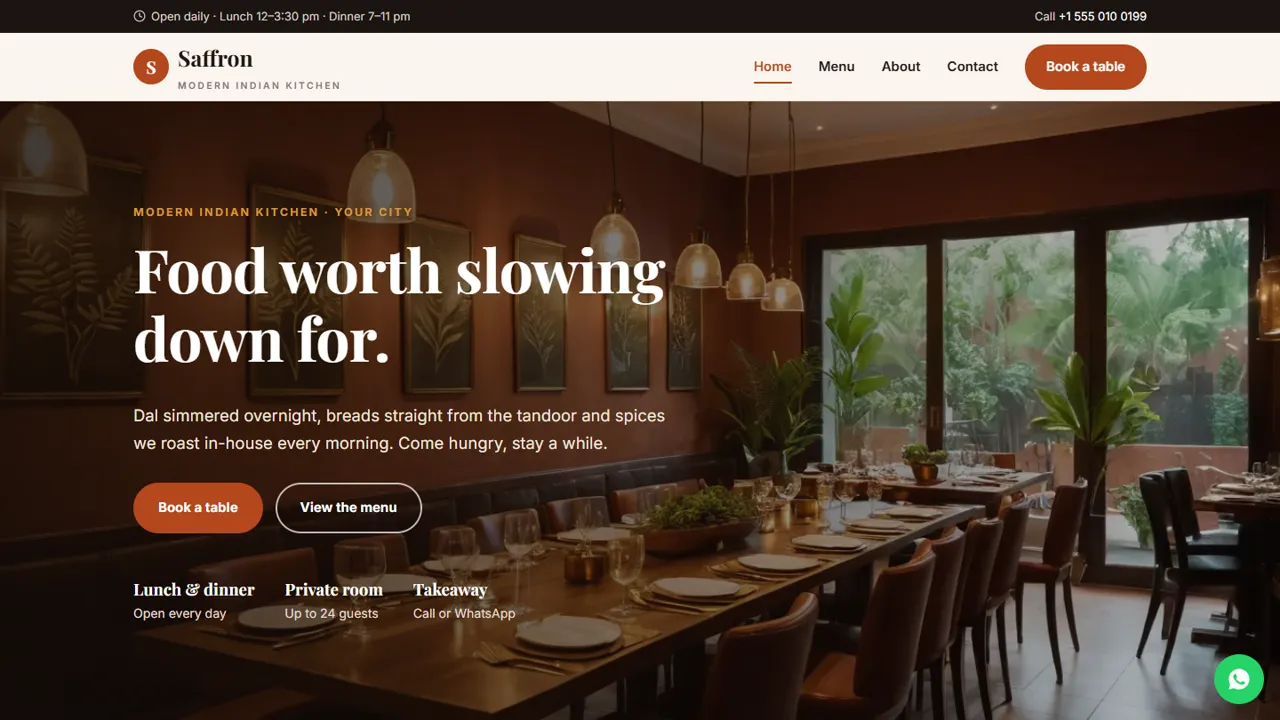
Guests visit a restaurant website for four things: what you serve, what it costs, when you are open and how to book. Saffron puts all four one tap away. The home page shows your signature dishes and hours, the menu page lists every dish with prices and veg/non-veg markers, and the booking form sends the date, time and party size straight to your inbox.
- Home page with hero photo, signature dishes and opening hours
- Menu page with category tabs, prices, spice levels and veg markers
- Reservations page with date, time and guest count
- Contact page with phone, WhatsApp, email and a Google map
Made for ordinary cPanel hosting
Most restaurant owners already have, or can buy, a basic shared hosting plan. Saffron is plain HTML, CSS and a little PHP (the forms and a built-in admin panel), so it runs on any cPanel plan without database setup, WordPress, plugins to update or a monthly website-builder fee. Upload the folder to public_html and it works.
- No WordPress or Node.js; database built in
- Forms use PHP mail(), available on almost every cPanel host
- Spam trap and input checks on every form
- Included .htaccess for a custom 404 page and browser caching
Found on Google and easy to use on a phone
Each page has its own title and meta description, the home page carries Restaurant schema (address, cuisine, opening hours and reservations), and every image has descriptive alt text. The layout is designed for phones first, where most people look up a restaurant, with a click-to-call number and a WhatsApp button always in reach.
- Restaurant structured data for Google
- Unique title and description on every page
- Mobile-first layout with sticky navigation
- WebP photos, lazy loaded below the fold
Three ways to get it live
Choose Code only if you or your developer are comfortable uploading files: you get the download and a step-by-step guide. Choose We set it up and we install it on your own cPanel, connect your domain and SSL, add your details and test the forms. Choose Customised and we also add your logo, colours, full menu and photos and up to three extra pages. With either service package we contact you after you order to get access to your hosting. Your hosting and domain always stay in your name.
- Code only: download and upload it yourself
- We set it up: installed on your cPanel with your details
- Customised: your brand, menu and photos, plus 3 months of support
Who it is for
Saffron is written for a sit-down Indian restaurant, but the layout works for any restaurant, dhaba, café or bistro that takes table bookings and wants its menu readable on a phone. It suits a single outlet with lunch and dinner service, a private room for celebrations and a mix of regulars, families and walk-ins.
- Family and fine-dining restaurants
- Cafés and bistros with table service
- Restaurants with a private dining room
- Owners replacing a menu PDF or social page
The pages and what guests do there
The home page opens with a photo, your promise and three quick facts (lunch and dinner every day, a private room, takeaway by call or WhatsApp), then a kitchen story, six signature dishes with prices and veg or non-veg labels, a photo strip of the room, opening hours with directions, a sample guest-quotes block and a private-dining call-out. The menu page has tabs for starters, main course, biryani and rice, breads, and desserts and drinks, with a veg or non-veg marker and one to three dots for spice level on each dish, plus an allergy line and a GST note. The about page tells the restaurant's story, describes the kitchen and the room, and lists the indoor room, terrace, private room and high chairs on request. Contact has the address, phone, email, hours, a message form and a map. A custom 404 page sends lost visitors back to the menu.
- Home, Menu, About, Reservations, Contact and 404
- Menu tabs for every course, plus All
- Spice-level dots and veg markers explained under the menu
- Sample guest quotes marked in the code for you to replace or delete
Table bookings and the admin panel
The reservations form asks for a name, phone, email, a date, a lunch or dinner time slot, the number of guests from 1 to 12 or '13 or more', and an optional note for occasions or allergies. The page tells guests a request is not confirmed until you reply, that tables are held for 15 minutes and that groups of 13 or more get a call to plan a set menu. Each booking is emailed to you and also saved in the admin's Enquiries inbox at /admin/, alongside contact messages, with a CSV download, so the evening's bookings are in one list even if an email goes astray. In the admin you set the restaurant name, logo, phone, WhatsApp, email, address, map, opening hours, social links and colours, and they replace the demo details on every page. You can show an announcement bar for a festival menu or a holiday closure, add live chat, connect Google Analytics, Tag Manager or the Meta Pixel, switch on a cookie notice or put the site in maintenance mode.
- Bookings by email and in the Enquiries inbox
- Guest count with a large-group option
- Festival menus and closures in the announcement bar
- Admin login with hashed passwords and lock-out after failed attempts
What it does not do
Saffron does not take online food orders, deliveries or payments, and it has no cart, no table plan and no live availability. It does not send automatic booking confirmations: you reply to each request by phone, WhatsApp or email. The menu is plain HTML that you edit yourself, not a database, and the dishes, prices and guest quotes are samples to replace.
- No online ordering or payment
- No table-availability calendar
- Bookings confirmed by you
More ready-made websites
Built by the same team, with the same setup service and support.
Browse every ready-made website, or compare our custom website packages if you need a site designed from scratch. Want more guests to find you on Google Maps? See our local SEO service, or talk to our web design team.