
Mann — Counselling & Therapy Practice Website
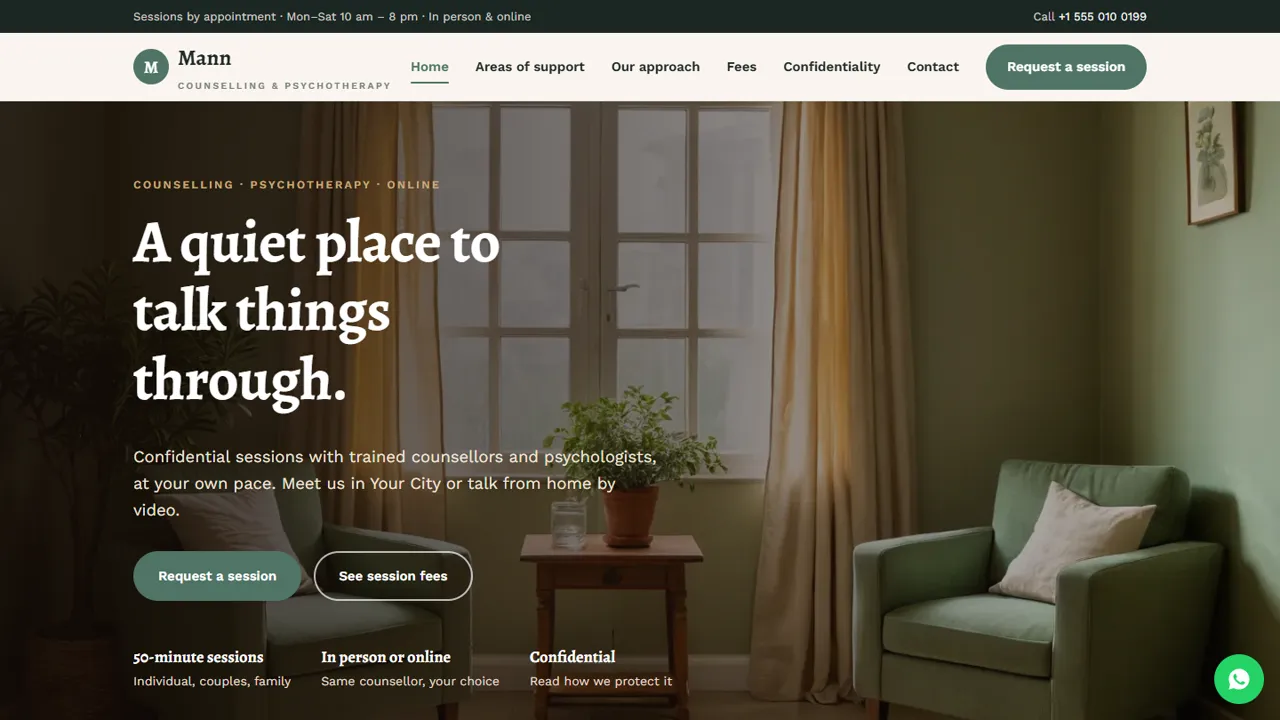
A calm, ready-made website for a counselling or psychotherapy practice, with fees, confidentiality and session requests
Everything included
- Areas of support, approach and counsellor profiles
- Session fees for in-person, online and couples sessions
- Plain-language confidentiality page
- Session request form: in person or online, date and time
- Crisis notice with Tele-MANAS 14416 and 112
- No testimonials, no result promises
- Admin panel for your details, currency, chat and enquiries
- WhatsApp and click-to-call on every page
From order to a live website
- 1
Choose a package
Code only, We set it up, or Customised. All prices are one-time.
- 2
Pay securely
Your download link is emailed once payment is confirmed and also appears in My Account.
- 3
We contact you
For setup packages we email within one business day for your cPanel / hosting login and domain.
- 4
Live on your domain
Your practice site runs on your own hosting, with session requests arriving in your private inbox.
What clients want to know before they reach out
Someone thinking about counselling usually wants to know whether you help with what they are going through, what a session is like, what it costs and whether it will stay private. Mann answers each of these on its own page, in calm, plain language. The home page introduces common reasons people come (anxiety and stress, relationships, low mood and grief, young adults), three steps from request to session, session hours and the in-person or online choice. The areas of support page lists nine areas and then a What we do not offer box: not an emergency service, no prescribing, no court reports and, in the demo, no sessions for under-18s. The approach page explains the first session, regular sessions, reviews and ending well, with three counsellor profiles. The fees page shows online, in-person and couples or family session cards, other fees such as late cancellation and reduced-fee slots, and how payment works after the session. All names, fees and policies are samples for you to replace with your own.
- Areas of support, and what you do not offer
- Your approach and counsellor profiles
- Fees for in-person, online and couples sessions
- A clear confidentiality page
Session requests, handled privately
The request form asks for the client's name, phone and optional email, a session type grouped under In person, Online (video) and Not sure yet (including a free 15-minute introductory call or a request for help choosing), a date and a time, with optional notes. A What happens next box explains that you will call or WhatsApp to confirm the counsellor and time. The request is emailed to you and saved in the admin's Enquiries inbox, which only you can open with your admin login. The form reminds visitors not to use it in an emergency. Because notes may be sensitive, the guide suggests keeping the form short and discussing details on the call.
- In person or online session types
- Free introductory call option
- Spam trap and input checks
- Requests kept in your private admin inbox
Confidentiality in plain words
The confidentiality page covers what stays private, when you may need to share (for example a risk to life), supervision, session notes, how you contact clients and how online sessions work. It is sample text: rewrite it to match your professional code and local law. One line in the demo says nothing about sessions is stored on the website; since session requests are kept in the admin inbox, adjust that line to describe how you handle requests before going live.
- Six short confidentiality topics
- Sample wording to adapt
- Edit to match your own practice
Careful wording for mental health care
The demo has no client testimonials and makes no promises about results or timelines. A crisis notice with Tele-MANAS 14416 and 112 appears on several pages, along with a notice that the information is general and not medical advice. The README reminds you to add your real qualifications and registration details.
- No testimonials or result claims
- Crisis notice with Tele-MANAS 14416 and 112
- Not-medical-advice notice
- Calm palette and readable type
Your practice's admin panel
At your-domain.com/admin/ you read session requests and contact messages in the Enquiries inbox, mark who you have called back, and download the list as a CSV if you keep your own appointment records. The admin login uses a hashed password and locks after repeated failed attempts. You set the practice name, logo, phone, WhatsApp number, address, map and session hours, which replace the demo details on every page, plus the WhatsApp greeting, SMTP email, a cookie notice and an announcement bar for holiday closures. Live chat and tracking pixels are optional; many practices leave them off. Page text and counsellor profiles are edited in the HTML.
- Private Enquiries inbox with CSV download
- Session hours and contact details in one place
- Cookie notice and analytics are optional
Setup, hosting and limits
The zip has seven HTML pages and a 404 page, CSS, JavaScript, the PHP form handler, the admin panel, photos and an .htaccess file, with an illustrated installation guide. Host it on any cPanel or shared plan with PHP 7.4 or later, set your email in config.php, create your admin login and paste your licence key to switch the forms on; one key covers up to three domains. SQLite is created automatically (pdo_sqlite), MySQL is optional, and email goes by PHP mail() or SMTP. It has no video calls, payments, booking calendar or client case notes: use dedicated tools for those.
- Plain HTML, CSS, JavaScript and PHP
- SQLite built in, MySQL optional
- No video, payments or client records
More ready-made websites
Built by the same team, with the same setup service and support.
Browse every ready-made website, or compare our custom website packages if you need a site designed from scratch. Want more guests to find you on Google Maps? See our local SEO service, or talk to our web design team.



