

WooCommerce PluginDownload free version
Abandoned Cart Recovery for WooCommerce
No reviews yet
from$69.00/yr
WordPress OTP verification for sign-ups, logins and Cash on Delivery orders
Get a Codelatch Pro key by email and use every Pro feature for 7 days on one site. No card needed, nothing renews automatically — when the trial ends, Pro switches off unless you choose a plan. One trial per email.
Choose monthly, 1 year or lifetime — your key and download link are emailed instantly.
Upload the zip in wp-admin. The free core works right away.
Paste it in the plugin's License tab to activate.
Pro features, updates and priority support switch on.
Turn on email codes, sign up with a code, log in with a password and a code, log in with no password, then in Pro send codes by SMS, verify a mobile number on My Account and confirm the phone before a Cash on Delivery order.
Download the PDF user guideThe free core is a real, working plugin — not a trial that expires. Pro unlocks the advanced modules with a licence key, and nothing you build on free is lost when you upgrade.
Everything most sites need. No account, no email required — download and install.
.zip · v1.0.0 · 1 downloads
Same plugin, every module unlocked by your licence key — plus updates and priority support.
Already bought it? Enter your key:
Or sign in — every licence you own shows up there.
| Feature | Free | Pro |
|---|---|---|
| Email code on the WordPress register form | Included | Included |
| Email code on the WooCommerce My Account register form | Included | Included |
| Email code after the password, per role (WordPress + WooCommerce login) | Included | Included |
| Passwordless login that does not reveal who has an account | Included | Included |
| Expiry, resend wait, per-address and per-IP hourly limits, wrong tries per code | Included | Included |
| Codes stored as hashes, compared in constant time | Included | Included |
| Translatable messages and your own email text | Included | Included |
| Recovery line for wp-config.php | Included | Included |
| SMS codes: Twilio, MSG91, Vonage, Plivo (your own account) | Not included | Included |
| WhatsApp codes: WhatsApp Cloud API (approved template) | Not included | Included |
| Phone code before Cash on Delivery orders (block + classic checkout) | Not included | Included |
| Country code picker and E.164 number validation | Not included | Included |
| Verify a mobile number on My Account and log in with it | Not included | Included |
| Brute-force lockout across codes and a verification log | Not included | Included |
| Updates and email support | Community | Included |
Upgrading is just entering a key — same plugin, same settings, nothing to reinstall or migrate.
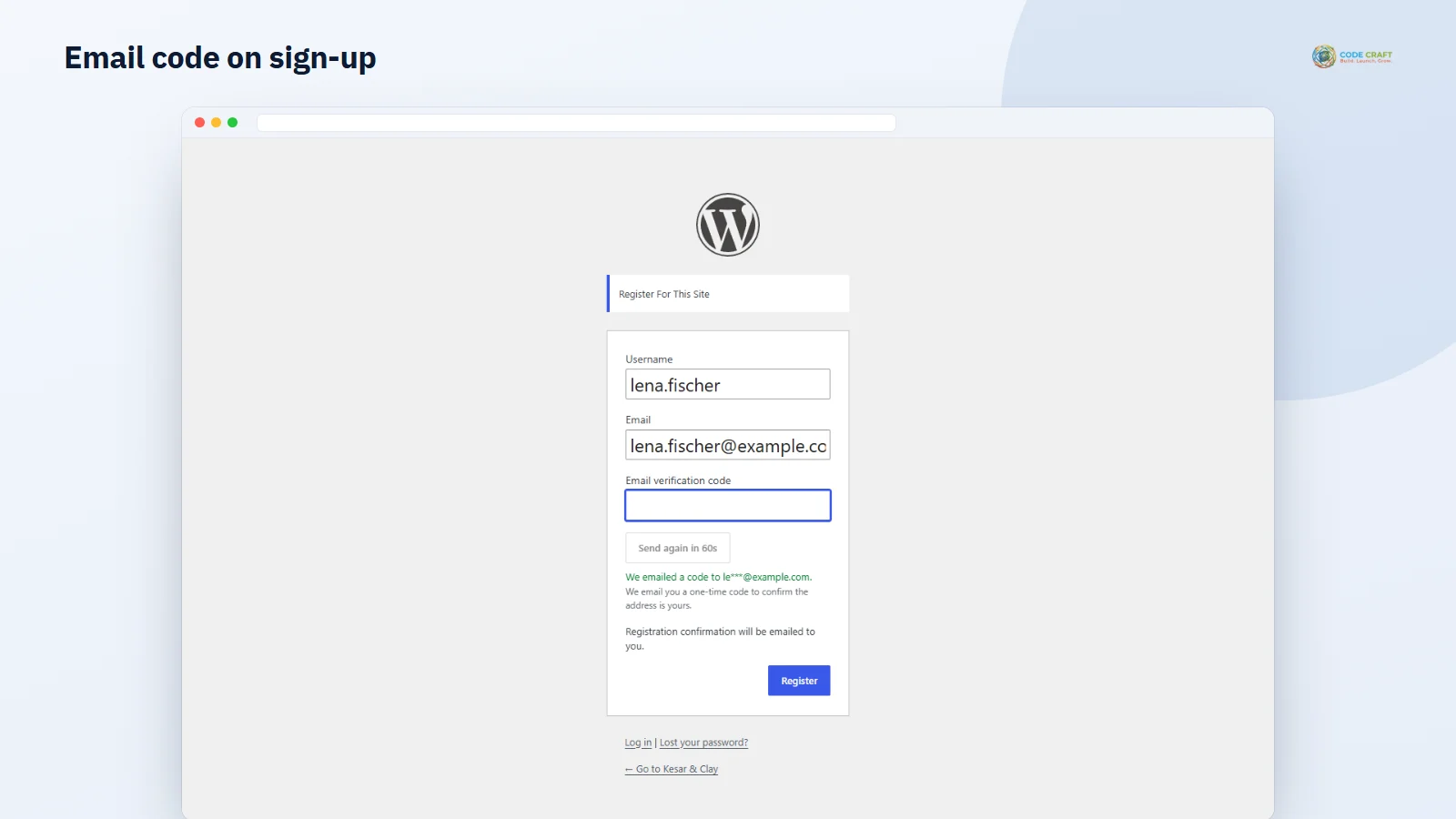
Codelatch puts a one-time code on the WordPress register form (wp-login.php?action=register) and on the WooCommerce My Account register form. The visitor fills in the form and clicks Email me a code; the code arrives through your site's normal email, they type it and press Register. Without JavaScript the same thing happens when they press Register with the code field empty. The account is created only with the right code for that exact address: in testing a wrong code, an expired code, a code that had already been used and a code that had been burned by too many wrong tries were all refused and no account was created. Codelatch waits until the rest of the form is fine before it sends or uses up a code, so a taken username does not waste one.
Pick roles — for example Customer, Shop manager or Editor — and anyone in them gets an emailed code after typing the right password. No login cookie is set until the code is right, on the WordPress login form and the WooCommerce My Account login form; password logins over XML-RPC are refused for those roles, while application passwords for the REST API keep working. Passwordless login adds "Log in with a one-time code instead" under the login forms: type an email address or username, get a code, log in. In testing the page for an account that exists and for one that does not were byte-for-byte the same, nothing was sent for the unknown address, and a wrong code gave the same error in both cases.
Each code expires (10 minutes by default), a new code can be requested only after a wait (60 seconds), each email address or phone number gets at most 5 codes an hour and each IP 15, and a code stops working after 5 wrong tries. A newer code replaces the older one and a used code can never be used again. All numbers can be changed. Codes are never stored in plain text: each is kept as an HMAC-SHA256 hash with a random salt and compared with PHP's constant-time hash_equals(). Email addresses and phone numbers in the codes table are kept as keyed hashes too, and old rows are deleted after two days. Every message is translatable, and you can write your own email subject and text with {code}, {minutes} and {site}.
Pro sends codes by SMS through your own Twilio, MSG91 (DLT flow template), Vonage or Plivo account, or on WhatsApp through the WhatsApp Cloud API with your approved authentication template, including its copy-code button. Keys are stored in a separate option that is not autoloaded and are never shown again in full. Each provider's request was checked against its documented API — endpoint, authentication and parameters — using a local stand-in; no message was sent to a real provider during testing. If a provider refuses a message the visitor sees a plain "could not send the code" message and the provider's reply goes to the verification log. Messages cost what your provider charges, and delivery depends on the provider and the mobile network.
Fake Cash on Delivery orders cost a shop the shipping both ways. With the COD check on, a shopper who picks Cash on delivery sees a small panel: Send code, type the code, Verify. Until the billing phone is confirmed the order is refused with a clear message, on the block checkout and on the classic [woocommerce_checkout] page, where the code can also be typed into the panel before pressing Place order. Bank transfer and every other payment method go straight through, and no payment method's own settings or code are changed. The order gets a private note and the masked number that was confirmed. In testing an unverified COD order was refused on both checkouts, the same shopper's bank-transfer order went through, and a verified COD order was placed with the note.
A country code picker and number validation check each number against the country's dialling code and length, drop a leading trunk 0, accept numbers typed with + or 00, and store them in international E.164 format such as +919876543210. Customers can add a mobile number under My Account → Account details, confirm it with a code, change or remove it; a number can be verified on one account only. A verified number can then be typed on the passwordless form to log in with an SMS or WhatsApp code. Pro also locks an address and an IP for 30 minutes after 8 wrong codes in 15 minutes, counted across codes so asking for a new one does not reset it, and keeps a verification log of codes sent, verified and refused, lockouts, failed sends, logins, new accounts and COD orders, with masked addresses.
Codelatch is for WooCommerce shops fighting fake sign-ups and fake Cash on Delivery orders, and for membership and community sites that want real email addresses and stronger logins. It needs WordPress 6.4 or newer and PHP 7.4 or newer; the WooCommerce parts need WooCommerce 8.0 or newer. It was tested on WordPress 7.1 with PHP 8.3 and WooCommerce, on a block theme and a classic theme. It does not stop every fake sign-up or fake order — someone with a real inbox or phone can still pass — but it removes the ones made with addresses and numbers people do not own.
Most stores running Codelatch pair it with these. Every plugin below shares the same licence system, coding standards and support team.
Also popular with our customers: PingPost. Browse every wordpress plugins or see our best-selling plugins. Need this built into a custom project? Our WordPress development team can help.


