

WooCommerce PluginDownload free version
Abandoned Cart Recovery for WooCommerce
No reviews yet
from$69.00/yr
WooCommerce WhatsApp notifications through the official Cloud API — order updates, shop alerts, opt-in and a message log
Get a PingPost Pro key by email and use every Pro feature for 7 days on one site. No card needed, nothing renews automatically — when the trial ends, Pro switches off unless you choose a plan. One trial per email.
Choose monthly, 1 year or lifetime — your key and download link are emailed instantly.
Upload the zip in wp-admin. The free core works right away.
Paste it in the plugin's License tab to activate.
Pro features, updates and priority support switch on.
Connect the WhatsApp Business Cloud API, map order messages to approved templates, tick the opt-in box on the block and classic checkout, send order placed, completed and shipping messages with a tracking link, opt out with one click, confirm a cash-on-delivery order with a reply button, send an abandoned-cart reminder and read the message log.
Download the PDF user guideThe free core is a real, working plugin — not a trial that expires. Pro unlocks the advanced modules with a licence key, and nothing you build on free is lost when you upgrade.
Everything most sites need. No account, no email required — download and install.
.zip · v1.0.0 · 2 downloads
Same plugin, every module unlocked by your licence key — plus updates and priority support.
Already bought it? Enter your key:
Or sign in — every licence you own shows up there.
| Feature | Free | Pro |
|---|---|---|
| WhatsApp Business Cloud API with your own account (masked token) | Included | Included |
| Connection check and test message | Included | Included |
| Order placed, processing and completed messages | Included | Included |
| New-order alert to up to 5 shop numbers | Included | Included |
| Template variables with live preview | Included | Included |
| Opt-in box on block and classic checkout | Included | Included |
| One-click opt-out page and opt-out list | Included | Included |
| Per-number hourly limit and message log | Included | Included |
| Tracking number and link on the order screen | Included | Included |
| On hold, cancelled, refunded, failed and custom status messages | Not included | Included |
| Shipping update button on the order screen | Not included | Included |
| Cash-on-delivery confirmation with reply buttons | Not included | Included |
| Abandoned-cart reminders (opted-in shoppers) | Not included | Included |
| Twilio WhatsApp API as a second provider | Not included | Included |
| Signed webhook: STOP replies, delivered / read status | Not included | Included |
Upgrading is just entering a key — same plugin, same settings, nothing to reinstall or migrate.
In India, the Gulf and Latin America customers read WhatsApp long before they open an order email. PingPost sends your WooCommerce order updates there: a message when the order is placed, when it starts processing and when it is completed or shipped, plus an alert to your own phone for every new order. It works only through the official WhatsApp Business Cloud API from Meta, with your own WhatsApp Business account, your own access token and your own approved message templates, so there is no WhatsApp Web automation, no unofficial gateway and nothing that puts your number at risk. Meta bills template messages to you directly; PingPost adds no per-message fee.
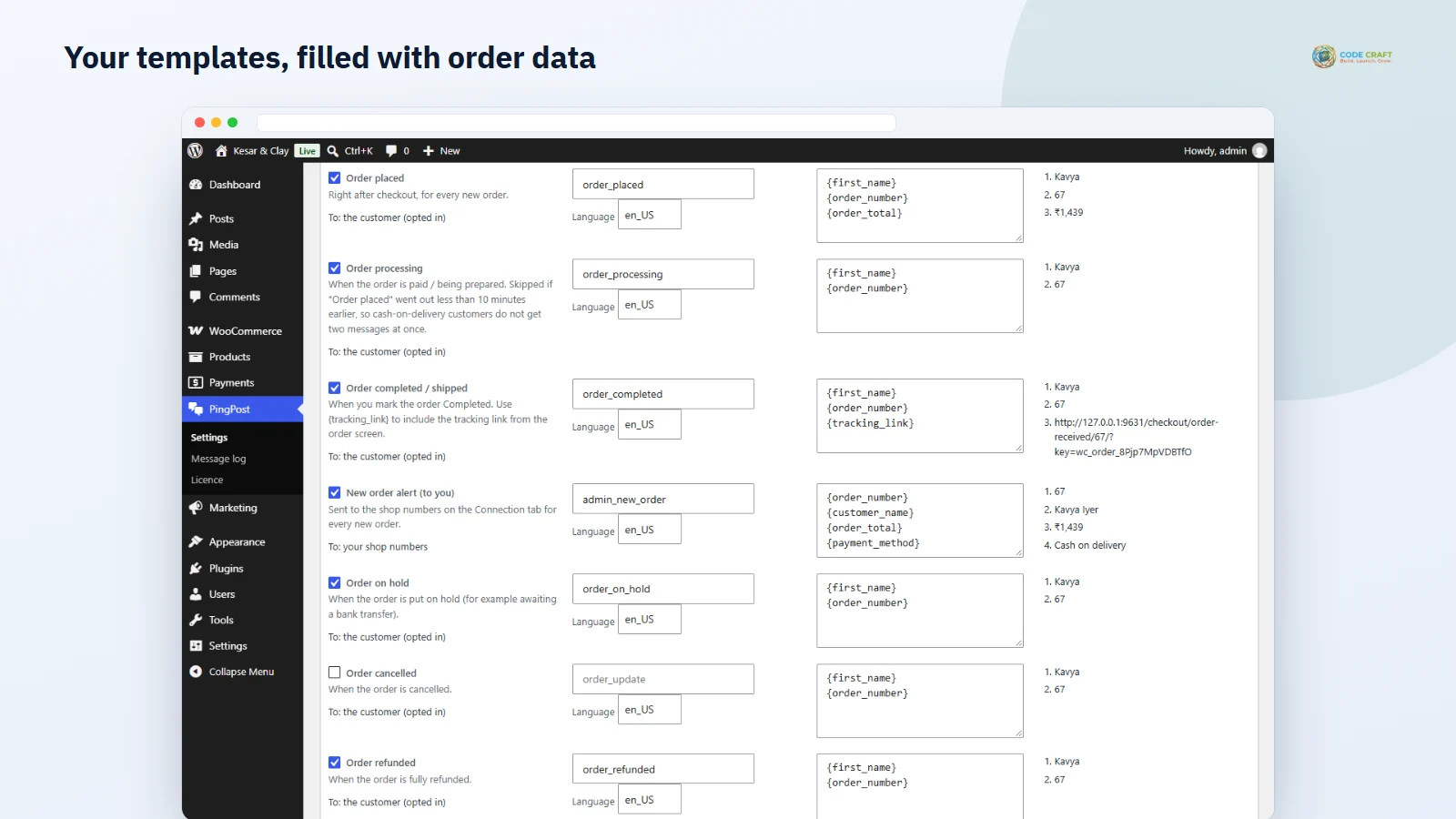
WhatsApp only lets a business start a conversation with an approved template, so PingPost does not invent message text. On the Messages tab you switch each message on, type the template name and language exactly as they appear in WhatsApp Manager, and write one line per template variable: line one fills {{1}}, line two fills {{2}} and so on. Each line can mix your own words with variables such as {first_name}, {customer_name}, {order_number}, {order_total} (with the currency symbol), {order_status}, {order_date}, {payment_method}, {shipping_method}, {items}, {item_count}, {billing_city}, {order_link}, {tracking_number}, {tracking_link}, {optout_link} and {store_name}. A preview column shows the exact values from your latest order, and PingPost cleans every value the way the Cloud API requires (no line breaks, tabs or empty values).
WhatsApp requires a customer's opt-in before a business messages them, and PingPost builds that in. An unticked "Send me order updates on WhatsApp" box appears in the contact section of the WooCommerce checkout block (through WooCommerce's Additional Checkout Fields API) and under the billing fields of the classic checkout. Customers who do not tick it never get a message, and the log says so. The {optout_link} variable opens a page where customers stop all messages with one button press; you can also add or remove numbers on the opt-out list yourself, and the list keeps only a hash and a masked copy of each number. A per-number hourly limit, counted atomically in the database, skips anything above the number you set.
Every message PingPost sends, cannot send or skips is written to the Message log with the time, the order, the message, the masked number, the template, the provider and the status — Sent, Failed or Skipped — with the provider's own error for failures (for example a template name that does not exist in that language) and the reason for skips (no opt-in, opted out, hourly limit, not connected). Filter by status or message; old rows are removed after the number of days you choose. On each order a WhatsApp messages box shows the customer's opt-in answer, an Opted out badge when it applies, the messages sent for that order and two fields — tracking number and tracking link — that fill the {tracking_*} variables. Tracking saved by the WooCommerce Shipment Tracking extension is read as well.
Pro adds a message for every other order status — on hold, cancelled, refunded, failed and any custom status another plugin registers — and a Send shipping update button on the order screen that sends your tracking number and link. Cash-on-delivery confirmation holds new COD orders from opted-in customers On hold and sends your template with two quick-reply buttons; a Confirm tap moves the order to Processing and a Cancel tap cancels it, each with an order note. PingPost only accepts a tap from the order's own number and with its own signed button payload, and you can choose to release the order automatically if the request cannot be sent.
Abandoned-cart reminders go only to shoppers who ticked the opt-in box and typed a valid phone number at checkout — on the block checkout and the classic checkout. If no order follows within your delay (60 minutes by default) one reminder goes out with a link that restores the cart and opens the checkout; placing an order marks the cart Ordered, and no cart is reminded twice. Pro can also send through Twilio's WhatsApp API (Content SID templates) instead of Meta directly. The webhook gives Meta a callback URL with your verify token, checks the X-Hub-Signature-256 signature of every call with your App Secret, puts numbers that reply STOP on the opt-out list (START takes them off), handles the COD buttons and updates the log to Delivered and Read.
PingPost needs WordPress 6.4+, WooCommerce 8.0+ (8.9+ for the opt-in box on the block checkout) and PHP 7.4+, plus a WhatsApp Business account on the Cloud API with approved templates. We tested it on WordPress 7.1, WooCommerce 11.2 and PHP 8.3 with debugging on, on Twenty Twenty-Five (block checkout) and Twenty Twenty-One (classic theme), with the block checkout and the classic checkout. All Cloud API and Twilio calls were tested against a local stand-in that records each request and answers like the provider; no message was sent to Meta or Twilio during testing, so do one real test message with your own account after setup. Messages are sent while the order is saved (one HTTPS request each with a 12-second timeout); there is no background queue. PingPost does not create or submit templates for you, has no SMS fallback and no inbox for free-text replies. When a monthly or yearly Pro licence ends, the Pro messages, COD confirmation, cart reminders, Twilio and the webhook stop until you renew; nothing you configured is deleted and the free features keep working. WhatsApp is a trademark of Meta Platforms, Inc.; PingPost is an independent product by Code Craft and is not affiliated with or endorsed by Meta or Twilio.
Most stores running PingPost pair it with these. Every plugin below shares the same licence system, coding standards and support team.


