WooCommerce PluginDownload free version
Abandoned Cart Recovery for WooCommerce
No reviews yet
from$69.00/yr
WordPress mega menu with columns, images, products and an accessible mobile menu
Get a MenuForge Pro key by email and use every Pro feature for 7 days on one site. No card needed, nothing renews automatically — when the trial ends, Pro switches off unless you choose a plan. One trial per email.
Choose monthly, 1 year or lifetime — your key and download link are emailed instantly.
Upload the zip in wp-admin. The free core works right away.
Paste it in the plugin's License tab to activate.
Pro features, updates and priority support switch on.
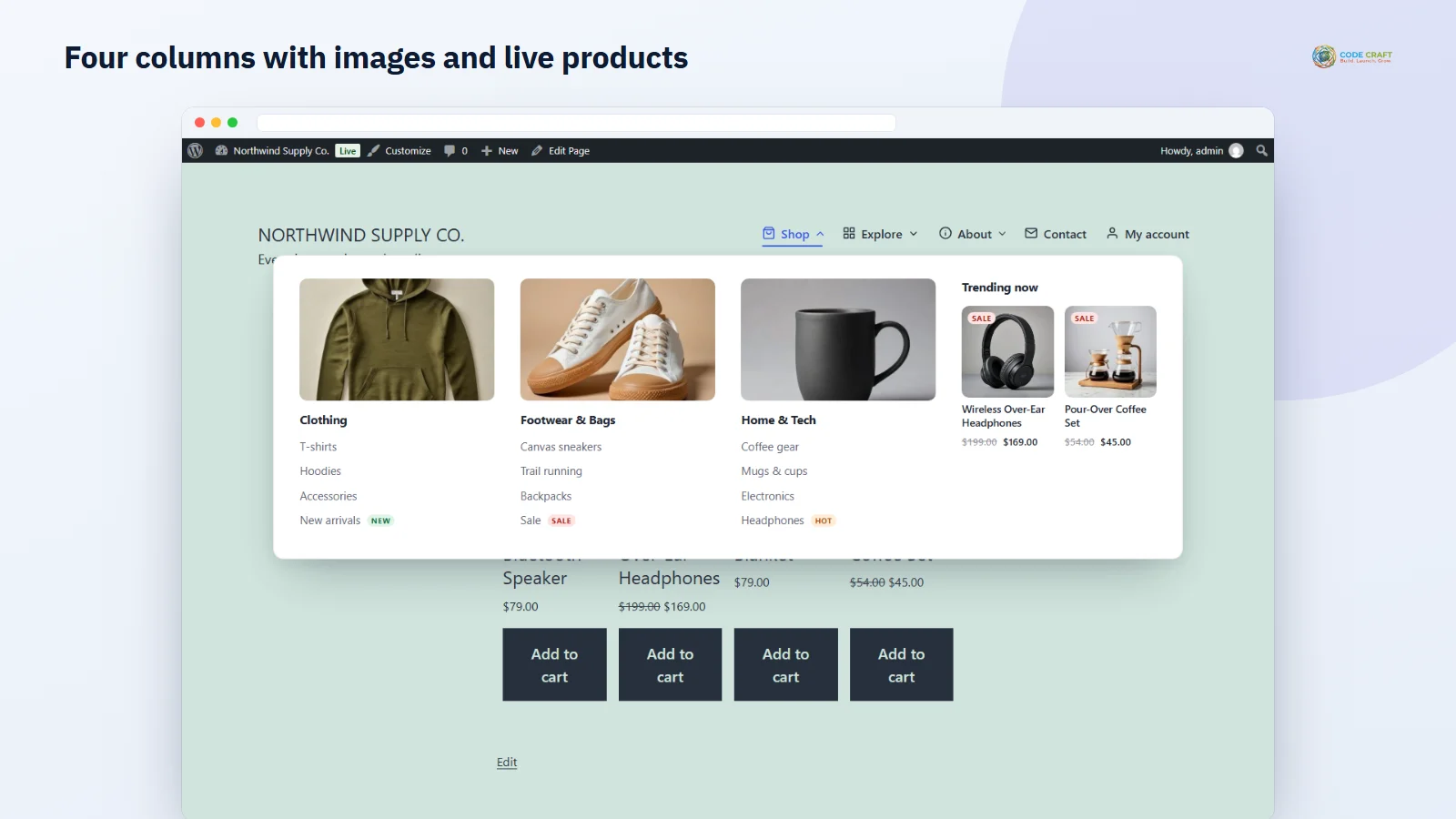
Turn a menu item into a mega menu, add columns, images and sale products, then use it with the mouse, the keyboard, as a sticky bar and on a phone.
Download the PDF user guideThe free core is a real, working plugin — not a trial that expires. Pro unlocks the advanced modules with a licence key, and nothing you build on free is lost when you upgrade.
Everything most sites need. No account, no email required — download and install.
.zip · v1.0.0 · 0 downloads
Same plugin, every module unlocked by your licence key — plus updates and priority support.
Already bought it? Enter your key:
Or sign in — every licence you own shows up there.
| Feature | Free | Pro |
|---|---|---|
| Mega menu panels with 1–6 columns | Included | Included |
| Icons and images on items | Included | Included |
| Hover or click, keyboard and screen-reader support | Included | Included |
| Classic multi-level dropdowns | Included | Included |
| Off-canvas mobile menu | Included | Included |
| Theme locations, block and shortcode | Included | Included |
| Column layout builder | Not included | Included |
| Vertical and horizontal tabs | Not included | Included |
| Live WooCommerce product panels | Not included | Included |
| Block pattern and widget panels | Not included | Included |
| New, Sale and Hot badges | Not included | Included |
| Show items by user role | Not included | Included |
| Style presets, colours and sticky menu bar | Not included | Included |
| Updates and email support | Community | Included |
Upgrading is just entering a key — same plugin, same settings, nothing to reinstall or migrate.
Stores and content sites outgrow simple dropdowns fast. MenuForge adds a WordPress mega menu to the menu you already have: open Appearance > Menus, open a top-level item and click its MenuForge button, switch on Show sub-items as a mega menu and choose 1 to 6 columns. The structure follows the menu tree: the top-level item is the bar entry, its direct sub-items become column headings, and their sub-items become the links in each column, with deeper levels indented. A top-level item whose link is # simply opens its panel. Click Apply in the modal, then Save Menu, and the panel is live.
Each mega panel can be Wide (centred on the screen up to a maximum width you set, 1200px by default), the same width as the menu bar, or fit its content under the item. Every item can carry one of 18 built-in line icons, drawn as inline SVG so no icon font is loaded, with an icon-only option that keeps the label for screen readers. Pick an image from the Media Library: on a column it shows as a banner at the top, on a deeper link as a small thumbnail. Items you leave as normal parents keep classic multi-level fly-out dropdowns that flip left when they reach the edge of the screen.
Menus are the one thing every visitor uses. Every sub-menu is opened by a real button that reports whether it is expanded. Enter or Space opens and closes, Arrow Down moves into the panel, Arrow Left and Right move between top-level items, and Escape closes the panel and puts focus back on its button; moving focus out of a panel closes it. On phones the menu becomes a modal dialog: focus moves to its Close button, Tab stays inside it and Escape closes it. Without JavaScript, panels still open on hover and keyboard focus, and animations are switched off for visitors who prefer reduced motion.
Appearance > MenuForge lists your theme's menu locations with the menu assigned to each; tick a location to let MenuForge render it, untick it to hand it back to the theme. On activation the theme's main location is ticked for you. Block themes have no classic locations, so MenuForge switches on the Appearance > Menus screen for them and gives you the MenuForge Mega Menu block to drop into the header template part in place of the Navigation block, with a menu picker and an optional accessible name. Anywhere else, use the shortcode [menuforge menu="main-menu"], which accepts a menu slug, name or ID; the settings screen lists the shortcode for every menu.
Pro opens a panel layout builder with one card per column, where you set how many grid columns it spans, whether it starts a new row and what it contains: its links, WooCommerce products, a synced block pattern or one of four MenuForge widget areas. A product column shows 1 to 8 products — Newest, On sale, Featured, Best sellers or from a category — and the list is refreshed whenever a product is saved. Panel style can also be Tabs or Vertical tabs, where each direct sub-item becomes a tab with its own columns inside; tabs follow the ARIA tabs pattern and stack as sections in the mobile menu.
Add a New, Sale or Hot badge after any label. Choose who can see an item — everyone, logged-in visitors, logged-out visitors or chosen user roles such as wholesale customers — and hidden parents hide their children too; this applies to every menu on the site, not only MenuForge locations. Style presets (Light, Dark, Midnight bar, Warm and Minimal) set the look in one click, five colour fields override the menu bar, panel and accent colours, and the sticky menu bar keeps the menu pinned to the top on desktop while visitors scroll, allowing for the admin bar.
It suits online stores with many categories that want shoppers to see the range at a glance, magazines and content sites with deep section trees, agencies building client sites who want menus clients can edit in the familiar screen, and B2B catalogues that show trade-only sections to chosen roles. The free edition is a complete, accessible mega menu; Pro is for sites that want products, tabs and styling inside the menu.
MenuForge needs WordPress 6.4 or newer and PHP 7.4 or newer, and works without WooCommerce — the product column option only appears when WooCommerce is active. Our end-to-end tests ran on WordPress 7.1 with the classic Twenty Twenty-One theme, for both Free and Pro. MenuForge still runs the core menu filters, so other plugins that change menu items keep working. The free plugin makes no outside calls; Pro only contacts coodecraft.com for the licence.
Most stores running MenuForge pair it with these. Every plugin below shares the same licence system, coding standards and support team.
Also popular with our customers: Foldwise. Browse every wordpress plugins or see our best-selling plugins. Need this built into a custom project? Our WordPress development team can help.