WooCommerce PluginDownload free version
Abandoned Cart Recovery for WooCommerce
No reviews yet
from$69.00/yr
The all-in-one WordPress SEO plugin: titles, analysis, schema, sitemaps, IndexNow, redirects — plus an AI assistant with your own key, Search Console, an SEO audit and a broken link checker
Get a SmartRank SEO Pro key by email and use every Pro feature for 7 days on one site. No card needed, nothing renews automatically — when the trial ends, Pro switches off unless you choose a plan. One trial per email.
Choose monthly, 1 year or lifetime — your key and download link are emailed instantly.
Upload the zip in wp-admin. The free core works right away.
Paste it in the plugin's License tab to activate.
Pro features, updates and priority support switch on.
A short tour of the strongest parts: the setup wizard, live SEO analysis while you write, the schema graph on the page, sitemaps and IndexNow, redirects and the 404 monitor, FAQ and WooCommerce product schema, the SEO audit and the AI assistant's suggestions.
Download the PDF user guideThe free core is a real, working plugin — not a trial that expires. Pro unlocks the advanced modules with a licence key, and nothing you build on free is lost when you upgrade.
Everything most sites need. No account, no email required — download and install.
.zip · v1.3.0 · 0 downloads
Same plugin, every module unlocked by your licence key — plus updates and priority support.
Already bought it? Enter your key:
Or sign in — every licence you own shows up there.
| Feature | Free | Pro |
|---|---|---|
| SEO title and meta templates, Open Graph, X cards and a connected schema graph | Included | Included |
| Block editor sidebar, classic meta box and live SEO + readability analysis | Included | Included |
| Focus keyphrases per post | 1 | Up to 5, with synonyms and word forms |
| Rich result builder (FAQ, HowTo, Recipe, Event, Job, Course, Product, Software, Video, Review, Podcast) and schema templates | Not included | Included |
| WooCommerce product schema (per-variation GTIN), Local SEO and Image SEO | Not included | Included |
| XML sitemaps with images and IndexNow instant indexing | Included | Included |
| Video, Google News and per-language sitemaps; Google Indexing API for job and livestream pages | Not included | Included |
| Redirects with loop protection and a 404 monitor | Exact and wildcard | Plus regex, groups, CSV and 404 clean-up |
| Internal link suggestions, orphan report and a broken link checker for external links | Not included | Included |
| Search Console, site-wide SEO audit, bulk editor and weekly e-mail report | Not included | Included |
| AI assistant with your own OpenAI, Anthropic or Gemini key; headline and inclusive-language checks | Not included | Included |
| SEO revisions, author E-E-A-T, REST API, WP-CLI and settings export / import | Not included | Included |
| Import from Yoast SEO, Rank Math, AIOSEO and SEOPress | Included | Included |
Upgrading is just entering a key — same plugin, same settings, nothing to reinstall or migrate.
SmartRank SEO is a WordPress SEO plugin for site owners who want the technical side of search done properly without stacking five plugins. Every feature is a module with a switch on the dashboard — titles and meta, content analysis, Open Graph and X cards, schema, XML sitemaps, IndexNow, redirects, the 404 monitor, breadcrumbs, robots.txt and llms.txt, and crawl cleanup — and switched-off modules load no front-end code. A setup wizard asks what kind of site you run, whether it represents an organisation or a person, your logo, separator and social profiles, and points you to the importer if another SEO plugin's data is found.
Set the SEO title and meta description once per content type, taxonomy, author, date, search and 404 page, using variables such as %title%, %sitename%, %sep%, %excerpt%, %category%, %term%, %author%, %page% and %currentyear%; every post, page, term and author profile can override them. Robots meta goes through WordPress's own wp_robots API, so it merges cleanly with core: index or noindex per item or per type, nofollow, noarchive, nosnippet, noimageindex and the image preview size. Canonical URLs replace core's tag (one canonical per page, paginated archives point to themselves), and noindexed pages get no canonical. When Settings → Reading discourages search engines, SmartRank leaves core's noindex alone.
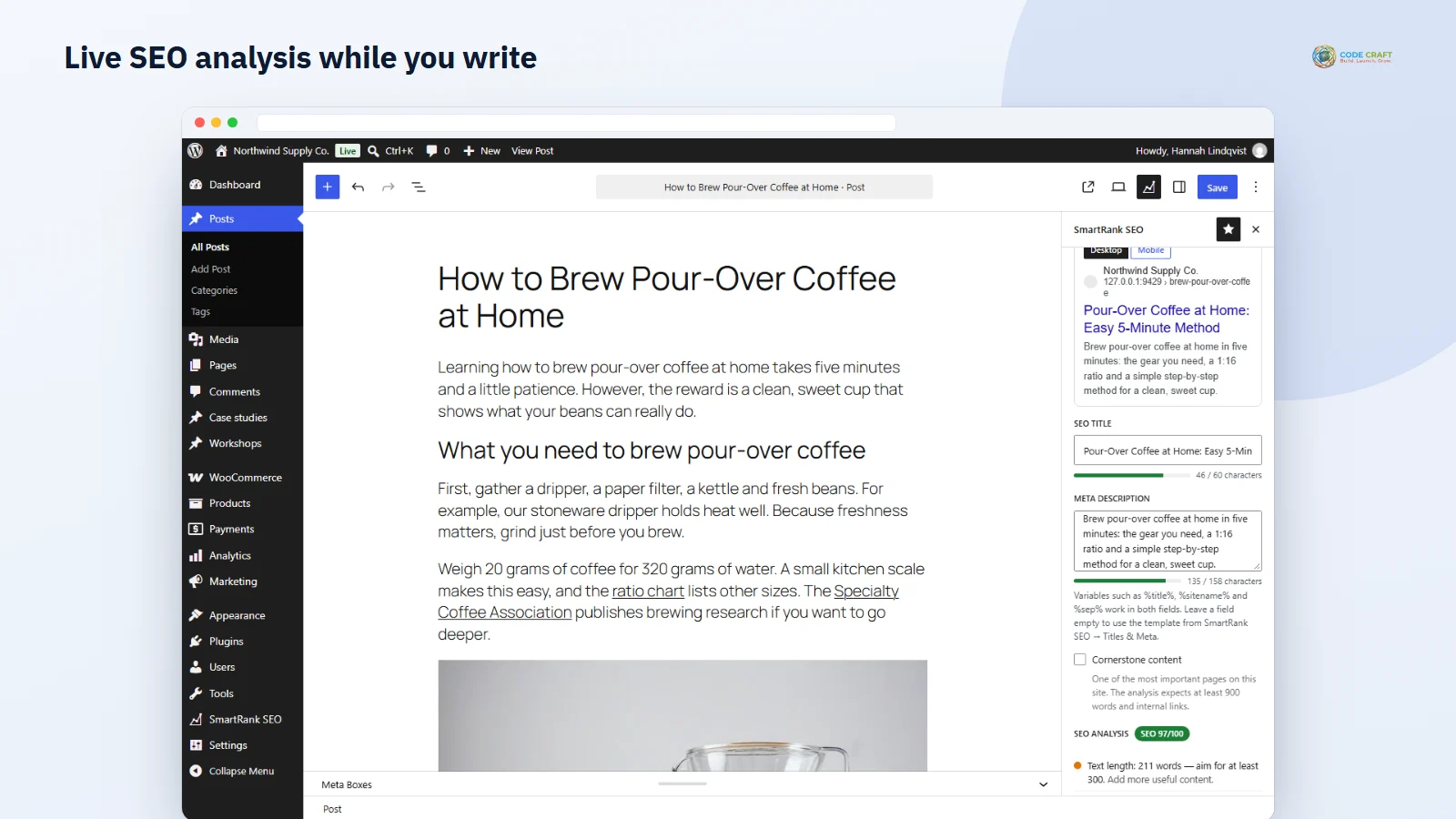
Open a post and the SmartRank sidebar shows a focus keyphrase field, SEO title and description with character bars, and a Google-style preview for desktop and mobile that measures pixel width, so you see exactly where a long title gets cut. The SEO checks look for the keyphrase in the title (and near its start), meta description, URL slug, introduction, H2/H3 subheadings and image alt text, measure keyphrase density, text length, title and description length, and count internal and outbound links. The readability tab scores Flesch reading ease, long sentences and paragraphs, passive voice, transition words, repeated sentence openings and subheading distribution. Everything recalculates as you type, without saving, and nothing is sent to a server. Scores are stored with the post and shown in an SEO column in the posts list; cornerstone content gets stricter targets and its own dashboard report with word counts and incoming internal links. Post types that use the classic editor get the same checks in a tabbed meta box.
Each page carries one JSON-LD graph in which every node has an @id and points to the others: WebSite with a SearchAction, your Organization (with logo and social profiles) or Person, the WebPage — or CollectionPage, ProfilePage or SearchResultsPage on archives — a BreadcrumbList, and on posts an Article, BlogPosting or NewsArticle with its author, publisher, image, dates, word count, categories and tags. Only data that exists on your site is used; SmartRank never invents ratings or reviews. Open Graph and X card tags use the social title, description and image you set, falling back to the featured image, the first image in the content and then your default image. Breadcrumbs come as a block, the [ssuite_breadcrumbs] shortcode and the ssuite_breadcrumbs() template tag, with accessible markup.
The sitemap index at /sitemap.xml (also answered at /sitemap_index.xml and /wp-sitemap.xml) links to sitemaps for posts, pages, custom post types, taxonomies and authors, with featured and in-content images. Noindexed items, password-protected posts, excluded IDs and posts whose canonical URL points elsewhere are left out automatically. Each sitemap is built once and cached until content or settings change, and a readable stylesheet shows it nicely in a browser. IndexNow gets a key file served for you; new, updated, trashed and deleted URLs are sent in one request at the end of the save, and a manual box submits up to 10,000 of your URLs with a log of the responses. An llms.txt file lists your pages and posts in Markdown for AI assistants, and the robots.txt editor adds your own rules.
Add 301, 302, 307, 410 or 451 redirects with exact or wildcard matching (a * in the target keeps the matched part). SmartRank refuses a redirect that points to itself or closes a loop with existing redirects, never redirects a URL to itself at runtime, and matches requests from a cached list before WordPress queries the database for the page. When the slug of a published post changes, a 301 from the old URL is added; change it back and the old rule is removed, so there is no loop. The 404 monitor logs missing URLs with hit counts, first and last seen and the last referrer — no IP addresses or browser details — and its Redirect link opens the form with the URL filled in. Once a redirect handles a URL it leaves the log.
The importer reads each plugin's documented data — post meta, All in One SEO's own tables, Yoast's taxonomy option, Rank Math's and AIOSEO's redirect tables, Yoast Premium and SEOPress redirects — and converts title variables like %%title%% or #post_title to SmartRank's. A dry run first shows how many posts, terms and redirects will be imported, which fields, how many posts already have SmartRank values and five sample conversions. Imports run in batches of 200 posts. Existing SmartRank values are kept unless you tick Overwrite, and the other plugin's data is only read, never changed or deleted, so you can switch back at any time.
Every post, page, product and custom post type gets a Rich result schema box in the block editor and the classic editor. Choose FAQ, HowTo, Recipe, Event, JobPosting, Course, Product, SoftwareApplication, VideoObject or Review — or the LocalBusiness of one of your locations — and fill in the fields; required ones are marked and a hint lists anything Google still needs. Text fields take variables such as %title%, %excerpt% and %featured_image%, empty image fields use the featured image, and repeatable rows hold FAQ questions and recipe or how-to steps. The nodes join the same connected graph as the free schema: a FAQ turns the WebPage into an FAQPage with its questions as mainEntity, a recipe or review points to the author node, an event, job posting or course points to your organisation, and every node links back to the page by @id. FAQ and how-to content can be shown on the page from the same data, because structured data must describe what visitors see. Schema templates let you set up, say, Course schema once and make it the default for a whole content type; single posts can still build their own, pick another template or switch it off. Honest notes are built in: Google now shows FAQ rich results only for well-known government and health sites and no longer shows how-to results, and software rich results need real ratings, which SmartRank never invents.
With WooCommerce active, every product page gets a Product node built only from your store data: name, short description, main and gallery images, SKU, the GTIN from WooCommerce's own field, MPN and brand fields SmartRank adds to the Inventory tab (or WooCommerce Brands, or a default brand), the main category and an Offer with the displayed price, currency, stock status, sale end date and your organisation as seller. Variable and grouped products get an AggregateOffer with the lowest and highest price. Review stars are added only when a product really has approved reviews with a rating — the average, the real review count and the latest five reviews — and WooCommerce's own JSON-LD is switched off, so there is one graph instead of two. Title templates gain %price%, %sku%, %brand%, %stock% and %product_cat%. Product categories and tags with fewer products than you choose are noindexed and left out of the sitemap, filtered and sorted shop URLs get noindex, the product sitemap lists gallery images and leaves hidden products out, and an optional switch removes /product-category/ from category URLs with 301 redirects from the old ones.
Local SEO stores up to 200 locations with business type, address, coordinates, phone, e-mail, price range and opening hours per day (closed and 24-hour days included). The primary location's LocalBusiness schema goes on the home page, each location's on its own page and on any page that shows it; days with the same hours are grouped. Shortcodes print a location card with hours, an OpenStreetMap or Google Maps embed (no API key) and a directions link, and /locations.kml plus a locations sitemap list your places. Image SEO fills missing alt and title text from templates such as %filename% — 'IMG_2041_linen-napkins-stack.jpg' becomes 'Linen napkins stack' — on upload and on the page, with case control and a report of every image without alt text where you can type a better description or fill them all at once. Video SEO finds YouTube, Vimeo and self-hosted videos when content is saved, adds VideoObject schema and serves a video sitemap; no video platform is contacted. The News sitemap lists the articles of the last two days with your publication name and language, as Google News expects.
Google's Indexing API is officially only for pages with JobPosting or BroadcastEvent (livestream) structured data, and the screen says so first. Connect your own service account by uploading its JSON key: SmartRank checks it, encrypts it with your site's secret keys and never shows it again — only the service account's e-mail and project appear. Pages whose rich result schema is a job posting or a livestream video are then sent automatically when they are published, updated, unpublished or deleted; ordinary posts are never sent. A manual box sends up to 20 URLs or checks when Google last received a notice, a counter shows today's publish requests against the daily quota (reset at midnight Pacific time) and stops before it is exceeded, and the log explains Google's answers, such as a 403 meaning the service account is not yet an Owner in Search Console.
Pro lets you set up to five focus keyphrases per post — each with its own synonyms and its own set of checks — and turns on English word forms, so brew, brews, brewed and brewing all count as the same keyphrase (Porter stemming). For redirects, Pro adds regular-expression sources with $1 replacements, checked for validity before saving, plus CSV export and import of every redirect with formula-safe cells. When a monthly or yearly licence ends, every Pro feature switches off while all its data stays saved; location, FAQ and how-to shortcodes then print nothing instead of raw text.
SmartRank Pro keeps an index of the links inside your content. Each time a post, page or product is saved, its links are read and matched to what they point to: another post, the home page or an archive, a redirect, an outside site — or nothing at all. Content that already existed is indexed once in the background with WP-Cron, 50 posts per run, and the job carries on from the last post it finished, so it never times out; the Internal Links screen can run the same batches from your browser or rebuild the index. From that index you get a Links column in the posts, pages and products lists with inbound and outbound internal links, a list of orphan content that no other post links to, a list of broken internal links — to deleted, trashed or draft content, or to URLs that match nothing on the site — each with an Edit post and a one-click Redirect button, and the most-linked content. In the block editor a Link suggestions panel, and in the classic editor a side box, compare the text you are writing with your published posts and suggest up to eight to link to: posts whose focus keyphrase or title appears in your text come first, orphans are moved up, and posts you already link to are left out. Copy the link, select the words and paste. Links in menus and widgets are not counted.
Connect Google Search Console with your own service account: upload its JSON key (or reuse the key you saved for the Indexing API) and SmartRank encrypts it with the same code that protects the Indexing API key, signs in with a read-only scope and picks the property that matches your site. The overview shows clicks, impressions, average CTR and average position for the last 28 or 90 days with the change against the period before, plus top pages and top queries. The Pages tab lists up to 100 pages with the post they belong to, Google's index status and the queries each page was found for; the Queries tab lists the top 100 queries. Reports are cached for 12 hours. Once a day SmartRank stores the position of your queries from that same data in its own table — no scraping of search results — so the Keyword history tab shows the latest position, the change and a trend line for up to 90 days. The URL Inspection API tells you whether a URL is indexed, when Google last crawled it and which canonical it chose, one URL or ten posts at a time. Sign-in with a personal Google account (OAuth) is not offered yet, and the connection was tested against a local mock of the API, not Google's live service.
The SEO audit checks every published post, page and product in small batches while a progress bar fills: titles and meta descriptions exactly as SmartRank prints them (missing, duplicate, too long), important pages set to noindex — front page, posts page, shop page and cornerstone content — broken internal links and orphans from the link index, rich result schema missing fields Google requires, image files over 300 KB and images without alt text. Each check shows its severity, how many items it found, the first affected items with edit links and a button to the screen that fixes it, and the site gets a score out of 100 with the change since the previous audit. The score is guidance, not a ranking forecast. The bulk editor shows 20 posts, pages or products per page with editable SEO title, meta description, focus keyphrase and robots, filters for content type, missing title, missing description, missing keyphrase and noindex, and saves every changed row in one REST request that checks the nonce, the SEO-editor permission and edit rights per post. Redirects can be put in groups that you filter, switch on or off, ungroup or delete at once, and the 404 log can clean itself up daily after the number of days you choose. A weekly HTML e-mail goes to the user roles you choose with the audit score, Search Console highlights and the week's new 404s, with a preview and a test button.
Pick OpenAI, Anthropic (Claude) or Google Gemini on SmartRank SEO → AI Assistant, type the model you want and paste your own API key; it is encrypted with your site's secret keys and never shown again. In the editor, an AI assistant panel (a box in the classic editor) offers seven buttons: three SEO titles, three meta descriptions, FAQ questions answered only from your text, alt text for images that have none, a sharing title and description, an outline of subheadings, and shorter rewrites of sentences over 22 words. Every result is a suggestion with a Use button — an SEO title goes into the SEO title field, FAQ items fill the FAQ schema builder, alt text goes onto the image block, a rewrite replaces the sentence — and nothing changes until you click. Nothing is sent until someone clicks a button, and then only the title, the focus keyphrase and the start of the text up to the limit you set (6,000 characters by default). Each user has an hourly limit and the site a daily one, and the request log records who asked for what, never the content. The provider's usage is billed to your own account. The three connections were tested against local servers that mimic each provider's API, not live accounts.
SEO revisions keep the last 30 versions of each post's SEO fields — title, description, keyphrases, robots, canonical, social fields, schema and reviewers — whoever changed them and from wherever, with a Restore button in both editors. Author E-E-A-T adds job title, credentials, areas of expertise, education and awards to user profiles and to that person's Person schema, and lets you set who reviewed and who fact-checked a post and when; the page schema gets reviewedBy and lastReviewed and an optional credit line appears under the post. The broken link checker takes the external links from the link index and checks a small batch every hour: a HEAD request first, a short GET when a server does not answer HEAD properly, redirects followed one by one so permanent moves show their new address, a delay of a few seconds between requests to the same website, short timeouts and one retry before a server error counts as broken. From its screen you unlink a dead link in every post that contains it, replace the address, or update a moved link to where it now points; private network addresses are never requested.
SmartRank reads the saved content of Elementor, Bricks, Beaver Builder and Divi pages for the content analysis and the link index, adds ACF text fields to the analysis and lets you use them in titles as %acf_field_name%. With Polylang or WPML, translated posts get hreflang links with an x-default and every language gets its own sitemap with alternate links; Web Stories are listed in the sitemaps like any other content type, and the schema builder has a podcast episode type. Variable WooCommerce products list each variation as its own offer with its own SKU and GTIN, Vimeo videos in posts without a featured image get their thumbnail from Vimeo's oEmbed service, and the schema builder can move into the block-editor sidebar. Developers get REST endpoints to read and update SEO fields, a public head-data endpoint for headless front ends, sitemap regeneration and IndexNow submission, the same as wp smartrank commands, and a Tools screen exports every setting to one JSON file (never keys), imports it on another site or resets everything to defaults. Archives get noarchive, nosnippet and noimageindex per term or author, optional noindex on page 2 and later and rel prev/next, and the RSS feed can carry a line with links under every item.
SmartRank SEO needs WordPress 6.4+ and PHP 7.4+. It was tested on WordPress 7.1 with PHP 8.3 in the block theme Twenty Twenty-Five and the classic theme Twenty Twenty-One, with the block editor and the classic editor, and the Pro add-ons with WooCommerce 11.2.1 and its demo store. On a single post the whole head window it prints in needs at most a handful of database queries, all front-end data comes from one cached settings option, and sitemaps, llms.txt and the redirect list are cached. A role manager decides who may edit SEO fields, manage redirects or change settings. The free plugin only contacts the IndexNow API; Pro also checks its licence with coodecraft.com and, only once you set them up, Google's Indexing API with your own key and map embeds on pages where you place a map.
Most stores running SmartRank SEO pair it with these. Every plugin below shares the same licence system, coding standards and support team.