

WooCommerce PluginDownload free version
Abandoned Cart Recovery for WooCommerce
No reviews yet
from$69.00/yr
A WordPress speed optimization plugin that unloads the scripts and styles each page does not need
Get a Paceloom Pro key by email and use every Pro feature for 7 days on one site. No card needed, nothing renews automatically — when the trial ends, Pro switches off unless you choose a plan. One trial per email.
Choose monthly, 1 year or lifetime — your key and download link are emailed instantly.
Upload the zip in wp-admin. The free core works right away.
Paste it in the plugin's License tab to activate.
Pro features, updates and priority support switch on.
Open a page with the asset manager and unload what it does not need, defer and async scripts, remove emojis, embeds and Dashicons, preload fonts, then delay a chat widget until interaction, add URL rules, critical CSS and local Google Fonts, and measure the result in the before/after report.
Download the PDF user guideThe free core is a real, working plugin — not a trial that expires. Pro unlocks the advanced modules with a licence key, and nothing you build on free is lost when you upgrade.
Everything most sites need. No account, no email required — download and install.
.zip · v1.0.0 · 2 downloads
Same plugin, every module unlocked by your licence key — plus updates and priority support.
Already bought it? Enter your key:
Or sign in — every licence you own shows up there.
| Feature | Free | Pro |
|---|---|---|
| Per-page asset manager with sizes and dependencies | Included | Included |
| Unload scripts and styles per page, dependency-safe | Included | Included |
| Defer / async by handle, defer everything except jQuery | Included | Included |
| Remove emojis, embeds and Dashicons | Included | Included |
| Preload key fonts and images | Included | Included |
| Admin, editor, logged-in users and WooCommerce checkout excluded | Included | Included |
| Safe mode: URL switch for admins and wp-config constant | Included | Included |
| Delay JavaScript until the first interaction | Not included | Included |
| Unloading rules by post type or URL regex | Not included | Included |
| Critical CSS per template + non-blocking stylesheets | Not included | Included |
| Local Google Fonts | Not included | Included |
| Heartbeat interval and revisions limit | Not included | Included |
| Before/after asset report | Not included | Included |
| Updates and email support | Community | Included |
Upgrading is just entering a key — same plugin, same settings, nothing to reinstall or migrate.
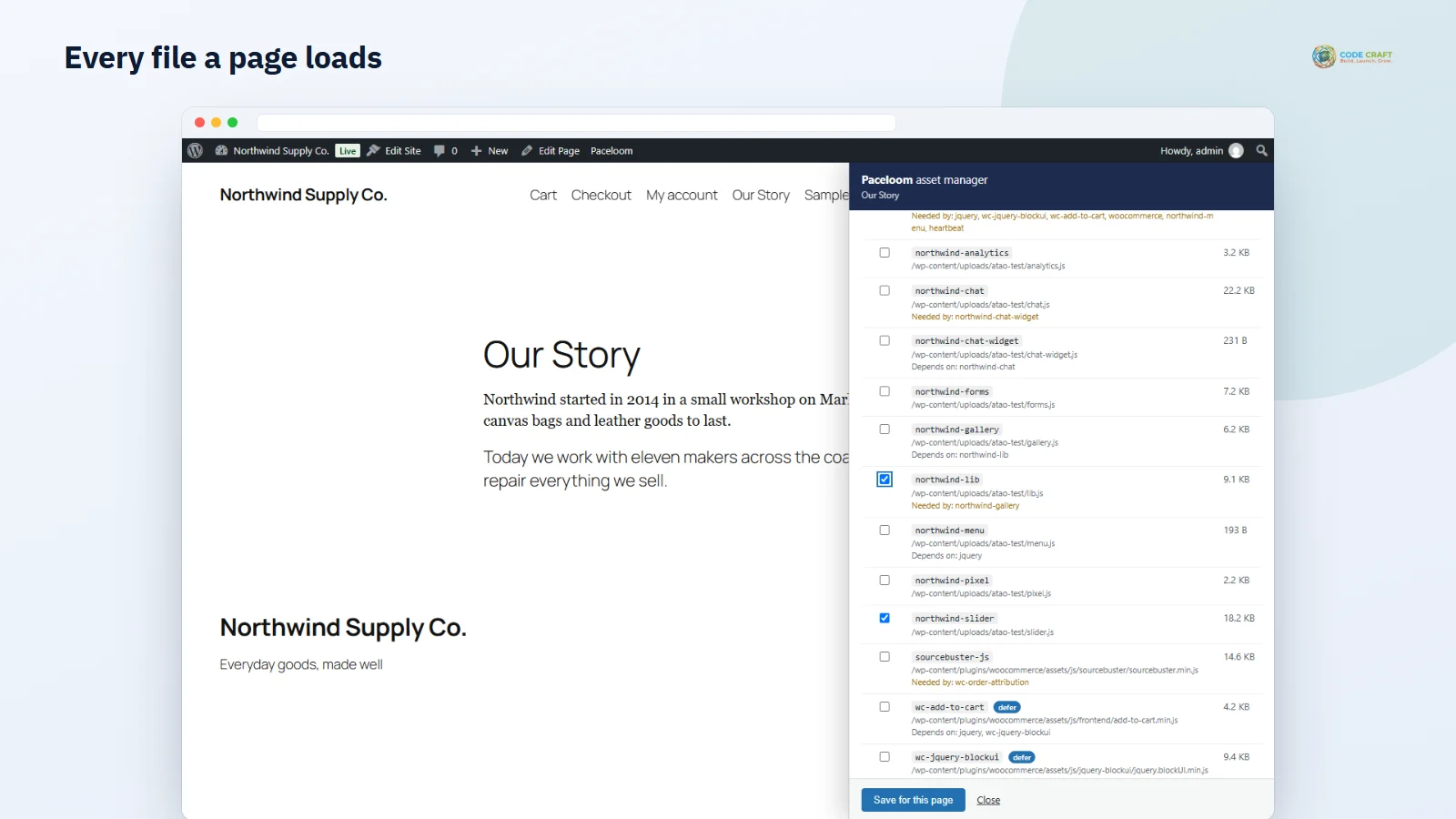
Most WordPress pages load scripts and stylesheets they never use: a form plugin's files on every blog post, a slider's files on pages without a slider, a gallery library on the contact page. Paceloom's asset manager shows you the real list. While logged in as an administrator, open any page and choose Paceloom → Manage assets on this page in the admin bar. A panel lists every script and every style that page printed, with its handle, the file it comes from, its size on disk, the handles it depends on and the handles that need it. Tick the ones this page does not need and click Save for this page; the page reloads with the change and the panel marks those files as unloaded. The rule is stored for that page only — other pages keep loading the file. In testing, a slider's script and stylesheet were unloaded on one page: they disappeared from that page's HTML for visitors and were still present on another page.
Unloading the wrong file is how speed plugins break sites, so Paceloom works on WordPress's own dependency list rather than removing tags from the HTML. Just before WordPress prints scripts or styles, Paceloom takes the list it is about to print, removes the handles you chose and then checks every handle that stays: if any of them still depends on a file you wanted gone, directly or through another file, that file is kept and the asset manager shows "Kept: another loaded file needs it". In testing, unloading a gallery's library alone kept the library because the gallery still needed it; unloading the gallery as well removed both, with no script errors on the page. jQuery, jQuery Migrate and the admin bar are protected and cannot be unloaded, even by a rule written straight into the database.
Render-blocking scripts in the head hold up the first paint. Paceloom can defer or async any script by handle, or defer every front-end script except jQuery. It uses WordPress's own loading strategies (the defer and async attributes WordPress added in 6.3), so if a normal script depends on a script you defer, WordPress keeps it blocking and nothing runs out of order. Pro adds delay until interaction: chosen handles — including their inline before/after code and translations — and any script tag that contains a piece of text you enter are rewritten so the browser neither downloads nor runs them while the page loads. On the first mouse move, scroll, tap, click or key press they run once, in page order. In testing a chat script, its widget (which depends on it), the widget's inline code and a hard-coded tracker printed by the theme did not run during load or after a 3.5-second wait, then ran exactly once each, in page order, after the first mouse move, with further interactions running nothing again.
Paceloom removes the emoji detection script and styles (browsers draw emojis themselves), the WordPress embed script with its oEmbed discovery links, and the Dashicons icon font for visitors who do not see the admin bar. Dashicons stay for logged-in users with the admin bar and whenever another loaded style needs them; this was checked with logged-in optimisation switched on. Emojis and Dashicons are removed straight after activation; everything else is off until you choose it. The preload list prints <link rel="preload"> tags for the files your pages need first: fonts get the right type and crossorigin, images get high fetch priority, stylesheets and scripts get the matching as= value.
Critical CSS is set per template — front page, blog page, single post, single page, single product or any public post type, archives, search and 404 — and printed inline at the top of the head; Paceloom does not generate critical CSS for you. With "load the other stylesheets without blocking rendering" on, stylesheets switch to media=print with an onload swap and a noscript fallback. Local Google Fonts copies the Google Fonts stylesheets your pages use, and their font files, into wp-content/uploads/atao-fonts, rewrites the pages to use the copies and removes the preconnect hints to Google's font hosts; in testing the visitor's browser made no request to fonts.googleapis.com or fonts.gstatic.com and the text rendered with the copied font (the copy itself was tested against a local stand-in for Google, not Google's real servers). The Heartbeat can be slowed to every 30, 60 or 120 seconds in the admin and the post editor and switched off on the front end, and the number of revisions kept per post can be capped — both were measured in testing (admin interval 120 s, editor 60 s, six saves kept three revisions).
The report loads a page of your site twice from your browser, without cookies, the way a visitor gets it: once with a one-time token that switches every Paceloom optimisation off and once as it is now. It counts the script and stylesheet files, JavaScript and CSS bytes (files plus inline code, uncompressed, downloaded from your site), render-blocking files in the head, delayed scripts and links to Google Fonts hosts, and lists which files were removed, delayed or added. The last result is saved. In testing the report's counts matched an independent count of the same two HTML pages. We do not publish "X% faster" figures: the result depends on your site, so measure your own pages.
The WordPress admin, the block editor, the login page, the Customizer, previews, REST and AJAX requests, feeds and embeds are never changed. Logged-in users and the WooCommerce cart, checkout and My account pages are excluded by default, and you can add your own addresses. In testing the block checkout rendered for a visitor with a cart while every option was on, with none of Paceloom's changes on it, and the block editor loaded with none of the front-end changes. If a page breaks, add ?atao_safe=1 to its address as an administrator to see it without Paceloom (visitors cannot use this switch), untick Optimisations in the settings, or put define( 'ATAO_SAFE_MODE', true ); in wp-config.php to switch everything off site-wide while keeping your rules.
Most stores running Paceloom pair it with these. Every plugin below shares the same licence system, coding standards and support team.
Also popular with our customers: Pixelkiln. Browse every wordpress plugins or see our best-selling plugins. Need this built into a custom project? Our WordPress development team can help.


