

WooCommerce PluginDownload free version
Abandoned Cart Recovery for WooCommerce
No reviews yet
from$69.00/yr
WooCommerce product bundles with a bundle price and stock taken from every item
Get a Bundlewright Pro key by email and use every Pro feature for 7 days on one site. No card needed, nothing renews automatically — when the trial ends, Pro switches off unless you choose a plan. One trial per email.
Choose monthly, 1 year or lifetime — your key and download link are emailed instantly.
Upload the zip in wp-admin. The free core works right away.
Paste it in the plugin's License tab to activate.
Pro features, updates and priority support switch on.
Sell a coffee kit at 15% off, check the stock of each item after a block checkout, build a fixed-price bundle, a Pro build-your-own box and a bundle with a size picker and optional extra, then read the sales report.
Download the PDF user guideThe free core is a real, working plugin — not a trial that expires. Pro unlocks the advanced modules with a licence key, and nothing you build on free is lost when you upgrade.
Everything most sites need. No account, no email required — download and install.
.zip · v1.0.0 · 3 downloads
Same plugin, every module unlocked by your licence key — plus updates and priority support.
Already bought it? Enter your key:
Or sign in — every licence you own shows up there.
| Feature | Free | Pro |
|---|---|---|
| Bundle product type made of existing products | Included | Included |
| Simple products and exact variations as items, with quantities | Included | Included |
| Percent off the items or a fixed bundle price | Included | Included |
| Stock taken from every item; restored on cancel | Included | Included |
| Cart refuses a bundle when an item would run out | Included | Included |
| Items listed under the bundle in cart, order and emails | Included | Included |
| Block and classic cart and checkout | Included | Included |
| Build-your-own box with a minimum and maximum | Not included | Included |
| Optional items the shopper can tick | Not included | Included |
| Variable items: shopper picks the size or colour | Not included | Included |
| A different discount for every item | Not included | Included |
| Itemised contents with each item's price | Not included | Included |
| Bundle sales report (7 to 365 days) | Not included | Included |
Upgrading is just entering a key — same plugin, same settings, nothing to reinstall or migrate.
A bundle sells several products as one: a coffee set with two mugs, a skincare routine, a camera with a memory card and a bag, a gift box. The shopper sees one product with one price that is lower than buying the items one by one, and adds it to the cart with one click. Bundlewright adds this as a new WooCommerce product type called "Bundle". You do not create new stock-keeping products for the bundle: you choose products you already sell, so each item keeps its own price, stock, SKU and product page. It suits gift, beauty, food and electronics shops, and any store that wants to move slower items next to popular ones.
Bundles → Add bundle opens a new product with the type "Bundle" already selected (you can also choose it from Products → Add New). On the Bundle items tab search for each product, set its quantity and add as many rows as you need. An item can be a simple product or one exact variation, such as "Organic Cotton Crew T-Shirt – Navy, M". Then choose the pricing: a percentage off the items bought separately, or one fixed bundle price. After saving, the tab shows the price of the items bought separately and the bundle price, and the Bundles screen lists every bundle with its items, prices and stock status. The bundle has its own name, description, images, categories, tax class and shipping weight, like any WooCommerce product.
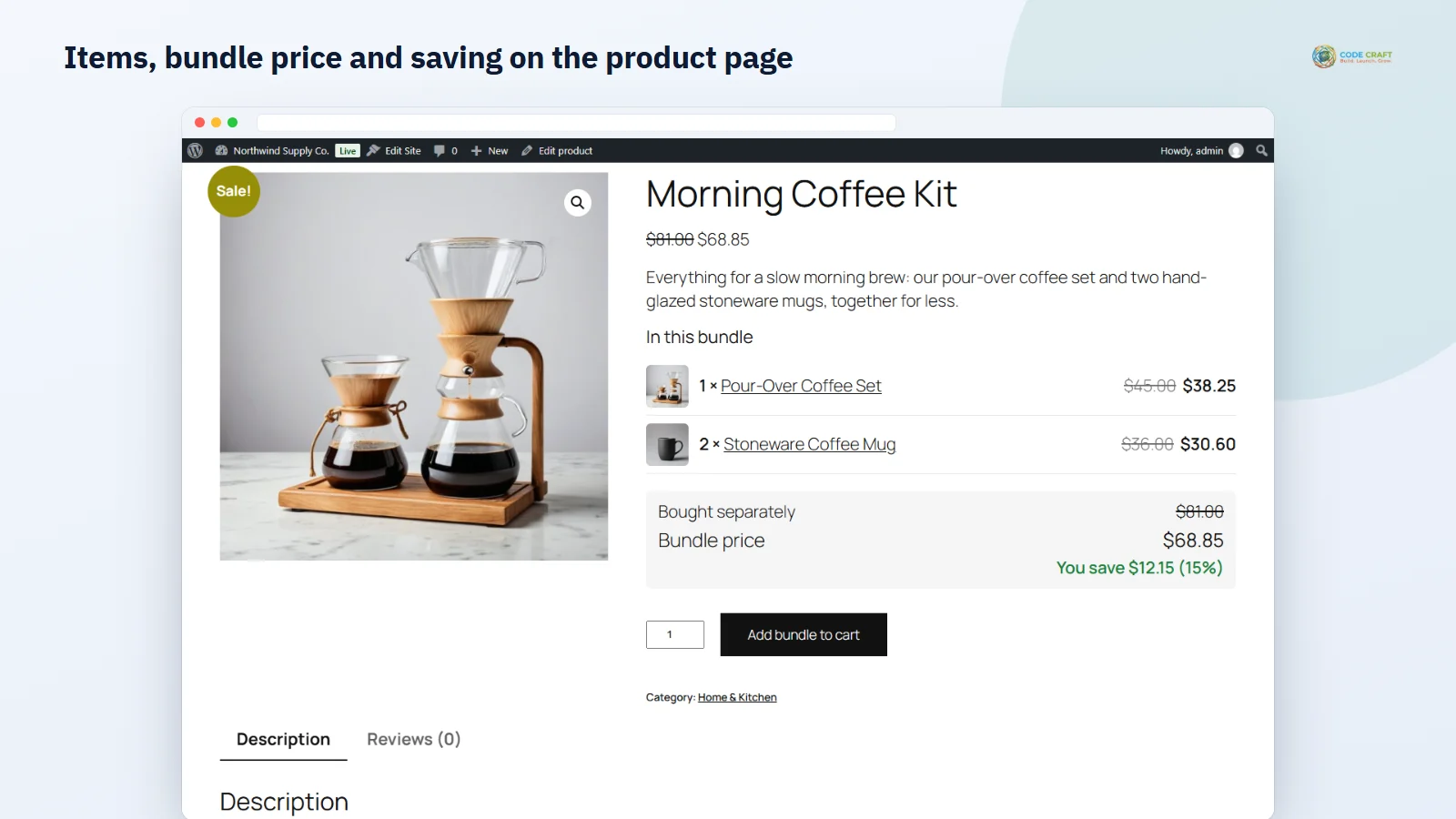
The bundle page lists each item with its picture, quantity and a link to its own page, with the item's normal price crossed out next to its share of the bundle price. A summary shows "Bought separately", "Bundle price" and "You save" with the amount and percentage; you can hide the savings lines in the settings. Shop and category pages show the bundle price with the separate price crossed out, and a bundle with nothing to choose can be added straight from the shop page. In the cart and checkout the bundle is one line at the bundle price, with the items listed under it; the same list is saved on the order and shown on the thank-you page, in the admin order screen and in the order emails.
The browser only says which bundle (and, in Pro, which choices) the shopper picked. Every time the cart is calculated, Bundlewright reads the saved bundle and the items' current prices and works the bundle price out again. With a percentage discount the bundle follows the items' prices automatically, sale prices included; with a fixed price the bundle price stays the same and is shared over the items for display. The catalogue price used for sorting, price filters and the Store API is updated whenever a bundle or one of its items is saved.
A bundle has no stock of its own. When an order is processing, on hold or completed, the stock of every item in every bundle goes down by the bundle quantity times the item quantity, using WooCommerce's own stock functions, and an order note lists each item's old and new stock. If the order is cancelled, fails or goes back to pending, the stock goes back. Each order line remembers what it took, so stock is never reduced or restored twice. A bundle is out of stock as soon as one item cannot make one more, and the cart and checkout add up everything the cart needs: a shopper cannot buy more of an item than you have, whether it sits in a bundle, on its own, or both.
Switch a bundle to "Build your own box" and choose the products shoppers may fill it with, a minimum and maximum number of items, and a percentage off the chosen items or a fixed price per box. The product page shows the products as cards with plus and minus buttons, a counter such as "3 picked — choose 3 to 5 items" and a live price. The button turns on once the minimum is reached. The server checks the choice again: only listed products, within the limits, with enough stock. Shop pages show the cheapest full box as a "From" price.
Add a variable product to a bundle and shoppers choose the size or colour inside the bundle; only variations in stock are offered, and the stock of the chosen variation is reduced. Mark an item as optional and shoppers can add it with one tick. Give each item its own discount, for example 10% off the T-shirt, 15% off the sneakers and 20% off an optional wallet. The live total on the product page follows every choice. The itemised display setting shows each item on its own line with its price in the cart, checkout, order and emails. The sales report lists, for the last 7, 30, 90 or 365 days, the orders with each bundle, bundles sold, items shipped, revenue before tax and how much shoppers saved; cancelled orders drop out.
Bundlewright needs WordPress 6.4 or newer, PHP 7.4 or newer and WooCommerce 8.0 or newer. It was tested on WordPress 7.1 with the current WooCommerce on PHP 8.3 with WP_DEBUG on, with orders placed on the block checkout and on a classic shortcode checkout. It declares High-Performance Order Storage and cart/checkout block compatibility and keeps its data in product meta, order item meta and one settings option, with no extra database tables. The free plugin makes no outside connections; Pro contacts coodecraft.com only to activate and check the licence.
Most stores running Bundlewright pair it with these. Every plugin below shares the same licence system, coding standards and support team.
Also popular with our customers: Pairloom. Browse every woocommerce plugins or see our best-selling plugins. Need this built into a custom project? Our WordPress development team can help.


