

WooCommerce PluginDownload free version
Abandoned Cart Recovery for WooCommerce
No reviews yet
from$69.00/yr
A WooCommerce frequently bought together block with checkboxes, a live total and one-click add
Get a Pairloom Pro key by email and use every Pro feature for 7 days on one site. No card needed, nothing renews automatically — when the trial ends, Pro switches off unless you choose a plan. One trial per email.
Choose monthly, 1 year or lifetime — your key and download link are emailed instantly.
Upload the zip in wp-admin. The free core works right away.
Paste it in the plugin's License tab to activate.
Pro features, updates and priority support switch on.
Pick suggestions on a product, watch the total change as items are ticked, add three products in one click, apply a 10% bought-together discount on the block and classic checkouts, build suggestions from past orders and read the revenue report.
Download the PDF user guideThe free core is a real, working plugin — not a trial that expires. Pro unlocks the advanced modules with a licence key, and nothing you build on free is lost when you upgrade.
Everything most sites need. No account, no email required — download and install.
.zip · v1.0.0 · 3 downloads
Same plugin, every module unlocked by your licence key — plus updates and priority support.
Already bought it? Enter your key:
Or sign in — every licence you own shows up there.
| Feature | Free | Pro |
|---|---|---|
| Hand-picked suggestions per product, in your order | Included | Included |
| Checkbox per product and a live total price | Included | Included |
| Add the product and ticked suggestions in one click | Included | Included |
| Upsells or cross-sells as fallback | Included | Included |
| Out-of-stock and unpurchasable products skipped | Included | Included |
| Block and classic themes, cart and checkout | Included | Included |
| Heading, button text, position and number of suggestions | Included | Included |
| Suggestions from products bought together in your orders | Not included | Included |
| Bought-together discount (store-wide and per product) | Not included | Included |
| Colour and size picker for variable suggestions | Not included | Included |
| List and grid layouts | Not included | Included |
| Revenue report (7 to 365 days) | Not included | Included |
Upgrading is just entering a key — same plugin, same settings, nothing to reinstall or migrate.
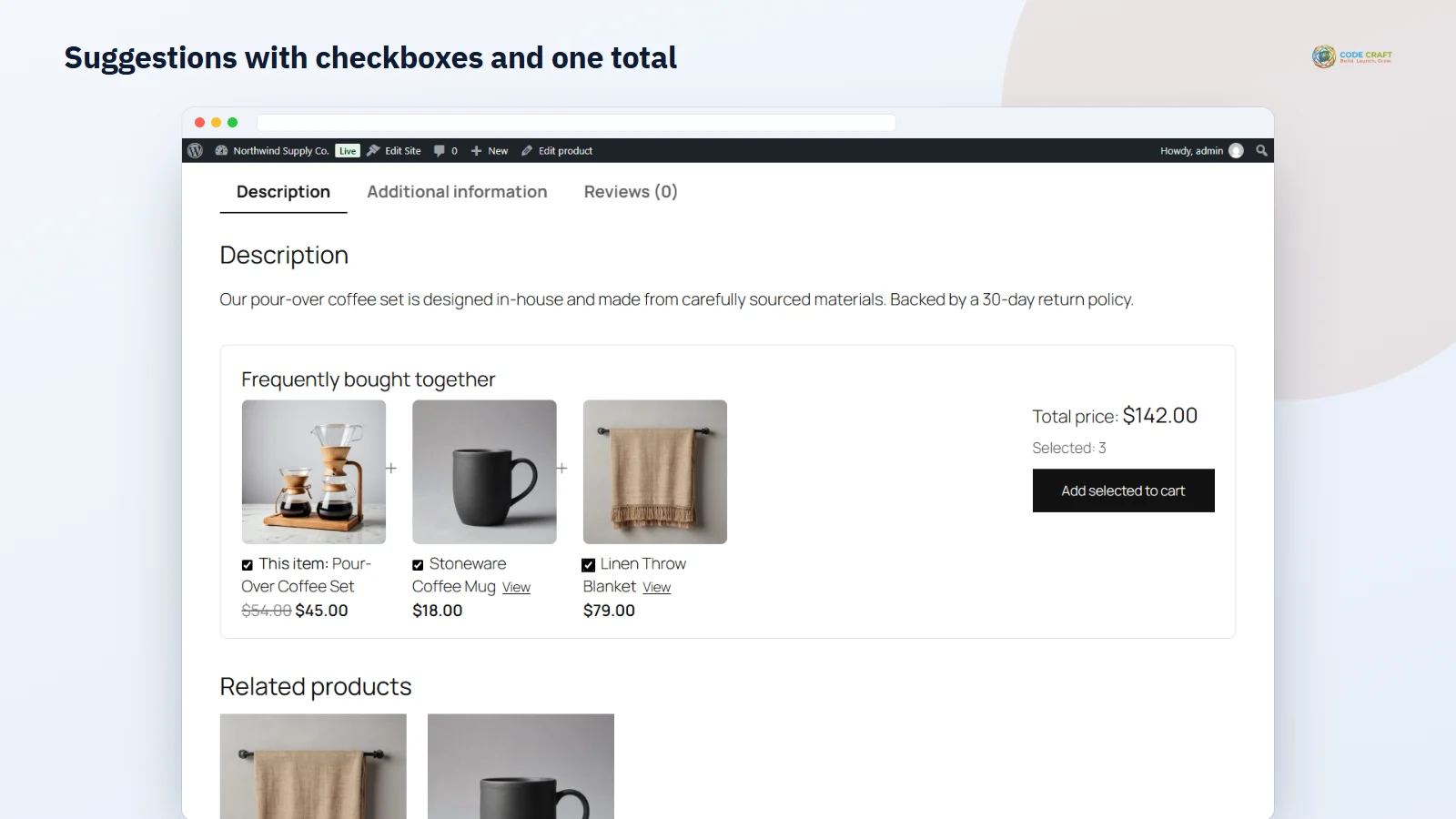
Shoppers often need more than one thing: filters and a mug with a coffee maker, a case with headphones, socks with shoes. A frequently bought together block puts those items right on the product page, under the heading "Frequently bought together", with "This item:" first and the suggestions next to it. Every product has a checkbox and they all start ticked. The total price of the ticked products is shown under the pictures, together with how many are selected, and it changes the moment a box is ticked or unticked. One button, "Add selected to cart", adds them all. Pairloom is for any WooCommerce store that wants a larger average order without a pop-up or a separate upsell page: homeware, fashion, electronics, beauty, hobby and gift shops.
Edit a product and open the Linked Products tab, next to WooCommerce's own upsells and cross-sells. In "Frequently bought together" search for products and pick them in the order you want them shown. You can also tick "Hide the block" on a product that should not have one. The block fills its places in a fixed order: your hand-picked products first, then (in Pro) products often bought together in your orders, then the product's upsells, or its cross-sells, or nothing, as chosen under Fallback in the settings. How many are shown is up to you, from one to six (three by default). The Pairs screen lists every product with a hand-picked list next to what its block shows right now.
Before a product is shown it is checked: it must be published, visible in the catalogue, not password protected, purchasable, in stock and have a price, and it must be a simple or variable product. A sold-out speaker or filters with no price yet are simply left out and the next suggestion moves up, so the block never shows an item that would fail at the cart. When the button is clicked the server checks every product again: it only accepts the product being viewed and its current suggestions, runs WooCommerce's own add-to-cart validation for each one (stock, limits and other plugins' rules) and reports anything that could not be added. The browser sends product IDs only — never prices.
The default row layout shows the pictures side by side with a plus sign between them and the total on the right; on phones it becomes two columns with the total below. The block sits below the product summary or right after the add-to-cart button, on classic themes such as Twenty Twenty-One (where it comes before the description tabs) and on block themes such as Twenty Twenty-Five (where it comes after the product details). After adding, a message says how many products were added with a "View cart" link, and the theme's mini cart updates; if WooCommerce is set to go to the cart after adding, the shopper is taken there. If the product being viewed is variable, its options are chosen in the normal form above and the block uses that choice. The products are ordinary cart lines, so prices, coupons, taxes and shipping work as usual on the block and classic checkout.
Pro reads your processing and completed orders from the last 180 days (you can change this), newest first, up to 5,000 orders. For each order it takes the distinct products in it, counting a variation as its parent product, and adds one to every pair. A pair is used once it appears in at least two orders (also adjustable), and each product's partners are sorted by how many orders they share. This runs once a day in the background and whenever you click "Rebuild now", so product pages never wait for it. The Pairs screen shows every product with its partners and the number of orders, how many orders were read and when. In our test store, three orders of a backpack with sneakers and two with a wallet made the backpack suggest the sneakers first, then the wallet; a pair seen only once was left out.
Set a store-wide percentage, and a different one on any product's Linked Products tab (empty uses the store default, 0 turns it off). The product page then shows the old total crossed out, the new total and "You save". In the cart each suggested item that sits in the cart together with the product it was suggested for gets the percentage off, for at most as many units as there are of that product, and every cart unit is discounted only once. The discount is one line per product, such as "Bought together discount (Pour-Over Coffee Set) −$9.70", in the block and classic cart and checkout, and it is saved on the order as a fee line, so totals, emails and refunds are right. It is worked out from the cart on every change, so it disappears as soon as either product leaves the cart — also when an app or headless front end removes it through the WooCommerce Store API.
A variable suggestion, such as a T-shirt, gets a picker inside the block listing the colour and size combinations in stock with their prices; the total follows the choice and that exact variation is added. In the free version it shows a link to its own page instead. Besides the row, Pro offers a list layout (one product per line) and a grid of product cards. The revenue report shows, for the last 7, 30, 90 or 365 days and per product page, the orders, the add-on items added with the block's button, what was paid for them and the discount given, counting processing, on-hold and completed orders.
Pairloom needs WordPress 6.4 or newer, PHP 7.4 or newer and WooCommerce 8.0 or newer. It was tested on WordPress 7.1 with the current WooCommerce on PHP 8.3 with WP_DEBUG on, on the block theme Twenty Twenty-Five and the classic theme Twenty Twenty-One, with real orders on the block checkout and on a classic shortcode checkout. It declares High-Performance Order Storage and cart/checkout block compatibility and keeps its data in product meta, order item meta and its own options, with no extra tables. The free plugin makes no outside connections; Pro contacts coodecraft.com only to activate and check the licence.
Most stores running Pairloom pair it with these. Every plugin below shares the same licence system, coding standards and support team.


