WooCommerce PluginDownload free version
Abandoned Cart Recovery for WooCommerce
No reviews yet
from$69.00/yr
WooCommerce email customizer with live preview, templates and content blocks
Get a Mailwright Pro key by email and use every Pro feature for 7 days on one site. No card needed, nothing renews automatically — when the trial ends, Pro switches off unless you choose a plan. One trial per email.
Choose monthly, 1 year or lifetime — your key and download link are emailed instantly.
Upload the zip in wp-admin. The free core works right away.
Paste it in the plugin's License tab to activate.
Pro features, updates and priority support switch on.
Apply a template, add your logo and colours, rewrite the heading with placeholders, add content blocks, check mobile, then see the real order email a customer receives.
Download the PDF user guideThe free core is a real, working plugin — not a trial that expires. Pro unlocks the advanced modules with a licence key, and nothing you build on free is lost when you upgrade.
Everything most sites need. No account, no email required — download and install.
.zip · v1.0.0 · 0 downloads
Same plugin, every module unlocked by your licence key — plus updates and priority support.
Already bought it? Enter your key:
Or sign in — every licence you own shows up there.
| Feature | Free | Pro |
|---|---|---|
| Visual editor with live desktop and mobile preview | Included | Included |
| Logo, colours, fonts, header and footer | Included | Included |
| Subject, heading and intro text with placeholders | Included | Included |
| Send a test email | Included | Included |
| Applied to the real emails WooCommerce sends | Included | Included |
| Five ready-made templates | Not included | Included |
| Button, text, image and divider blocks | Not included | Included |
| Recommended products block | Not included | Included |
| Blocks shown only for chosen payment or shipping methods | Not included | Included |
| Import and export designs | Not included | Included |
| Updates and email support | Community | Included |
Upgrading is just entering a key — same plugin, same settings, nothing to reinstall or migrate.
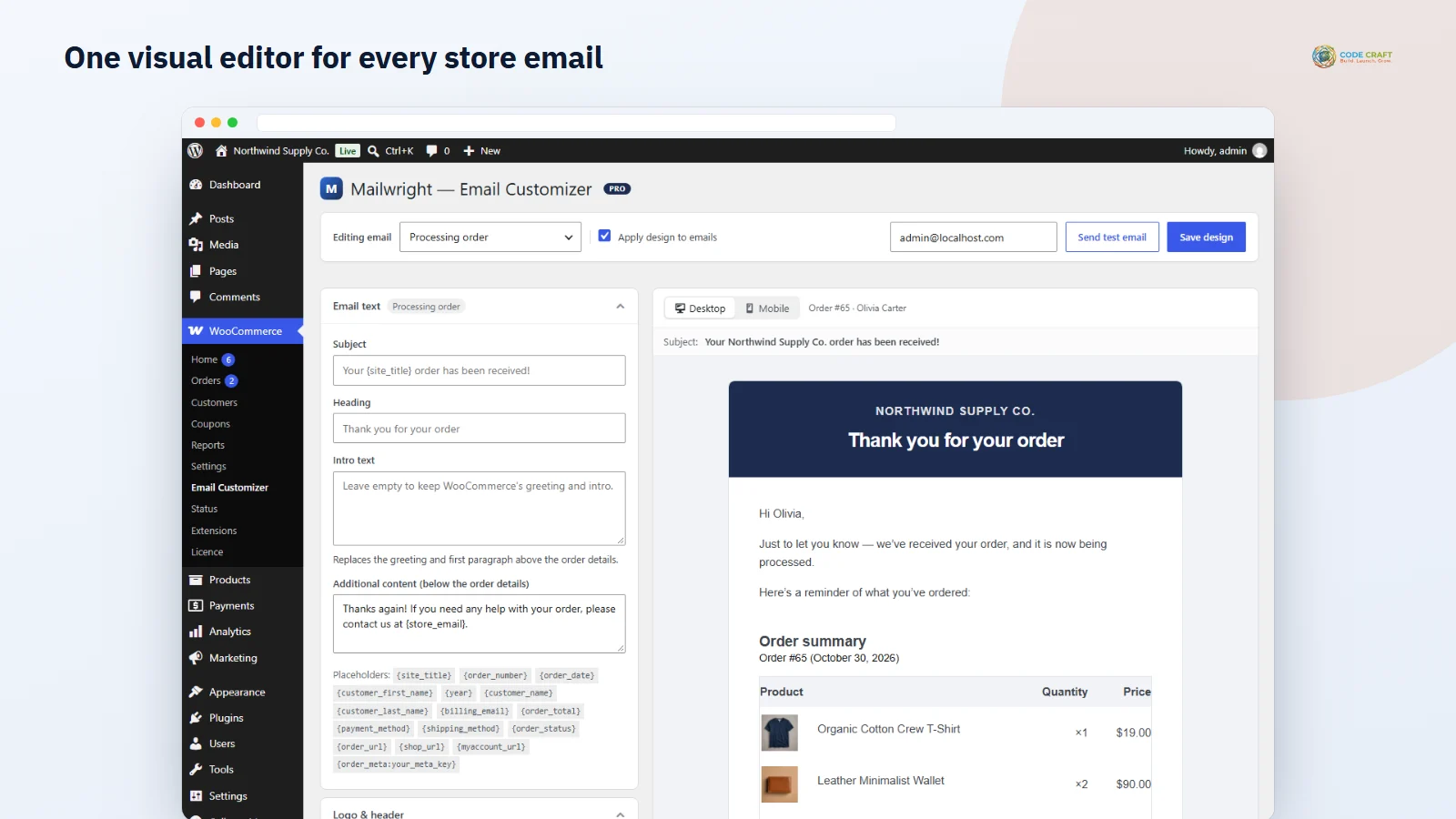
WooCommerce's default emails are plain and look the same on every store. Changing them normally means copying PHP templates into your theme. Mailwright is a WooCommerce email customizer that puts every store email in one editor: choose an email, change the logo, colours, fonts and text, and the preview beside it updates as you type — on desktop or mobile.
Rewrite the subject, heading and opening paragraph of each email and use placeholders such as {customer_first_name}, {order_number} and {site_title}, so “Thanks for your order, Olivia!” is written once and personalised every time. Footer text, link and button colours apply to every email.
Start from one of five ready-made templates, then add blocks above the order details or before the footer: a button (for example “Track your order”), recommended products picked from upsells, cross-sells or related items, text, images and dividers. A block can be limited to certain payment or shipping methods — for example bank details only on bank-transfer orders.
Mailwright changes the emails WooCommerce already sends, at the moment they are sent, with inline styles built to display well in Gmail, Outlook and phone mail apps. Turn the design off with one switch and WooCommerce's own emails come back unchanged.
Mailwright does not replace WooCommerce’s content templates. It swaps only the email header and footer for its own table-based versions and adds its styles through WooCommerce’s email-styles hook, so WooCommerce’s own inliner turns them into inline styles before sending. Mobile rules stay in a media query for the apps that support it. The intro paragraph and Pro blocks are placed around WooCommerce’s order-details section, and placeholders are filled in by WooCommerce’s own string formatting. Because only the shared header and footer change, emails added by other plugins that use WooCommerce’s standard header and footer — subscriptions, bookings or memberships, for example — pick up your logo, colours and footer too. Plain-text emails are never touched.
The top bar picks the email you are editing (grouped into emails sent to customers and to the store), switches the design on or off, sends a test of the current, even unsaved, design with “[Test]” in the subject, and saves. Email text holds the subject and heading — the same values as WooCommerce → Settings → Emails — plus the intro text and additional content. Logo & header covers the logo (40 to 400 px wide), alignment, a store-name fallback, header colours and heading size. Colours, fonts & layout sets page, email, text, link/button and border colours, one of eight email-safe fonts, text size, email width from 480 to 720 px and corner radius. The footer takes rich text with {site_title}, {site_url}, {site_address}, {store_address} and {year}. The preview is built from your most recent real order, or WooCommerce’s sample order on a new store.
Mailwright is for store owners who want their order emails to look like their brand without hiring a developer, for shops that want a “Track your order” button or a few recommended products in every completed-order email, for stores that need bank details shown only on bank-transfer orders, and for agencies who style many client stores and want to export a design from one and import it on the next.
Mailwright needs WordPress 6.4 or higher, WooCommerce 8.0 or higher (tested up to 11.2) and PHP 7.4 or higher; it was tested on WordPress 7.1, WooCommerce 11.2.1 and PHP 8.3 with WooCommerce’s newer email templates active. It declares compatibility with high-performance order storage. If your theme overrides email-header.php or email-footer.php, Mailwright’s versions are used while the design is on; other overridden templates keep working. The free plugin makes no external connections; Pro contacts coodecraft.com only to activate and check the licence. Test emails use WordPress’s wp_mail, so a host that cannot send mail needs an SMTP plugin.
The intro text can only be replaced in emails that show order details; account emails such as new account and password reset keep WooCommerce’s intro, although their subject, heading and additional content are editable. Blocks are reordered with up and down buttons, not drag and drop. Web fonts are not offered because Outlook and several mobile apps ignore them. Outlook for Windows shows square corners. We verified the HTML that WooCommerce actually sent, not every inbox app, so send yourself a test. The image, divider, product-table and social blocks, shipping-method conditions, the extra Pro placeholders, import and export, and WPML and Polylang translation are built but were not covered by the automated test. Emails designed in WooCommerce’s optional block email editor are left to WooCommerce; that combination has not been tested.
Most stores running Mailwright pair it with these. Every plugin below shares the same licence system, coding standards and support team.
Also popular with our customers: Giftlark, TrackTrail. Browse every woocommerce plugins or see our best-selling plugins. Need this built into a custom project? Our WordPress development team can help.