WooCommerce PluginDownload free version
Abandoned Cart Recovery for WooCommerce
No reviews yet
from$69.00/yr
WooCommerce shipment tracking with tracking links, a Shipped email and a Track your order page
Get a TrackTrail Pro key by email and use every Pro feature for 7 days on one site. No card needed, nothing renews automatically — when the trial ends, Pro switches off unless you choose a plan. One trial per email.
Choose monthly, 1 year or lifetime — your key and download link are emailed instantly.
Upload the zip in wp-admin. The free core works right away.
Paste it in the plugin's License tab to activate.
Pro features, updates and priority support switch on.
Add USPS and FedEx tracking numbers to an order, email the customer, connect carrier APIs, show live status on the Track your order page, import a CSV and read the delivery reports.
Download the PDF user guideThe free core is a real, working plugin — not a trial that expires. Pro unlocks the advanced modules with a licence key, and nothing you build on free is lost when you upgrade.
Everything most sites need. No account, no email required — download and install.
.zip · v1.0.0 · 0 downloads
Same plugin, every module unlocked by your licence key — plus updates and priority support.
Already bought it? Enter your key:
Or sign in — every licence you own shows up there.
| Feature | Free | Pro |
|---|---|---|
| Carrier, tracking number and ship date on any order | Included | Included |
| Tracking links for 47 carriers | Included | Included |
| Shipped order status and Order shipped email | Included | Included |
| Tracking in WooCommerce emails and My Account | Included | Included |
| Track your order page (block and shortcode) | Included | Included |
| Tracking column and bulk Shipped action | Included | Included |
| Multiple parcels per order | 1 per order | Included |
| Live status from USPS, FedEx, UPS and DHL APIs (your own keys) | Not included | Included |
| In transit, out for delivery, delivered and exception emails | Not included | Included |
| Status timeline on the tracking page and My Account | Not included | Included |
| Complete orders automatically on delivery | Not included | Included |
| CSV import, custom carriers, delivery reports, API log | Not included | Included |
| Updates and email support | Community | Included |
Upgrading is just entering a key — same plugin, same settings, nothing to reinstall or migrate.
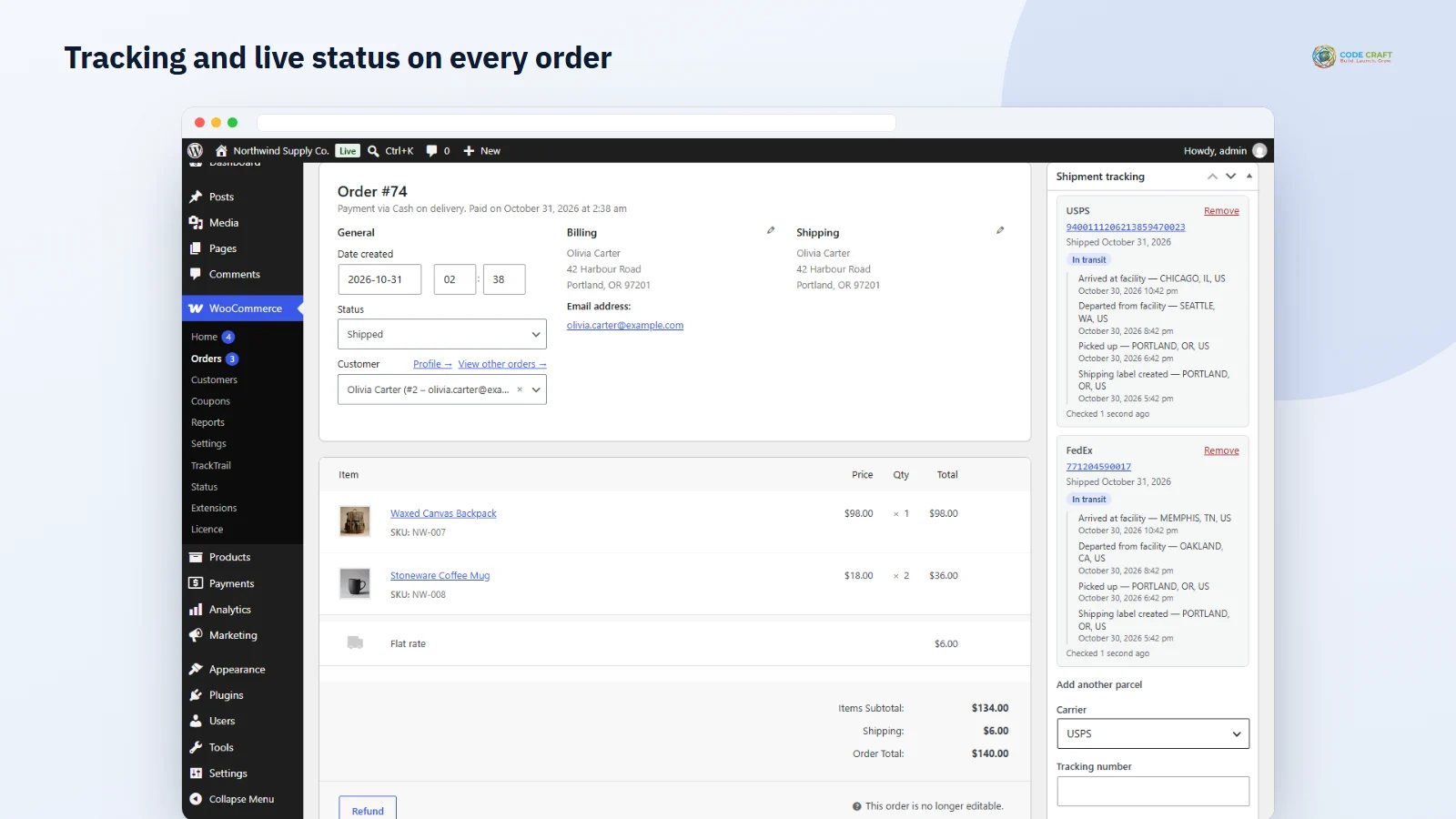
Most where-is-my-order emails happen because the customer has no tracking link. TrackTrail puts a Shipment tracking box on every WooCommerce order: choose the carrier, paste the tracking number, and the order moves to Shipped while the customer receives a Your order is on its way email with the number linked straight to the carrier's tracking page. WooCommerce shipment tracking then follows the customer everywhere — in their order emails, in My Account and on your Track your order page.
Customers enter their order number and the billing email they used at checkout. A wrong number or a wrong email always gives the same neutral message, repeated failed attempts are rate limited, and the links in your emails use the order's secret key to open the order directly. Add the page anywhere with the Track your order block or the [ttot_tracking] shortcode.
Connect your own developer accounts with USPS, FedEx, UPS and DHL — there is no TrackTrail service in between and no per-parcel fee from us. TrackTrail Pro checks open parcels in the background with WP-Cron, shows the status, a progress bar and every scan on the tracking page, and emails the customer when a parcel is in transit, out for delivery, delivered or has a delivery exception. When every parcel is delivered it can complete the order for you. Keys are stored encrypted and only ever sent to that carrier.
The Shipment tracking box sits on every order. Pick the carrier from a list grouped by region (or keep your default), paste the tracking number — spaces are stripped for you — set the ship date and click Add tracking. With Mark order Shipped and email the customer ticked, Pending, On hold and Processing orders move to the new Shipped status, which WooCommerce counts as paid, and the customer gets the Order shipped email with the number linked to the carrier and a private link to your tracking page. Remove a number or send the tracking email again from the same box without reloading the order. In the orders list a Tracking column shows the carrier and linked number, and the bulk action Change status to shipped moves many orders at once.
The Order shipped email is a real WooCommerce email you can edit or switch off under WooCommerce → Settings → Emails, and the tracking table can also be added to the Completed, Processing, Order details and Customer note emails you choose. In My Account, View order and the order received page show each tracking number, and the Orders list gets a Track button. The Track your order page is created on activation; email links open the order directly with its secret order key, while a visitor typing details must give both the order number (a leading # is fine) and the billing email. Failed lookups are limited to 10 per 15 minutes per IP address.
The General tab controls the Shipped status, whether email the customer is ticked by default, which WooCommerce emails carry the tracking table, tracking in My Account, which page is your tracking page and the delete-data option. The Carriers tab sets the default carrier and lets you tick only the carriers you use so the dropdown stays short. In Pro the General tab adds background sync, how often to check carriers (hourly, twice a day or daily, up to 25 orders per run), completing delivered orders, after how many days a parcel counts as late (default 7) and when to stop checking (default 60 days), and further tabs hold Carrier APIs, CSV import, Delivery reports and Logs.
Each order can carry several parcels, each with its own carrier, number, status and emails. CSV import takes order, carrier, tracking_number and ship_date columns separated by commas, semicolons or tabs, up to 2 MB or 2,000 rows; carriers can be names or slugs, rows already on an order are skipped so a second upload is safe, and you choose whether to mark orders Shipped and email customers. Custom carriers use a link pattern with {tracking_number} and {postcode} placeholders. Delivery reports cover 30, 90 or 365 days with parcels shipped, delivered, on the way, late and exceptions, average days to deliver per carrier, and lists linking to the orders. The Logs tab keeps the last 200 carrier problems for admins; customers never see them.
TrackTrail fits US stores shipping with USPS, FedEx and UPS, UK, European and Australian shops using their national posts and couriers, Indian stores sending with Delhivery, Blue Dart, India Post or Shiprocket, and any team that wants fewer where-is-my-order emails without paying a tracking service per parcel. The free edition covers one tracking number per order with links and the Shipped email; Pro is for stores that split orders, ship in volume or want customers told about every step.
TrackTrail needs WordPress 6.4 or newer, PHP 7.4 or newer and WooCommerce 8.0 or newer. It was tested on WordPress 7.1, WooCommerce 11.2 and PHP 8.3 with the Twenty Twenty-Five block theme, once on the classic posts order storage and once with High-Performance Order Storage. If a monthly or yearly licence ends, background sync stops and the Pro screens lock, but every parcel, status, key and custom carrier is kept and the free features keep working. The free plugin makes no outside calls; Pro calls coodecraft.com for the licence and the carriers whose keys you enter.
Ship an order in several boxes with different carriers, import hundreds of tracking numbers from your shipping software in one CSV, add your local courier with its own tracking-link pattern, and see delivery reports: average days to deliver per carrier, late parcels and exceptions to follow up before the customer asks.
Most stores running TrackTrail pair it with these. Every plugin below shares the same licence system, coding standards and support team.