WooCommerce PluginDownload free version
Abandoned Cart Recovery for WooCommerce
No reviews yet
from$69.00/yr
WooCommerce gift cards with PDF vouchers, QR codes and partial redemption
Get a Giftlark Pro key by email and use every Pro feature for 7 days on one site. No card needed, nothing renews automatically — when the trial ends, Pro switches off unless you choose a plan. One trial per email.
Choose monthly, 1 year or lifetime — your key and download link are emailed instantly.
Upload the zip in wp-admin. The free core works right away.
Paste it in the plugin's License tab to activate.
Pro features, updates and priority support switch on.
Create a gift card product, design the PDF voucher, buy a $50 card, then redeem it at checkout and in store while the remaining balance stays on the card.
Download the PDF user guideThe free core is a real, working plugin — not a trial that expires. Pro unlocks the advanced modules with a licence key, and nothing you build on free is lost when you upgrade.
Everything most sites need. No account, no email required — download and install.
.zip · v1.0.0 · 0 downloads
Same plugin, every module unlocked by your licence key — plus updates and priority support.
Already bought it? Enter your key:
Or sign in — every licence you own shows up there.
| Feature | Free | Pro |
|---|---|---|
| Gift card product with fixed amounts | Included | Included |
| Recipient name, email and personal message | Included | Included |
| Unique code issued and emailed when paid | Included | Included |
| Redeem in the coupon field (block checkout too) | Included | Included |
| Admin list, card history, balance adjustment | Included | Included |
| Code-guessing protection | Included | Included |
| Partial redemption (balance kept for later orders) | Not included | Included |
| Printable PDF voucher with QR code | Not included | Included |
| Redeem in store screen | Not included | Included |
| Custom amount chosen by the shopper | Not included | Included |
| Scheduled delivery date and resend | Not included | Included |
| Expiry rules and reminder emails | Not included | Included |
| Bulk generate cards | Not included | Included |
| CSV import and export | Not included | Included |
| Updates and email support | Community | Included |
Upgrading is just entering a key — same plugin, same settings, nothing to reinstall or migrate.
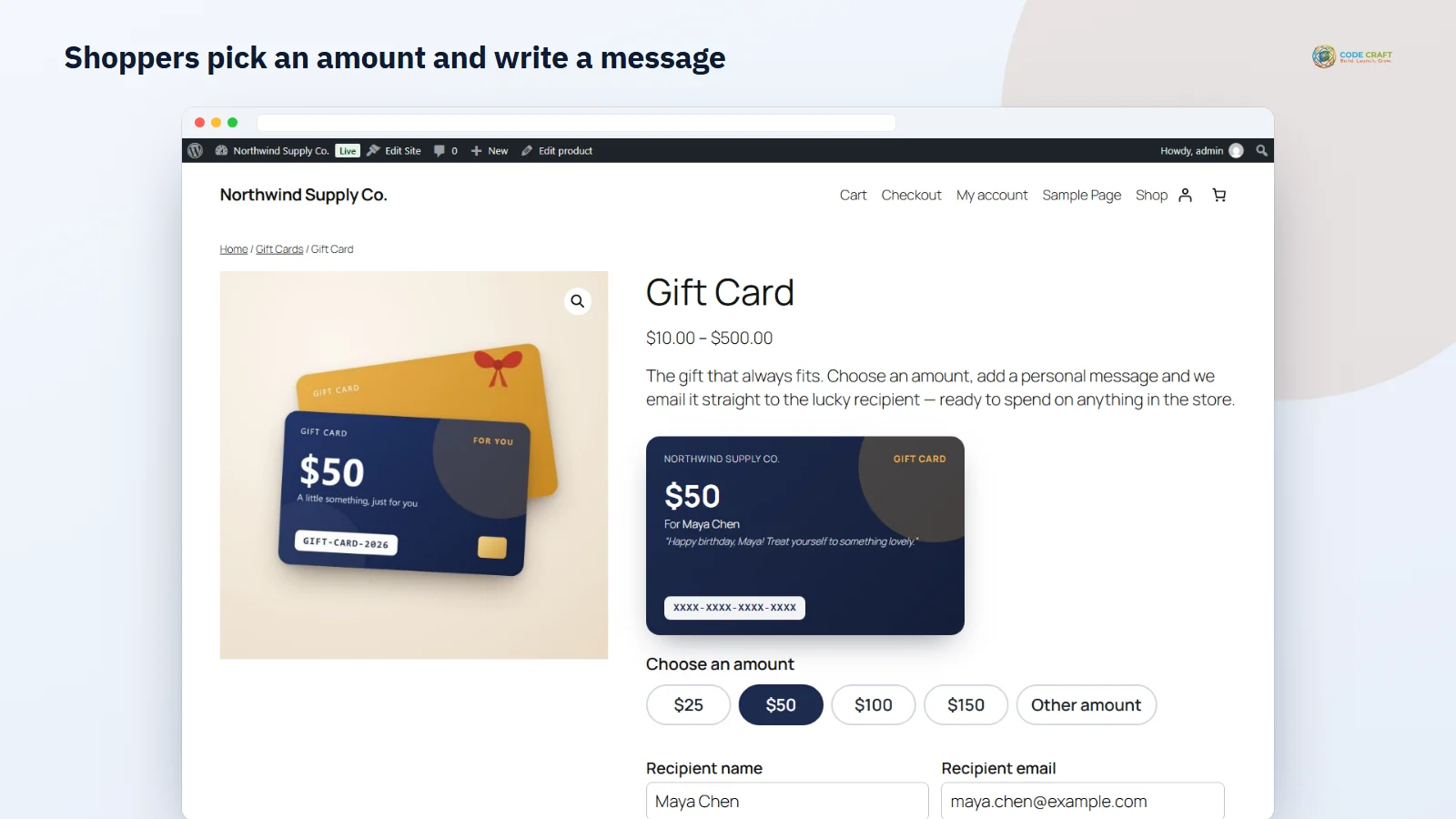
Gift cards bring in new customers and cash before the sale. Giftlark adds WooCommerce gift cards as their own product type. Choose Gift card in the product editor, type the amounts you sell separated by commas (for example 25, 50, 100, 150) and publish. Gift card products are always virtual and not taxable, so no shipping is asked for, and the shop shows the range of amounts you offer. On the product page the shopper picks an amount, enters the recipient's name and email (leaving the email empty sends the card to the buyer), adds their own name and a message of up to 300 characters, and watches a live preview of the card. Each card goes into the cart as its own line showing who it is for.
Codes are only created once an order is really paid. By default that is when the order reaches Processing; you can switch it to Completed. Pending, on-hold and failed orders never get a code. Cash-on-delivery orders that contain gift cards are put on hold until you mark them as paid, so nobody receives a spendable code before you have the money. The recipient then gets the WooCommerce email "Gift card received", which you can edit or switch off under WooCommerce → Settings → Emails, and which a theme can override by copying the template. The issued code and its live balance also appear under the gift card line in the order screen.
There is no extra field to learn: the recipient types the code into the normal coupon box (Add coupons in the block checkout, or the classic cart and checkout). Behind the scenes a valid code becomes a fixed-cart discount worth the card's live balance. The discount is never larger than the balance or the products in the cart, several cards can be combined on one order, and a gift card can never be used to buy another gift card. The value is deducted when the order is placed for real (on hold, processing or completed) and put back automatically if that order is cancelled, refunded or fails. Balance updates are locked, so two orders using the same card at once cannot spend it twice.
Gift Cards → All gift cards shows totals for cards issued, value issued, outstanding balance and value redeemed, followed by every card with its balance, original value, status, recipient, order, created date and expiry. Filter by Active, Used up, Expired or Disabled, or search by code, email or order number. Opening a card shows its full history — issue, every redemption online or in store, returns, manual adjustments and emails sent — and lets you set a new balance with a reason, disable or re-enable the card, and preview the email exactly as the recipient sees it.
The Voucher designer builds an A4 PDF with a cut-out card: pick the Classic, Modern or Minimal template, a main and accent colour, a PNG or JPEG logo (the store name is printed without one), a heading and your terms, and choose whether to print a QR code and attach the PDF to the gift card email. Buyers can also download the voucher from their order in My account through a private link, so they can print it and hand it over. In the shop, a Shop Manager or Administrator who is logged in scans the QR code with a phone or tablet; it opens Redeem in store with the code filled in, shows the balance, status and expiry, and deducts the amount spent with an optional note such as a receipt number. The deduction is logged in the card history with the staff member's name.
Let shoppers type their own amount between a minimum and maximum you set, and let them pick a delivery date from today up to a year ahead so the card lands on a birthday; scheduled sends run through WooCommerce's Action Scheduler and any card can be emailed again with Resend. Generate & import creates up to 500 cards in one go with an optional recipient, message and expiry — useful for prizes, refunds, corporate gifts or cards sold at the till — and can email them straight away. CSV import accepts code, amount, balance, recipient, expiry and message columns (up to 2 MB or 5,000 rows) so you can move cards from another system with their opening balance; codes that already exist as a card or WooCommerce coupon are skipped and reported. Export covers all cards or one status. Expiry rules set how many months new cards last, and a daily job emails recipients a set number of days before a card with balance expires.
It suits WooCommerce shops that want to sell gift cards for holidays and birthdays without a separate service, stores with a physical counter that want one balance for online and in-store spending, and teams that hand out store credit for returns, prizes or corporate orders. The free edition is enough to sell single-use digital cards; Pro is for shops that need balances to carry over, printed vouchers and bulk work.
Giftlark needs WordPress 6.4 or newer, PHP 7.4 or newer and WooCommerce 8.8 or newer, because it relies on a coupon filter added in 8.8. It was tested on WordPress 7.1 with WooCommerce 11.2 on PHP 8.3, with High-Performance Order Storage on and every test order placed through the block checkout. Coupons must be enabled in WooCommerce. The free plugin makes no outside connections; Pro only contacts coodecraft.com to activate and check the licence.
Most stores running Giftlark pair it with these. Every plugin below shares the same licence system, coding standards and support team.