
Shri Mandir — Temple & Trust Website
A temple and religious trust website with aarti timings, festivals, seva booking and donation details
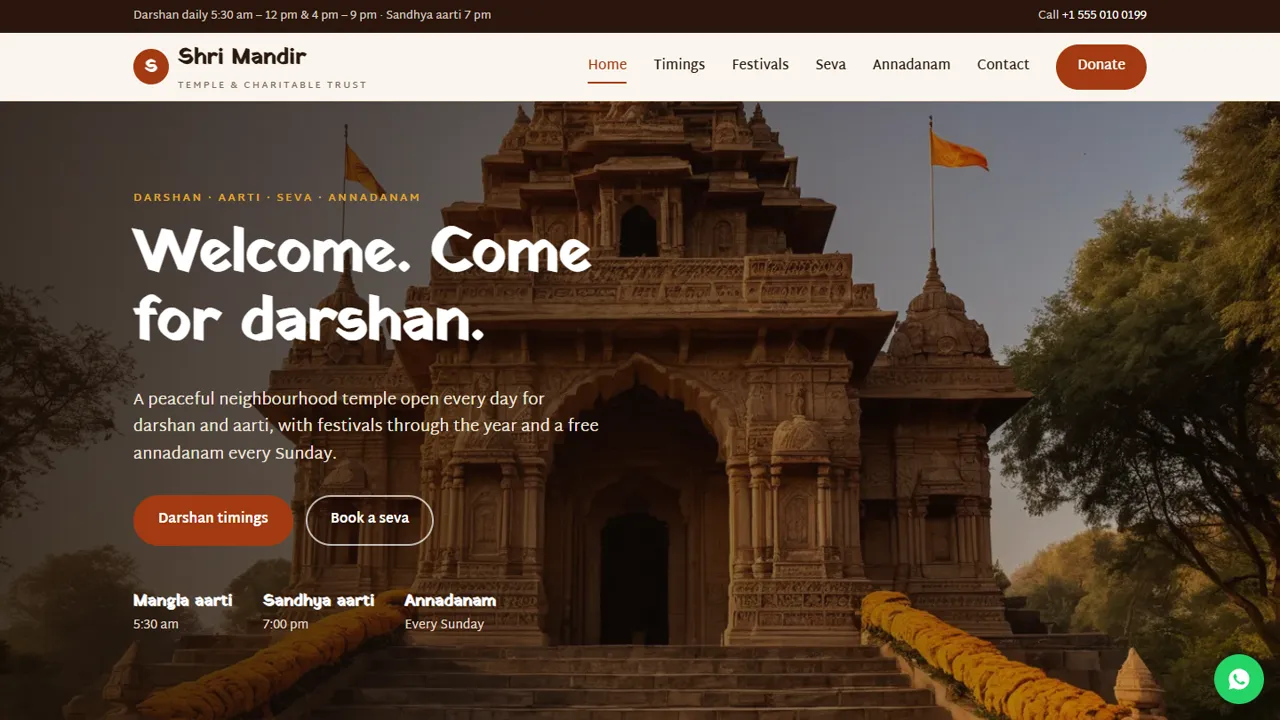
Everything included
- Darshan and aarti timetable for summer and winter
- Festival calendar and visitor information
- Seva and pooja list with a booking request form
- Donations page with bank and UPI placeholders
- Annadanam and community work page
- WhatsApp and click-to-call on every page
- HinduTemple schema, titles and meta descriptions
- Admin panel for your details, currency, chat and enquiries
From order to a live website
- 1
Choose a package
Code only, We set it up, or Customised. All prices are one-time.
- 2
Pay securely
Your download link is emailed once payment is confirmed and also appears in My Account.
- 3
We contact you
For setup packages we email within one business day for your cPanel / hosting login and domain.
- 4
Live on your domain
Your temple site runs on your own hosting, with seva requests arriving in the office inbox.
What devotees ask the office every day
When is the evening aarti? Is the temple open in the afternoon? What should I wear? Shri Mandir answers these on the website: a timetable for summer and winter, visitor information, and a festival calendar that you update each year.
- Darshan and aarti timetable
- Dress, footwear, prasad and photography rules
- Festival calendar with what happens
- Elderly access and parking
Seva and pooja requests
Devotees choose a seva or pooja, a date and a time, and add names and gotra for the sankalp or an address for a pooja at home. The request reaches the office by email and the office calls to confirm. Offerings are paid at the counter.
- Seva list with suggested offerings
- Booking request form
- Sankalp details in the notes box
- No online payments to manage
Donations, shown clearly and carefully
The donations page shows the trust's bank account and UPI ID, how to ask for a receipt and what offerings support. It never takes money on the website, and the template tells you to mention 80G only if the trust is registered under Section 80G.
- Bank transfer and UPI placeholders
- Receipt request steps
- Where donations go
- 80G wording only if registered
Who it is for
Shri Mandir is meant for a neighbourhood temple, a mandir samiti or a small religious and charitable trust that already runs daily pooja, festivals and some community service, and gets the same questions on the office phone every day. The pages are written in a calm, respectful tone that a committee can adapt to its own deity, traditions and language without rebuilding the site.
- Neighbourhood temples and mandir committees
- Religious and charitable trusts
- Temples that run an annadanam or bhandara
- Committees that want timings online without an app
The pages, one by one
The home page has Darshan timings and Book a seva buttons, today's aarti times, cards for seva, festivals and annadanam, and a 'before you come' band on dress, footwear and prasad. Timings shows a summer and winter timetable for each aarti and darshan, with notes such as the Monday abhishek, then six visitor cards: dress code, footwear and bags, prasad, photography, elderly and wheelchair access, and parking. Festivals lists the year's main festivals with the usual month and what happens, plus a volunteer section. Seva lists daily seva, pooja and path, sanskar ceremonies and annadanam shares in tabs, beside the booking form. Community describes the Sunday meal and other service, and Donate shows the bank and UPI details.
- Home, Timings, Festivals, Seva, Annadanam, Donate and Contact
- Contact page with a map and message form
- HinduTemple schema markup for search
- Festival dates are a sample to update each year
Seva requests in the trust's admin
Every seva request is emailed to the temple office and also kept in the admin's Enquiries inbox with the seva chosen, the date, the time, the devotee's phone and the sankalp notes, so the office volunteer on duty can see pending requests and download them as a spreadsheet. In the admin the trust sets its name, logo, phone, WhatsApp, address, map and opening hours once, and they change on every page. An announcement bar suits notices such as changed festival timings or a closure for an eclipse.
- Seva requests saved and emailed, CSV download
- WhatsApp button that opens with a seva question
- Announcement bar for festival and closure notices
- Maintenance mode while the committee edits pages
Setup, hosting and honest limits
The zip contains the HTML pages, stylesheet, script, photos, the PHP form handler and config.php, the admin panel and an .htaccess file, with an installation guide and a README that shows where the timetable, festival list, seva list and donation details sit in the HTML. It runs on any cPanel or shared hosting with PHP 7.4 or later, with no database to create. The website does not collect donations or seva payments, give 80G certificates, keep a donor register, publish accounts or live-stream aarti; devotees pay at the counter or by bank transfer and UPI, and the office issues receipts by hand.
- Replace every bank and UPI placeholder before going live
- Timetable rows and seva amounts edited in plain HTML
- No WordPress, plugins or monthly fee
- Online payment is not part of this template
More ready-made websites
Built by the same team, with the same setup service and support.
Browse every ready-made website, or compare our custom website packages if you need a site designed from scratch. Want more guests to find you on Google Maps? See our local SEO service, or talk to our web design team.



