
Royal Orchid — Banquet Hall Website
A ready-made website for a banquet hall, marriage lawn or event venue, with capacities, per-plate packages and date enquiries
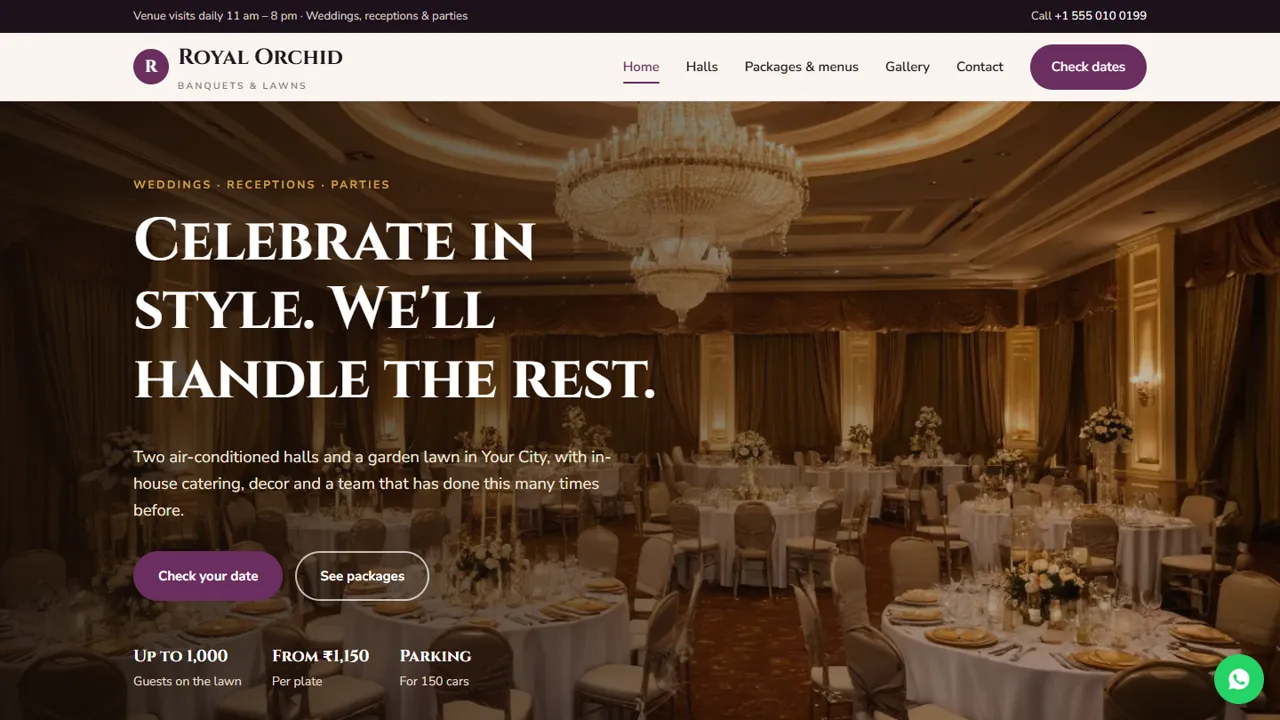
Everything included
- Hall cards with seated and floating capacity
- Per-plate packages and an add-on price list
- Event enquiry form: event type, date, session, guests
- Home, halls, packages, gallery, enquiry and contact pages
- WhatsApp and click-to-call on every page
- EventVenue schema with maximum capacity
- Admin panel for your details, currency, chat and enquiries
- Colours and fonts changed from one CSS block
From order to a live website
- 1
Choose a package
Code only, We set it up, or Customised. All prices are one-time.
- 2
Pay securely
Your download link is emailed once payment is confirmed and also appears in My Account.
- 3
We contact you
For setup packages we email within one business day for your cPanel / hosting login and domain.
- 4
Live on your domain
Your venue site runs on your own hosting, with event enquiries arriving in your inbox.
Answer the first questions every family asks
Before they visit, families want to know how many guests each hall holds, what the food costs per plate and what the venue looks like decorated. Royal Orchid answers each on its own page.
- Halls with seated and floating capacity
- Per-plate packages with menus
- Decor and add-on price list
- Photo gallery of setups
Turn date checks into venue visits
The enquiry form asks for the event type, date, lunch or dinner session and expected guests. The request arrives by email and you reply with availability and invite the family to visit. Nothing is booked or charged on the website.
- Event type, date and session
- Expected guest count
- Notes for hall, menu and decor
- Spam trap and input checks
Easy to keep up to date
Halls are simple cards, packages are plan cards and add-ons are a price list, so changing a per-plate rate takes a minute in any text editor. EventVenue schema, titles and descriptions are ready for Google.
- Hall cards you can copy and edit
- Plan cards for packages
- EventVenue schema markup
- Colours and fonts in one CSS block
The pages, one by one
The home page opens with Check your date and See packages buttons, four short points on your spaces, catering, decor, power and parking, the halls with their guest counts, a food section about your kitchen and menu tastings, and a closing band that sends families to the enquiry form or WhatsApp. The halls page gives each space a full card with seated and floating capacity, a short description and its facilities, then lists what every booking includes, such as power backup, parking, a bridal room and an event manager, with a note that capacity depends on layout and decor. The packages page shows three per-plate buffet plans with what each menu includes, a note on GST and peak-date rates, and a tabbed price list of decor, extras and rooms. The gallery shows halls, stage, mehendi, lawn, entrance, buffet and corporate setups, and the contact page has your address, a map and a short message form.
- Home, Halls, Packages, Gallery
- Event enquiry page
- Contact page with map
- Page-not-found page
What the enquiry form asks
Families give their name and phone, an optional email, the event type (wedding, reception, engagement, sangeet, mehendi or haldi, birthday, anniversary, corporate or a religious or family function), the event date, the session (lunch, dinner or full day), the expected number of guests and any notes about the hall, package, veg or non-veg food and decor ideas. The page says plainly that this is an enquiry and that a date is held only after you confirm it and the booking advance is paid at the venue.
- Event type grouped into weddings and other events
- Lunch, dinner or full-day session
- Guest count drop-down
- Clear enquiry-not-booking note
Your admin panel for the sales desk
At your-domain.com/admin/ you create a login and enter the venue name, logo, phone, WhatsApp number, email, address, map and visiting hours once; they replace the demo details on every page. Every date check and contact message is emailed to the address you set and also kept in the Enquiries inbox, so the person handling bookings can see who asked about which date and download the list as a CSV. You can show an announcement bar for a season offer or a closed day, switch on the WhatsApp button with your own opening message, add live chat or Google Analytics, and set SMTP if your host's mail is unreliable. Halls, menus and prices stay in the HTML files.
- Date enquiries in your inbox and the admin
- CSV download of all enquiries
- Announcement bar for wedding-season notes
- WhatsApp button with your message
What you receive and what it needs
The zip contains the seven HTML pages, the stylesheet and scripts, the PHP form handler and admin, the photos, an .htaccess file, a README and an illustrated installation guide. It runs on any cPanel or shared hosting with PHP 7.4 or later. Upload it, create a mailbox, set the receiving address in config.php, paste your licence key and send a test enquiry.
- No WordPress or Node.js
- SQLite built in, MySQL optional
- Your own domain and hosting
- Setup and customised packages available
Honest limits
There is no availability calendar, date blocking, online advance payment or invoice on the site, and families cannot pick a menu dish by dish online. The home page carries three sample testimonials and the demo capacities, parking and prices are examples: replace them with your own, or remove the testimonials, before you go live.
- No live calendar or online booking
- No online payment
- Sample testimonials to replace or remove
- Prices and capacities are demo values
More ready-made websites
Built by the same team, with the same setup service and support.
Browse every ready-made website, or compare our custom website packages if you need a site designed from scratch. Want more guests to find you on Google Maps? See our local SEO service, or talk to our web design team.



