
NestIn — PG & Hostel Website
A ready-made PG and hostel website with room types, monthly rent, amenities, house rules and visit booking
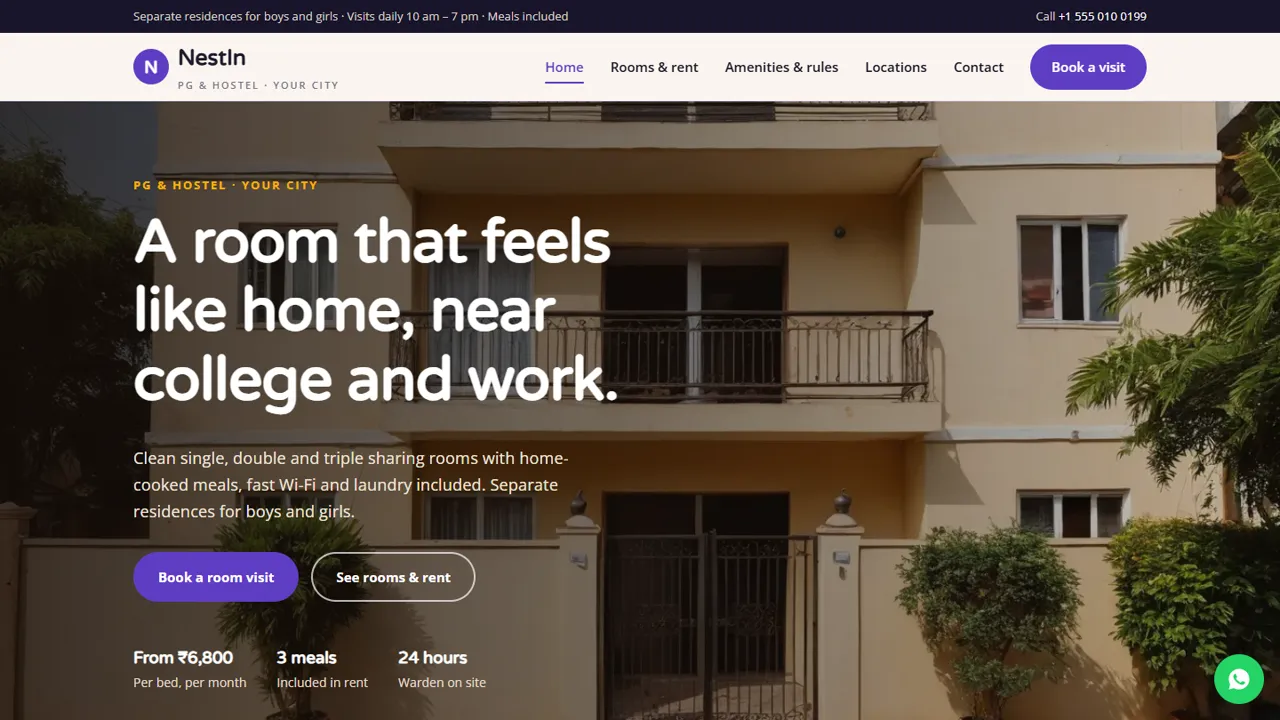
Everything included
- Single, double and triple sharing rooms with monthly rent
- Boys' and girls' residence tabs as placeholders
- Amenities page with meals, Wi-Fi and laundry
- Meal timings and sample house rules
- Locations page for each residence
- Visit booking form with room type, date and time
- Hostel schema, WhatsApp and click-to-call
- Admin panel for your details, currency, chat and enquiries
From order to a live website
- 1
Choose a package
Code only, We set it up, or Customised. All prices are one-time.
- 2
Pay securely
Your download link is emailed once payment is confirmed and also appears in My Account.
- 3
We contact you
For setup packages we email within one business day for your cPanel / hosting login and domain.
- 4
Live on your domain
Your PG site runs on your own hosting, with visit requests arriving in your inbox.
Answer the questions every parent and tenant asks
Before visiting a PG, people want the rent, what it includes, the food, the rules and how safe it is. NestIn puts rooms and rent, amenities and rules, and locations on their own pages, with a Book a visit button on every screen.
- Room cards with rent and inclusions
- Meal timings and amenities
- House rules section
- Residence locations with nearby places
Boys, girls or co-living: your choice
Rooms are shown in Boys' residence and Girls' residence tabs, and each location has its own placeholder block. Run one residence or several: delete or copy a block and its tab, and the visit form's drop-down follows the same pattern.
- Residence tabs on the rooms page
- Placeholder address blocks
- Visit form grouped by residence
- Step-by-step move-in explainer
Simple to run and update
Rents are plain text in simple HTML cards, so a price change takes a minute. The house rules and rent notes are clearly marked to replace, and Hostel schema, titles and descriptions are ready for Google.
- Rent in editable cards
- Sample house rules to replace
- Hostel schema markup
- Colours and fonts in one CSS block
Every page, and what a visitor does there
The home page opens with a photo of the building, a Book a room visit button and a short line on starting rent, then four cards for meals, Wi-Fi, laundry and security, the three room types and a block for each residence. Rooms & rent repeats the room cards inside each residence tab, with what each room includes and a rent note that explains the deposit, notice period and metered AC electricity, followed by four steps from visit to move-in. Amenities & rules lists what the rent covers, the daily meal timings and the house rules. Locations gives each residence an address placeholder, nearby colleges, offices and transport, and a line on how to check which beds are free. Contact has your address, a map, and a short message form.
- Home: rooms, residences and a visit call to action
- Rooms & rent: tabs per residence and the move-in steps
- Amenities & rules: inclusions, meal times, house rules
- Locations, Book a visit, Contact and a 404 page
The visit form, field by field
Most PG bookings start with a visit, so the form asks for exactly what the warden needs to plan one: the visitor's name and phone number, an optional email, the residence and room type (grouped by residence, with options for 'not sure' and a meals-only enquiry), a visit date and a time slot during visiting hours, how many people are moving in, and a free-text note for the move-in date, college or office, AC preference and food choices. The page says clearly that no payment is taken on the website and that you confirm the visit by phone or WhatsApp. Beside the form, a short list tells people to bring photo ID, a guardian or office contact and two photos if they want to reserve a bed.
- Residence and room type drop-down
- Visit date, time and number of people
- No payment taken on the site
- What to bring to reserve a bed
Your admin panel for the PG
Open /admin/ on your domain to set the PG's name, logo, warden or office phone, WhatsApp number, email, address, map and visiting hours; they replace the demo details on every page. Visit requests and contact messages are emailed to you and also saved in the Enquiries inbox, so a request is not lost if an email goes to spam, and you can download them as a CSV to follow up with families. From the same panel you can switch on the floating WhatsApp button with a ready message such as asking whether a bed is free, add live chat or Google Analytics, show an announcement bar for 'beds available from next month', and turn on maintenance mode while you update rents.
- Visit requests in the Enquiries inbox and your email
- CSV download of enquiries
- WhatsApp button with your own message
- Announcement bar for vacancies
What you get and what you need
The zip holds the HTML pages, stylesheet, JavaScript, the PHP form handler, config.php, the admin panel, sample photos, an .htaccess file, a README and an illustrated installation guide. You need any cPanel or shared hosting with PHP 7.4 or later and your own domain. Upload, extract, set your email in config.php, create your admin login and paste your licence key to switch on the forms.
- Upload with cPanel File Manager
- SQLite built in, nothing to set up
- PHP mail() or your own SMTP
- No WordPress or Node.js
What it does not do
NestIn is an information and enquiry site, not a property-management system. There is no live bed availability, no online rent or deposit payment, no resident login, no attendance or mess records and no document upload. People ask which beds are free on the phone or WhatsApp, and you handle agreements, police verification and payments the way you do today.
- No bed availability tracking
- No online rent or deposit payment
- No resident accounts or records
More ready-made websites
Built by the same team, with the same setup service and support.
Browse every ready-made website, or compare our custom website packages if you need a site designed from scratch. Want more guests to find you on Google Maps? See our local SEO service, or talk to our web design team.



