
Focus — Study Library Website
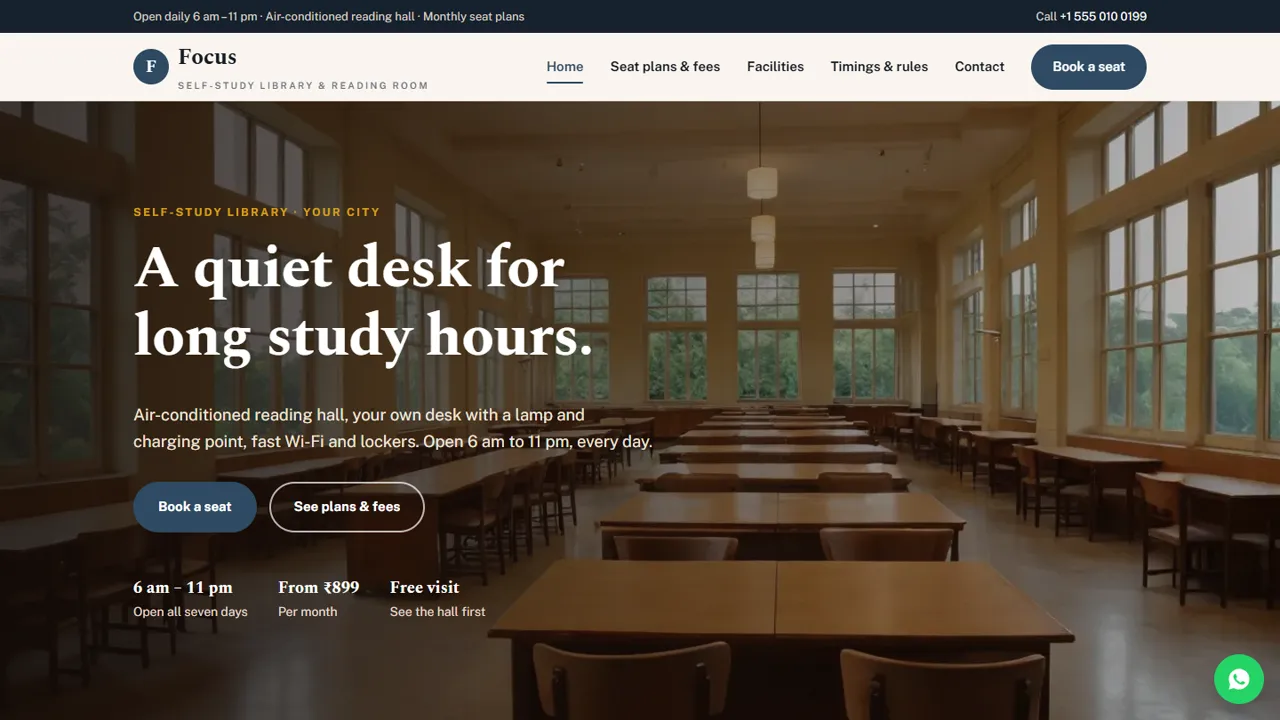
A ready-made website for a self-study library or reading room, with seat plans, facilities, timings and seat booking
Everything included
- Seat plan cards for half-day, full-day and reserved seats
- Passes and add-ons price list with tabs
- Facilities page with photo gallery
- Shift timings table and house rules
- Seat booking and free visit form
- Library schema, titles and meta descriptions
- Admin panel for your details, currency, chat and enquiries
- Colours and fonts changed from one CSS block
From order to a live website
- 1
Choose a package
Code only, We set it up, or Customised. All prices are one-time.
- 2
Pay securely
Your download link is emailed once payment is confirmed and also appears in My Account.
- 3
We contact you
For setup packages we email within one business day for your cPanel / hosting login and domain.
- 4
Live on your domain
Your library site runs on your own hosting, with seat requests arriving in your inbox.
What students check before they join
Students comparing reading rooms ask the same questions: how much a seat costs, which hours they can study, whether there is AC, Wi-Fi and a locker, and how quiet it really is. Focus answers each one clearly, with a call to book a seat or a free visit on every page.
- Home page with plans and key facilities
- Seat plan cards with monthly fees
- Facilities page with photos
- Timings table and house rules
Turn visits into seat bookings
The booking form asks for the plan, the day the student wants to visit or start, a preferred time and any notes, such as the exam they are preparing for or whether they need a locker. You confirm availability by phone or WhatsApp. Students who prefer to ask first can tap WhatsApp or call from any page.
- Plan choice grouped by monthly plans and short passes
- Preferred visit or start date and time
- Notes for exam and locker needs
- Spam trap and input checks
Rules and fees, stated plainly
A quiet hall depends on clear rules, and trust depends on clear fees. Focus has a house rules section, a note that fees are indicative and how payment works, and no reviews, ratings or result claims for you to remove before going live.
- House rules as simple cards
- Fee note for taxes and payment
- No sample reviews or result claims
- Plain HTML you can edit in any text editor
Easy to keep up to date
Plans are simple cards, passes are a price list and timings are a plain HTML table, so changing a fee or a shift takes a minute. Colours and fonts are set in one place, and Library schema, titles and descriptions are ready for Google.
- Plan cards easy to copy
- Timings as a simple table
- Library schema markup
- Colours and fonts in one CSS block
The pages, one by one
The home page opens with your opening hours, the lowest monthly fee and a free visit offer, then four facility cards (silent hall, personal desk, Wi-Fi and AC, lockers and CCTV), a 'why students study here' block, the plan cards, the shift timings with your address and a call to book. The plans page repeats the plan cards with a fee note on taxes and paying at the front desk, then tabs for short passes (day, weekly and exam-month) and add-ons such as a locker and its key deposit, and four steps from booking a visit to taking a desk. The facilities page has eight cards, from the AC hall and charging points to RO water, power backup and separate washrooms, a break-area block and a photo gallery. The timings page is a table of every shift, the reserved seat and front-desk hours, with six house-rule cards. Contact has a map and a message form, and a 404 page catches broken links.
- Home, Plans, Facilities, Timings & rules, Book, Contact and 404
- Passes and add-ons in a tabbed price list
- Joining steps: ID proof and a passport photo
- WhatsApp button with a seat-enquiry message
Seat requests in your admin panel
Every seat request and contact message is emailed to the desk address in config.php and saved in the admin's Enquiries inbox at /admin/, so the front desk can check new requests each morning and download them as CSV. In the admin you set the library name, logo, phone, WhatsApp, address, map, opening hours, social links and colours, and they update every page. The announcement bar is useful for 'seats open for the next batch' or festival timings, and you can add live chat, Google Analytics, a cookie notice or maintenance mode from their own screens.
- Seat requests by email and in the admin
- CSV download of every enquiry
- Announcement bar for seat openings and holiday hours
What is in the zip and what it needs
The zip holds seven HTML pages, the stylesheet and JavaScript, the PHP form handler and admin panel, photos, an .htaccess file, a README and an installation guide. Upload it to public_html in cPanel, set your email in config.php, create your admin login, paste your licence key and send a test request. It needs only shared hosting with PHP 7.4 or later. The README shows where the plan cards, passes, timings table, rules and the booking drop-down live, so the form always matches your plans.
- Plain HTML, no page builder
- Built-in SQLite, nothing to install
- Optional setup on your hosting
More ready-made websites
Built by the same team, with the same setup service and support.
Browse every ready-made website, or compare our custom website packages if you need a site designed from scratch. Want more guests to find you on Google Maps? See our local SEO service, or talk to our web design team.



