
PayPal Payments Add-on for Code Craft Store (Laravel)
Take PayPal payments in the Laravel store with the PayPal Orders v2 API and server-side capture
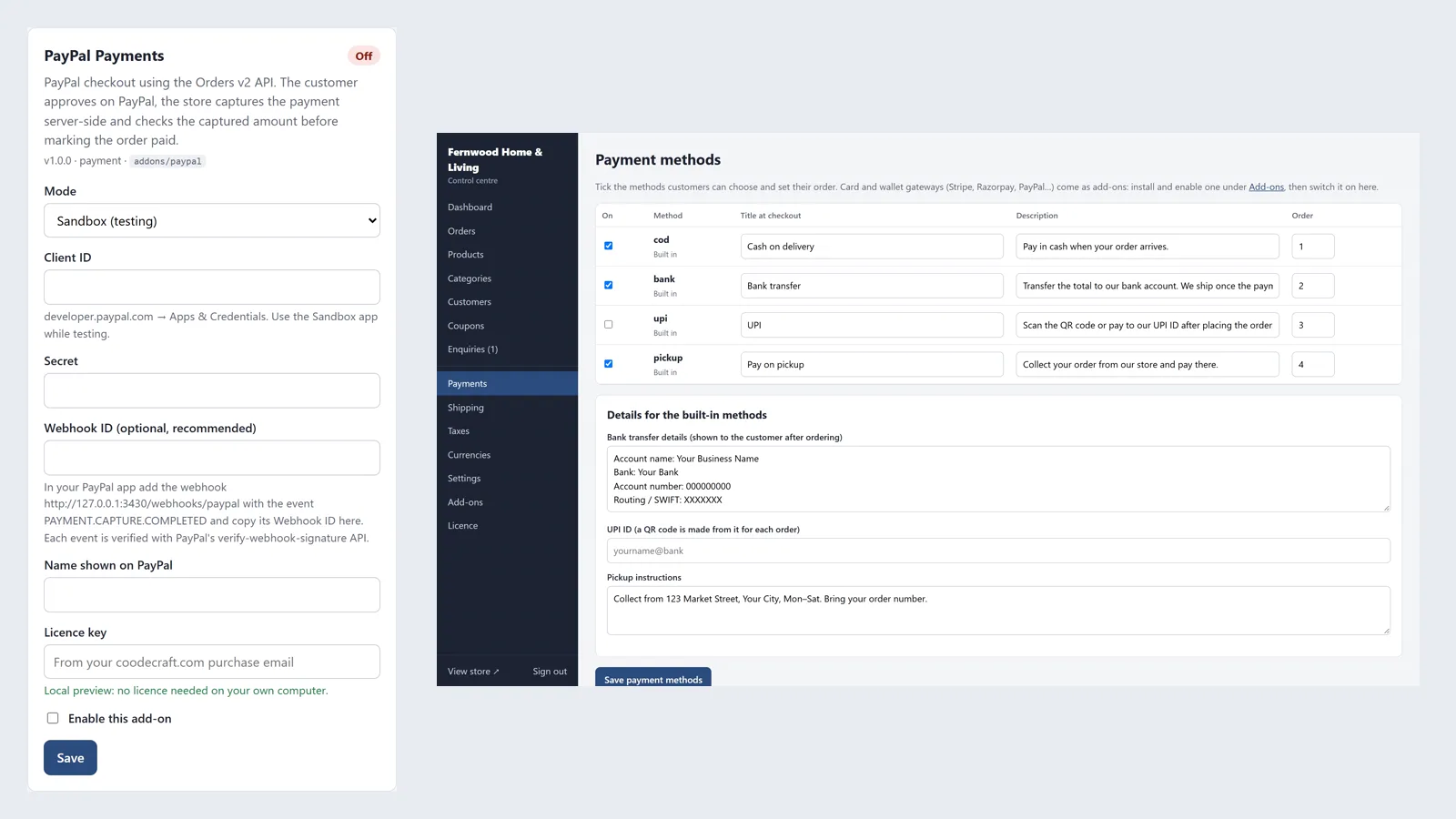
Everything included
- PayPal Orders v2 with server-side capture
- Captured amount and currency checked
- Webhooks verified with PayPal's API
- Sandbox and live modes
- Request ids to avoid duplicate orders
- Settings and licence key in Admin → Add-ons
From order to a live website
- 1
Buy the add-on
One-time price. Your download link and licence key arrive by email and in My Account.
- 2
Drop it in
Upload the folder to addons/ and enable it in the admin.
- 3
Configure
Pick PayPal at checkout, approve the payment on PayPal and come back; the store captures the payment and marks the order paid when the amount matches.
What it does
Adds PayPal as a payment method to Code Craft Store: Laravel Ecommerce. The add-on creates a PayPal order (Orders v2, intent CAPTURE) for the order total, sends the shopper to PayPal to approve it, then captures the payment from the server and checks the captured amount and currency before marking the order paid. An optional webhook is used only after PayPal's verify-webhook-signature API confirms it. Sandbox and live modes. You need your own PayPal business account. It follows PayPal's Orders v2 documentation and was tested against mocked PayPal responses, not with real payments.
- PayPal Orders v2 with server-side capture
- Captured amount and currency checked
- Webhooks verified with PayPal's API
- Sandbox and live modes
Requires Code Craft Store for Laravel
This is an add-on for Code Craft Store: Laravel Ecommerce, sold separately. Upload its folder to the store's addons/ folder and configure it in Admin → Add-ons; no Composer or code changes needed. Each add-on has its own licence key.
- Works with Code Craft Store for Laravel 1.0 or later
- Installed in minutes on cPanel, Hostinger or a VPS
- Its own settings card in the admin
Who needs it and what you need first
It is for shops running Code Craft Store: Laravel Ecommerce that sell abroad and want to accept PayPal, where shoppers pay with their PayPal balance or a card through PayPal. You need the store (1.0 or later) on PHP 8.3 and a PayPal business account with a REST app on developer.paypal.com. The webhook is optional but recommended and needs your store on HTTPS. The add-on uses Laravel's built-in HTTP client, so there is nothing to install with Composer.
- PayPal business account and REST app
- Store 1.0+, PHP 8.3+
- HTTPS domain if you use the webhook
Setting it up in PayPal and in your admin
On developer.paypal.com open Apps & Credentials, create an app (Sandbox while you test) and copy its Client ID and Secret. For the webhook, add https://your-domain/webhooks/paypal with the event PAYMENT.CAPTURE.COMPLETED and copy the Webhook ID PayPal shows. In the store open Admin → Add-ons, choose Sandbox or Live, paste the Client ID, Secret, Webhook ID and the add-on licence key, optionally set the name shown on PayPal, tick Enable and save. Then tick PayPal in Admin → Payments.
- Mode: Sandbox or Live
- Webhook address: /webhooks/paypal
- Optional brand name on the PayPal page
What happens during a payment
When the shopper chooses PayPal, the add-on gets an OAuth token and creates a PayPal order (Orders v2) for the total in the order's currency, then sends the shopper to PayPal to approve it. When they come back, the store captures the payment on the server and marks the order paid only if the captured amount and currency match the order; otherwise it adds a note asking you to check PayPal. HUF, JPY and TWD amounts are sent without decimals, as PayPal requires. Each webhook event is accepted only after PayPal's verify-webhook-signature API confirms it. An order already paid is not marked paid twice.
- Capture done by your server
- Captured amount checked against the order
- Webhooks verified by PayPal itself
Honest limits
The add-on was tested only against mocked PayPal responses in the store's feature tests (create, approve and capture, and a webhook that needs PayPal's verification), never with real money. Run a sandbox order with a PayPal sandbox buyer account before going live. Refunds and disputes are handled in your PayPal account. PayPal supports only some currencies, and INR only for Indian accounts, so choose your store currencies with that in mind.
- Mocked tests only
- Refunds are made in PayPal
- Check PayPal's currency list for your account
After the payment: what you see in the admin
In Admin → Orders the order moves from pending to paid with a history entry saying it was confirmed by PayPal, and the PayPal reference is saved as the order's payment reference. The customer and you get the usual status emails. If PayPal reports a different amount or currency, the order is not marked paid and a note in its history asks you to check your PayPal account. From there you ship the order as usual: processing, shipped with a tracking number and link, then delivered.
- Payment reference saved on the order
- Status emails to the customer and you
- Mismatch notes in the order history
More ready-made websites
Built by the same team, with the same setup service and support.
Browse every ready-made website, or compare our custom website packages if you need a site designed from scratch. Want more guests to find you on Google Maps? See our local SEO service, or talk to our web design team.



