
Swarna — Jewellery Store Website
A ready-made jewellery store website with collections, a daily rate box, hallmark guide and visit booking
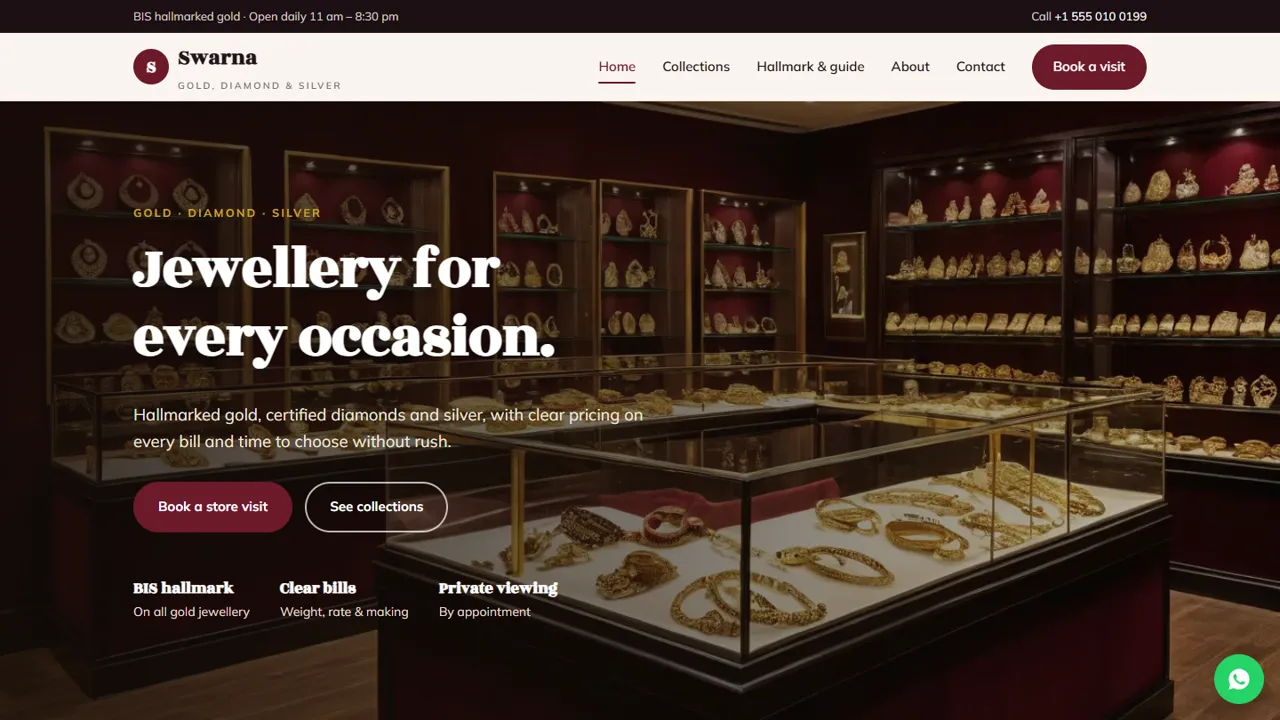
Everything included
- Collection cards with Price on request or From ₹
- Today's-rate box you update daily
- BIS hallmark, HUID and pricing guide page
- Store-visit and private-viewing booking form
- WhatsApp enquiry button on every collection
- JewelryStore schema, titles and meta descriptions
- Admin panel for your details, currency, chat and enquiries
- Colours and fonts changed from one CSS block
From order to a live website
- 1
Choose a package
Code only, We set it up, or Customised. All prices are one-time.
- 2
Pay securely
Your download link is emailed once payment is confirmed and also appears in My Account.
- 3
We contact you
For setup packages we email within one business day for your cPanel / hosting login and domain.
- 4
Live on your domain
Your jewellery site runs on your own hosting, with visit requests arriving in your inbox.
A catalogue, not a cart
Gold jewellery is priced by weight at the day's rate plus making charges, so fixed online prices go out of date by the next morning. Swarna shows your collections with "Price on request" or "From ₹" labels and a WhatsApp enquiry button on each card, so customers ask you directly.
- Six collection cards: necklaces, bangles, earrings, rings, bridal, silver
- WhatsApp enquiry pre-filled with the collection name
- Today's-rate box with clear update-daily placeholders
- Note explaining how the final price is confirmed
Explain hallmark and pricing plainly
The buying guide explains the three BIS hallmark marks and the HUID, how to check a HUID in the BIS CARE app, how weight, rate, making charges, stones and GST make up a bill, and how old-gold exchange works. There is a placeholder for your BIS registration details and no invented codes.
- BIS hallmark and HUID explained
- Four-step price breakdown
- Old-gold exchange steps
- Placeholder for your registration details
Book visits and bridal viewings
The visit form asks what the customer wants to see, a date and a time, plus notes on occasion and budget. The request arrives in your inbox and you confirm by phone or WhatsApp, with a selection ready when they arrive.
- Store-visit and private-viewing form
- Options grouped: gold, bridal, other
- Notes for budget and designs
- Spam trap and input checks
Each page, and what it does for the store
The home page leads with your collections, a short panel saying every bill shows how the price is made, four service cards (hallmarked gold, custom design, old-gold exchange and bridal viewing) and an invitation to plan bridal jewellery with you. The collections page shows six collection cards with their labels and enquiry buttons, alongside the rate box. The buying guide covers the BIS hallmark, the four parts of a gold bill (weight, day's rate, making charges, stones and GST), old-gold exchange, and how diamond and silver pieces are sold. The about page introduces the family store and your craftsmen, the visit page carries the booking form with store hours and what to bring, and the contact page has your address, phone, map and a message form. The visit form covers necklaces, bangles, earrings, rings, chains, bridal consultations, custom design, diamonds, silver, old-gold exchange and repair or polishing.
- Home, collections, buying guide, about, visit and contact pages
- Visit form notes that no advance is taken
- Store hours shown beside the form
- JewelryStore schema markup for local search
The admin panel, in jeweller's terms
At your-domain.com/admin/ you set the store name, logo, phone, WhatsApp number, email, address with map, store hours and social links, and they change on every page at once. Visit bookings and contact messages are emailed to you and also kept in the Enquiries inbox with the collection the customer chose, the date and time and their notes on occasion or budget, so the counter team can see who is coming in and download the list as a CSV. Use the announcement bar for an Akshaya Tritiya or wedding-season notice, add live chat or the floating WhatsApp button, and connect Google Analytics or the Meta Pixel if you advertise. The daily rate box itself is a few clearly marked lines in the HTML that you change each morning, or leave as "Call for today's rate".
- Enquiries inbox for visit and viewing requests
- Announcement bar for festival and season notices
- Rate box edited in the page, not fetched automatically
- SMTP email setting for reliable delivery
What you receive and how it runs
The zip holds the HTML pages, CSS, JavaScript, the PHP form handler and admin, demo photos and an .htaccess file, with an illustrated installation guide. It runs on any cPanel host with PHP 7.4 or later; the small SQLite database for the admin is created on first run. Swarna is a catalogue and enquiry site: it has no cart, no online payment, no product database and no stock levels, and it does not pull gold rates from any market feed. Replace the demo photos with your own pieces and add your real BIS registration details where the placeholders are.
- Plain HTML, CSS and PHP, no WordPress
- No cart, payments or live gold rates
- Placeholders for your BIS details
More ready-made websites
Built by the same team, with the same setup service and support.
Browse every ready-made website, or compare our custom website packages if you need a site designed from scratch. Want more guests to find you on Google Maps? See our local SEO service, or talk to our web design team.



