
Socketra — EV Charger Finder App
An EV charging station finder with driver reports, station owners, an approval queue, a REST API and an Expo mobile app
Everything included
- Map and list finder with connector, power, distance and open-now filters
- Station pages: connectors, kW, hours, price note, access, amenities
- Driver reports: working, busy or not working, with the report's age
- Check-ins and one rating per driver per station
- Drivers add missing stations; admin approval queue with duplicate warnings
- Ownership claims and an owner panel for verified owners
- Admin: stations, owners, contributions, users, CSV import with dry run
- REST API and Expo mobile app with finder, owner and queue modes
- 11 connector types, from CCS2 and Type 2 to Bharat DC-001
- SQLite by default; MySQL or PostgreSQL via Prisma
From order to a live website
- 1
Choose a package
Code only, We set it up, or Customised. All prices are one-time.
- 2
Pay securely
Your download link is emailed once payment is confirmed and also appears in My Account.
- 3
We contact you
For setup packages we email within one business day for your cPanel / hosting login and domain.
- 4
Live on your domain
Your charger finder runs on your own Node.js hosting, with new stations and claims waiting in your admin panel.
Who it is for
Socketra suits anyone who wants to run a charging station directory for a city, a region or a community of EV drivers: an EV owners' club, a local news or travel site, a fleet operator who wants a map for its own drivers, or a developer building a charging app for a client. You own the code, the database and the users. You decide which stations are listed, how long a driver's report counts and whether new stations need your approval. The demo ships with an invented city, "Ferngrove (sample city)", and 14 sample stations whose names all end in "(sample)", so you can try everything and then delete them.
- Your own directory, on your own hosting
- No reports, check-ins or ratings are seeded
- Sample stations are clearly marked as samples
Finding a station
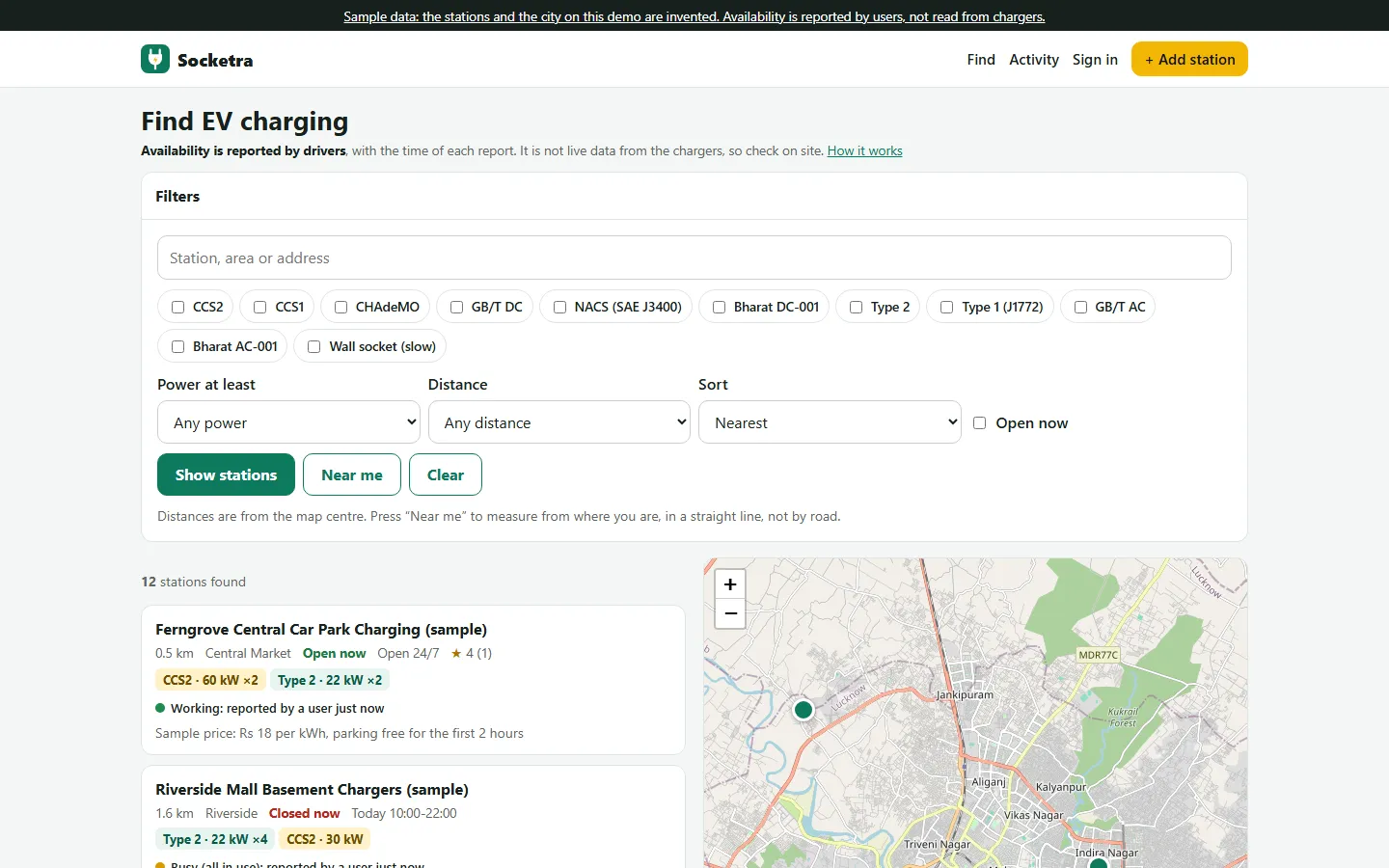
The home page shows a list and a Leaflet map side by side on a computer, and a List / Map switch on a phone. Drivers search by name, area or address, tick the connector types they need, choose a minimum power and a distance from the map centre or from their own location ("Near me"), keep only stations that are open now in the app's time zone, and sort by distance, power or rating. Pins are coloured by the latest driver report. A station page shows each connector with its power and number of plugs, the opening hours and whether it is open now, the price note and an optional price per kWh, access (public, customers only or restricted), amenities, the rating, the owner's notice and a small map, with a Directions link to openstreetmap.org and a link for the phone's own maps app.
- Connector, power, distance, amenity and open-now filters
- Sort by distance, power or rating
- Opening hours such as Mon-Fri 08:00-20:00, past midnight too
- Distances are straight-line, not by road
What drivers contribute
Signed-in drivers press Working, Busy or Not working on a station page, for the whole station or one connector, with an optional note. Every status is shown with its age, for example "reported by a user 12 min ago". After 24 hours a report is labelled "may be out of date", and after 72 hours it no longer sets the status; both times are settings, as is the 10-minute cooldown between reports. Drivers check in ("I charged here" or "I could not charge"), and by default only a driver who checked in can rate a station, once, with stars and an optional comment that they can change later. The database itself refuses a second rating. Drivers save favourites, follow a recent activity feed and add missing stations with a map pin, connectors, hours, price note and amenities.
- Working, busy or not working, with a note
- Check-ins and one rating per driver per station
- Favourites, activity feed and "My activity"
- Owners cannot report on or rate their own station
Station owners and the owner panel
A station's operator opens its page and presses "Claim this station" with their business name, phone and how you can check the claim. You decide in Admin → Owners & claims, for example after calling the station's own number; the app does not verify ownership by itself. Verifying a claim makes the driver the owner and closes other open claims for that station. The owner panel at /owner lists their stations with reports, check-ins, saves and rating. For each station they can edit the details, connectors, hours and price note, post a notice for drivers ("charger 2 is being repaired until Friday") and mark it temporarily closed. Only the verified owner of a station can edit it, on the web and through the API.
- Claims checked by a person, not automatically
- Owner notice and temporarily-closed switch
- Recent driver activity and a change history per station
The admin panel
The dashboard counts live stations, stations waiting for approval, claims to check, verified owners, drivers, reports and check-ins today, and lists the not-working reports of the last 24 hours. The approval queue shows each new station with who added it and warns about other stations within 150 metres; you approve it, edit it first or reject it with a reason the driver sees and receives by email. Stations can be added, edited, hidden, deleted and exported to CSV. User contributions lists every report, check-in and rating so you can hide abusive or fake ones; hidden ratings drop out of the average, and you cannot write or edit a rating yourself. Users can be blocked. CSV import runs a dry run first: every row is checked with the same rules as the add-station form, rows within 25 metres of an existing station or an earlier row are flagged, and nothing is created until you press Import. Settings cover the business and brand, map centre, time zone, station and report rules, live chat, WhatsApp button, analytics IDs, announcement bar, cookie notice, SEO, SMTP and maintenance mode, with an email log, add-ons and licence screens.
- Approval queue with nearby-duplicate warnings
- Owners & claims, contributions and users
- CSV import with dry run, up to 2,000 rows a file
- Email log shows every email even before SMTP is set
Mobile app and REST API
The mobile/ folder holds an Expo (React Native) app in TypeScript with Expo Router. It talks only to the server's REST API (/api/v1) and to a map tile server. The account's role picks the mode: drivers get the finder with list and map, station pages with reporting, check-in and rating, favourites, activity and adding a station; verified owners also manage their stations' notice, temporarily-closed flag, price note and hours; admins get the approval queue for new stations and claims. The API uses bearer tokens that are stored hashed, last 90 days and are revoked on sign-out, password change or when an admin blocks the account. API.md documents every endpoint.
- Finder, owner and approval-queue modes
- Bearer-token API documented in API.md
- App name, server address and tile URL set in mobile/.env
What is in the zip and how it was tested
You get the full source: server.js, the Express routes for the web app, owner panel, admin and API, the EJS templates, CSS and browser scripts, the Prisma schema and the sample-data seed, the Expo app, README.md and API.md, plus the illustrated installation guide. npm run setup creates the .env file with a random secret, the tables and the sample data; --no-seed starts empty with a setup wizard for your admin account, and --reseed reloads the samples. The 22 tests run with Node's built-in runner: unit tests for opening hours, distances, report recency, station validation, CSV parsing and export safety, and flow tests that start the real app on a throwaway SQLite database and cover the filters, the approval flow, owner-only editing, claims, one rating per driver, report expiry, CSV import and role checks. All 22 passed on our machine.
- Full source with README.md and API.md
- One setup command, with or without sample data
- 22 unit and flow tests, plus a curl smoke test
Honest limits
Availability is reported by drivers. It is not live charger data: the app is not connected to any charger or charging network, and the web app, mobile app and API all say so next to the status. The mobile map is a simple tile map with pins and zoom and move buttons; there is no pinch or drag. Native Android and iOS builds have not been run: the mobile type check and a web build were run, so build with EAS and test on real phones before you publish. Maps use OpenStreetMap's public tiles, which are for testing and light use only, so you need your own map tile provider before launch. The app takes no payments: it shows price notes as written, and no payment add-on is included. Our tests ran on SQLite; MySQL and PostgreSQL are supported through Prisma. Only list stations you have the right to publish.
- User-reported availability, not live charger data
- Mobile map: buttons only, no pinch or drag
- Native builds not run; bring your own tile provider
- No payments and no wallet
More ready-made websites
Built by the same team, with the same setup service and support.
Browse every ready-made website, or compare our custom website packages if you need a site designed from scratch. Want more guests to find you on Google Maps? See our local SEO service, or talk to our web design team.



