
Haatlist — Classifieds App (Web + Mobile)
A local buy-and-sell classifieds site with moderation, in-app chat, featured ads, a REST API and an Expo mobile app
Everything included
- Post ads with up to 8 photos and category-specific fields
- Search by words, category, city, price, distance and fields
- Buyer–seller chat inside the app (buyer and seller only)
- Admin moderation queue: approve, reject with reason, remove
- Reports with automatic hiding after a set number
- Ad expiry, renewal window and reminder emails
- Featured ads paid by UPI or bank transfer, no wallet
- REST API with bearer tokens for the mobile app
- Expo mobile app: buy and sell mode plus moderation mode
- SQLite by default; MySQL or PostgreSQL via Prisma
From order to a live website
- 1
Choose a package
Code only, We set it up, or Customised. All prices are one-time.
- 2
Pay securely
Your download link is emailed once payment is confirmed and also appears in My Account.
- 3
We contact you
For setup packages we email within one business day for your cPanel / hosting login and domain.
- 4
Live on your domain
Your classifieds site runs on your own Node.js hosting, with new ads waiting in your moderation queue.
Who it is for
Haatlist is for people who want to run a local buy-and-sell site for a town, a region or one niche such as cars, rentals or used phones, without paying a platform per listing. You install it on your own Node.js hosting and keep the users, ads and chats in your own database. Every customer account can both buy and sell, and an admin account moderates. There is no separate partner panel, because in a classifieds site every seller is an ordinary customer.
- Town or city classifieds sites
- Niche marketplaces for vehicles, property or electronics
- Community and campus buy-and-sell boards
- Developers building on a plain Node.js codebase
What buyers do in the web app
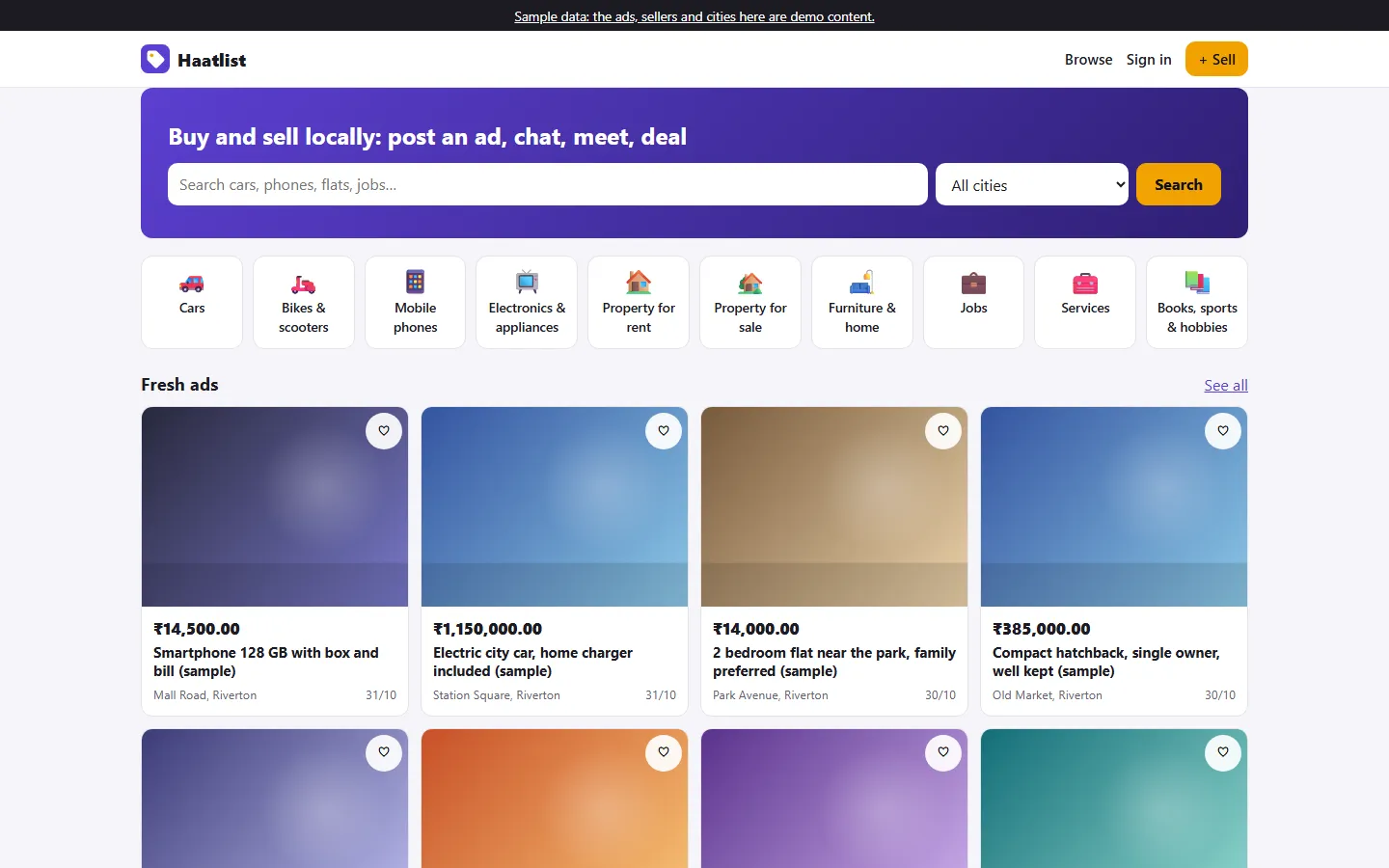
The home page shows a search bar with a city picker, the category tiles and the freshest live ads. Search filters by words, category, city, minimum and maximum price, free items and the category's own fields, and sorts by newest, price or nearest. A near-me option uses the visitor's location and straight-line distance. The ad page has a photo gallery, the details table, the seller's name and other ads, safety tips and the approximate area on a map: a circle, never the seller's exact pin. Signed-in buyers save ads to favourites, report an ad once with a reason, and start a chat with the seller. New messages appear every five seconds while the chat is open, and the other person gets an email without the message text if they have not opened the chat recently.
- Search with category fields, price, city and distance
- Favourites, seller profiles and a safety page
- Report an ad once per user
- Chat readable only by the buyer and the seller
What sellers do
A seller picks a category and fills in the title, description, price (fixed, negotiable, free or on request where the category allows it), the category's fields, the city and an optional map pin, and adds up to eight JPG, PNG or WebP photos. The server checks everything again, including that the pin is within 60 km of the chosen city. My ads lists every ad with its status, views, saves and chats. From there the seller edits an ad, renews it in the last three days before expiry or any time after it expires, marks it sold, deletes it, or features a live ad for one of your paid plans.
- Post with photos and category fields
- Edit, renew, mark sold or delete
- Expiry reminder email three days ahead
- Feature a live ad for a set number of days
The admin panel for a classifieds site
The moderation queue is the heart of the admin. New ads, and live ads that were edited, wait there with their photos, fields and seller. You approve an ad (it goes live for 30 days), reject it with a reason the seller sees and can fix, or remove it. Live ads with open reports come back to the same queue; at three open reports (you can change this) an ad is hidden from buyers until you decide, and you can dismiss the reports. Other screens cover all ads with their moderation history and a CSV export, reports, users (block an account, which also signs out its mobile app), categories and their ad fields, cities with a centre point, ad rules, featured plans and featured orders, payments, settings, add-ons, the email log and the licence.
- Moderation queue with approve, reject and remove
- Ad rules: lifetime, renewals, photo limits, blocked words
- Categories with a JSON list of fields and filters
- Users, reports, featured orders and email log
Featured ads: the one payment in the app
Sellers can pay you a one-off fee to feature a live ad. It then appears in the Featured strip at the top of the home page and matching searches for the plan's number of days. You set the plans and prices in Admin → Ad rules. The seller pays by UPI, with a upi:// link and a QR code for the exact amount to your UPI ID, or by bank transfer, and types the UTR. You confirm the payment in Admin → Featured orders after checking your own account, because the app cannot see your bank. Prices always come from the server, and confirming twice cannot add days twice. A payment gateway can be added as an add-on, but none is included in this download.
- UPI link and QR or bank transfer, confirmed by you
- Plans and prices set in the admin
- Gateway add-ons are not included
- No wallet and no balance held for anyone
The mobile app and the REST API
The mobile/ folder holds an Expo (React Native) app with two modes picked by the account that signs in. Buy and sell mode has tabs for browsing, saved ads, chats, my ads and the account, plus the ad page with a photo carousel, posting with photos from the phone's gallery, chat and the featured-ad payment screen. An admin account gets the moderation queue. The app talks only to the REST API at /api/v1, which uses bearer tokens stored hashed for 90 days and revoked on sign-out, password change or when an admin blocks the account. API.md documents every endpoint, from search and posting to chat, reports, featured orders and moderation.
- Buy and sell mode and moderation mode
- Brand name, ids and colour set in mobile/.env
- Colours follow the admin settings, no rebuild needed
- API.md documents every endpoint
What is in the zip and how it was tested
You get the full source: server.js, the Express routes for the web app, admin and API, EJS templates, CSS and browser scripts, the Prisma schema and a seed script, the mobile app, README.md, API.md and an illustrated PDF guide. npm run setup creates the .env file with a random secret, the tables and the sample data: three invented sample cities, ten categories with their fields, twenty sample ads and five demo accounts. No chats, reports, views or payments are invented. npm test runs 24 tests with Node's built-in runner: 8 unit tests and 16 flow tests that start the real app on a throwaway SQLite database and check posting, photos, moderation, ownership, search, chat privacy, reports, renewals, featured ads, admin roles and login rate limiting. A curl smoke test is included too.
- Full source with README.md and API.md
- Sample data you can wipe or reload
- 24 automated tests on SQLite
- Illustrated installation guide (PDF)
Honest limits
The mobile app passes its TypeScript check and its web build was tried against the server, but native Android and iOS builds have not been run: build them with EAS and test on real phones before you publish. Maps use Leaflet with OpenStreetMap's public tiles, which are fine for testing but not meant for production traffic, so switch to your own tile provider before launch (one setting in public/js/app.js). There are no push notifications; chat updates by polling. Moderation is done by people: blocked words and auto-hide are simple rules, and photos are checked to be real image files, not for what they show. There is no wallet, because holding users' money needs a licence (in India, an RBI PPI licence). Gateways are add-ons that are not included, and add-ons in this product family were tested only against mocked responses. Our tests ran on SQLite; MySQL and PostgreSQL are supported through Prisma. You set the rules of your site, such as prohibited items, terms and privacy policy.
- Native mobile builds not run by us
- Bring your own map tile provider for production
- No wallet, no gateway bundled
- No push notifications
More ready-made websites
Built by the same team, with the same setup service and support.
Browse every ready-made website, or compare our custom website packages if you need a site designed from scratch. Want more guests to find you on Google Maps? See our local SEO service, or talk to our web design team.



