Curavell — Doctor Appointment App
A doctor appointment booking app you host yourself: in-clinic and video slots with no double-booking, reception queue tokens, a doctor panel with notes, admin, REST API and an Expo mobile app
Everything included
- Doctor directory: speciality, clinic, language, video filters
- Free times from the server, no double-booking
- In-clinic or video (clinic-supplied meeting link)
- Book for yourself or a family member
- Weekly sessions per doctor and leave days
- Reception: check-in, queue token, fee, no-show
- Doctor panel: day list, seen, note with PDF, follow-up
- Admin: clinics, specialities, doctors, reception logins
- Pay at the clinic or UPI; no wallet
- REST API and Expo app with patient and doctor modes
From order to a live website
- 1
Choose a package
Code only, We set it up, or Customised. All prices are one-time.
- 2
Pay securely
Your download link is emailed once payment is confirmed and also appears in My Account.
- 3
We contact you
For setup packages we email within one business day for your cPanel / hosting login and domain.
- 4
Live on your domain
Your appointment system runs on your own Node.js hosting, with the queue at reception, each doctor's day in the doctor panel and everything in your admin.
An appointment system you own
Curavell gives you the code of a working doctor appointment system instead of a monthly subscription. It suits a single clinic with a few doctors, a multi-speciality practice, or a small group of clinics that wants one booking site. The download has five parts that share one database: the patient web app, a reception panel at /reception, a doctor panel at /doctor, the admin panel at /admin, and a REST API used by the included mobile app. The name Curavell is a placeholder: change the name, logo and colours in Admin → Settings. The app shows no star ratings or reviews at all.
- Patient web app built for phones
- Reception panel per clinic and a doctor panel
- Admin panel with a setup wizard for an empty install
- REST API /api/v1 and an Expo mobile app
What patients do
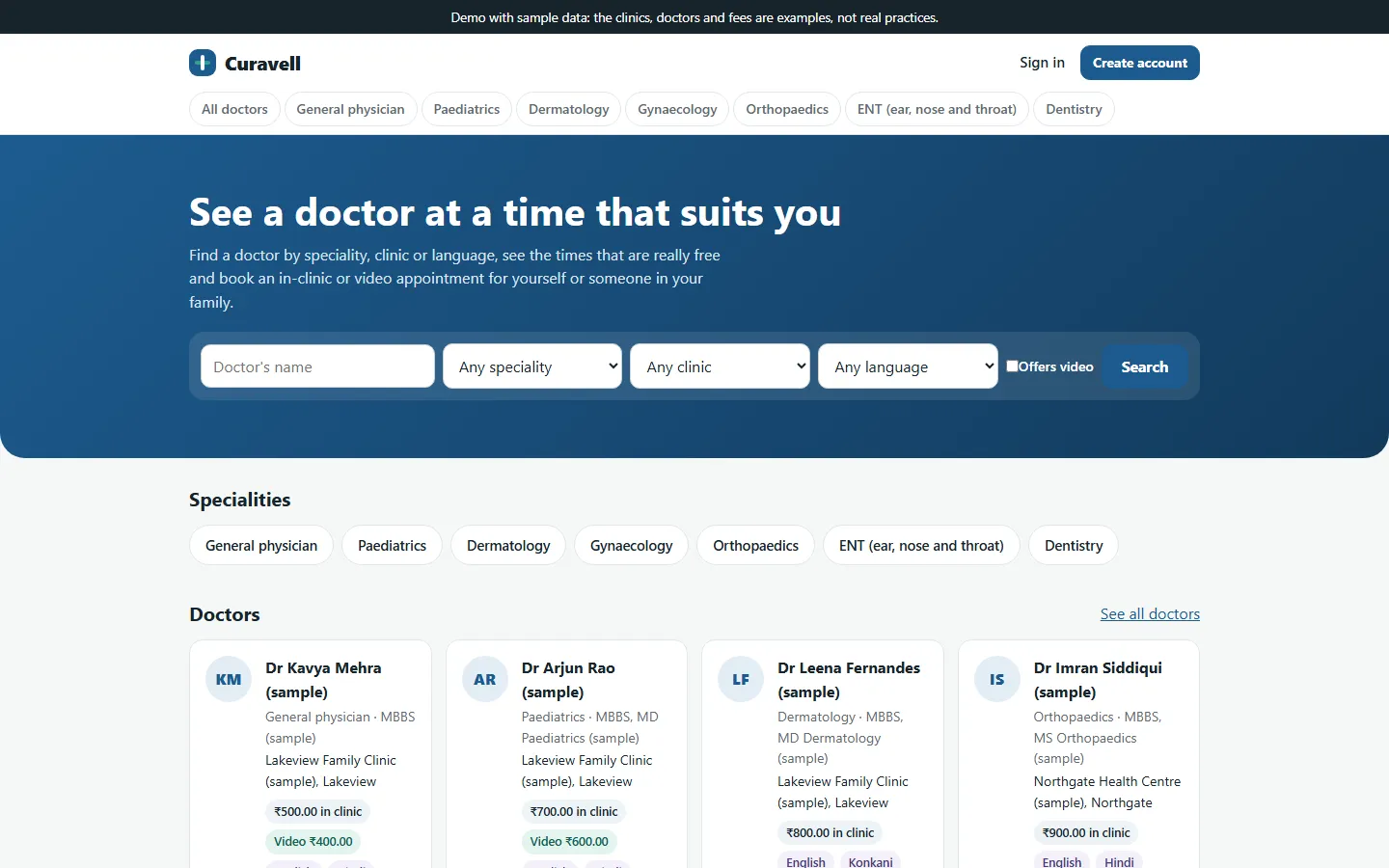
Patients search the doctor directory by speciality, clinic, language or name, or filter for doctors who offer video. A doctor's page shows qualifications and registration number as entered by the clinic, languages, the in-clinic and video fees, the weekly schedule and days off. They choose in clinic or video, pick a date from a strip that opens on the first day with a free time, and pick one of the free times calculated by the server. They say who the appointment is for (themselves or a family member on their account), type an optional short reason and choose how to pay. The appointment page refreshes by itself: after check-in it shows the token and how many checked-in patients are ahead, for video it shows the clinic's meeting link, and after the visit it shows the doctor's note with a PDF download and any follow-up, which they can book in one tap. Patients can cancel until a cut-off (two hours by default) and keep a history of past appointments.
- Directory with speciality, clinic, language and video filters
- Book for yourself or a family member
- Token and patients ahead after check-in
- Doctor's note, PDF and one-tap follow-up
No double-booking, schedules and leave
Every booked 5-minute block of a doctor's day is stored as a row with a unique doctor, date and block index, so two appointments can never overlap, even if two patients press Book at the same moment or the doctor later changes the appointment length; the tests book the same time five times at once and exactly one wins. A doctor can have several sessions on a weekday, for example a morning in clinic and an evening offering clinic and video, and each session is marked in clinic, video or both. The server checks every booking against these sessions, leave days, the lead time and how far ahead patients may book, and sets the fee from the doctor's record. Adding leave on a day that already has patients is refused unless the doctor or admin ticks the option to cancel them, which also emails them.
- Unique index on each doctor's time blocks
- Several sessions per weekday, clinic, video or both
- Leave days, lead time and booking window
- Fees set on the server from the doctor's record
Reception and doctor panels
Reception staff sign in for their own clinic and see the day's queue for each doctor. On the appointment day they check a patient in and the next token number for that doctor is given; the number is unique in the database, so two desks never hand out the same one. They record the fee as cash or as UPI with its UTR, mark a no-show after the time has passed, cancel, and see upcoming appointments. Reception never sees the doctor's note. Doctors see their own appointments by day with the patient's name, age, reason and earlier visits with them only. They mark a patient as seen, write a plain-text note of up to 5000 characters that the patient reads and downloads as a PDF, and suggest a follow-up date. In the doctor panel they also set their weekly schedule, appointment length, leave days, profile, languages and the https meeting link for video appointments.
- Queue per doctor with unique tokens
- Fee as cash or UPI with UTR, no-show, cancel
- Doctor's day, seen, note and PDF, follow-up
- Schedule, leave and meeting link set by the doctor
The admin panel and privacy
The admin panel has a setup wizard, a dashboard with real counts only, and a list of appointments with filters and a CSV export that leaves out reasons and notes. You add clinics with a map pin and specialities, and create doctors with their login, clinic, speciality, fees, appointment length, video option, schedule and leave. You create reception logins, block or unblock patient accounts (the admin sees no medical details), set your UPI ID and payment methods, and fill in settings: business details, brand colours, SEO, maintenance mode, booking rules, the privacy contact, map centre, live chat, WhatsApp, analytics, an announcement banner, a cookie notice and SMTP email. Analytics tags are not loaded on patient account and appointment pages or in the panels. The app stores health-related data, so the README includes a privacy and local-law checklist for India, the EU and UK, and the US; the privacy page is a template to replace with your own policy.
- Clinics, specialities, doctors and reception logins
- CSV without reasons or notes
- Booking rules, privacy contact, SMTP and analytics
- Privacy checklist in the README
REST API, mobile app and what is in the zip
The REST API at /api/v1 uses bearer tokens that last 90 days. It covers the directory and free times, family members, booking, cancelling and the note PDF for patients, the doctor's day, notes, follow-ups, schedule and leave, and the reception queue, check-in, payments and no-shows; API.md documents every endpoint. The mobile/ folder holds an Expo (React Native) app with a patient mode (doctors, booking, appointments with token, video link and the doctor's note, family) and a doctor mode (the day's list, mark seen, write the note, follow-up). Reception and admin accounts use the website. The zip has server.js, the routes, views, the Prisma schema and seed script, ADDONS.md, mobile/, README.md, API.md and the PDF guide. npm run setup creates an invented sample city with two clinics, six sample doctors and a patient family; no appointments, notes or ratings are invented. npm test runs 24 tests on a throwaway SQLite database through the API and the web pages, including role checks, double-booking races, leave days, tokens and note privacy.
- API.md documents every endpoint
- Expo app: patient and doctor modes
- Sample clinics and doctors, no invented appointments
- 24 unit, API and web tests, plus a curl smoke test
Honest limits
This app books appointments. It does not give medical advice, diagnose or check anything a doctor writes, and it is not a telemedicine platform: a video appointment is a slot plus a meeting link the clinic supplies, and the app does not host, record or store calls. There are no SMS or push reminders, no waiting-room display, no e-signatures on notes, no audit log of who viewed a record and no two-factor sign-in, and reception cannot book on behalf of walk-in patients. Native Android and iOS builds of the mobile app have not been run: it type-checks and its web export builds, so test your EAS builds on real phones. No payment gateway is bundled and UPI payments are confirmed by hand with the UTR; there is no wallet or prepaid credit. Maps use OpenStreetMap's public tiles, which are for testing only. Only SQLite was tested.
- Not telemedicine and no medical advice
- No SMS reminders, no walk-in booking at reception
- Native builds not run; no gateway bundled, no wallet
More ready-made websites
Built by the same team, with the same setup service and support.
Browse every ready-made website, or compare our custom website packages if you need a site designed from scratch. Want more guests to find you on Google Maps? See our local SEO service, or talk to our web design team.