
BeatBox — DJ, Sound & Light Rental Website
A ready-made DJ and sound rental website with packages, an equipment price list and event booking
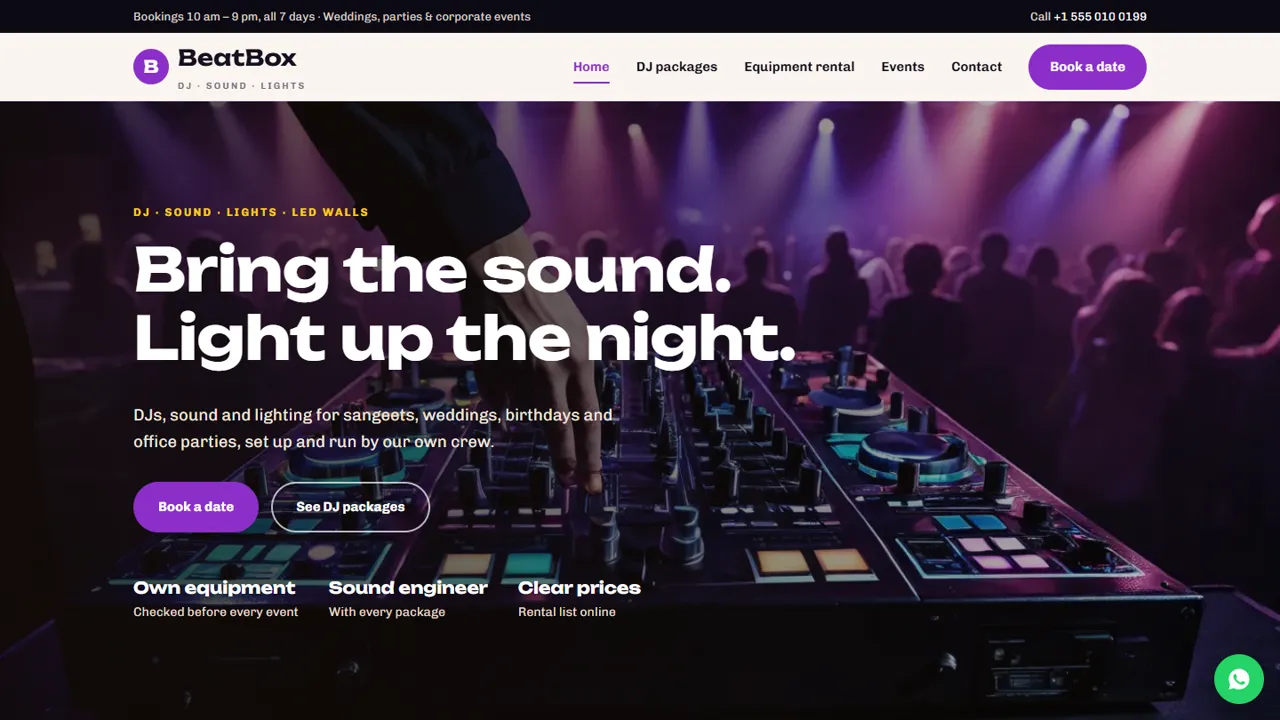
Everything included
- Three DJ packages with starting prices
- Tabbed equipment rental price list
- Event types page
- Booking form with event date, start time, guests and venue address
- Home, packages, rental, events, booking and contact pages
- WhatsApp and click-to-call on every page
- EntertainmentBusiness schema, titles and meta descriptions
- Admin panel for your details, currency, chat and enquiries
From order to a live website
- 1
Choose a package
Code only, We set it up, or Customised. All prices are one-time.
- 2
Pay securely
Your download link is emailed once payment is confirmed and also appears in My Account.
- 3
We contact you
For setup packages we email within one business day for your cPanel / hosting login and domain.
- 4
Live on your domain
Your DJ and rental site runs on your own hosting, with event bookings arriving in your inbox.
Answers event hosts look for
People booking a DJ or renting sound want to know what is included, what it costs and whether you cover their kind of event. BeatBox puts packages, a rental price list and event types on their own pages, with a Book a date button on every screen.
- Home page with services and packages
- Three DJ packages as cards
- Rental price list in tabs
- Event types page with a noise-rules notice
Bookings with the venue details
The booking form asks for the package or equipment, the event date and start time, the guest count and the venue address, plus notes for the event type and music. It is emailed to you and saved in the admin, and you confirm by phone or WhatsApp. Beside the form, a short list reminds the host to check the venue's music timings and power, to allow about two hours for setup, and to share must-play and do-not-play songs.
- Event date and start time
- Guest count and venue address
- Package or rental item
- Spam trap and input checks
Easy to keep up to date
Packages are simple cards and rental prices are plain HTML rows, so a price change takes a minute in any text editor. Colours and fonts are set in one place, and schema, titles and descriptions are ready for Google.
- Packages as editable cards
- Rental items as simple rows
- EntertainmentBusiness schema markup
- Sample reviews clearly marked to replace
What each page is for
The home page covers DJ packages, sound rental, stage lighting and setup crew, explains that you visit, plan and sound-check before guests arrive, and shows the three sample packages: House Party, Sangeet & Shaadi and Grand Night. The packages page repeats them with what each includes and a four-step booking flow: check the date, quote and hold, playlist call, then setup and party. The rental page splits items into sound, lights, stage and screens, and power and crew, from a speaker pair with mixer to an LED wall, a silent generator and a sound engineer. The events page lists weddings and sangeet, corporate events, parties, college fests, receptions, festivals and outstation jobs, with a note that music follows local noise rules and venue timings. Contact has a message form, a map and your studio hours.
- Home, packages, rental, events, booking and contact pages
- Rental list in four groups
- Noise-rules and venue-timing notice
- All prices are samples you replace
Your admin panel, for event bookings
Every date request lands in the Enquiries inbox at /admin/ with the package, event date, start time, guests and venue address, so you can scroll the season's requests in one place and download them as a CSV for your diary or crew sheet. In the admin you set the business name, logo, phone, the WhatsApp number and the message it opens with, email, studio address, map, booking hours and social links. You can add live chat for late-evening questions, connect Google Analytics or the Meta Pixel for your Instagram ads, show an announcement bar for festive-season dates, and pick the currency your rates are shown in. Package contents and rental prices stay in the HTML files.
- Date requests and contact messages in one inbox
- CSV download of all requests
- WhatsApp text, hours and map set in the admin
- Announcement bar for season offers
Setup, hosting and limits
The zip holds the pages, stylesheet, scripts, photos, the PHP form handler and the admin, plus an illustrated guide. Upload it to cPanel, open /admin/ to create your login and paste your licence key to switch the forms on; each key activates one live domain, and testing on your own computer needs no key. It needs PHP 7.4 or later, keeps its data in SQLite that sets itself up (MySQL is optional), and sends mail by PHP mail() or SMTP. It does not block booked dates, track which speakers are out, take advances or print quotes: you check your own diary and reply. Spam is held back by a hidden trap field and a cap on repeat messages from one visitor.
- Plain HTML, CSS, JavaScript and PHP
- No availability calendar or inventory
- No online payments or deposits
- Works on any cPanel host with PHP
More ready-made websites
Built by the same team, with the same setup service and support.
Browse every ready-made website, or compare our custom website packages if you need a site designed from scratch. Want more guests to find you on Google Maps? See our local SEO service, or talk to our web design team.



