
Hive — Coworking Space Website
A ready-made coworking website with plans and prices, amenities, a photo gallery and a book-a-tour form
Everything included
- Three monthly plan cards with prices
- Day passes, meeting rooms and add-ons price list
- Book-a-tour form with plan, team size, date and time
- Amenities, access hours and house rules
- Photo gallery of the space
- WhatsApp and click-to-call on every page
- LocalBusiness schema, titles and meta descriptions
- Admin panel for your details, currency, chat and enquiries
From order to a live website
- 1
Choose a package
Code only, We set it up, or Customised. All prices are one-time.
- 2
Pay securely
Your download link is emailed once payment is confirmed and also appears in My Account.
- 3
We contact you
For setup packages we email within one business day for your cPanel / hosting login and domain.
- 4
Live on your domain
Your coworking site runs on your own hosting, with tour requests arriving in your inbox.
What people ask before they visit
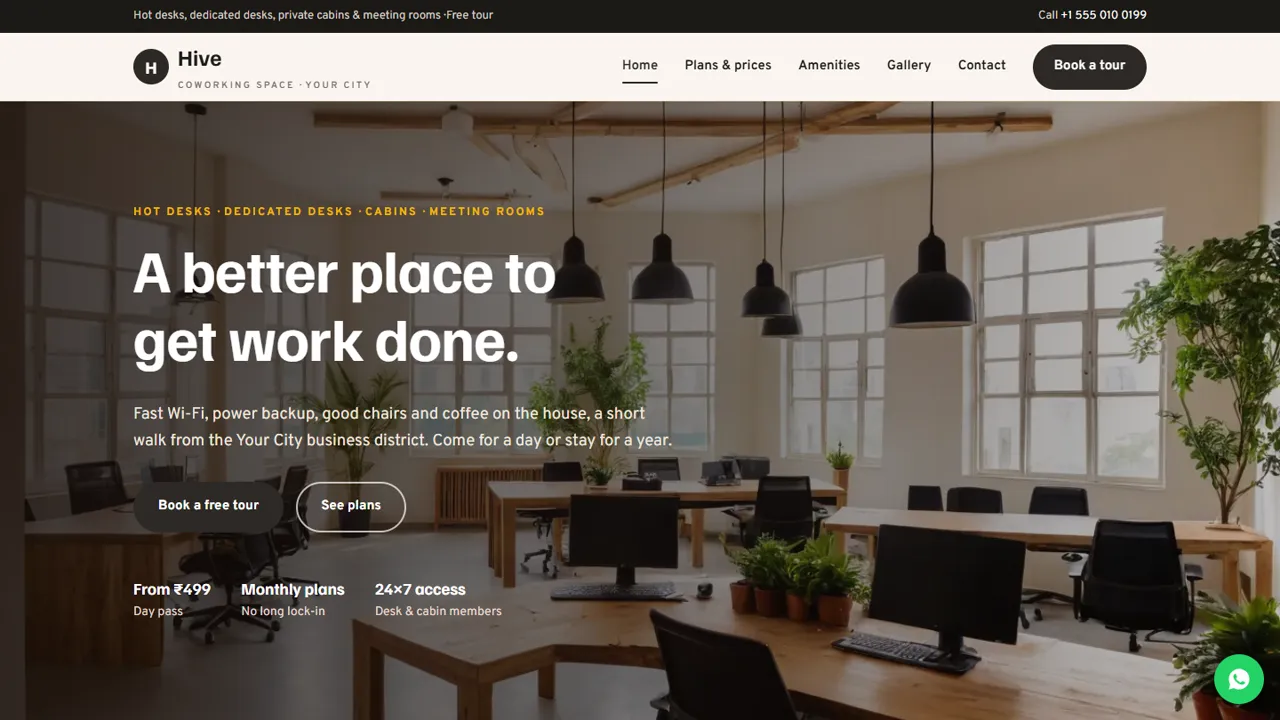
Someone looking for a desk wants to know what it costs, what is included, when they can come in and what the place looks like. Hive answers each on its own page, with a Book a tour button on every screen. The home page shows hot desks, dedicated desks and private cabins, the basics (Wi-Fi, power backup, meeting rooms, tea and coffee) and an offer to book a tour. The plans page has the three monthly plan cards, then tabs for day passes (day pass, 10-day pack, half-day pass), meeting rooms (a six-seat room, a twelve-seat board room by the hour or full day, a phone booth) and add-ons such as a business address with mail handling, lockers, printing and two-wheeler parking. The amenities page lists eight amenities, an access table showing which plans get 24×7 key-card entry and which follow reception hours, house rules and a short community note. The gallery page adds photos and getting-here notes for road, food nearby and parking. Every price, plan and access rule in the demo is a sample to change to your own.
- Three monthly plans as clear cards
- Day passes, meeting rooms and add-ons in tabs
- Amenities with access hours and house rules
- Photo gallery and getting-here notes
Turn visitors into tours
The tour form asks for the visitor's name, phone and optional email, the plan they are interested in (from hot desk to business address, or not sure yet), team size from one person to more than ten, a date and an hourly time, plus a notes box for start date and needs like parking or a meeting room. A What to expect box beside it describes the tour, a Wi-Fi speed test, written prices for their team size and a free day pass to try, alongside your reception hours. The request arrives in your inbox and you confirm by phone or WhatsApp.
- Book-a-tour form
- Plan and team-size drop-downs
- Date and time slots
- Spam trap and input checks
Easy to keep up to date
Plan prices are plain HTML cards and the price list is simple rows, so a change takes a minute in any text editor. Prices are shown as indicative and exclusive of GST, with a note to confirm at the tour.
- Plans as editable cards
- Price list as simple rows
- Gallery photos replaced by file name
- Colours and fonts in one CSS block
Tour requests and space details in the admin
Your admin panel at your-domain.com/admin/ keeps every tour request in the Enquiries inbox with the plan, team size and chosen slot, alongside contact messages, and emails each one to you as well. Download the list as a CSV to follow up with teams who toured but have not joined. You set the space name, logo, phone, WhatsApp number, address, map and reception hours in one place, choose the currency your plan prices are written in, write the WhatsApp greeting, add live chat for questions from visitors, connect analytics or the Meta Pixel, and run an announcement bar for a free-day offer. Plans and page text are edited in the HTML.
- Tour requests in the Enquiries inbox
- CSV download for follow-ups
- Reception hours and map in one place
- Announcement bar for offers
Download, setup and hosting
The zip holds six HTML pages and a 404 page, the stylesheet and scripts, the PHP form handler, the admin panel, photos and an .htaccess file, with an illustrated installation guide. It needs cPanel or shared hosting with PHP 7.4 or later. Upload it, set where tour requests are emailed in config.php, create your admin login and paste your licence key on the Dashboard to switch the forms on. Each key activates one live domain, and testing on your own computer needs no key. SQLite is created automatically when pdo_sqlite is on, MySQL is optional, and email is sent with PHP mail() or SMTP.
- Plain HTML, CSS, JavaScript and PHP
- No WordPress or Node.js
- SQLite built in, MySQL optional
What it does not do
Hive is a marketing site for your space. It has no member portal, desk or meeting-room booking calendar, live availability, visitor management, invoicing or online payment. Members pay and book rooms the way they do today, and you confirm each tour yourself.
- No room-booking calendar
- No member billing or payments
- No key-card or visitor system
More ready-made websites
Built by the same team, with the same setup service and support.
Browse every ready-made website, or compare our custom website packages if you need a site designed from scratch. Want more guests to find you on Google Maps? See our local SEO service, or talk to our web design team.



