
Form Architects — Architecture Firm Website
A ready-made website for an architecture practice, with services, a filterable project portfolio, process, team and consultation booking
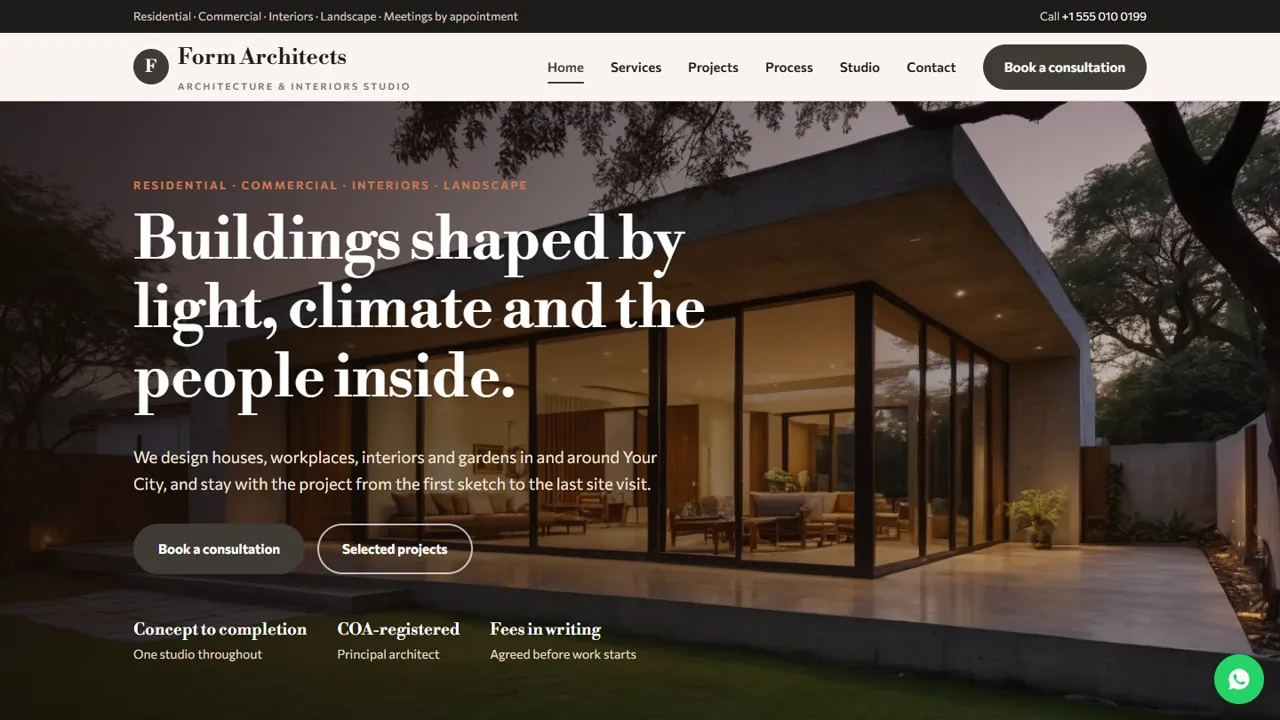
Everything included
- Project portfolio with category tabs
- Four service sections with what each includes
- Eight-stage design and construction process
- Studio page with team cards and COA placeholder
- Consultation booking form with project type
- WhatsApp and click-to-call on every page
- ProfessionalService schema, titles and meta descriptions
- Admin panel for your details, currency, chat and enquiries
From order to a live website
- 1
Choose a package
Code only, We set it up, or Customised. All prices are one-time.
- 2
Pay securely
Your download link is emailed once payment is confirmed and also appears in My Account.
- 3
We contact you
For setup packages we email within one business day for your cPanel / hosting login and domain.
- 4
Live on your domain
Your practice site runs on your own hosting, with consultation requests arriving in your inbox.
Let your buildings do the talking
Clients choosing an architect want to see built work, understand the services and know how the process and fees work. Form Architects gives projects a filterable portfolio and explains every stage, with a Book a consultation button on every screen.
- Portfolio with residential, commercial, interiors and landscape tabs
- Service sections with what each includes
- Eight stages from brief to handover
- Studio page with team cards
Factual, as the profession expects
In India, architects registered with the Council of Architecture follow conduct rules on how they present their work. The template keeps the copy factual, has no testimonials or award badges, explains that fees are agreed in writing, and holds a clearly marked placeholder for your COA registration number.
- COA registration placeholder with instructions
- Fees explained without price promises
- No testimonials, awards or rankings
- Sample projects marked for replacement
Easy to keep up to date
Each project is a simple block with a photo, name, location and size, so adding a new one takes a minute. Colours and fonts are set in one place, and ProfessionalService schema, titles and descriptions are ready for Google.
- Projects as copy-and-edit blocks
- Team as simple cards
- ProfessionalService schema markup
- Colours and fonts in one CSS block
What each page does
The home page introduces the four kinds of work, your approach of starting with the site and the brief, and a short line on fees being agreed in writing. Services gives residential, commercial, interior and landscape design their own section with what each includes and a link to discuss that type of project. Projects is a portfolio with tabs for each category; every project shows a photo, name, location and approximate built area. Process walks through the eight stages in two halves, design and construction, and lists what you need from the client, with a note that construction is done by a contractor the client appoints. Studio tells the practice's story, introduces the team and holds the COA registration line. Consultation has the booking form and what to bring to the first meeting, and Contact gives the address, hours, a message form and a map. The projects and team in the demo are samples.
- Home, services, projects, process, studio, consultation and contact
- What to bring to the first meeting
- Contractor role explained plainly
- Friendly 404 page
The admin panel for a design practice
Open your-domain.com/admin/ and create your login. Consultation requests and contact messages are each saved in the Enquiries inbox and emailed to the studio, with the project type and preferred meeting time, so a request is not lost if the email goes to spam; export the list as a CSV when you review new leads. Set the studio name, logo, phone, WhatsApp number and its pre-filled message, address, map pin, studio hours (meetings by appointment), social links and colours, and they replace the demo details across the site. If you quote clients abroad, choose a base currency and add others with your own rates. Live chat, Google Analytics, Tag Manager, an announcement bar, a cookie notice and maintenance mode are switched on from the same panel. Projects, services and page text are edited in the HTML files.
- Consultation requests saved and emailed
- CSV export of leads
- Studio hours, WhatsApp text and colours
- Maintenance mode while you add projects
The download, setup and hosting
The zip has the HTML pages, stylesheet, scripts and photos, the PHP form handler, config.php, the admin panel, a README and an illustrated installation guide. It runs on any cPanel or shared hosting with PHP 7.4 or later. Upload and extract it, open the admin to create your login, then paste your licence key to switch the forms on; one key covers up to three domains, so a staging address and your live one both work. The site keeps its data in SQLite, created on first run with PHP's pdo_sqlite extension, or in MySQL if you fill in config.php. Email is sent with PHP mail() or your own SMTP server.
- Plain HTML, CSS, JavaScript and PHP
- SQLite built in, MySQL optional
- PHP mail() or SMTP
- No WordPress or page builder
What it does not do
It is a public website for the studio, not project software. It does not take fees or deposits online, share drawings with clients, hold a client login, run a project calendar or send invoices, and the consultation time is a preference you confirm by phone or email. The forms take up to eight messages from one visitor in ten minutes, and a hidden field turns away most spam bots.
- No online payments
- No drawing sharing or client portal
- Your registration number to be added by you
More ready-made websites
Built by the same team, with the same setup service and support.
Browse every ready-made website, or compare our custom website packages if you need a site designed from scratch. Want more guests to find you on Google Maps? See our local SEO service, or talk to our web design team.



