
Kala — Art & Craft Classes Website
A ready-made art studio website with courses and fees, kids and adult batches, workshops and a student gallery
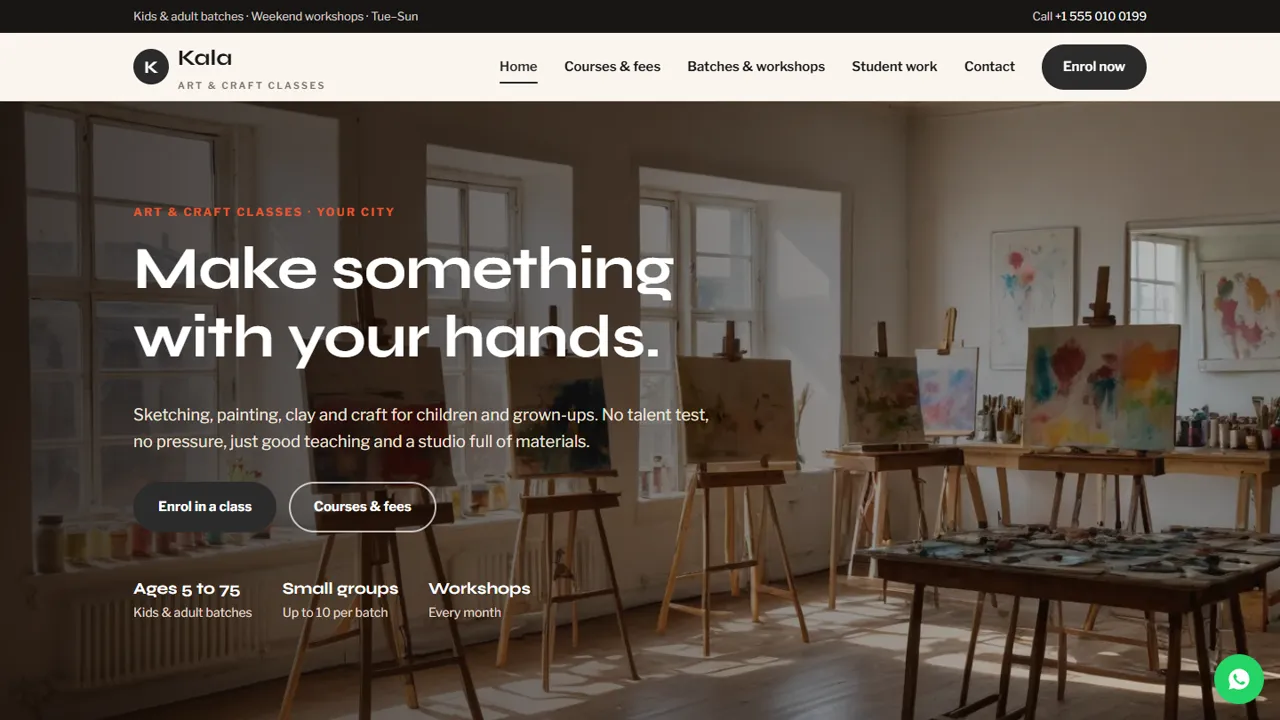
Everything included
- Courses and fees in tabs by medium
- Kids, teen and adult batch timetable
- Workshop cards with indicative prices
- Gallery page for student work
- Enrolment form with course, date and batch time
- WhatsApp and click-to-call on every page
- Admin panel for your details, currency, chat and enquiries
- Colours and fonts changed from one CSS block
From order to a live website
- 1
Choose a package
Code only, We set it up, or Customised. All prices are one-time.
- 2
Pay securely
Your download link is emailed once payment is confirmed and also appears in My Account.
- 3
We contact you
For setup packages we email within one business day for your cPanel / hosting login and domain.
- 4
Live on your domain
Your art studio site runs on your own hosting, with enrolment requests arriving in your inbox.
Show what learners will make
People join an art class when they can picture themselves making something. Kala leads with a bright studio, courses by medium and a gallery page for your students' sketches, paintings and pottery, with an Enrol now button on every screen.
- Home page with courses and how you teach
- Courses and fees in tabs
- Gallery page for student work
- Contact page with map and hours
Kids, adults and workshops in one place
One timetable lists children's, teen and adult batches side by side, and three workshop cards cover one-day and holiday workshops. Prices are labelled indicative so you can confirm current fees at enrolment.
- Batch timetable with age group and timing
- Workshop cards with prices
- Indicative fee wording
- Notes about materials and make-up classes
Turn visitors into enrolments
The enrolment form asks for the course or workshop, a start date and a batch time, plus a notes box for the learner's age and experience. The request arrives in your inbox and you confirm the seat by phone or WhatsApp.
- Enrolment form
- Courses and workshops grouped
- Notes for age and experience
- Spam trap and input checks
A walk through the pages
The home page shows the age range, small batches and monthly workshops, explains how you teach (skills first, style later) and links to three mediums with a starting fee. Courses and fees puts monthly courses in tabs: sketching and drawing, painting, clay and pottery, and kids' art and craft, each card with a fee and what is covered, plus glazing and firing charged per piece. Batches and workshops has the timetable with who each batch is for, the days and timing, the batch size and the make-up class rule, then cards for a monthly folk art Sunday, a pottery taster and a kids' summer camp. Student work is a photo gallery split into painting and drawing, and clay and craft, with a note that work is shown with permission. Enrol has the form and a before-your-first-class list, and Contact has your address, hours, a message form and a map. Course names, fees and timings in the demo are samples.
- Home, courses, batches, gallery, enrol and contact pages
- Workshop cards for one-off sessions
- Before-your-first-class checklist
- Friendly 404 page
The admin panel for your studio
Your admin sits at your-domain.com/admin/. Each enrolment request and contact message is kept in the Enquiries inbox and also emailed to you, with the course or workshop, start date and batch time the learner picked, so you can see at a glance how full the pottery wheels are getting; the list downloads as a CSV. Set your studio name, logo, phone, WhatsApp number and its opening line, address, map, studio hours and weekly day off, social links and colours, and every page picks them up. Fees can be shown in more than one currency with rates you enter. Use the announcement bar for the next workshop date or summer camp, and switch on live chat, Google Analytics, the Meta Pixel, a cookie notice or maintenance mode when you need them. Courses, fees, the timetable and gallery photos are edited in the HTML files.
- Enrolments saved and emailed
- CSV download for seat planning
- Studio hours, WhatsApp line and colours
- Announcement bar for workshops
What is in the zip and how it goes live
You get the HTML pages, stylesheet, scripts and photos, the PHP form handler, config.php, the admin panel, a README and an illustrated installation guide. Upload to cPanel or any shared hosting with PHP 7.4 or later, create your admin login and paste your licence key to switch the forms on; one key covers up to three domains. A SQLite database file is made automatically on first run using PHP's pdo_sqlite extension, and MySQL is optional in config.php. Mail goes out with PHP mail() or your own SMTP server.
- Plain HTML, CSS, JavaScript and PHP
- SQLite built in, MySQL optional
- PHP mail() or SMTP
- One licence for up to three domains
Honest limits
The site does not sell artwork or materials, has no cart and takes no fees online: the demo says fees are paid at the studio. It does not count seats, keep attendance or give students a login, and the gallery is a page of photos you replace yourself, not an upload area for students. Forms accept up to eight messages per visitor in ten minutes, and a hidden field stops most spam bots.
- No online payments or artwork shop
- No seat counter or student login
- Gallery photos added by you
More ready-made websites
Built by the same team, with the same setup service and support.
Browse every ready-made website, or compare our custom website packages if you need a site designed from scratch. Want more guests to find you on Google Maps? See our local SEO service, or talk to our web design team.



