
Studio Kaya — Interior Design Website
A ready-made interior designer website with portfolio, pricing, process and consultation booking
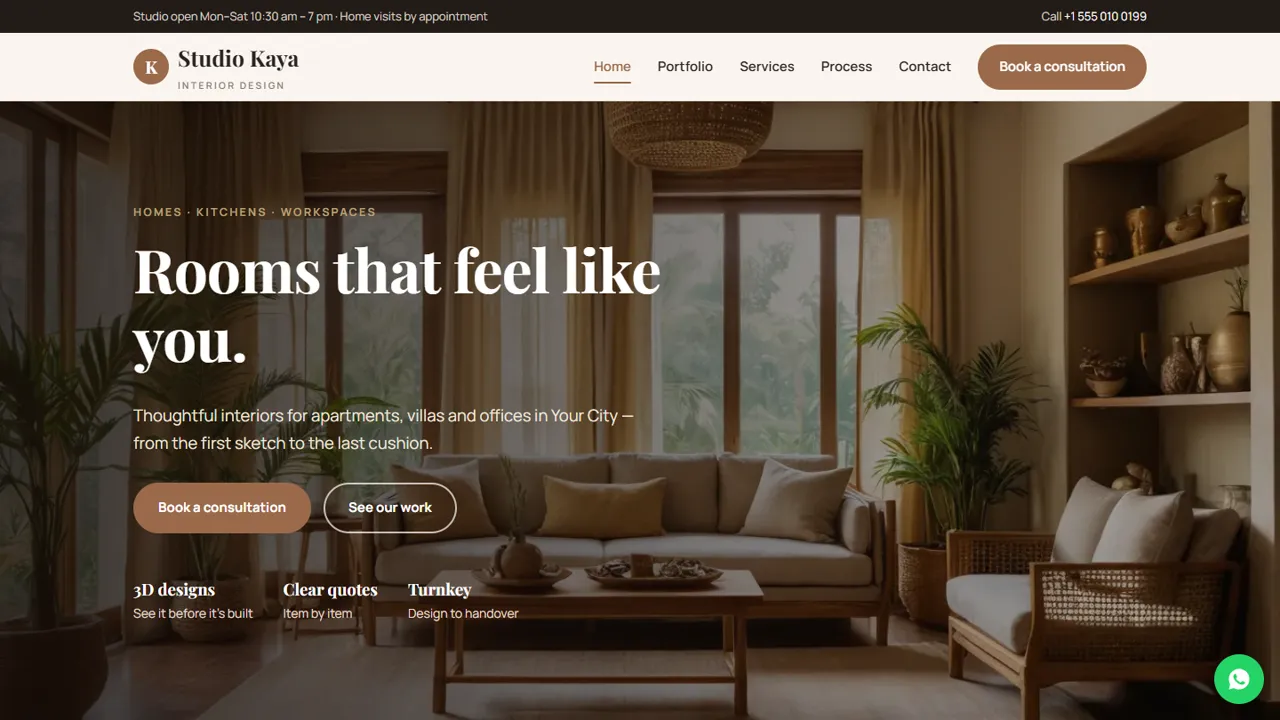
Everything included
- Portfolio gallery and project cards
- Design packages with indicative prices
- Rate card with filter tabs
- Four-step design process page
- Consultation booking form
- HomeAndConstructionBusiness schema and meta tags
- Admin panel for your details, currency, chat and enquiries
- Colours and fonts changed from one CSS block
From order to a live website
- 1
Choose a package
Code only, We set it up, or Customised. All prices are one-time.
- 2
Pay securely
Your download link is emailed once payment is confirmed and also appears in My Account.
- 3
We contact you
For setup packages we email within one business day for your cPanel / hosting login and domain.
- 4
Live on your domain
Your studio site runs on your own hosting, with consultation requests arriving in your inbox.
Let your work sell itself
Interior design is bought with the eyes. Studio Kaya opens with a full-width photo, shows recent projects on the home page, and gives the portfolio its own page with a photo gallery and a card for each project with its area and scope.
- Full-width hero photo
- Recent projects on the home page
- Portfolio gallery and project cards
- Sample testimonials marked for replacement
Answer the price question early
Most enquiries start with "roughly how much?". The services page shows three packages with indicative starting prices and a rate card for kitchens, wardrobes, ceilings and painting, with tabs to filter by type. Every price is labelled indicative, so you can confirm the final quote after a site visit.
- Design only, Design & build and Turnkey packages
- Rate card with filter tabs
- Indicative-price notes
- Easy to edit in any text editor
Turn visitors into consultations
The process page explains how a project runs in four steps, and the consultation form asks for the project type, a date and a time, and notes such as size and budget. The request arrives in your inbox and you confirm by phone or WhatsApp.
- Four-step process page
- Consultation booking form
- Project-type choice
- Spam trap and input checks
A walk through the pages
The home page introduces four strengths (full-home design, modular kitchens, transparent quotes and site supervision), shows three recent projects, explains that each design starts from how the client lives, and ends with sample client words and a call to book a consultation. The portfolio page holds six project cards, from a 3 BHK and a master bedroom to a modular kitchen, a dining corner, a studio office and a villa. The services page compares Design only, Design & build and Turnkey, then prices individual work in three groups: design (consultation, space planning, 3D renders, single-room styling), modular and carpentry (an L-shaped kitchen, a sliding wardrobe, a TV unit, a study desk) and finishes (false ceiling, painting, wallpaper, curtains and blinds). The process page sets out four stages, from consult and measure through layout and 3D design and an itemised quote to build and handover, and invites clients to see material samples at the studio.
- Home, portfolio, services, process, consultation and contact pages
- Consultation at the studio or at the client's home
- Project types from full homes to shops and clinics
- HomeAndConstructionBusiness schema markup
The admin panel for a design studio
Open your-domain.com/admin/ to set the studio name, logo, phone, WhatsApp, email, studio address with map, opening hours and social links such as Instagram and Facebook, and they replace the demo details on every page. Each consultation request lands in your inbox and in the admin's Enquiries list with the project type, preferred date and time and the client's notes on flat size, budget or address for a home visit, and you can download the list as a CSV for follow-up. If you work with clients abroad, add currencies with your own rates and the indicative prices convert for each visitor. You can also switch on live chat, the floating WhatsApp button, Google Analytics or the Meta Pixel for Instagram ads, an announcement bar for a festive offer, a cookie notice and maintenance mode while you add new projects.
- Consultation requests kept in the Enquiries inbox
- Indicative prices in the visitor's chosen currency
- Meta Pixel and Analytics without editing code
- SMTP email if your host's mail is unreliable
What is in the zip and how to set it up
You get the HTML pages, the stylesheet, JavaScript, the PHP form handler and admin, the demo photos and an .htaccess file, with an illustrated installation guide. Upload it to any cPanel host with PHP 7.4 or later, run AutoSSL and open /admin/ to create your login; the SQLite database for the admin creates itself. Replace the demo project photos with your own work, rewrite the project cards and prices in the HTML, and swap the sample testimonials for real ones from your clients.
- Plain HTML, CSS and PHP, no WordPress
- Projects and prices edited in the HTML
- Demo photos and testimonials to replace
What it does not do
There is no 3D room planner, cost calculator, client login or online payment, and projects are added by copying an HTML block. If you need any of these, ask us about a custom build.
- No 3D planner or calculator
- No client portal
- No online payments
- Admin panel included, nothing to install
More ready-made websites
Built by the same team, with the same setup service and support.
Browse every ready-made website, or compare our custom website packages if you need a site designed from scratch. Want more guests to find you on Google Maps? See our local SEO service, or talk to our web design team.



