
Aqua — Swimming Academy Website
A ready-made swimming academy website with age-wise batches, a timetable, fees and enrolment requests
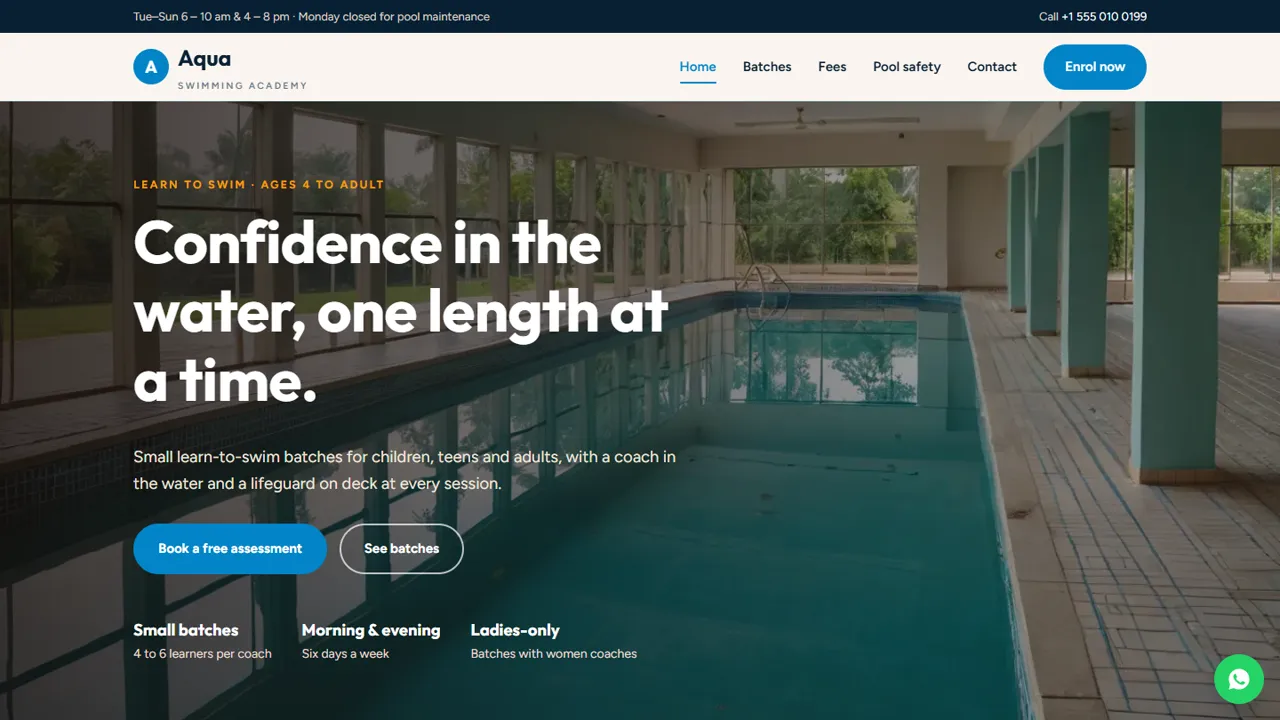
Everything included
- Batches by age with coach-to-learner ratios
- Weekly batch timetable
- Fee plans, one-off fees and a swim-bag checklist
- Pool rules, supervision and hygiene page
- Free assessment / enrolment request form
- SportsActivityLocation schema, titles and meta descriptions
- Admin panel for your details, currency, chat and enquiries
- WhatsApp and click-to-call on every page
From order to a live website
- 1
Choose a package
Code only, We set it up, or Customised. All prices are one-time.
- 2
Pay securely
Your download link is emailed once payment is confirmed and also appears in My Account.
- 3
We contact you
For setup packages we email within one business day for your cPanel / hosting login and domain.
- 4
Live on your domain
Your academy site runs on your own hosting, with enrolment requests arriving in your inbox.
What parents ask before they enrol
Parents want to know which batch suits their child's age, when it runs, what it costs and how safe the pool is. Aqua answers each on its own page, with an Enrol now button on every screen.
- Batches by age with session length and coach ratio
- Weekly timetable as a simple table
- Fee plans plus registration and private lesson fees
- What to bring in the swim bag
A safety page you can stand behind
The safety page explains lifeguard cover, how children are supervised, pool hygiene and the rules every swimmer follows. Edit it to describe exactly what your pool provides; the guide reminds you not to claim supervision you do not offer.
- Supervision and lifeguard section
- Nine pool rules as cards
- Hygiene and changing rooms
- Note to check with a doctor about medical conditions
Enrolment requests, not a payment system
The form asks for the batch, a preferred date and time for a free assessment, and notes such as the learner's age and experience. The request is emailed to you and you confirm by phone or WhatsApp. Fees are paid at the desk or by UPI as you do today.
- Batch choice grouped by age
- Date and time slots
- Spam trap and input checks
- A copy of each request kept in the admin inbox
Every page, and what it is for
The home page shows your batch size, morning and evening sessions and ladies-only batches, explains how you teach and points to the three age groups. Batches and timetable describes each batch with its age range, session length, what is taught and how many learners share a coach, followed by a weekly timetable from Tuesday to Sunday. Fees sets out monthly, quarterly and summer camp plans, one-off fees such as registration, lap swimming and private lessons, a sibling discount and the swim-bag checklist. Pool rules and safety covers supervision, the rules every swimmer follows, hygiene and photo rules. Enrol holds the free assessment form and a three-step explainer of what happens at the pool, and Contact has your address, hours, a message form and a map. Batch names, timings and fees in the demo are samples to replace with your own.
- Home, batches, fees, safety, enrol and contact pages
- Six sample batches from age 4 to adults
- Summer camp plan on the fees page
- Friendly 404 page
Running enrolments from the admin
At your-domain.com/admin/ you set up the details that change through the year. Every assessment request and contact message lands in the Enquiries inbox and is emailed to you too, so a request that comes in at 6 am is still waiting when the desk opens; download them as a CSV to plan new batches before summer. Set your pool timings (including the weekly maintenance day), phone, WhatsApp number and its greeting, address, map, logo and colours, and they show across the site. Choose the currency your fees are written in and add more with your own exchange rates if you need to. The announcement bar suits summer camp dates or a pool closure, and live chat, Google Analytics, a cookie notice and maintenance mode are there if you want them. Batches, fees and the timetable are edited in the HTML files.
- Assessment requests saved and emailed
- CSV download of every request
- Pool hours, WhatsApp text and colours
- Announcement bar for summer camp
What you get and how to install it
The zip contains the HTML pages, stylesheet, scripts and photos, the PHP form handler, config.php, the admin panel, a README and an illustrated installation guide. Upload it to cPanel or other shared hosting running PHP 7.4 or later, open the admin to create your login, and paste your licence key to switch the forms on; one key works on up to three domains. The database is SQLite, created automatically on first run through PHP's pdo_sqlite extension, with MySQL as an option in config.php. Mail is sent with PHP mail() or through your own SMTP server.
- Plain HTML, CSS, JavaScript and PHP
- Nothing to install on the server
- SQLite built in, MySQL optional
- PHP mail() or SMTP email
Things it does not do
There is no online fee payment, membership system or live slot calendar, and no parent login to see progress cards or attendance. The date and time on the form are a preference, not a reserved slot: you confirm by phone. The site accepts up to eight form messages from one visitor in ten minutes, and a hidden field turns away most spam bots.
- No payments, memberships or attendance
- No live availability
- Safety copy must describe your real pool
More ready-made websites
Built by the same team, with the same setup service and support.
Browse every ready-made website, or compare our custom website packages if you need a site designed from scratch. Want more guests to find you on Google Maps? See our local SEO service, or talk to our web design team.



