

WooCommerce PluginDownload free version
Abandoned Cart Recovery for WooCommerce
No reviews yet
from$69.00/yr
A WooCommerce Google Shopping feed and Meta catalog feed, built on your own site every day
Get a Shelfcast Pro key by email and use every Pro feature for 7 days on one site. No card needed, nothing renews automatically — when the trial ends, Pro switches off unless you choose a plan. One trial per email.
Choose monthly, 1 year or lifetime — your key and download link are emailed instantly.
Upload the zip in wp-admin. The free core works right away.
Paste it in the plugin's License tab to activate.
Pro features, updates and priority support switch on.
Map categories to Google, build the Google Shopping XML feed, list variations with item_group_id, add mapping and rules, fill product fields, build Meta, Pinterest and TikTok feeds and read the feed check.
Download the PDF user guideThe free core is a real, working plugin — not a trial that expires. Pro unlocks the advanced modules with a licence key, and nothing you build on free is lost when you upgrade.
Everything most sites need. No account, no email required — download and install.
.zip · v1.0.0 · 3 downloads
Same plugin, every module unlocked by your licence key — plus updates and priority support.
Already bought it? Enter your key:
Or sign in — every licence you own shows up there.
| Feature | Free | Pro |
|---|---|---|
| Google Shopping XML feed | Included | Included |
| Meta (Facebook & Instagram) catalog CSV feed | Included | Included |
| Category mapping to Google product categories | Included | Included |
| Daily automatic refresh + Build now | Included | Included |
| Sale prices and dates, stock status, images | Included | Included |
| GTIN from WooCommerce, brand, identifier_exists | Included | Included |
| Pinterest, Microsoft (Bing) and TikTok-format feeds | Not included | Included |
| Unlimited feeds, XML or CSV each | Not included | Included |
| Variations as separate items (item_group_id, colour, size) | Not included | Included |
| Category, price, stock and product filters | Not included | Included |
| Field mapping and rules (custom labels and more) | Not included | Included |
| GTIN, MPN, brand and condition fields per product | Not included | Included |
| Feeds in another currency | Not included | Included |
| Feed error checker | Not included | Included |
Upgrading is just entering a key — same plugin, same settings, nothing to reinstall or migrate.
Google Shopping ads, Google's free listings and Meta's Facebook and Instagram shops all start with a product feed: a file that lists every product with its price, stock and photos. Shelfcast writes that file from your WooCommerce catalogue and keeps it on your own site, in wp-content/uploads/shelfcast, with a random code in the file name so nobody can guess it. You paste the URL into your own Merchant Center or Commerce Manager account once, as a scheduled fetch, and from then on Google and Meta download the latest file on their own. Shelfcast does not need your Google or Meta login, never sends them data and never changes anything in those accounts. It is built for small and mid-sized WooCommerce stores that want Shopping ads or free listings without a monthly feed service.
Each product becomes an item with id (the product ID), title, a plain-text description from the description or short description, the product link, the main image and up to ten gallery images, availability (in_stock, out_of_stock or backorder; Meta gets "in stock" and "out of stock"), the regular price and, while a sale runs, the sale price with sale_price_effective_date when the sale has an end date. Prices are the ones your shop shows, so your WooCommerce tax display setting is respected. Brand comes from WooCommerce Brands, a Brand attribute or your default brand; the GTIN comes from WooCommerce's own GTIN, UPC, EAN or ISBN field; the SKU can be sent as MPN. Items without a GTIN and without brand plus MPN get identifier_exists = no, which is what Google asks for. Drafts, private, password-protected and catalogue-hidden products are never listed, and out-of-stock products are included as out_of_stock unless you switch that off.
Google sorts products with its own product taxonomy. Shelfcast → Category mapping lists your WooCommerce categories with their product counts; type a Google category ID such as 166 or a full path such as "Apparel & Accessories > Shoes", or pick one of the suggestions. Sub-categories without their own mapping use their parent's, and a fallback category covers everything else. Pro lets you override the Google category on a single product.
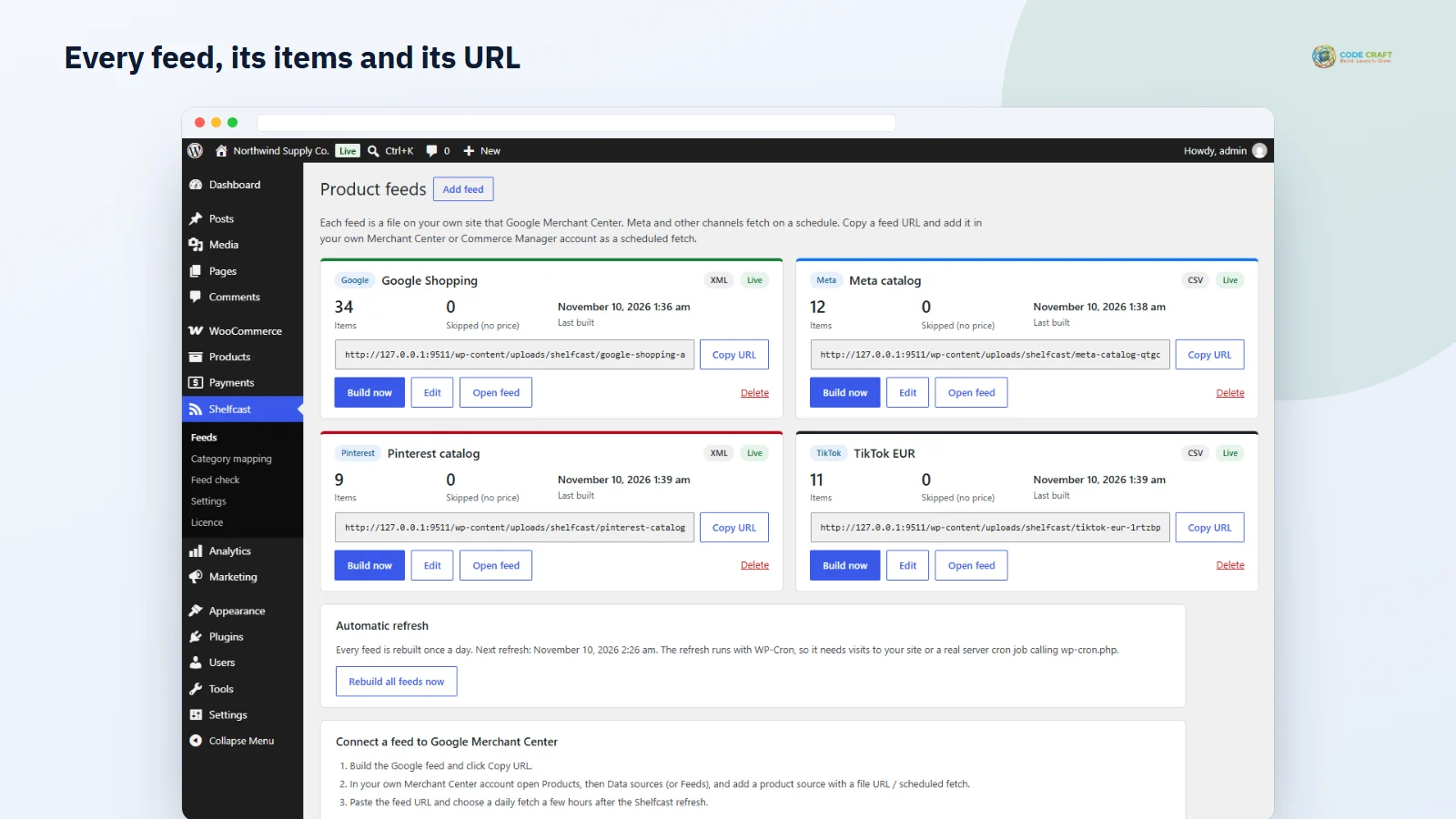
Every feed is rebuilt once a day by WP-Cron and written to a temporary file that replaces the old one only when it is complete, so Merchant Center never fetches half a feed and the URL never changes. Build now and Rebuild all feeds now buttons are there for the moments you change prices. Because the feed is a plain file, Google's fetch does not run WordPress or slow your shop. WP-Cron needs visits to your site, so on a quiet store we recommend a real server cron job for wp-cron.php.
Clothing and shoe stores need every size and colour listed separately. Pro lists each variation as its own item with item_group_id (the parent product), colour and size taken from the variation's attributes, its own price, sale price, stock, image and a link that opens the product with that variation selected. Each feed can also leave out out-of-stock products, list only some categories or leave some out, keep to a price range and skip single products by ID or SKU, and every product gets an Exclude from feeds box. Field mapping fills fields such as brand, colour, material, gender or custom_label_0 to custom_label_4 from attributes, custom fields or text with placeholders ({title}, {sku}, {brand}, {category}, {price}, {attr:…}, {meta:…}). Rules then set a field or leave an item out when a condition matches: category, on sale, in or out of stock, price over or under, title or SKU contains.
Pro adds unlimited feeds for Pinterest, Microsoft Merchant Center (Bing) and a TikTok-format CSV that starts with sku_id, each in XML or CSV. A feed can use another currency with your exchange rate, for stores whose pages show that currency to those shoppers. The Shelfcast feed tab on each product adds Brand, GTIN, MPN, Condition and Google category fields, and each variation gets its own GTIN and MPN. The feed check runs on every build and lists errors Merchant Center rejects — no image, no price, a GTIN with a wrong check digit — and warnings such as a missing brand, identifier_exists = no, no Google category or a backorder without an availability date, each with a link to the product.
Shelfcast needs WordPress 6.4 or newer, PHP 7.4 or newer and WooCommerce 8.0 or newer, and was tested with WordPress 7.1 and WooCommerce 11.2 on PHP 8.3. It declares High-Performance Order Storage and cart/checkout block compatibility; it does not touch orders, the cart or the checkout. The free plugin makes no outside connections; Pro contacts coodecraft.com only to activate and check the licence. Our automated test builds every feed type on a demo store and reads the real files back: XML well-formedness, required fields, sale prices, stock, GTINs, item_group_id, filters, rules and currency conversion. Feeds were not submitted to a live Google or Meta account.
Most stores running Shelfcast pair it with these. Every plugin below shares the same licence system, coding standards and support team.


