

WooCommerce PluginDownload free version
Abandoned Cart Recovery for WooCommerce
No reviews yet
from$69.00/yr
WooCommerce points and rewards: customers earn points on orders and redeem them at checkout
Get a Pointsmith Pro key by email and use every Pro feature for 7 days on one site. No card needed, nothing renews automatically — when the trial ends, Pro switches off unless you choose a plan. One trial per email.
Choose monthly, 1 year or lifetime — your key and download link are emailed instantly.
Upload the zip in wp-admin. The free core works right away.
Paste it in the plugin's License tab to activate.
Pro features, updates and priority support switch on.
Give a customer points, set the rates, use 500 points on the block checkout and 300 on the classic checkout, complete, cancel and refund orders, then the Pro bonuses, tiers, expiry reminders and the CSV history.
Download the PDF user guideThe free core is a real, working plugin — not a trial that expires. Pro unlocks the advanced modules with a licence key, and nothing you build on free is lost when you upgrade.
Everything most sites need. No account, no email required — download and install.
.zip · v1.0.0 · 3 downloads
Same plugin, every module unlocked by your licence key — plus updates and priority support.
Already bought it? Enter your key:
Or sign in — every licence you own shows up there.
| Feature | Free | Pro |
|---|---|---|
| Points per currency spent, after discounts, before tax and shipping | Included | Included |
| Points added when an order is completed | Included | Included |
| Redeem points for money off on the block and classic checkout | Included | Included |
| Points value, minimum per order and maximum share of an order | Included | Included |
| Earned points taken back and used points returned on cancel or full refund | Included | Included |
| My Account points tab with balance and recent activity | Included | Included |
| Customers screen and manual add / remove with a reason | Included | Included |
| "Earn N points" on product pages | Included | Included |
| Bonus points for sign-ups, reviews, referrals and birthdays | Not included | Included |
| Tiers (Silver, Gold) with earn multipliers | Not included | Included |
| Points expiry and "Points expiring soon" email | Not included | Included |
| Category points multipliers (for example double points) | Not included | Included |
| Full points history filtered by customer and type, CSV export | Not included | Included |
Upgrading is just entering a key — same plugin, same settings, nothing to reinstall or migrate.
A points program turns a one-off buyer into a regular: every order leaves the customer with points that are only worth something in your shop. Pointsmith keeps it simple for shoppers and for you. Customers with an account earn points on their orders, see the balance and its value in My Account, and take the value off a later order at checkout. It suits direct-to-consumer brands with repeat purchases — coffee, skincare, pet food, apparel, supplements, gifts — and any store that would rather reward returning customers than hand out public coupon codes.
Under Points → Settings you choose how many points a customer earns per 1 unit of your currency (default 1 point per $1). Points are counted on the products in the order after discounts, including a points discount, before tax and shipping, and rounded down. They are added when the order is completed. Each award is written to the customer's history and to the order as a note, for example "145 points earned for this order. Customer balance: 711 points." Product pages show "Earn 45 points with this purchase." above the add-to-cart button, and the checkout shows how many points the order will earn.
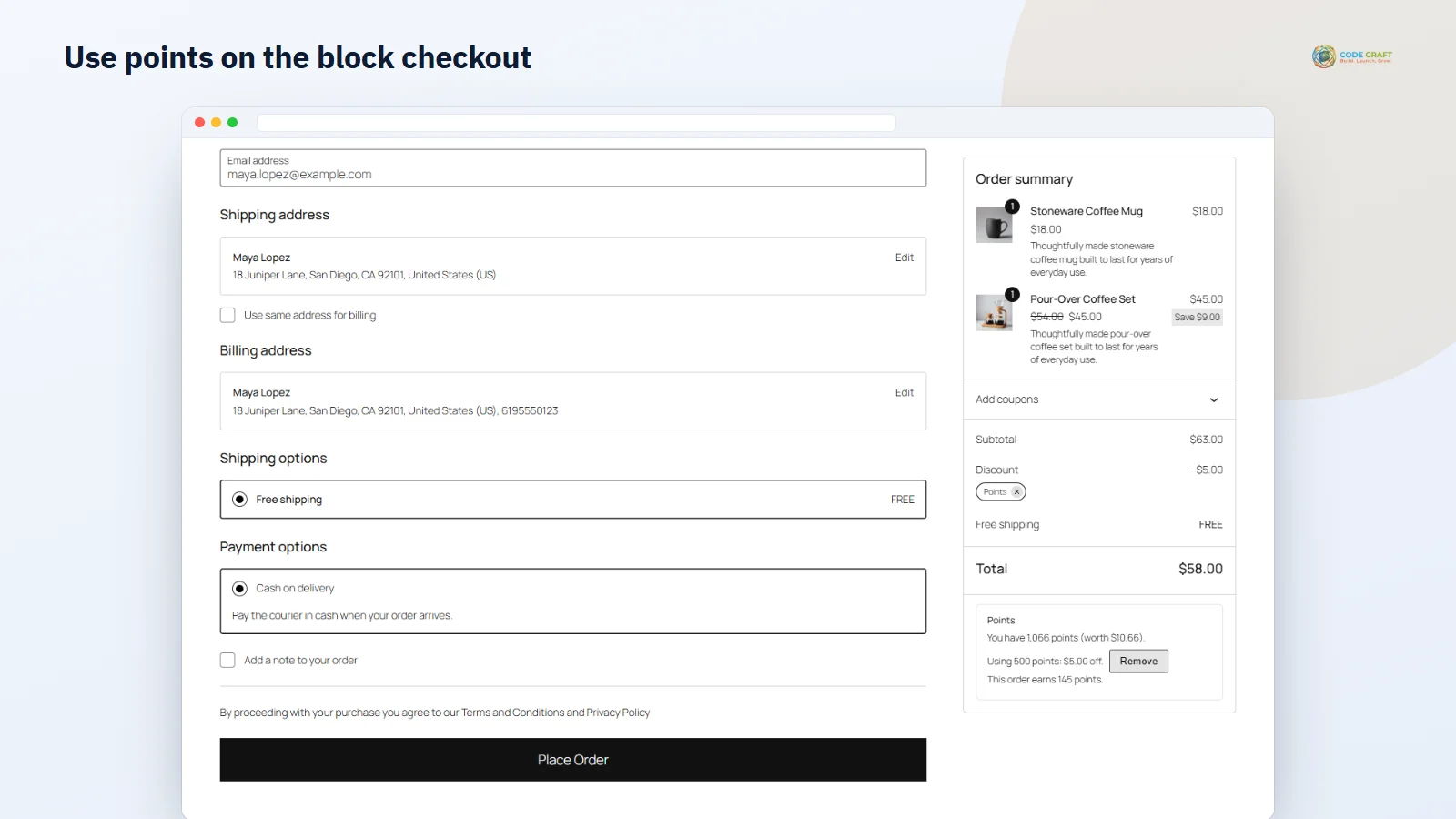
You set what points are worth (default 100 points = $1 off), the fewest points a customer can use on an order (default 100) and the largest share of the products total points may pay for (default 50%; shipping is never paid with points). On the block checkout a Points box in the order summary shows the balance, what it is worth and what the order earns; the customer types how many points to use and clicks Use points, and the totals update at once with a "Points" line. The classic shortcode checkout has the same box above the checkout form. Behind the scenes the discount is a WooCommerce virtual coupon, so it is saved on the order as a normal WooCommerce discount line. The points are taken from the balance when the order is placed.
The browser only says how many points the customer would like to use. Every time the cart is totalled, Pointsmith reads the customer's current balance, the minimum and the maximum share, and works the discount out again. Asking for 999,999 points uses only the points the customer really has, and the same is true when the WooCommerce Store API is called directly; guests cannot apply the points coupon at all. When an order is cancelled or refunded in full, the points it earned are taken back and the points used on it are returned, each once, with an order note.
Customers get a Points tab under My Account with their balance, its value, how earning and redeeming work, and their latest activity. In the admin, Points → Customers lists every customer with points, their balance, its value and lifetime points, with a search box and a form to add or remove points with a reason the customer sees in their history. The settings screen shows the Pro options visibly but locked in the free version.
Pro gives bonus points for creating an account, for each approved product review (once per product per customer), for referring a new customer with a personal link (credited when the new customer's first order is completed), and on the customer's birthday, which they add under My Account → Account details. Tiers (Silver from 500 and Gold from 2,000 lifetime points by default, up to three) make loyal customers earn faster, for example ×1.25 and ×1.5, and show the next tier in My Account. A multiplier on a product category gives double points (or none) on everything in it.
Turn on expiry and points added from then on expire a set number of days later. A daily task removes expired points, gives birthday bonuses and sends one "Points expiring soon" email per customer a set number of days before (a WooCommerce email). Points → History lists every change for every customer — earned, used, returned, taken back, adjusted, bonuses, expiry and reminders — filtered by customer and type, with a CSV export, and a button to run the daily tasks now.
Pointsmith needs WordPress 6.4 or newer, PHP 7.4 or newer and WooCommerce 8.0 or newer, with WooCommerce coupons turned on. It was tested on WordPress 7.1 with the current WooCommerce on PHP 8.3 with WP_DEBUG on, with orders placed on the block checkout and on a classic shortcode checkout. It declares High-Performance Order Storage and cart/checkout block compatibility and keeps the points history in its own database table. The free plugin makes no outside connections; Pro contacts coodecraft.com only to activate and check the licence.
Most stores running Pointsmith pair it with these. Every plugin below shares the same licence system, coding standards and support team.


